1. Introduzzjoni
It-Two Notes Torpedo Captor 4 huwa apparat versatili ddisinjat għal plejers tal-kitarra u tal-bass li jużaw apparat tat-tubi. amplifiers. Jiffunzjona bħala kaxxa tat-tagħbija reattiva, attenwatur, kaxxa ta' injezzjoni diretta (DI), u simulatur tal-ispiker. Din l-unità tippermettilek li tqabbad it-tubu tiegħek b'mod sigur amplifer mingħajr kabinett tal-ispiker, naqqas tiegħek ampil-volum tal-lifer għall-prattika jew ir-reġistrazzjoni, u ibgħat sinjal ta' kwalità għolja, simulat minn kabinett, direttament lil console tat-taħlit jew interface awdjo.
Dan il-manwal jipprovdi informazzjoni essenzjali għat-tħaddim sikur u effettiv tat-Torpedo Captor 4 tiegħek. Jekk jogħġbok aqrah bir-reqqa qabel l-użu.
2. Informazzjoni dwar is-Sigurtà
TWISSIJA: Riskju ta' Xokk Elettriku. Tiftaħx l-għeluq. Irreferi għas-servizz lil persunal kwalifikat biss.
- Dejjem qabbad tiegħek ampl-output tal-ispiker tal-amplificatur għal tagħbija xierqa. It-Torpedo Captor 4 jipprovdi tagħbija reattiva ta' 4 ohm. Kun żgur li tiegħek ampL-impedenza tal-ħruġ tal-lifier taqbel mal-impedenza tal-Captor.
- Issettjax tiegħek amp il-volum ewlieni għall-massimu meta tkun imqabbad mal-Captor 4, speċjalment meta tuża l-attenwatur, biex tevita ħsara possibbli lill-apparat tiegħek amplifier jew il-Captor.
- Dan l-apparat huwa ddisinjat għat-tubu ampamplificaturi sa 100 Watts RMS. Jekk tinqabeż din il-qawwa nominali, dan jista' jikkawża ħsara.
- Aċċerta ruħek li l-ventilazzjoni hija xierqa. Timblokkax il-fetħiet tal-ventilazzjoni.
- Żomm l-apparat 'il bogħod mill-ilma, umdità, u temperaturi estremi.
- Uża biss il-provvista tal-enerġija speċifikata (9 sa 24VDC, 5mA) għat-taqsima DI jekk l-enerġija phantom ma tkunx disponibbli.
3. Prodott Aktarview
It-Torpedo Captor 4 għandu kaxxa robusta tal-metall iswed b'inputs, outputs u kontrolli mmarkati b'mod ċar.

Figura 3.1: Quddiem View tat-Torpedo Captor 4. Din l-immaġni turi l-parti ta' fuq u ta' quddiem tal-unità rettangolari sewda, li turi l-logo 'Two Notes Audio Engineering' u l-marka 'Torpedo Captor 4'. Tindika wkoll il-funzjonijiet tagħha: '100W 4Ω LOADBOX', 'ATTENUATOR', 'SPEAKERSIM', u 'DI'.
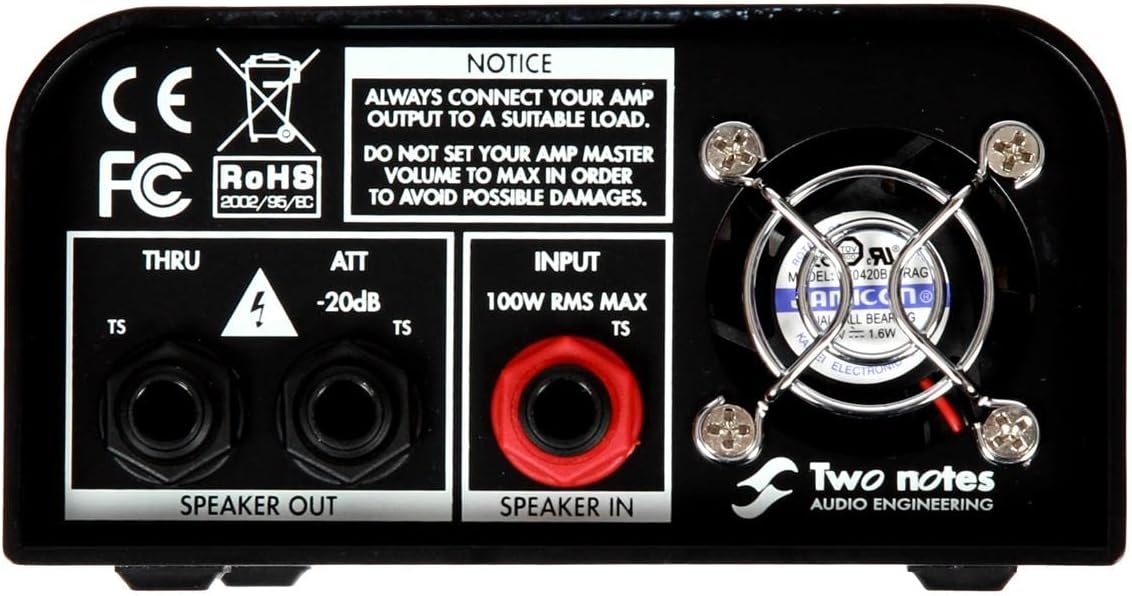
Figura 3.2: Konnessjonijiet tal-Panel ta' Wara. Din l-immaġni turi l-pannell ta' wara tat-Torpedo Captor 4, li fih il-jacks 'SPEAKER IN' (100W RMS MAX TS) u 'SPEAKER OUT' (THRU u ATT -20dB TS). Avviż prominenti jwissi lill-utenti biex dejjem jgħaqqdu l-apparati tagħhom. amp output għal tagħbija xierqa u mhux biex tissettja l- amp Il-volum ewlieni huwa massimu. Fann li jkessaħ huwa wkoll viżibbli.

Figura 3.3: Kontrolli tal-Panel ta' Quddiem u l-Output DI. Din l-immaġni turi l-pannell ta' quddiem tat-Torpedo Captor 4, fejn jenfasizza l-output TRS 'LINE (DRY)', l-output XLR 'DI' bis-swiċċ 'GND LIFT', il-pum 'OUT LEVEL', is-swiċċ 'PHASE' (0°/180°), u s-swiċċ 'SPKR SIM' (OFF/GTR/BASS). Indikatur tal-Phantom Power ta' 48V u input DC għal 9 sa 24VDC huma wkoll viżibbli.
Karatteristiċi ewlenin:
- Kaxxa tat-Tagħbija Reattiva: Jipprovdi tagħbija stabbli ta' 4 ohm għat-tubu tiegħek ampli jippermettilu jopera b'mod sikur mingħajr kabinett tal-ispiker.
- Attenwatur: Inaqqas tiegħek ampl-output tal-lifer b'-20dB, li jippermettilek tikseb cranked-amp toni f'volumi aktar baxxi u aktar maniġġabbli.
- Kaxxa Diretta (DI): Joffri output XLR bilanċjat biex tibgħat tiegħek ampIs-sinjal tal-lifier direttament lil mixer jew interface awdjo.
- Simulatur tal-Ispeaker: Simulazzjoni ta' kelliem analogu integrata (modi Kitarra u Bass) għall-output DI, li telimina l-ħtieġa għat-tqegħid tal-mikrofonu.
- Output tal-Linja: Ħruġ tal-linja TRS ta' 1/4" mhux bilanċjat jipprovdi sinjal niexef għal ri-ampjew aktar ipproċessar.
- Ground Lift: Swiċċ fuq l-output tad-DI jgħin biex jelimina l-ħoss ta' ħoss u ground loops.
- Swiċċ tal-Fażi: Jippermetti l-inverżjoni tal-fażi (0° jew 180°) fuq l-output DI.
4. Setup
Qabel ma tikkonnettja, kun żgur li tiegħek amplifier huwa mitfi u splaggjat mis-sors tal-enerġija.
4.1 Konnessjoni Bażika (Modalità Kaxxa tat-Tagħbija/Attenwatur)
- Qabbad it-tubu tiegħek ampl-output tal-ispiker tal-lifer (kun żgur li huwa output ta' 4-ohm jekk tiegħek amp għandu għażliet multipli) għall- SPEAKER IN (Jack TS 1/4") fuq il-pannell ta' wara tat-Torpedo Captor 4. Uża kejbil tal-ispiker ta' kwalità għolja.
- Jekk tixtieq tuża kabinett tal-ispiker estern b'attenwazzjoni, qabbad il- ĦRUĠ TAL-ISPEKER ATT -20dB (Jack TS 1/4") mal-kabinett tal-ispiker tiegħek. Dan inaqqas il-volum b'20dB.
- Jekk tixtieq tuża kabinett tal-ispiker estern mingħajr attenwazzjoni (pass-through), qabbad il- SPEAKER OUT THRU (Jack TS 1/4") mal-kabinett tal-ispiker tiegħek. Il-Captor xorta se jipprovdi tagħbija lill- amp, iżda s-sinjal jgħaddi mill-ispiker b'volum sħiħ.
- Għal reġistrazzjoni jew prattika siekta, m'għandekx bżonn tqabbad xejn mal-jacks SPEAKER OUT. Il-Captor 4 jipprovdi t-tagħbija meħtieġa.
4.2 Konnessjoni tal-Output DI
- Qabbad il- DI (XLR) output għall-console tat-taħlit tiegħek, l-interface tal-awdjo, jew is-sistema PA billi tuża kejbil XLR standard.
- Jekk il-console tat-taħlit jew l-interface awdjo tiegħek jipprovdu enerġija phantom ta' 48V, is-sezzjoni DI tal-Captor 4 tiġi mħaddma awtomatikament. Inkella, qabbad provvista tal-enerġija ta' 9 sa 24VDC (mhux inkluża) mal-jack tad-dħul DC fuq il-pannell ta' quddiem.
4.3 Konnessjoni tal-Output tal-Linja
- Qabbad il- LINJA (NIEXFA) (TRS 1/4") output għal input fuq l-interface awdjo tiegħek jew unità oħra tal-ipproċessar għal sinjal niexef u mhux ipproċessat. Dan l-output huwa żbilanċjat.

Figura 4.1: Torpedo Captor 4 f'Setup ta' Studio (Ġenb View). Din l-immaġni turi t-Torpedo Captor 4 imqiegħed fuq kitarra. amplifer f'ambjent ta' studio. Il-kejbils huma konnessi mal-pannell ta' wara, li juru setup tipiku għar-reġistrazzjoni jew id-daqq attenwat. Console tal-istudjo hija viżibbli fl-isfond.

Figura 4.2: Torpedo Captor 4 f'Setup ta' Studio (Faċċata View). Din l-immaġni tipprovdi perspettiva oħra tat-Torpedo Captor 4 imqabbad ma' amplifer fi studio. Il-kontrolli tal-pannell ta' quddiem huma viżibbli, flimkien mal-kejbils konnessi, li juru d-daqs kompatt tal-unità u l-integrazzjoni tagħha f'setup awdjo professjonali.
5. Istruzzjonijiet Operattivi
5.1 L-Użu tal-Attenwatur
Ladarba tiegħek amplifier huwa konness mal- SPEAKER IN u l-kabinett tal-ispikers tiegħek għall- ĦRUĠ TAL-ISPEKER ATT -20dB, tista' tixgħel tiegħek amplifier. Il-Captor 4 awtomatikament inaqqas il-volum b'20dB, u b'hekk tkun tista' ssuq tiegħek amp aktar diffiċli għat-ton mixtieq mingħajr volum eċċessiv.
5.2 L-Użu tal-Output DI bis-Simulazzjoni tal-Ispeaker
- Kun żgur li l-output tad-DI huwa konness mal-mixer/interface tiegħek u mħaddem (enerġija phantom jew adapter DC).
- Uża l- SIM tal-SPKR swiċċ biex tagħżel is-simulazzjoni tal-kelliem mixtieqa:
- MITFI: Ma ġiet applikata l-ebda simulazzjoni tal-kelliem.
- GTR: Ottimizzat għal toni ta' kitarra elettrika.
- BASS: Ottimizzat għal toni ta' kitarra bass.
- Aġġusta l- BARRA LIVELL pum biex tikkontrolla l-volum tal-ħruġ tas-sinjal DI. Ibda b'livell baxx u żid gradwalment biex tevita l-qtugħ.
- Jekk tesperjenza ħoss ta’ tħaxwix jew żanżin, ipprova dawwar il-buttuna GND LIFT swiċċ.
- Il- FAŻI Swiċċ (0°/180°) jippermettilek taqleb il-fażi tas-sinjal DI, li jista' jkun utli biex tikkoreġi kwistjonijiet ta' fażi meta tgħaqqad ma' sinjali oħra (eż., kabinett bil-mikrofonu).
5.3 L-Użu tal-Output tal-Linja
Il- LINJA (NIEXFA) L-output jipprovdi sinjal dirett u mhux ipproċessat minn tiegħek ampl-output tal-lifer, wara l-kaxxa tat-tagħbija. Dan huwa ideali għal ri-amping, fejn tirrekordja s-sinjal niexef u mbagħad tibgħatu lura permezz ta' amplifer jew simulazzjonijiet tas-softwer aktar tard. Il-livell tal-ħruġ huwa kkontrollat mill- BARRA LIVELL pum.
6. Manutenzjoni
- Tindif: Uża drapp artab u niexef biex tnaddaf il-barra tal-unità. Tużax prodotti tat-tindif jew solventi li joborxu.
- Ventilazzjoni: Kun żgur li l-islottijiet tal-ventilazzjoni huma nodfa mit-trab u l-fdalijiet biex tevita li jisħnu żżejjed. Iċċekkja u naddaf perjodikament jekk meħtieġ.
- Ħażna: Aħżen l-unità f'post niexef u frisk 'il bogħod mix-xemx diretta u minn temperaturi estremi meta ma tkunx qed tużaha.
- Spezzjoni tal-Cable: Spezzjona l-kejbils kollha regolarment għal sinjali ta’ xedd jew ħsara. Ibdel il-kejbils bil-ħsara immedjatament.
7 Issolvi l-problemi
| Problema | Kawża Possibbli | Soluzzjoni |
|---|---|---|
| L-ebda ħoss mill-output tad-DI. | L-ebda enerġija phantom jew adapter DC konness; kejbil mhux korrett; OUT LEVEL baxx wisq. | Kun żgur li l-enerġija phantom ta' 48V hija attiva fuq il-mixer/interface tiegħek jew qabbad provvista tal-enerġija ta' 9-24VDC. Iċċekkja l-konnessjoni tal-kejbil XLR. Żid il-buttuna OUT LEVEL. |
| Ħoss jew tħaxwix mill-ħruġ tad-DI. | Loop tal-art. | Involvi l- GND LIFT swiċċ fuq il-pannell ta’ quddiem. Kun żgur li t-tagħmir kollu huwa ertjat kif suppost. |
| Ħoss distort mill-output tad-DI. | LIVELL TA' ĦRUĠ għoli wisq; ampIl-ħruġ tal-lifier huwa għoli wisq. | Naqqas il- BARRA LIVELL pum. Kun żgur li tiegħek ampL-output tal-lifier mhuwiex eċċessivament għoli, u jikkawża qtugħ fl-input tal-Captor. |
| Amplifier jinstema' ħażin jew bil-ħsara. | Tqabbil tal-impedenza mhux korrett; l-ebda tagħbija konnessa; ampIl-qawwa tal-lifier taqbeż il-100W. | Tiżgura tiegħek ampL-impedenza tal-ħruġ tal-ispiker tal-amplificatur (eż., 4 ohms) taqbel mal-Captor 4. Dejjem qabbad il- SPEAKER INTużax ma' ampamplificaturi li jaqbżu l-100 Watts RMS. |
8. Speċifikazzjonijiet
- Mudell: Kaptatur tat-Torpidows 4
- Impedenza tat-Tagħbija: 4 Ohms
- Massimu AmpEnerġija aktar ħajja: 100 Watt RMS
- Attenwatur: -20dB
- Inputs: 1 x 1/4" TS Speaker In
- Outputs: 1 x 1/4" TS Speaker Out (Thru), 1 x 1/4" TS Speaker Out (-20dB Attenwazzjoni), 1 x XLR DI Out, 1 x 1/4" TRS Line Out (Dry)
- Qawwa tal-Ħruġ DI: Qawwa Phantom ta' 48V jew 9-24VDC (5mA)
- Simulazzjoni tal-Ispeaker: Analogu (Kitarra, Bass)
- Swiċċ tal-Fażi: 0°/180°
- Ground Lift: Iva
- Dimensjonijiet: 8.85 x 6.6 x 3.95 pulzieri (22.5 x 16.8 x 10 ċm)
- Piż: 2.95 liri (1.34 kg)
- Kulur: Iswed
9. Garanzija u Appoġġ
Għal informazzjoni dwar il-garanzija u appoġġ tekniku, jekk jogħġbok irreferi għas-sit uffiċjali ta' Two Notes Audio Engineering. webis-sit jew ikkuntattja lin-negozjant awtorizzat tiegħek. Żomm il-prova tax-xiri tiegħek għal kwalunkwe talba ta' garanzija.
Riżorsi onlajn: Żur iż-Żewġ Noti websit għall-aħħar aġġornamenti tal-firmware, softwer, u dokumentazzjoni addizzjonali.


