1. Introduzzjoni
Grazzi tax-xiriasing the Inline USB 3.0 Hub. This 4-port SuperSpeed USB 3.0 hub is designed to expand the connectivity of your computer, allowing you to connect multiple USB devices simultaneously. With its external power adapter, it ensures stable power delivery for all connected peripherals. Please read this manual carefully before using the product to ensure proper operation and to maximize its lifespan.
2. Prodott Aktarview
2.1 Karatteristiċi ewlenin
- Tip ta' Apparat: Hub - 4 ports
- Portijiet: 4 x SuperSpeed USB 3.0
- Standards Konformi: USB 3.0 (kompatibbli b'lura ma' USB 2.0 u USB 1.1)
- Tip ta' kompartiment: Desktop
- Kulur: Iswed
- Qawwa: External power adapter included for stable operation
2.2 Kontenut tal-Pakkett
- Inline USB 3.0 4-Port Hub
- Kejbil USB 3.0 SuperSpeed
- Adapter tal-Enerġija Esterna
- Manwal għall-Utent (dan id-dokument)
2.3 Dijagramma tal-Prodott

Figura 1: Quddiem View of the USB 3.0 Hub. This image displays the sleek black casing of the hub, highlighting the four SuperSpeed USB 3.0 ports, identifiable by their blue interior, and a small LED indicator light on the top surface.
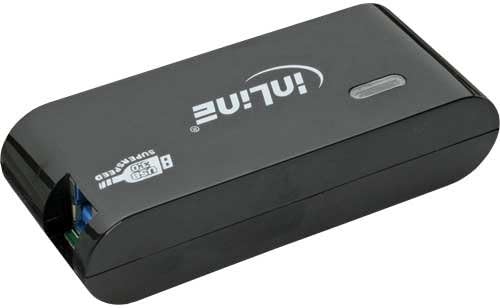
Figura 2: Wara View of the USB 3.0 Hub. This image shows the back of the hub, featuring the input port for the external power adapter and the upstream USB 3.0 port used to connect the hub to your computer.
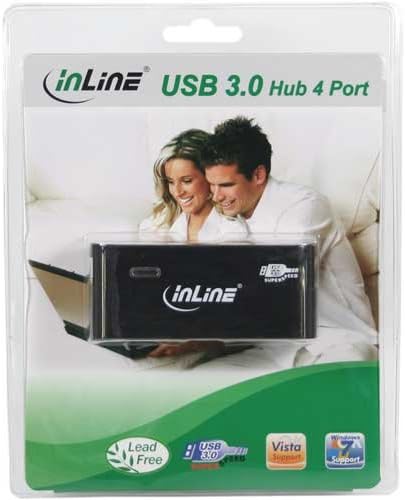
Figura 3: Product Packaging. This image displays the Inline USB 3.0 Hub enclosed in its transparent retail packaging, showcasing the product as it would appear when purchased.
3. Setup
- Qabbad l-Adapter tal-Enerġija: Insert the DC plug of the external power adapter into the "DC IN" port on the back of the USB 3.0 Hub. Plug the power adapter into a standard electrical outlet.
- Qabbad mal-Kompjuter: Use the provided SuperSpeed USB 3.0 cable. Connect the Type-B end of the cable to the "USB IN" port on the back of the hub. Connect the Type-A end of the cable to an available USB 3.0 port on your computer. For optimal performance, ensure you connect it to a USB 3.0 port on your computer (usually identified by a blue port or a "SS" symbol).
- Installazzjoni tas-Sewwieq (Plug & Play): The Inline USB 3.0 Hub is plug-and-play. Your operating system (Windows, macOS, Linux) should automatically detect and install the necessary drivers. No manual driver installation is typically required.
- Ivverifika l-Konnessjoni: Once connected, the LED indicator light on the hub should illuminate, indicating that the hub is powered and ready for use.
Nota: While the hub is backward compatible with USB 2.0 and USB 1.1, connecting it to a USB 2.0 port on your computer will limit the data transfer speed to USB 2.0 speeds.
4. Istruzzjonijiet Operattivi
- Konnessjoni ta' Apparat USB: Once the hub is set up and connected to your computer, you can plug your USB devices (e.g., flash drives, external hard drives, keyboards, mice, printers) into any of the four available USB 3.0 ports on the front of the hub.
- Trasferiment tad-Data: The hub supports SuperSpeed USB 3.0 data transfer rates up to 5 Gbps, which is significantly faster than USB 2.0 (480 Mbps). This allows for quick transfer of large files.
- Kunsinna tal-Enerġija: The external power adapter ensures that the hub can provide sufficient power to all connected devices, including power-hungry devices like external hard drives, without relying solely on your computer's USB port for power.
- Tneħħija Sikura: Always safely eject USB storage devices from your operating system before disconnecting them from the hub to prevent data corruption.
5. Manutenzjoni
- Tindif: Disconnect the hub from power and your computer before cleaning. Use a soft, dry, lint-free cloth to wipe the surface of the hub. Do not use liquid cleaners, aerosols, or abrasive solvents.
- Ħażna: Meta ma tkunx qed tużah għal perjodi twal, aħżen il-hub f'post frisk u niexef 'il bogħod mix-xemx diretta u minn temperaturi estremi.
- Immaniġġjar: Avoid dropping the hub or subjecting it to strong impacts. Do not attempt to disassemble or modify the hub, as this will void the warranty and could cause damage.
6 Issolvi l-problemi
Kwistjonijiet Komuni u Soluzzjonijiet:
- Hub not recognized by computer:
- Ensure the USB cable is securely connected to both the hub and your computer.
- Ipprova qabbad il-buttun ma 'port USB differenti fuq il-kompjuter tiegħek.
- Verify that the power adapter is correctly connected and plugged into a working outlet. Check if the LED indicator on the hub is lit.
- Ibda mill-ġdid il-kompjuter tiegħek.
- Devices connected to the hub are not working or are unstable:
- Ensure the external power adapter is connected and providing power to the hub. Some power-hungry devices require the hub to be externally powered.
- Try connecting the device directly to your computer's USB port to confirm it functions correctly.
- Skonnettja u erġa' qabbad l-apparat problematiku mill-hub.
- If using multiple power-hungry devices, try reducing the number of devices connected to the hub.
- Veloċitajiet baxxi tat-trasferiment tad-dejta:
- Ensure the hub is connected to a USB 3.0 port on your computer. USB 3.0 ports are often blue or marked with "SS".
- Verify that the device you are connecting also supports USB 3.0.
- The performance can be affected by the quality of the USB cable used. Ensure you are using the provided SuperSpeed USB 3.0 cable.
7. Speċifikazzjonijiet
| Karatteristika | Deskrizzjoni |
|---|---|
| Dimensjonijiet tal-Prodott | 7.68 x 6.1 x 3.27 pulzieri (19.5 x 15.5 x 8.3 ċm) |
| Piż tal-oġġett | 11 uqija (313 Grammi) |
| Numru tal-Mudell | 35394B |
| Brand | Inline |
| Interface tal-Ħardwer | USB, USB 3.0, USB 2.0, USB 1.1 |
| Numru ta' Portijiet | 4 |
| Materjal | Ram |
| Kulur | Iswed |
| Apparat tal-Enerġija | Adapter tal-Enerġija Esterna |
8. Garanzija u Appoġġ
Inline products are designed for reliability and performance. This product comes with a standard manufacturer's warranty. Please refer to the warranty card included in your product packaging for specific terms and conditions, or visit the official Inline websit għal informazzjoni dettaljata dwar il-garanzija.
For technical support, troubleshooting assistance, or product inquiries, please contact Inline customer service. Contact information can typically be found on the Inline webis-sit jew fuq l-imballaġġ tal-prodott.
Riżorsi onlajn: For the latest drivers, FAQs, and product information, please visit the official Inline websit.


