1. Introduzzjoni
This manual provides detailed instructions for the proper setup, operation, and maintenance of your Fossil Analog Brown Dial Men's Watch, model CH2727. This timepiece features a quartz movement with chronograph functionality and a date display. Please read this manual thoroughly to ensure optimal performance and longevity of your watch.

Figura 1: Quddiem view of the Fossil Analog Brown Dial Men's Watch CH2727, showcasing the brown dial, chronograph sub-dials, and brown silicone band.
2. Setup
2.1 Issettjar tal-Ħin
- Pull the crown (B) out to position 2. The watch hands will stop.
- Turn the crown (B) clockwise or counter-clockwise to set the hour and minute hands to the desired time.
- Push the crown (B) back into position 0 to start the watch.
2.2 Issettjar tad-Data
- Pull the crown (B) out to position 1.
- Turn the crown (B) clockwise to advance the date until the correct date is displayed. Avoid setting the date between 9 PM and 3 AM, as this may interfere with the automatic date change mechanism.
- Push the crown (B) back into position 0.
2.3 Aġġustament tal-Faxxa
The silicone band is designed for comfort and durability. To adjust the fit, use the buckle mechanism. If further adjustment or resizing is required, it is recommended to visit a professional watch repair service to avoid damage to the band or watch.
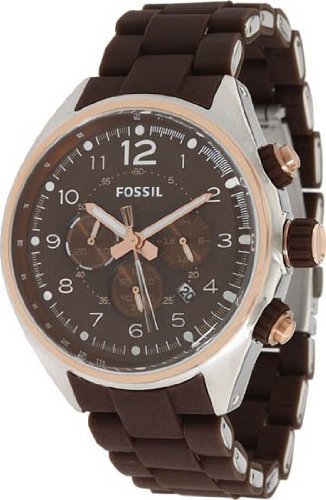
Figura 2: Angolat view of the Fossil CH2727 watch, highlighting the crown (B) and chronograph pushers (A and C) on the side of the case.
3. It-Tħaddim tal-Kronografu
Your Fossil CH2727 watch features a chronograph function, allowing you to measure elapsed time independently of the main time display.
3.1 Chronograph Functions
- Ibda/Waqqaf: Press pusher A (top right button) to start the chronograph. Press it again to stop.
- Irrisettja: While the chronograph is stopped, press pusher C (bottom right button) to reset all chronograph hands to their zero positions.
3.2 Sub-dial Explanations
The watch features three sub-dials:
- Indikatur ta' 24 Siegħa: Typically located at the 3 o'clock position, this sub-dial displays the time in a 24-hour format, synchronised with the main time.
- Chronograph Minutes: Located at the 9 o'clock position, this sub-dial records elapsed minutes when the chronograph is active.
- Chronograph Seconds: Located at the 6 o'clock position, this sub-dial records elapsed seconds when the chronograph is active. The main second hand of the watch typically functions as the chronograph second hand.
4. Manutenzjoni
4.1 Tindif tal-Arloġġ Tiegħek
To maintain the appearance of your watch, wipe the case and band regularly with a soft, dry cloth. For the silicone band, a damp Jista' jintuża drapp b'sapun ħafif, segwit minn tnixxif sewwa. Evita li tuża kimiċi ħarxa jew materjali li joborxu.
4.2 Reżistenza għall-Ilma
While your watch may be water-resistant, it is important to understand its specific rating. Avoid operating the crown or pushers when the watch is wet, as this can compromise the water seal. Refer to the specifications section for the exact water resistance rating. Generally, water resistance ratings are for static pressure and do not account for dynamic pressure from movement in water.
4.3 Sostituzzjoni tal-batterija
The quartz movement is powered by a battery. When the watch stops or the second hand begins to jump erratically (indicating a low battery), it is time for a replacement. It is highly recommended to have the battery replaced by an authorized Fossil service center or a professional watchmaker to ensure the water resistance is maintained and to prevent damage to the movement.
4.4 Ħażna
When not wearing your watch, store it in a cool, dry place away from direct sunlight and extreme temperatures. Keeping it in its original box or a watch case can protect it from dust and scratches.
5 Issolvi l-problemi
| Problema | Kawża Possibbli | Soluzzjoni |
|---|---|---|
| L-arloġġ mhux qed jaħdem | Batterija mejta; Kuruna mhux imbuttata 'l ġewwa | Replace battery (professional service recommended); Push crown fully into position 0. |
| Ħin/Data mhux korretti | Time/Date not set correctly; Crown pulled out | Refer to "Setting the Time" and "Setting the Date" sections; Push crown fully into position 0. |
| L-idejn tal-kronografu mhux qed jerġgħu jiġu rrisettjati għal żero | Chronograph not reset properly; Magnetic interference | Ensure chronograph is stopped, then press pusher C to reset. If issue persists, seek professional service. |
| Kondensazzjoni taħt il-kristall | Exposure to extreme temperature changes; Compromised water resistance | Avoid extreme temperature changes. Seek professional service immediately to prevent internal damage. |
6. Speċifikazzjonijiet
- Numru tal-Mudell: CH2727
- Tip ta' Moviment: Kwarz
- Tip ta' wiri: Chronograph, Analog
- Kulur Dial: Kannella
- Forma tal-Kaxxa: Round
- Materjal tal-Każ: Stainless Steel
- Dijametru tal-Każ: 46 mm
- Ħxuna tal-Każ: 15 mm
- Kulur tal-Banda: Kannella
- Materjal tal-Faxxa: Silikonju
- Piż tal-oġġett: 136 g
- Reżistenza għall-Ilma: (Not explicitly stated in provided data, typically 5 ATM or 50 meters for Fossil chronographs, but should be verified from product packaging if available. For general guidance, avoid swimming or showering unless specified for higher ratings.)
7. Informazzjoni dwar Garanzija
Your Fossil Analog Brown Dial Men's Watch CH2727 comes with a 2 Years International Warranty from the manufacturer. This warranty covers manufacturing defects in materials and workmanship under normal use. It does not cover damage resulting from improper handling, accidents, unauthorized repairs, or normal wear and tear.
For warranty claims or service, please retain your proof of purchase and contact an authorized Fossil service center. The specific terms and conditions of the warranty may vary by region; please refer to the warranty card included with your purchase for complete details.
8. Appoġġ għall-Klijent
Should you require further assistance, have questions about your watch, or need to arrange for service, please contact Fossil customer support. You can typically find contact information on the official Fossil website or through the retailer where the watch was purchased.
Għal aktar informazzjoni, żur l-uffiċjal Ħanut tal-Fossili fuq Amazon.


