Introduzzjoni
This manual provides essential information for the safe and efficient operation of your Time DPA-195 portable media player. Please read it thoroughly before using the device and keep it for future reference.
Informazzjoni dwar is-Sigurtà
- Tesponix the device to extreme temperatures, direct sunlight, or high humidity.
- Evita li twaqqa’ or subjecting the device to strong impacts.
- Tippruvax tiżżarma or repair the device yourself. Refer all servicing to qualified personnel.
- Uża biss the recommended accessories and power adapters.
- Aġġusta l-volum to a moderate level to prevent hearing damage.
Kontenut tal-Pakkett
Ivverifika li l-oġġetti kollha huma preżenti fil-pakkett:
- Time DPA-195 Portable Media Player
- Cable tal-Iċċarġjar tal-USB
- Earphones
- Manwal għall-Utent (dan id-dokument)
Prodott Overview
Familiarize yourself with the various parts of your DPA-195 player.
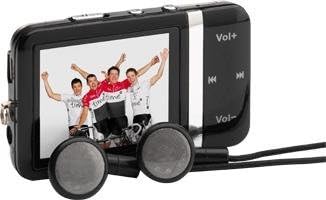
Image: The Time DPA-195 player, showing its compact black body, LCD screen displaying an image, and attached wired earphones. Buttons for volume and navigation are visible on the side.
Kontrolli u Portijiet:
- 1. Skrin LCD: Displays menus, playback information, and settings.
- 2. Vol+ Button: Iżżid il-volum.
- 3. Vol- Buttuna: Tnaqqas il-volum.
- 4. Play/Pause Button: Jibda jew iwaqqaf il-plejbek.
- 5. Next/Fast Forward Button: Skips to the next track or fast forwards.
- 6. Previous/Rewind Button: Skips to the previous track or rewinds.
- 7. Menu/Back Button: Navigates through menus or returns to the previous screen.
- 8. Power/Hold Switch: Turns the device on/off or locks/unlocks buttons.
- 9. Ġak tal-Headphones: Jqabbad il-earphones.
- 10. Port USB: Għall-iċċarġjar u t-trasferiment tad-dejta.
- 11. miniSD Card Slot: Għall-espansjoni tal-kapaċità tal-ħażna.
Setup
1. Iċċarġjar tal-Apparat
Before first use, fully charge the DPA-195 player.
- Connect the small end of the USB charging cable to the USB port on the player.
- Connect the large end of the USB cable to a powered USB port on a computer or a compatible USB wall adapter (not included).
- The screen will indicate charging status. A full charge typically takes approximately 2-3 hours.
- Skonnettja l-kejbil ladarba l-iċċarġjar ikun lest.
2. Inserting a miniSD Card (Optional)
The DPA-195 has 4096 MB of integrated memory. You can expand storage using a miniSD card.
- Locate the miniSD card slot on the device.
- Gently insert the miniSD card into the slot with the metal contacts facing down until it clicks into place.
- To remove, gently push the card in until it clicks, then release, and it will eject slightly.
Istruzzjonijiet Operattivi
1. Power On/Off
To power on the device, slide the Power/Hold switch to the 'On' position. To power off, slide it to 'Off'.
2. Navigazzjoni tal-Menùs
Use the navigation buttons (Next/Previous) to scroll through menu options. Press the Play/Pause button to select an option. Press the Menu/Back button to return to the previous screen.
3. MP3 Playback
- From the main menu, select "Music" or "MP3".
- Navigate to the desired folder or track.
- Agħfas il-buttuna Play/Pause biex tibda daqq.
- Uża l-buttuni Li Jmiss/Preċedenti biex taqbeż it-traċċi.
- Press and hold Next/Previous to fast forward or rewind.
- Adjust volume using the Vol+ and Vol- buttons.
4. Funzjoni tar-Radju
The DPA-195 includes an FM radio tuner.
- Connect the earphones, as they act as the antenna for the radio.
- From the main menu, select "Radio" or "FM".
- Use the navigation buttons to scan for stations or select a preset.
- Press Play/Pause to mute/unmute the radio.
5. Trasferiment tad-Data
Biex tittrasferixxi mużika jew affarijiet oħra files to your DPA-195:
- Qabbad it-tagħmir mal-kompjuter tiegħek billi tuża l-kejbil USB.
- The device will appear as a removable disk drive on your computer.
- Iddreggja u qiegħed files into the appropriate folders on the device's internal memory or miniSD card.
- Oħroġ l-apparat mill-kompjuter tiegħek b'mod sigur qabel ma skonnettja l-kejbil USB.
Manutenzjoni
Tindif
Wipe the device with a soft, dry, lint-free cloth. Do not use liquid cleaners or abrasive materials.
Ħażna
When not in use for extended periods, store the device in a cool, dry place away from direct sunlight and extreme temperatures. Ensure the battery is partially charged before storing.
Issolvi l-problemi
| Problema | Kawża Possibbli | Soluzzjoni |
|---|---|---|
| L-apparat ma jixgħelx. | Il-batterija hija eżawrita. | Iċċarġja l-apparat għal kollox. |
| L-ebda ħoss mill-earphones. | Volume is too low or muted; earphones not properly connected; faulty earphones. | Increase volume; check earphone connection; try different earphones. |
| Ma jistax jittrasferixxi files. | USB cable issue; device not recognized by computer. | Try a different USB port or cable; ensure device is powered on and connected correctly. |
| Ir-riċeviment tar-radju huwa fqir. | Earphones not connected or acting as antenna; weak signal. | Ensure earphones are connected; try moving to an area with better signal. |
Speċifikazzjonijiet
| Karatteristika | Dettall |
|---|---|
| Mudell | DPA-195 |
| Brand | Ħin |
| Piż tal-Prodott | 51 g |
| Tip ta' Memorja Flash | miniSD Card |
| Teknoloġija tal-Memorja | Integrated Memory |
| Kapaċità Hard Drive | 4096 MB |
| Karatteristiċi oħra | MP3, Radio |
| Teknoloġija tal-Wiri | LCD |
| Daqs tal-Iskrin | 2 Pulzier |
| Tip ta 'Wiri | LCD |
| Batteriji Inklużi | Nru |
| Tip ta' Midja Appoġġjat | AVI, WAV, WMA |
Garanzija u Appoġġ
For warranty information and technical support, please refer to the documentation provided at the time of purchase or visit the official Time brand websit. Żomm il-prova tax-xiri tiegħek għal talbiet ta' garanzija.
For further assistance, please contact Time customer service.