Introduzzjoni
Grazzi tax-xiriasing the Sanyo DC-AS 1500 DX Home Cinema 2 (Stereo) System. This manual provides essential information for the safe and efficient operation of your new system. Please read this manual thoroughly before using the product and retain it for future reference.
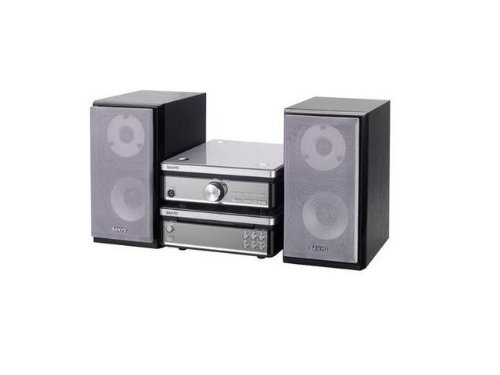
Image: The Sanyo DC-AS 1500 DX Home Cinema System, featuring the main unit and two stereo speakers.
Informazzjoni dwar is-Sigurtà
Biex tiżgura tħaddim sikur u tevita ħsara, jekk jogħġbok osserva l-prekawzjonijiet li ġejjin:
- Sors tal-Enerġija: Connect the system only to an AC outlet of the voltage speċifikat fuq l-unità.
- Ventilazzjoni: Timblokkax il-fetħiet tal-ventilazzjoni. Kun żgur li jkun hemm biżżejjed spazju madwar l-unità għal fluss tal-arja xieraq.
- Ilma u Umdità: Tesponix l-unità għax-xita, umdità, jew likwidi li jqattru/jittajru. Tpoġġix oġġetti mimlija b'likwidi, bħal vażuni, fuq l-unità.
- Sħana: Żomm l-unità 'l bogħod minn sorsi ta' sħana bħal radjaturi, reġistri tas-sħana, stufi, jew apparat ieħor (inkluż amplifiers) li jipproduċu sħana.
- Tindif: Skonnettja l-unità mill-plagg tal-ħajt qabel ma tnaddafha. Uża biss drapp artab u niexef. Tużax prodotti tat-tindif likwidi jew prodotti tat-tindif bl-ajrusol.
- Servizzi: Tippruvax isservi dan il-prodott int stess. Irreferi l-manutenzjoni kollha lil persunal tas-servizz kwalifikat.
Setup
1. Żpakkjar u Tqegħid
Carefully remove all components from the packaging. Place the main unit on a stable, level surface with good ventilation. Position the two stereo speakers equidistant from your primary listening position for optimal sound.
2. Konnessjoni tal-Ispeaker
- Identify the speaker terminals on the rear of the main unit (typically color-coded or labeled 'L' for Left and 'R' for Right).
- Connect the speaker wires from each speaker to the corresponding terminals on the main unit. Ensure correct polarity (+ to + and - to -) for optimal sound quality.
3. Konnessjoni tal-Enerġija
After all audio connections are made, plug the power cord of the main unit into a suitable AC wall outlet.
Istruzzjonijiet Operattivi
1. Basic Playback (CD/DVD/DivX/Video CD)
- Agħfas il- QAWWA buttuna biex tixgħel is-sistema.
- Agħfas il- FTUĦ/MAGĦLUQ buttuna fuq il-pannell ta’ quddiem jew fuq il-kontroll remot biex tiftaħ it-trej tad-diska.
- Place a CD, DVD, DivX, or Video CD disc gently into the tray with the label side facing up.
- Agħfas il- FTUĦ/MAGĦLUQ button again to close the disc tray. The system will automatically begin playback or display a menu.
- Uża l- DĦABBA/PAWŻA, STOP, SKIP (forward/backward), and FITTEX buttons on the remote control or front panel to manage playback.
2. Kontroll tal-Volum
Aġġusta l-volum billi tuża VOLUM +/- buttons on the remote control or the volume knob on the main unit.
3. Għażla tas-Sors tal-Input
If your system has multiple input options (e.g., AUX, USB), use the SORS or FUNZJONI button on the remote control or main unit to cycle through available input sources.
Manutenzjoni
1. Tindif tal-Unità
Wipe the exterior surfaces of the main unit and speakers with a soft, dry, lint-free cloth. Do not use abrasive cleaners, waxes, or solvents as they may damage the finish. For stubborn stains, lightly dampen the cloth with water and then wipe dry immediately.
2. Kura tad-Diska
Handle discs by their edges. Keep discs clean and free of scratches. Store discs in their cases when not in use to prevent dust and damage.
Issolvi l-problemi
If you experience problems with your system, refer to the following common issues and solutions:
- Ebda Qawwa:
- Ensure the power cord is securely plugged into both the unit and the wall outlet.
- Check if the wall outlet is functioning by plugging in another appliance.
- Ebda Ħsejjes:
- Verify that the speakers are correctly connected to the main unit with correct polarity.
- Żid il-livell tal-volum.
- Kun żgur li s-sors tad-dħul korrett huwa magħżul.
- Check if headphones are connected, which might mute the speakers.
- Disc Not Playing / Disc Error:
- Ensure the disc is clean and free of scratches or smudges. Wipe gently from the center outwards with a soft cloth.
- Verify that the disc type (CD, DVD, DivX, Video CD) is supported by the system.
- Try a different disc to determine if the issue is with the disc or the player.
Speċifikazzjonijiet
| Karatteristika | Speċifikazzjoni |
|---|---|
| Isem tal-Mudell | DC-AS 1500 DX |
| Brand | Sanyo |
| Konfigurazzjoni tal-Ispeaker | 2 (Stereo) |
| Wattage | 30 watt |
| Tipi ta 'Midja appoġġjati | CD, DVD, DivX, Video CD |
| ASIN | B0055ZKOBK |
| L-Ewwel Data Disponibbli | 21 ta’ Frar, 2020 |
Garanzija u Appoġġ
Specific warranty details for the Sanyo DC-AS 1500 DX Home Cinema System are not provided in this manual. For warranty information, technical support, or service inquiries, please refer to the warranty card included with your purchase or contact Sanyo customer support directly. Contact information can typically be found on the manufacturer's official webis-sit jew l-imballaġġ tal-prodott.


