1. Introduzzjoni
This manual provides comprehensive instructions for the setup, operation, and maintenance of your RadioShack CTR-121 Desktop Cassette Recorder. Please read this manual thoroughly before using the device to ensure proper function and longevity.
Key features of the CTR-121 include voice-activated (VOX) recording, auto-level recording, auto stop mechanism, and various input/output jacks for enhanced functionality.
2. Informazzjoni dwar is-Sigurtà
Observe the following safety precautions to prevent damage to the unit and ensure user safety:
- Tesponix l-unità għax-xita jew l-umdità.
- Evita li tpoġġi l-unità ħdejn sorsi ta’ sħana jew fid-dawl tax-xemx dirett.
- Uża biss l-adapter tal-enerġija speċifikat.
- Tiftaħx is-casing; irreferi s-servizz kollu lil persunal kwalifikat.
- Żomm fejn ma jintlaħaqx mit-tfal.
3. Kontenut tal-Pakkett
Ivverifika li l-oġġetti kollha huma preżenti fil-pakkett:
- RadioShack CTR-121 Desktop Cassette Recorder
- Kurdun tal-Enerġija AC
- Gwida għall-Utent (dan id-dokument)
- Istruzzjonijiet tas-Sigurtà
4. Prodott Aktarview
Familiarize yourself with the various parts of your CTR-121 recorder.

Figura 1: Quddiem view of the RadioShack CTR-121 Desktop Cassette Recorder, showing the speaker, cassette compartment, and control buttons.
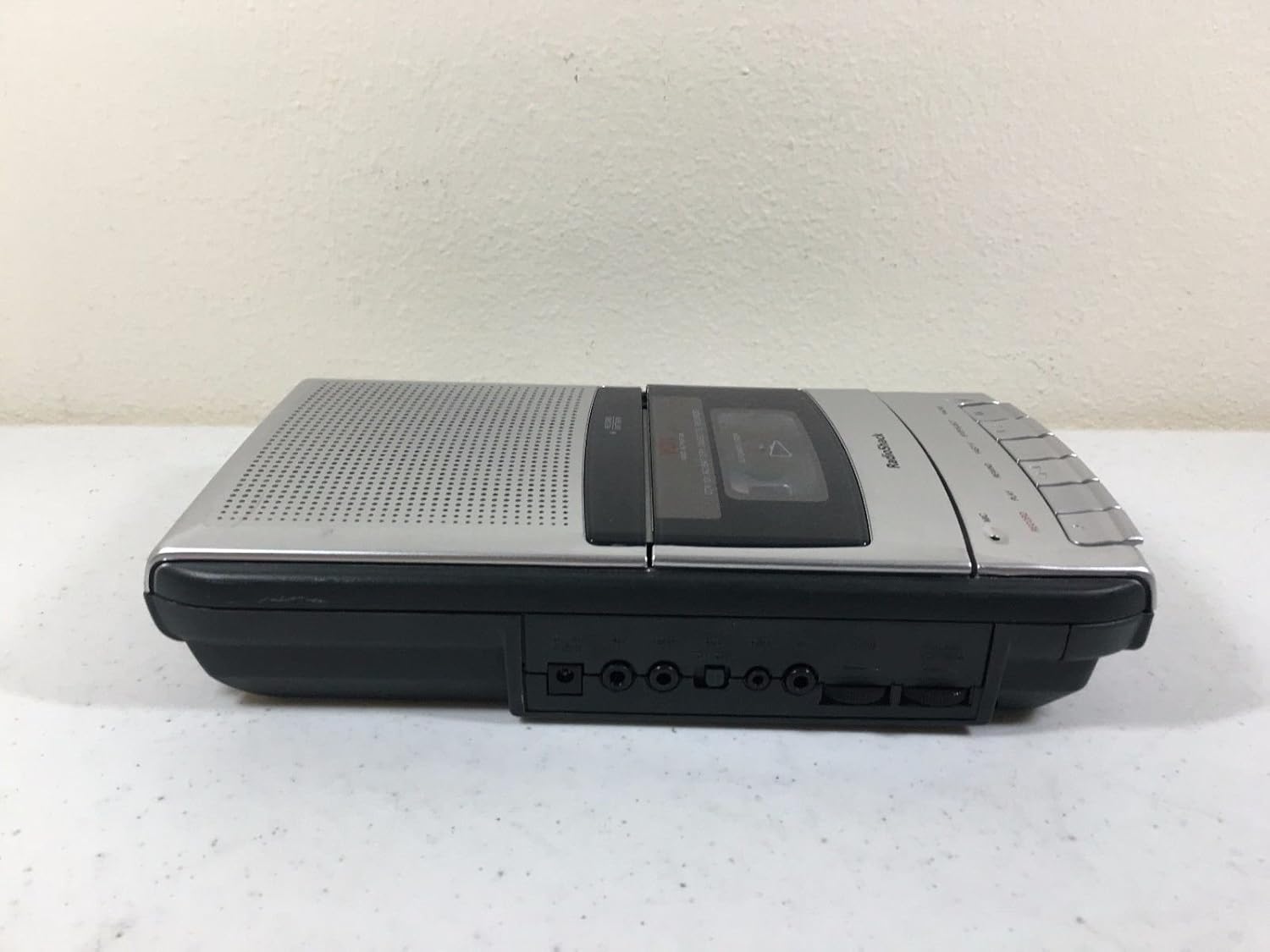
Figura 2: In-naħa tax-xellug view of the recorder, illustrating the microphone, earphone, and remote control jacks.

Figura 3: In-naħa tal-lemin view of the recorder, showing the DC power input jack.
The front panel includes controls for Record, Play, Rewind, Fast-F (Fast Forward), Stop/Eject, and Pause. A built-in microphone is located on the front, along with a speaker grille.
5. Setup
5.1 L-Ixgħel tal-Unità
The CTR-121 can be powered by either AC power or batteries.
Qawwa AC:
- Ensure the recorder is turned off.
- Connect the supplied AC power cord to the DC IN jack on the right side of the unit (refer to Figure 3).
- Plug the other end of the power cord into a standard AC wall outlet.
Qawwa tal-batterija:
(Note: Battery compartment details are not provided in the product data, so this section will be generic.)
- Open the battery compartment cover, usually located on the bottom or rear of the unit.
- Insert the required number of C-size batteries (not included), observing the correct polarity (+/-) as indicated inside the compartment.
- Agħlaq l-għatu tal-kompartiment tal-batterija sew.
5.2 Aċċessorji tal-Konnessjoni
The CTR-121 features several jacks for external devices (refer to Figure 2):
- Jack MIC: Connect an external microphone for improved recording quality or hands-free operation.
- EARPHONE Jack: Connect headphones or an earphone for private listening.
- Jack tal-REMOT: Connect a compatible remote control for convenient operation (remote control sold separately).
6. Istruzzjonijiet Operattivi
6.1 Loading a Cassette Tape
- Agħfas il- Waqqaf/EJETTA buttuna biex tiftaħ il-bieba tal-kompartiment tal-cassette.
- Insert a standard audio cassette tape with the open edge facing upwards and the full reel on the left.
- Gently close the cassette compartment door until it clicks shut.
6.2 Ir-reġistrazzjoni
Reġistrazzjoni Normali:
- Daħħal tejp tal-cassette vojt jew li jista' jiġi rrekordjat.
- Agħfas il- REKORD buttuna. Il- PLAY button will also engage automatically.
- The recording indicator light will illuminate.
- Speak into the built-in microphone or ensure an external microphone is connected and active.
- Biex tieqaf tirrekordja, agħfas Waqqaf/EJETTA buttuna.
Voice-Activated (VOX) Recording:
The VOX feature allows the recorder to start recording automatically when sound is detected and pause when silence occurs, conserving tape.
- Ensure the VOX switch (if present, location not specified in data) is set to the ON position.
- Agħfas il- REKORD button. The recorder will enter standby mode.
- Recording will begin when sound is detected and pause during periods of silence.
- To stop VOX recording, press the Waqqaf/EJETTA buttuna.
Auto Level Recording:
The CTR-121 features an automatic level control (ALC) system that adjusts the recording volume to an optimal level, preventing distortion from overly loud sounds and ensuring softer sounds are audible.
6.3 Daqq
- Insert a recorded cassette tape.
- Agħfas il- PLAY buttuna.
- Adjust the volume control (if present, location not specified in data) to your desired listening level.
- Biex twaqqaf il-plejbek, agħfas il-buttuna Waqqaf/EJETTA buttuna.
6.4 Avvanza 'l Quddiem u Lura Mgħaġġel
- To fast forward the tape, press the FAST-F buttuna.
- To rewind the tape, press the REWIND buttuna.
- Agħfas Waqqaf/EJETTA to stop fast forwarding or rewinding.
6.5 Funzjoni Pawża
During recording or playback, press the PAWŻA button to temporarily stop the tape movement. Press it again to resume.
6.6 Kontroll tat-Ton
The CTR-121 includes a tone control feature (if present, location not specified in data) to adjust the audio output's treble and bass frequencies, allowing for a customized listening experience.
7. Manutenzjoni
7.1 Cleaning the Tape Heads
Regular cleaning of the tape heads, capstan, and pinch roller is essential for optimal sound quality and to prevent tape damage. Clean these components after every 10-12 hours of use or if sound quality deteriorates.
- Iftaħ il-kompartiment tal-cassette.
- Using a cotton swab lightly moistened with isopropyl alcohol or a specialized head cleaning fluid, gently wipe the tape heads, capstan, and pinch roller.
- Allow the components to dry completely before inserting a tape.
7.2 Kura Ġenerali
- Keep the unit free from dust and dirt. Use a soft, dry cloth for cleaning the exterior.
- Tużax tindif jew solventi li joborxu.
- Meta ma tkunx qed tużaha għal perjodi twal, neħħi l-batteriji biex tevita t-tnixxija.
8 Issolvi l-problemi
| Problema | Kawża Possibbli | Soluzzjoni |
|---|---|---|
| L-unità ma tixgħelx. | No AC power; dead batteries; incorrect battery polarity. | Check AC cord connection and outlet; replace batteries; ensure correct battery polarity. |
| L-ebda ħoss waqt id-daqq. | Volume too low; headphones connected; dirty tape heads; faulty tape. | Increase volume; disconnect headphones; clean tape heads; try another tape. |
| Kwalità fqira tar-reġistrazzjoni. | Dirty tape heads; microphone too far; faulty tape. | Clean tape heads; speak closer to microphone; try a new tape. |
| It-tejp ma jiċċaqlaqx. | Tape jammed; auto stop engaged; unit not powered. | Open compartment and re-seat tape; ensure power is on. |
9. Speċifikazzjonijiet
| Numru tal-Mudell | CTR-121 |
| Brand | RadioShack |
| Dimensjonijiet tal-Pakkett | 12.8 x 7 x 2.9 pulzieri |
| Piż tal-oġġett | 2.25 liri (madwar 1.02 kg) |
| Manifattur | Radju Shack |
| Apparati Kompatibbli | Personal Computer (via USB, if applicable) |
| Interface tal-Ħardwer | USB (for data transfer, if applicable) |
| Fattur tal-Forma tal-Mikrofonu | Mibnija fil- |
| Format | MP3 Audio (for digital output, if applicable) |
| Headphones Jack | 3.5 millimetru |
| Kapaċità tal-Ħżin tal-Memorja | 2.2 GB (for digital storage, if applicable) |
| UPC | 040293153236 |
Note: Specifications are subject to change without notice. The "Compatible Devices", "Hardware Interface", "Format", and "Memory Storage Capacity" listed may refer to digital conversion capabilities or compatibility with modern systems, as the primary function is analog cassette recording.
10. Garanzija u Appoġġ
For warranty information, please refer to the warranty card included with your product or contact RadioShack customer support. Keep your purchase receipt as proof of purchase.
For technical support or service inquiries, please visit the official RadioShack website or contact their customer service department using the information provided in your product packaging or on their websit.


