1. Introduzzjoni
The Powerwerks PW50 PA System is a highly portable and versatile audio solution designed for amplifying vocals, instruments, keyboards, drum machines, and various audio devices. Its compact design and robust construction make it suitable for a wide range of environments, from small venues to personal practice spaces. The PW50 delivers clear and balanced sound through its two 4.5-inch speakers and high-frequency driver, ensuring excellent vocal clarity and minimizing harsh frequencies.
This manual provides detailed instructions for setting up, operating, and maintaining your Powerwerks PW50 PA System. Please read it thoroughly before use to ensure optimal performance and longevity of your device.
2. Informazzjoni dwar is-Sigurtà
- Sors tal-Enerġija: Connect the unit only to the specified power supply (AC 120V~60Hz 80W). Ensure the power cable is not damaged or pinched.
- Ventilazzjoni: Timblokkax xi fetħiet tal-ventilazzjoni. Kun żgur li jkun hemm fluss tal-arja adegwat madwar l-unità biex tevita li tisħon iżżejjed.
- Ilma u Umdità: Tesponix l-unità għax-xita, umdità, jew umdità eċċessiva. Tpoġġix oġġetti mimlija b'likwidi fuq l-unità.
- Sorsi tas-Sħana: Żomm l-unità 'l bogħod minn sorsi ta' sħana bħal radjaturi, reġistri tas-sħana, stufi, jew apparat ieħor li jipproduċi sħana.
- Tindif: Clean only with a dry cloth. Avoid using liquid cleaners or aerosols.
- Servizzi: Tippruvax tagħmel manutenzjoni ta' dan il-prodott int stess. Irreferi s-servizz kollu lil persunal tas-servizz kwalifikat. Is-servizz huwa meħtieġ meta l-apparat ikun ġarrab ħsara b'xi mod, bħal meta l-korda jew il-plagg tal-provvista tal-enerġija jkunu bil-ħsara, ikun inxtered likwidu jew ikunu waqgħu oġġetti fl-apparat, l-apparat ikun ġie espost għax-xita jew għall-umdità, ma jaħdimx normalment, jew ikun twaqqa'.
- Pjazzament: For optimal stability, place the unit on a flat, stable surface. It can also be positioned on a standard speaker stand using the integrated 35mm mounting socket.
3. Kontenut tal-Pakkett
Iċċekkja li l-oġġetti kollha elenkati hawn taħt huma inklużi fil-pakkett tiegħek:
- Powered PA Tower (Powerwerks PW50)
- Kejbil tal-Enerġija
- Manwal ta' Istruzzjoni
4. Prodott Aktarview
The Powerwerks PW50 is a compact and powerful PA system. Below are images illustrating its design and the rear control panel, followed by a description of its key components and controls.

Figure 4.1: Powerwerks PW50 PA System (Angled Front View)
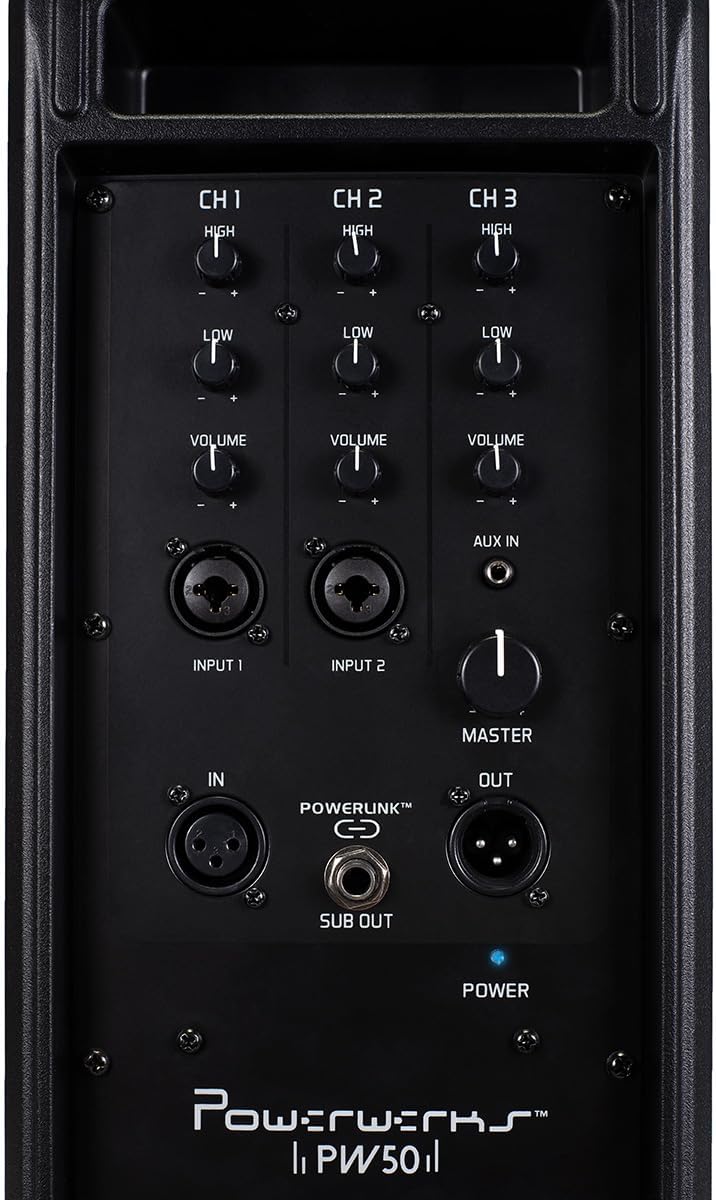
Figure 4.2: Powerwerks PW50 PA System (Rear Control Panel)
Karatteristiċi tal-Panew tal-Kontroll:
- Channels 1 & 2 (MIC/Line Inputs): Each channel features XLR and 1/4" line inputs, allowing connection of microphones or line-level instruments. Each channel has independent High (treble) and Low (bass) EQ controls, and a Volume knob. Phantom power is available for XLR inputs.
- Channel 3 (AUX IN): An 1/8" (3.5mm) stereo jack summed to mono, ideal for connecting external audio devices like smartphones or MP3 players. This channel also has independent High (treble) and Low (bass) EQ controls, and a Volume knob.
- Volum Master: A global control for the overall output level of the PA system.
- POWERLINK™ (IN/OUT): XLR connections that allow two or more PW50 units to be linked together, functioning as a single, synchronized PA system.
- SUB OUT: An output for connecting an external subwoofer, which diverts low frequencies from the PW50's internal speakers to the subwoofer for enhanced bass response.
- POWER Switch and Indicator: Turns the unit on/off. A blue LED indicates power status.
5. Setup
- Pjazzament: Position the PW50 on a stable, flat surface or mount it on a standard speaker stand using the 35mm socket. Ensure proper ventilation.
- Konnessjoni tal-Enerġija: Connect the supplied power cable to the AC input on the rear panel of the PW50 and then to a suitable power outlet. Do not power on the unit yet.
- Qabbad l-Inputs:
- For microphones, use an XLR cable and connect to Input 1 or 2.
- For instruments (e.g., guitar, keyboard), use a 1/4" TS cable and connect to Input 1 or 2.
- For external audio devices (e.g., smartphone, MP3 player), use an 1/8" (3.5mm) stereo cable and connect to the AUX IN on Channel 3.
- Issettjar tal-Volum Inizjali: Before powering on, ensure all Channel Volume knobs and the Master Volume knob are set to their minimum (fully counter-clockwise) position.
- Qawwa Mixgħul: Flip the POWER switch to the 'ON' position. The blue power indicator LED will illuminate.
6. Istruzzjonijiet Operattivi
Once the PW50 is set up, follow these steps to begin operation:
- Adjust Channel Volume: Slowly increase the Volume knob for the channel you are using (Channel 1, 2, or 3) until you hear sound at a comfortable level.
- Aġġusta l-Volum Prinċipali: Use the Master Volume knob to control the overall output level of the entire system. This allows you to adjust the total loudness without affecting the individual channel mixes.
- Ekwalizzazzjoni (EQ): Use the High and Low EQ knobs on each channel to shape the tone of your input. Turn the High knob clockwise to increase treble, and counter-clockwise to decrease it. Do the same for the Low knob to adjust bass frequencies.
- Using POWERLINK™: To expand your sound system, connect the POWERLINK™ OUT of one PW50 unit to the POWERLINK™ IN of another PW50 unit using an XLR cable. This allows multiple units to function as a single, synchronized PA system.
- Connecting a Subwoofer: For enhanced bass, connect an active subwoofer to the SUB OUT port. This output sends a dedicated low-frequency signal to the subwoofer.
7. Manutenzjoni
Proper care and maintenance will ensure the longevity and optimal performance of your Powerwerks PW50 PA System:
- Tindif: Regularly wipe the exterior of the unit with a soft, dry, lint-free cloth. Do not use abrasive cleaners, solvents, or waxes.
- Ħażna: Meta ma tkunx qed tużaha għal perjodi twal, aħżen l-unità f'post frisk u niexef, 'il bogħod mix-xemx diretta u minn temperaturi estremi.
- Ventilazzjoni: Ensure that the ventilation grilles are free from dust and debris. Use a soft brush or vacuum cleaner to gently remove any buildup.
- Kura tal-Cable: Inspect all cables regularly for signs of wear or damage. Replace any damaged cables immediately to prevent electrical hazards or signal loss.
8 Issolvi l-problemi
If you encounter issues with your PW50, refer to the following common problems and solutions:
| Problema | Kawża Possibbli | Soluzzjoni |
|---|---|---|
| Ebda output tal-ħoss | Unit not powered on; Volume knobs too low; Incorrect input connection; Damaged cable. | Check power switch and indicator; Increase Master and Channel Volume; Verify cables are securely connected to correct inputs; Test with different cables. |
| Ħoss distort | Volume levels too high (clipping); Incorrect EQ settings; Damaged speaker. | Reduce Master or Channel Volume; Adjust High/Low EQ knobs; If distortion persists, contact customer support. |
| Ħsejjes ta’ daqq jew żanżin | Ground loop issue; Interference from other electronics; Faulty cable. | Try plugging into a different outlet; Move unit away from other electronic devices; Test with different cables. |
If the issue persists after trying these solutions, please contact Powerwerks customer support.
9. Speċifikazzjonijiet
| Karatteristika | Dettall |
|---|---|
| Qawwa tal-Ħruġ | 50 Watts |
| Tip ta' Kelliem | Sistema tal-PA li tinġarr |
| Daqs tal-Kelliem | Two 4.5-inch Drivers |
| Dijametru tat-Tweeter | 4 Inches (High-Frequency Driver) |
| Inputs | 2 x MIC/Line (XLR/1/4" Combo), 1 x AUX IN (1/8" Stereo Jack) |
| Outputs | POWERLINK™ Out, Subwoofer Out |
| Kontrolli | High EQ, Low EQ, Volume per channel; Master Volume |
| Materjal | Steel Grill and Rigid Corners |
| Kulur | Iswed |
| Piż tal-oġġett | 12 Liri |
| Dimensjonijiet tal-Prodott | 18 x 6.5 x 7.5 pulzieri |
| Numru tal-Mudell | PW50 |
| Sors tal-Enerġija | Corded Elettriku |
10. Garanzija u Appoġġ
The Powerwerks PW50 PA System comes with a limited warranty. For specific warranty terms and conditions, please refer to the warranty card included in your product packaging or visit the official Powerwerks website. For technical support, troubleshooting assistance beyond what is provided in this manual, or service inquiries, please contact Powerwerks customer support through their official channels.


