1. Introduzzjoni
The Linksys SE1500 is a 5-Port Fast Ethernet Switch designed to expand your wired network. It allows you to connect up to five devices, such as computers, printers, storage devices, and gaming consoles, at speeds up to 100 Mbps. This device provides a simple and efficient way to add more wired connections to your existing network without complex configuration.

Figura 1: Quddiem view of the Linksys SE1500 5-Port Fast Ethernet Switch.
2. Kontenut tal-Pakkett
Ivverifika li l-pakkett tiegħek fih l-oġġetti li ġejjin:
- Linksys SE1500 5-Port 10/100 Switch
- Adapter tal-Enerġija
- Gwida ta' Bidu Mgħaġġel (mhux inkluża f'dan il-manwal)
3. Karatteristiċi tal-prodott
The Linksys SE1500 switch offers the following key features:
- 5 Portijiet Ethernet Mgħaġġla: Provides five 10/100 Mbps ports for connecting wired devices.
- Auto-Sensing Ports: Automatically detects and optimizes the speed for each connected device.
- Kwalità tas-Servizz (QoS): Prioritizes traffic for smooth performance of bandwidth-intensive applications.
- Karatteristiċi li jiffrankaw l-enerġija: Includes auto power-down for unused ports and a port status switch to disable LED indicators, reducing energy consumption.
- Plug-and-Play: Requires no software configuration for basic operation.
4. Istruzzjonijiet ta' Setup
Follow these steps to set up your Linksys SE1500 switch:
- Position the Switch: Poġġi s-swiċċ fuq wiċċ ċatt u stabbli jew immuntah f'post adattat. Kun żgur li jkun hemm ventilazzjoni adegwata madwar l-apparat.
- Qabbad l-Adapter tal-Enerġija: Plug the included power adapter into the 12V DC port on the back of the switch. Then, plug the other end of the power adapter into a standard electrical outlet. The power LED on the front of the switch should illuminate.
- Qabbad man-Netwerk Tiegħek: Connect an Ethernet cable from your router or modem to any of the five numbered Ethernet ports on the back of the SE1500 switch.
- Qabbad Apparat: Connect your wired devices (e.g., computer, printer, gaming console) to the remaining Ethernet ports on the switch using Ethernet cables. The switch's auto-sensing ports will automatically detect the connection speed.
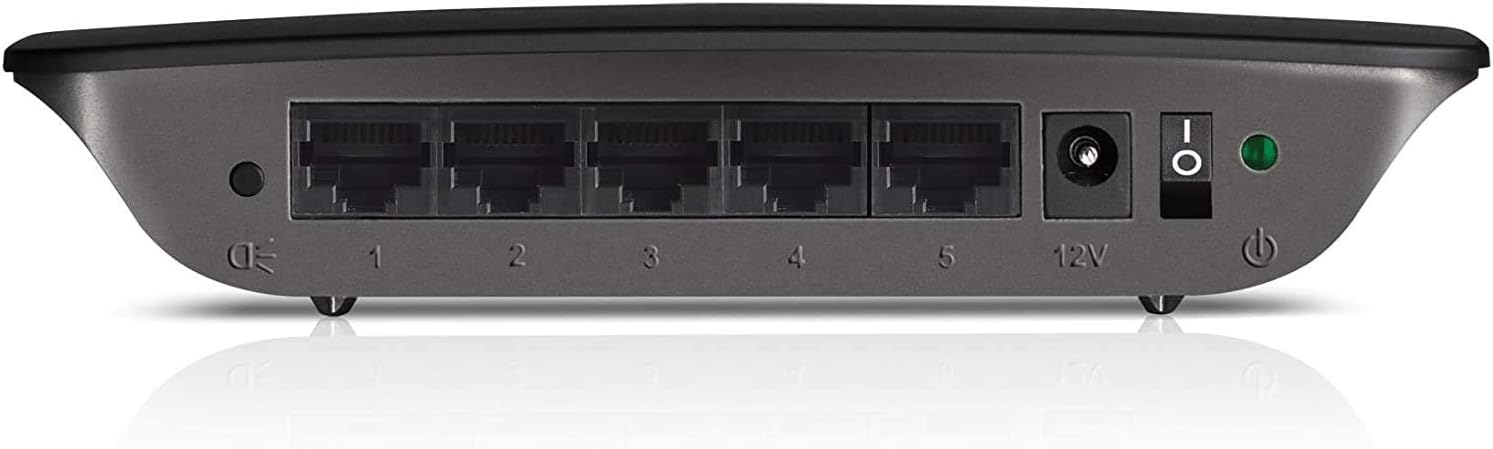
Figure 2: Rear panel of the Linksys SE1500, showing Ethernet ports, power input, and power switch.
5. Istruzzjonijiet Operattivi
The Linksys SE1500 is a plug-and-play device, meaning it typically requires no software configuration. Once connected, it operates automatically.
Indikaturi LED
Il-pannell ta’ quddiem tas-swiċċ għandu indikaturi LED biex jipprovdu informazzjoni dwar l-istatus:
- LED tal-qawwa: Jixgħel meta s-swiċċ ikun mixgħul.
- LEDs tal-portijiet (1-5): Each numbered port has an associated LED.
- Aħdar Solidu: Indicates a successful link connection at 100 Mbps.
- Ambra solida: Indicates a successful link connection at 10 Mbps.
- Teptip: Jindika attività tan-netwerk (trażmissjoni tad-dejta).
- Mitfi: Ma nstab l-ebda link jew il-port mhux attiv.
Modalità ta' Iffrankar tal-Enerġija
The SE1500 automatically enters a power-saving mode when a connected device is turned off or when a port is unused. This feature helps reduce energy consumption. You can also use the port status switch on the rear panel to turn off the port LEDs if desired.
6. Manutenzjoni
To ensure optimal performance and longevity of your Linksys SE1500 switch, consider the following maintenance tips:
- Żomm Nadif: Regularly wipe the exterior of the switch with a soft, dry cloth. Avoid using liquid cleaners or aerosols.
- Żgura Ventilazzjoni: Do not block the ventilation openings on the switch. Ensure it is placed in an area with good airflow to prevent overheating.
- Ġestjoni tal-Kejbil: Keep Ethernet cables neatly organized to prevent accidental disconnections or damage.
- Ċiklu tal-Enerġija (jekk meħtieġ): If the switch becomes unresponsive, disconnect the power adapter, wait 10 seconds, and then reconnect it.
7 Issolvi l-problemi
If you encounter issues with your Linksys SE1500 switch, try the following troubleshooting steps:
- Ebda Qawwa:
- Kun żgur li l-adapter tal-enerġija huwa konness sew mas-swiċċ u ma' sokit elettriku li jaħdem.
- Verify the power switch on the rear panel is in the "On" position.
- L-ebda Dawl tal-Konnessjoni:
- Iċċekkja li l-kejbil Ethernet huwa konness sew kemm mal-port tas-swiċċ kif ukoll mat-tagħmir konness.
- Ipprova kejbil Ethernet differenti.
- Kun żgur li l-apparat imqabbad ikun mixgħul u qed jaħdem sew.
- If the port status switch is off, toggle it to enable the LEDs.
- Veloċità baxxa tan-Netwerk:
- Ensure all connected devices and cables support Fast Ethernet (100 Mbps) for optimal performance.
- Check for excessive network traffic or issues with your internet service provider (ISP) or router.
- Konnessjoni intermittenti:
- Inspect Ethernet cables for damage.
- Try connecting devices to different ports on the switch.
- Power cycle the switch, router, and connected devices.
8. Speċifikazzjonijiet
| Mudell | SE1500 |
| Brand | Linksys |
| Numru ta' Portijiet | 5 |
| Tip ta' Interface | RJ45 |
| Rata ta' Trasferiment tad-Data | 10/100 Mbps (Ethernet veloċi) |
| Dimensjonijiet tal-Prodott | 4.29 x 6.06 x 1.14 pulzieri |
| Piż tal-oġġett | 5.4 uqija (0.34 Libbra) |
| Kulur | Iswed |
| Apparati Kompatibbli | Desktop, Konsoll tal-Logħob, Laptop, Printer |
| Komponenti Inklużi | 5-port 10/100 Switch, Power Adapter |
9. Garanzija u Appoġġ
For detailed warranty information and technical support, please refer to the documentation included with your purchase or visit the official Linksys support websit. It-termini u l-kundizzjonijiet tal-garanzija jistgħu jvarjaw skont ir-reġjun.
Appoġġ Linksys Websit: www.linksys.com/support


