Introduzzjoni
This manual provides comprehensive instructions for the safe and efficient use of your BlackBerry HS-300 Wireless Bluetooth Headset. Please read this manual thoroughly before operating the device and retain it for future reference. The BlackBerry HS-300 is designed for hands-free communication with compatible Bluetooth-enabled devices.
Kontenut tal-Pakkett
Ivverifika li l-pakkett tiegħek fih l-oġġetti li ġejjin:
- BlackBerry HS-300 Wireless Bluetooth Headset
- Ear hook (optional, for secure fit)
- Ear gels/tips (various sizes for comfort)
- Cable tal-iċċarġjar
- Manwal għall-Utent (dan id-dokument)
Apparat Matulview
Familiarize yourself with the components of your BlackBerry HS-300 headset.
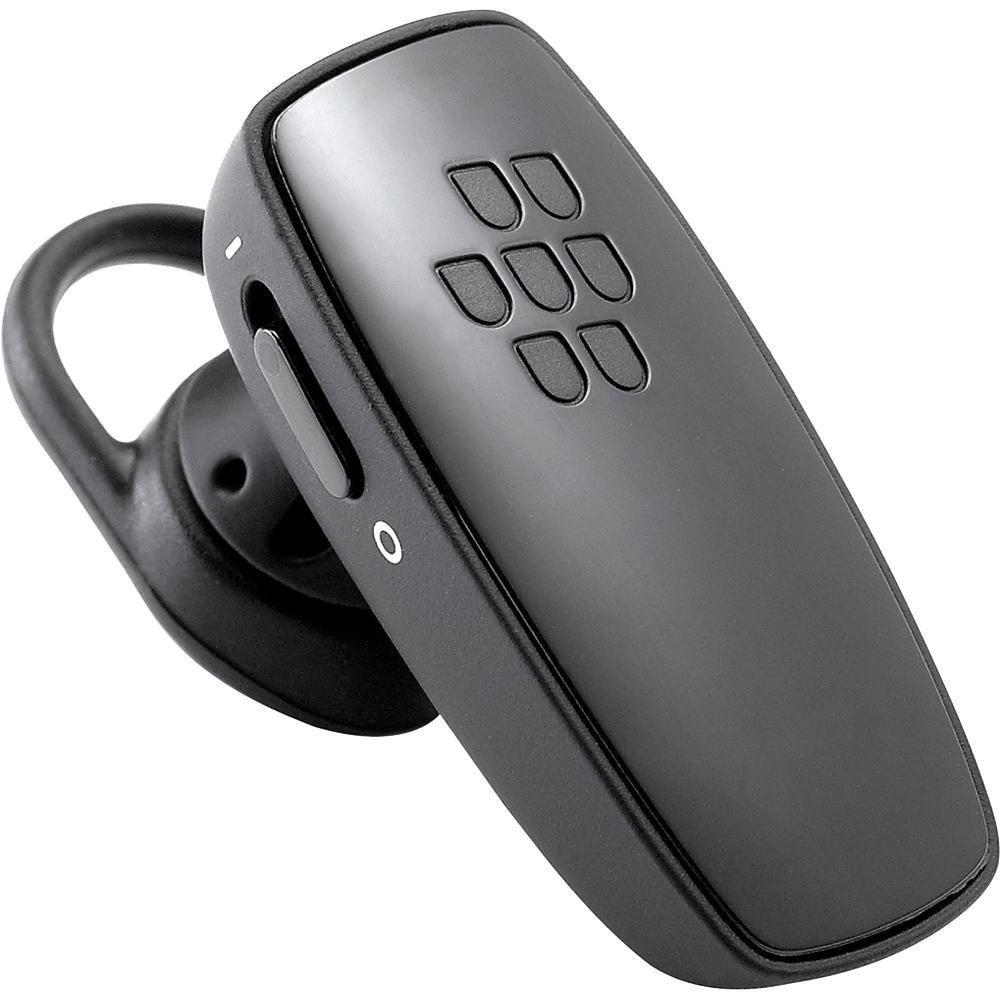
Stampa 1: Quddiem view of the BlackBerry HS-300 Wireless Bluetooth Headset. The image displays the main body of the headset, featuring the BlackBerry logo (seven-dot pattern) on the front surface. A slender button, likely for volume control or multi-function, is visible on the side. An ear hook is attached, designed to secure the headset over the ear. A small indicator light is also present near the button.
- Buttuna b'ħafna funzjonijiet: Used for answering/ending calls, voice commands, and pairing.
- Buttuni tal-Kontroll tal-Volum: Adjusts call and media volume.
- Dawl Indikatur LED: Displays status (power, pairing, charging).
- Mikrofonu: Captures your voice during calls.
- Swiċċ tal-Enerġija: Ixgħel jew jitfi l-headset.
- Port tal-Iċċarġjar: Connects to the charging cable.
Setup
1. Iċċarġjar tal-Headset
Before initial use, fully charge your headset. The HS-300 features rapid charge capabilities.
- Connect the charging cable to the headset's charging port and to a compatible USB power source.
- The LED indicator will show the charging status (e.g., solid red for charging, solid blue for fully charged).
- A full charge provides up to 4 hours of talk time.
2. Tqabbil ma' Apparat Bluetooth
To use your headset, it must be paired with a Bluetooth-enabled phone or device.
- Kun żgur li l-widna hija mitfija.
- Press and hold the Multi-function Button until the LED indicator flashes blue and red alternately. This indicates pairing mode.
- Fuq it-telefon tiegħek, attiva l-Bluetooth u fittex apparati ġodda.
- Select "BlackBerry HS-300" from the list of available devices.
- Jekk tintalab għal passcode, daħħal "0000" (erba' żerijiet).
- Ladarba jkun imqabbad, l-indikatur LED se jteptep blu perjodikament.
Istruzzjonijiet Operattivi
Qawwa mixgħul/mitfi
- Biex Tixgħel: Slide the Power Switch to the 'On' position. The LED indicator will flash blue.
- Biex Tifi: Slide the Power Switch to the 'Off' position. The LED indicator will turn off.
Jagħmel u Jirċievi Sejħiet
- Tweġiba għal Sejħa: Agħfas il-Buttuna Multi-funzjoni darba.
- Tmiem Sejħa: Press the Multi-function Button once during a call.
- Ċaħda ta 'Sejħa: Press and hold the Multi-function Button for approximately 2 seconds.
- Tagħmel Sejħa: Dial the number on your phone. The call will automatically transfer to the headset if connected.
- Voice Dialing (if supported by phone): Press the Multi-function Button once when not on a call.
Kontroll tal-Volum
- Use the Volume Control Buttons on the headset to adjust the call or media volume.
Manutenzjoni
- Naddaf il-headset regolarment b'ċarruta ratba u niexfa.
- Avoid exposing the headset to extreme temperatures, moisture, or corrosive substances.
- Aħżen il-headset f'post frisk u niexef meta ma tkunx qed tuża.
- Tippruvax tiżżarma jew timmodifika l-headset, għax dan jannulla l-garanzija u jista' jikkawża ħsara.
Issolvi l-problemi
| Problema | Soluzzjoni |
|---|---|
| Il-headset ma jixgħelx. | Ensure the headset is charged. Connect it to a power source using the charging cable. |
| Cannot pair the headset with my phone. |
|
| L-ebda awdjo jew kwalità tal-awdjo fqira. |
|
| Il-headset jiskonnettja spiss. |
|
Speċifikazzjonijiet
| Karatteristika | Dettall |
|---|---|
| Numru tal-Mudell | HS-300 |
| Konnettività | Bluetooth Wireless (Version 2.1) |
| Ħin tat-Tkellem | Sa 4 sigħat |
| Iċċarġjar | Rapid charge capable |
| Kontrolli | Volume control, Multi-function button |
| Mikrofonu | Integrata |
| Fattur tal-Formola | On-ear (single ear) |
| Piż | Madwar 3.2 uqija |
| Dimensjonijiet | 2.5 x 2 x 6.5 pulzieri (approssimattiv) |
Garanzija u Appoġġ
For warranty information and technical support, please refer to the documentation provided at the time of purchase or visit the official BlackBerry support websit. Żomm il-prova tax-xiri tiegħek għal talbiet ta' garanzija.
Appoġġ onlajn: www.blackberry.com/support


