Introduzzjoni
This manual provides detailed instructions for the proper setup, operation, and maintenance of your Nortek NDVX 2503 DVD Player. Please read this manual thoroughly before using the device to ensure optimal performance and safety. Keep this manual for future reference.
Informazzjoni dwar is-Sigurtà
- Sors tal-Enerġija: Connect the DVD player only to the specified power supply voltage.
- Ventilazzjoni: Aċċerta ruħek li jkun hemm ventilazzjoni adegwata madwar l-unità. Timblokkax il-fetħiet tal-ventilazzjoni.
- Ilma u Umdità: Do not expose the unit to rain, moisture, or dripping/splashing liquids.
- Sħana: Żomm l-unità 'l bogħod minn sorsi ta' sħana bħal radjaturi, reġistri tas-sħana, stufi, jew apparat ieħor li jipproduċi sħana.
- Tindif: Skonnettja l-unità mill-plagg tal-ħajt qabel ma tnaddafha. Uża drapp niexef għat-tindif.
- Servizzi: Tippruvax isservi dan il-prodott int stess. Irreferi l-manutenzjoni kollha lil persunal tas-servizz kwalifikat.
Kontenut tal-Pakkett
Iċċekkja li l-oġġetti kollha elenkati hawn taħt huma inklużi fil-pakkett tiegħek:
- Nortek NDVX 2503 DVD Player
- Kontroll mill-bogħod (bil-batteriji)
- Kejbil AV (tip RCA)
- Manwal għall-Utent (dan id-dokument)
- Korda tal-Enerġija
Prodott Overview
Familiarize yourself with the components and controls of your DVD player.
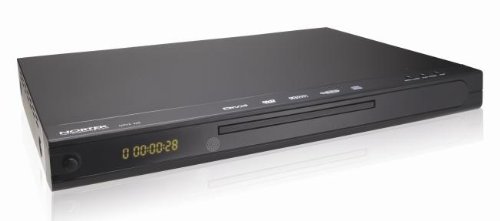
Figura 1: Quddiem view of the Nortek NDVX 2503 DVD Player. This image shows the sleek black casing, the central disc tray, the digital display on the left, and control buttons on the right side of the front panel.
Kontrolli tal-Panew ta' Quddiem:
- Buttuna tal-Qawwa: Ixgħel jew jitfi l-unità.
- Trej tad-Diska: Insert your DVD or CD here.
- Wiri: Shows playback time, track number, and other status indicators.
- Buttuna Miftuħa/Agħlaq: Jiftaħ u jagħlaq it-trej tad-diska.
- Buttuna Play/Pause: Jibda jew iwaqqaf il-plejbek tad-diska.
- Buttuna Waqqaf: Iwaqqaf il-plejbek tad-diska.
- Skip Buttons (Forward/Backward): Jaqbeż għat-track/kapitlu li jmiss jew ta’ qabel.
Konnessjonijiet tal-Panew ta' wara:
(Note: Specific connections may vary. Common connections include:)
- Audio/Video Output (RCA): Red, White (audio) and Yellow (video) jacks for connecting to a TV or ampaktar ħaj.
- Ħruġ Awdjo Diġitali Koassjali/Ottiku: For connecting to a home theater receiver for digital audio.
- Input ta' Enerġija: Tqabbad il-korda tad-dawl.
Setup
1. Connecting to a Television:
- Ensure both the DVD player and your television are turned off and unplugged.
- Connect the yellow RCA video cable from the "Video Out" jack on the DVD player to the "Video In" jack on your television.
- Connect the red and white RCA audio cables from the "Audio Out" jacks (Red for Right, White for Left) on the DVD player to the corresponding "Audio In" jacks on your television or audio receiver.
- If using digital audio, connect a coaxial or optical cable from the DVD player's digital audio output to your receiver's digital audio input.
2. Konnessjoni tal-Enerġija:
- Plug the power cord into the power input on the rear of the DVD player.
- Ipplaggja t-tarf l-ieħor tal-korda tad-dawl ġo żbokk tal-ħajt.
3. Initial Power-On:
- Turn on your television and select the correct input source (e.g., AV1, Video 1) that corresponds to where you connected the DVD player.
- Press the Power button on the DVD player or its remote control to turn it on.
- The Nortek logo or a setup menu should appear on your TV screen.
Istruzzjonijiet Operattivi
1. Disc Playback:
- Agħfas il- FTUĦ/MAGĦLUQ buttuna fuq il-pannell ta’ quddiem jew fuq il-kontroll remot biex tiftaħ it-trej tad-diska.
- Place a DVD, DVD+R, or Video CD disc gently into the tray with the label side facing up.
- Agħfas il- FTUĦ/MAGĦLUQ buttuna mill-ġdid biex tagħlaq it-trej.
- The player will automatically begin reading the disc. Playback should start shortly. If a menu appears, use the arrow keys on the remote to navigate and the DĦUL buttuna biex tagħżel.
- Uża l- DĦABBA/PAWŻA, STOP, u SKIP buttuni fuq ir-remote jew il-pannell ta' quddiem biex tikkontrolla l-plejbek.
2. Navigazzjoni tal-Menu:
- Uża l- VLEĠĠA buttons on the remote control to move through menu options.
- Agħfas il- DĦUL or OK buttuna biex tikkonferma għażla.
- Il- MENU button typically returns you to the disc's main menu.
Manutenzjoni
Tindif tal-Unità:
- Unplug the DVD player from the power outlet before cleaning.
- Use a soft, dry cloth to wipe the exterior of the unit. Do not use liquid cleaners or aerosol sprays.
- Avoid getting dust or debris inside the disc tray mechanism.
Kura tad-Diska:
- Immaniġġja d-diski mit-truf tagħhom biex tevita marki tas-swaba’ fuq il-wiċċ tal-logħob.
- Store discs in their cases when not in use to prevent scratches.
- Naddaf id-diski maħmuġin b'ċarruta ratba u mingħajr suf, billi timsaħ miċ-ċentru 'l barra.
Issolvi l-problemi
| Problema | Kawża Possibbli | Soluzzjoni |
|---|---|---|
| Ebda qawwa | Il-korda tal-enerġija mhux imqabbda; Is-sokit tal-enerġija mhux attiv. | Kun żgur li l-korda tal-enerġija hija mdaħħla sew. Ittestja s-sokit b'apparat ieħor. |
| L-ebda stampa jew ħoss | AV cables not connected correctly; Incorrect TV input selected. | Check all AV cable connections. Select the correct input source on your TV (e.g., AV1, Video 1). |
| Diska mhux qed tindaqq | Disc is dirty or scratched; Disc inserted incorrectly; Incompatible disc format. | Clean the disc. Ensure the disc is inserted label-side up. Verify the disc is a supported format (DVD, DVD+R, Video CD). |
| Il-kontroll mill-bogħod ma jaħdimx | Il-batteriji huma mejta jew imdaħħla ħażin; Ostruzzjoni bejn ir-remote u l-plejer. | Replace batteries. Ensure correct battery polarity. Remove any obstructions. Point remote directly at the player's sensor. |
Speċifikazzjonijiet
- Ditta: Nortek
- Isem tal-Mudell: NDVX 2503
- Media Types Supported: DVD, DVD+R, Video CD
- ASIN: B0044AL0TM
- Manifattur: Nortek
- Note: Other specifications such as dimensions, weight, and power consumption are not available in the provided data.
Garanzija u Appoġġ
For warranty information or technical support, please refer to the warranty card included with your product or visit the official Nortek websit. Żomm il-prova tax-xiri tiegħek għal kwalunkwe talba ta' garanzija.
For further assistance, you may contact Nortek customer service through their official channels.


