1. Introduzzjoni
Grazzi tax-xiriasing the Digiquest Invisible DVB-T2 HEVC H.265 Digital Terrestrial Receiver. This device is designed to provide high-definition digital terrestrial television reception, including HEVC H.265 encoded channels. Its compact and adjustable design allows for discreet installation behind your television. This manual provides detailed instructions for setup, operation, and troubleshooting to ensure optimal performance.

Image 1.1: Digiquest Invisible DVB-T2 HEVC H.265 Digital Terrestrial Receiver.
2. Kontenut tal-Pakkett
Please check the package carefully to ensure all items are present and in good condition. If any items are missing or damaged, please contact your retailer.

Image 2.1: Contents of the Digiquest Invisible DVB-T2 HEVC H.265 Receiver package.
- Digiquest Invisible DVB-T2 HEVC H.265 Receiver Unit
- Kontroll mill-bogħod
- External Power Supply (AC 100-240V - DC 12V)
- Remote Control Extender (IR sensor with adhesive)
- Removable Support with Hole and Adhesive
- User Manual / Quick Guide
3. Prodott Aktarview
3.1. Receiver Unit
The Digiquest Invisible receiver is designed for compact and flexible installation. It features a 180° adjustable SCART connector, allowing it to be positioned optimally behind your TV.

Immaġni 3.1: Ġenb view of the receiver unit with the adjustable SCART connector.
3.2. Portijiet u Konnessjonijiet
Familiarize yourself with the various ports on your receiver:

Image 3.2: Detailed diagram showing all ports and their functions.
- USB 2.0 Port (Lateral): For connecting USB storage devices to play multimedia content.
- RF IN: Terrestrial antenna input for connecting your DVB-T/T2 antenna.
- LAN: Ethernet port for network connection, primarily for FTP updates.
- HDMI: High-Definition Multimedia Interface for connecting to a modern TV.
- IR: Input for the external IR sensor (remote control extender).
- Input ta' Enerġija: For connecting the 12V DC power adapter.
- Sokit SCART: 180° adjustable connector for older TVs.
3.3. Kontroll mill-bogħod
The remote control allows you to operate all functions of the receiver. Insert two AAA batteries (not included) into the battery compartment.

Image 3.3: Layout of the remote control buttons.
- Buttuna tal-Qawwa: Ixgħel jew jitfi r-riċevitur.
- Buttuna Mute: Issikket jew jitneħħa l-awdjo.
- MESSAGG: Teletext function.
- SUBT: Għażla tas-sottotitli.
- INFORMAZZJONI: Juri informazzjoni dwar il-kanal.
- FAV: Accesses favorite channel list.
- Buttuni tal-Kulur (Aħmar, Aħdar, Isfar, Blu): For specific functions as indicated on-screen.
- LANG: Audio language selection.
- MENU: Jaċċessa l-menu prinċipali.
- Buttuni tan-Navigazzjoni ('Il fuq/'l isfel/Xellug/Lemin) & OK: Għan-navigazzjoni u l-għażla tal-menù.
- ĦRUĠ: Joħroġ mill-menu jew funzjoni attwali.
- Volum 'il fuq/Niżżel: Jaġġusta l-volum.
- Kanal 'l fuq/'l isfel: Tibdel il-kanali.
- Tastiera numerika (0-9): Għal input dirett tal-kanal.
- EPG: Gwida Elettronika tal-Programm.
4. Konfigurazzjoni u Installazzjoni
Follow these steps to connect and set up your Digiquest Invisible receiver.
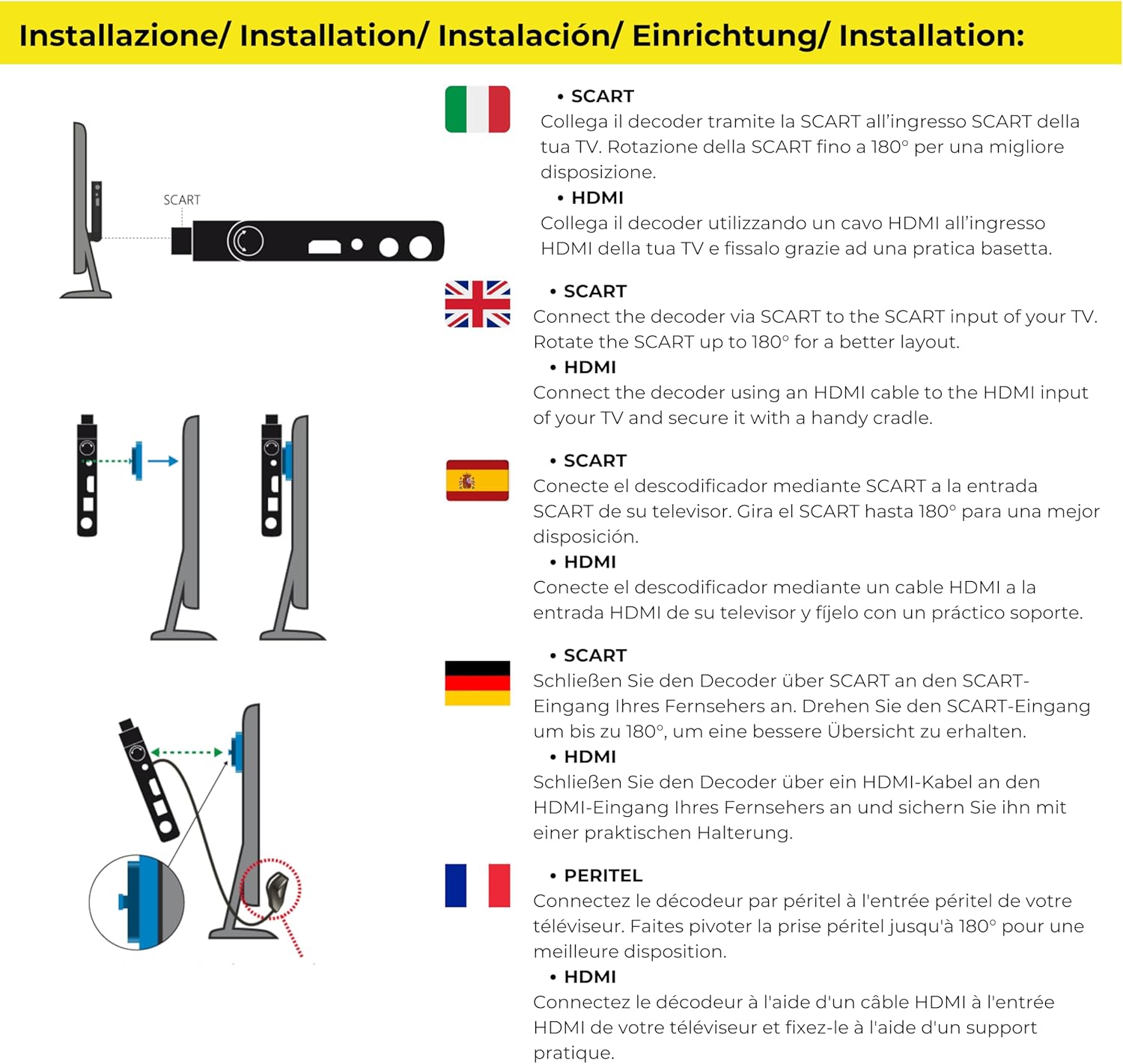
Image 4.1: Connection options for the receiver via SCART or HDMI.
4.1. Konnessjoni mat-TV tiegħek
The receiver offers flexible connection options:
- Using SCART: Connect the receiver directly to your TV's SCART input. The 180° articulated SCART connector allows you to position the receiver discreetly behind the TV.
- Bl-użu ta' HDMI: For TVs with an HDMI port, connect the receiver using an HDMI cable (not included). You can use the provided removable support to secure the receiver if needed.

Immaġni 4.2: Eż.ample of the receiver connected discreetly behind a TV using the SCART connector.
4.2. Antenna and Power Connection
- Connect your terrestrial antenna cable to the RF IN port fuq ir-riċevitur.
- If using the remote control extender, plug its cable into the IR port. Position the IR sensor in a location where it can receive signals from your remote control.
- Connect the external power supply to the Input tal-Enerġija port on the receiver, then plug the power adapter into a wall outlet.
4.3. Initial Setup and Channel Scan
- Turn on your TV and select the correct input source (SCART or HDMI) where the receiver is connected.
- Power on the Digiquest receiver using the remote control.
- The first-time installation wizard should appear. Follow the on-screen prompts to select your language, country, and initiate an automatic channel scan.
- Allow the receiver to complete the channel scan. This may take several minutes.
- Once the scan is complete, you should be able to view available digital terrestrial channels.
5. Operazzjoni Bażika
5.1. Għażla tal-Kanal
- Uża l- Kanal 'l fuq/'l isfel buttons on the remote to browse channels sequentially.
- Enter the channel number directly using the Tastiera numerika.
- Agħfas il- OK button to display the channel list, then use the navigation buttons to select a channel.
5.2. Kontroll tal-Volum
Aġġusta l-volum billi tuża Volum 'il fuq/'l isfel buttons on the remote control. For optimal control, set your TV's volume to a high fixed level and use the receiver's remote for daily volume adjustments.
5.3. CEC Function (Consumer Electronics Control)
If your TV supports CEC and it is enabled, you may be able to control basic functions of the receiver (like power on/off) using your TV's remote control. Refer to your TV's manual for CEC setup.

Image 5.1: CEC Functionality.
5.4. Subtitles and Audio Language
- Agħfas il- SUBT button to enable or disable subtitles, or to select from available subtitle tracks.
- Agħfas il- LANG button to select from available audio languages (if broadcast).
6. Funzjonijiet tal-Media Player
The Digiquest Invisible receiver includes a media player function, allowing you to view photos, listen to music, and watch videos from a USB storage device.

Image 6.1: Media Player functionality for various file tipi.
- Insert a USB storage device (e.g., USB flash drive) into the USB 2.0 Port on the side of the receiver.
- Access the Media Player menu from the main menu.
- Navigate through your USB device's folders to select the desired video, audio, or image file.
- Agħfas OK biex tilgħab jew view l-magħżula file.
7 Issolvi l-problemi
If you encounter problems with your receiver, please refer to the following common issues and solutions before contacting support.
| Problema | Kawża Possibbli | Soluzzjoni |
|---|---|---|
| L-ebda stampa jew ħoss | Incorrect TV input selected; Loose cable connections; Receiver not powered on. | Ensure TV is on correct input (SCART/HDMI). Check all cable connections (antenna, power, video). Power on the receiver. |
| Ma nstabu l-ebda kanali | Antenna not connected or faulty; Poor signal strength; No channel scan performed. | Check antenna connection. Adjust antenna position. Perform a new channel scan from the menu. |
| Il-kontroll mill-bogħod ma jaħdimx | Batteries depleted or incorrectly inserted; IR sensor blocked or not connected. | Replace batteries. Ensure batteries are inserted with correct polarity. Check IR sensor connection and ensure it has a clear line of sight to the remote. |
| Channels reorder after power off | Specific software behavior or setting. | Check receiver settings for channel sorting options. Ensure any custom channel lists are saved. If the issue persists, check for firmware updates. |
| Menu language not available | Limited language options in firmware. | The receiver may have a limited set of menu languages. Check for available firmware updates that might include additional languages. |
8. Speċifikazzjonijiet
Key technical specifications for the Digiquest Invisible DVB-T2 HEVC H.265 Digital Terrestrial Receiver:
- Ditta: DIGIQUEST
- Mudell: Invisible DVB-T2 HEVC H.265
- Kulur: Iswed
- Konnettività: HDMI, SCART (180° adjustable), USB 2.0 (x2), LAN (Ethernet), RF IN, IR
- Apparati Kompatibbli: Televiżjoni
- Kodifikazzjoni tal-Vidjo: HEVC Main 10
- Modalità tal-Ħruġ tal-Awdjo: Jdawru
- Provvista tal-Enerġija: 12V DC (External AC 100-240V adapter included)
- Piż: 200 Gramm
- Metodu ta' Kontroll: Kontroll mill-bogħod
- Karatteristiċi: Full HD, Mediaplayer, CEC Function, FTP Update via LAN

Image 8.1: LAN port for FTP updates.

Image 8.2: 12V power supply.
9. Garanzija u Appoġġ
9.1. Garanzija tal-Manifattur
Dan il-prodott jiġi ma 'a Garanzija ta' 2 snin mill-manifatturJekk jogħġbok żomm il-prova tax-xiri tiegħek għal talbiet taħt il-garanzija. Il-garanzija tkopri difetti fil-materjali u x-xogħol taħt użu normali.
9.2. Appoġġ għall-Klijent
For technical assistance, troubleshooting beyond this manual, or warranty inquiries, please contact your retailer or visit the official Digiquest websit għal informazzjoni ta' appoġġ.
10. Informazzjoni dwar is-Sigurtà
Jekk jogħġbok aqra u segwi dawn il-linji gwida tas-sigurtà biex tiżgura tħaddim sikur u tevita ħsara lill-apparat:
- Do not expose the receiver to rain, moisture, or extreme temperatures.
- Żgura ventilazzjoni xierqa madwar l-apparat biex tevita sħana żejda.
- Use only the provided power adapter. Using unauthorized adapters may damage the device and void the warranty.
- Do not attempt to open or repair the receiver yourself. Refer all servicing to qualified personnel.
- Żomm l-apparat 'il bogħod minn kampi manjetiċi qawwija.
- Armi l-iskart elettroniku b'mod responsabbli skont ir-regolamenti lokali.


