1. Introduzzjoni
This manual provides comprehensive instructions for the setup, operation, and maintenance of your HP 3502 IP Phone. The HP 3502 is a robust Voice over IP (VoIP) telephone designed for business environments, featuring four softkeys and full-duplex speakerphone capabilities for clear communication.
2. Kontenut tal-Pakkett
Please verify that all items listed below are present in your package. If any items are missing or damaged, contact your vendor immediately.
- HP 3502 IP Phone Unit
- Handset
- Korda tal-idejn
- Kejbil Ethernet (RJ-45)
- Adapter tal-Enerġija (jekk ma tużax Power over Ethernet - PoE)
- Gwida Quick Start
3. Prodott Aktarview
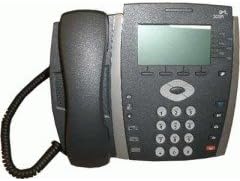
Figura 3.1: Quddiem view of the HP 3502 IP Phone. The image displays the phone's handset resting on its cradle on the left side. The main unit features a rectangular display screen at the top, below which are four softkeys. To the right of the display is a navigation cluster, and below that is a standard numeric keypad with additional function buttons.
The HP 3502 IP Phone is designed for intuitive use and reliable performance. Key features include:
- Skrin tad-displej: A 4.3-inch screen for call information, menus, and status.
- Softkeys: Four context-sensitive buttons located directly below the display, whose functions change based on the phone's current state.
- Speakerphone Full-Duplex: Allows for hands-free conversations with clear audio.
- Tastiera numerika: Standard 0-9 keys for dialing, along with * and #.
- Raggruppament ta' Navigazzjoni: Buttons for menu navigation and selection.
- Dedicated Function Buttons: Includes buttons for volume control, mute, headset, speaker, and message waiting indicator.
- Sors tal-Enerġija: Supports both Corded Electric power and Power over Ethernet (PoE).
4. Setup
4.1 Konnessjoni Fiżika
- Qabbad il-Handset: Ipplaggja tarf wieħed tal-korda mkebba tal-handset fil-handset u t-tarf l-ieħor fil-port tal-handset fuq il-bażi tat-telefon.
- Qabbad man-Netwerk:
- Locate the "LAN" or "NETWORK" port on the back of the phone.
- Connect one end of the Ethernet cable to this port and the other end to an active network port (e.g., a wall jack or network switch).
- Qabbad l-Enerġija:
- If your network supports Power over Ethernet (PoE), the phone will power on automatically once the Ethernet cable is connected.
- If PoE is not available, connect the provided power adapter to the "POWER" port on the phone and then plug the adapter into a standard electrical outlet.
- L-Ewwel Bidu: The phone will power on and begin its boot sequence. This may take a few moments. The display will show boot progress and then indicate network status.
4.2 Network and Account Configuration
The HP 3502 IP Phone typically obtains network settings (IP address, subnet mask, gateway, DNS) automatically via DHCP. VoIP account registration (SIP or H.323) is usually provisioned by your IT administrator or service provider. Consult your IT department for specific configuration details if manual setup is required.
- Proviżjonament Awtomatiku: Most enterprise deployments use automatic provisioning servers to configure the phone.
- Konfigurazzjoni Manwali: If manual configuration is necessary, access the phone's menu system (often via a "Menu" or "Settings" button) to enter network parameters and SIP/H.323 account details. Refer to your IT administrator's instructions for these values.
5. Istruzzjonijiet Operattivi
5.1 Nagħmlu Telefonati
- Erfa' l-idejn: Pick up the handset, or press the Speaker button for hands-free mode. You will hear a dial tone.
- Ċempel Numru: Daħħal in-numru tat-telefon mixtieq billi tuża t-tastiera numerika.
- Ibda Sejħa: Agħfas il- Ċempel softkey (if available) or wait a few seconds for the call to automatically connect.
5.2 Irċeviment ta' Telefonati
- Meta jdoqq it-telefon, erfa' l-handset biex twieġeb.
- Alternattivament, agħfas il- Speaker button to answer in hands-free mode, or press the Tweġiba softkey.
5.3 In-Call Functions
- Kontroll tal-Volum: Uża l- Volum buttons (usually +/-) to adjust the handset, headset, or speakerphone volume during a call.
- Siekta: Agħfas il- Mute buttuna biex tissettja l-mikrofonu tiegħek. Agħfasha mill-ġdid biex tneħħi l-istorbju.
- Żomm: Agħfas il- Żomm softkey or button to place the current call on hold. Press it again to resume the call.
- Trasferiment:
- Matul sejħa attiva, agħfas Trasferiment softkey or button.
- Ċempel in-numru li għalih trid tittrasferixxi s-sejħa.
- Agħfas il- Trasferiment softkey again to complete a blind transfer, or wait for the other party to answer and then press Trasferiment for a supervised transfer.
- Konferenza:
- Matul sejħa attiva, agħfas Konferenza softkey or button.
- Ċempel in-numru tal-parti terza.
- Ladarba t-tielet persuna twieġeb, agħfas il-buttuna Konferenza softkey again to join all parties.
- Tmiem Sejħa: Replace the handset in the cradle, or press the Tmiem Sejħa softkey or Speaker button if in hands-free mode.
6. Manutenzjoni
Proper care ensures the longevity of your HP 3502 IP Phone.
- Tindif: Uża drapp artab, niexef u mingħajr suf biex tnaddaf il-wiċċ tat-telefon. Għal marki persistenti, neħħi ftit.ampLaħlaħ id-drapp bl-ilma. Evita li tuża kimiċi ħarxa, prodotti tat-tindif li joborxu, jew solventi.
- Ambjent: Keep the phone away from excessive heat, direct sunlight, and moisture. Ensure adequate ventilation around the device.
- Immaniġġjar: Evita li twaqqa’ t-telefon jew li tissottomettih għal impatti qawwija.
7 Issolvi l-problemi
This section addresses common issues you might encounter with your HP 3502 IP Phone.
| Problema | Kawża Possibbli | Soluzzjoni |
|---|---|---|
| No dial tone / Phone not powering on | No power, network cable loose, network issue. |
|
| Ma nistax nagħmel jew nirċievi telefonati | No network connection, incorrect VoIP account registration, firewall issues. |
|
| Kwalità awdjo fqira (eku, statiku) | Konġestjoni fin-netwerk, kejbil difettuż, interferenza ambjentali. |
|
If the problem persists after attempting these solutions, please contact your IT support or the product manufacturer for further assistance.
8. Speċifikazzjonijiet
| Karatteristika | Dettall |
|---|---|
| Brand | HP (Hewlett Packard) |
| Numru tal-Mudell | JC507A |
| Tip ta' Prodott | IP Phone (VoIP Phone) |
| Daqs tal-Wiri | 4.3 Pulzier |
| Sors tal-Enerġija | Corded Electric, Power over Ethernet (PoE) |
| Tip ta' Dialer | Tastiera Unika |
| Tip ta' Sistema ta' Tweġiba | Diġitali |
| Operazzjoni b'ħafna linji | Operazzjoni b'ħafna linji |
| Piż tal-oġġett | 3.95 Libbra (madwar 1.79 kg) |
| Dimensjonijiet tal-Pakkett | 14.9 x 10.7 x 4.4 pulzieri (madwar 37.8 x 27.2 x 11.2 ċm) |
| UPC | 885631695951 |
| L-Ewwel Data Disponibbli | 13 ta’ Lulju, 2010 |
9. Garanzija u Appoġġ
The HP 3502 IP Phone is covered by a standard manufacturer's warranty. For specific warranty terms and conditions, please refer to the warranty card included with your product or visit the official HP support websit.
For technical support, troubleshooting assistance beyond this manual, or to inquire about service, please contact HP customer support or your authorized HP reseller. Contact information can typically be found on the HP official webis-sit jew fid-dokumentazzjoni tal-prodott tiegħek.
Appoġġ HP Websit: www.hp.com/support


