1. Introduzzjoni
The Zoom R24 is a versatile 24-track portable SD recorder, USB audio interface, pad sampler, and DAW control surface. It features 8 microphone inputs, built-in stereo condenser microphones, integrated effects, and USB connectivity for Mac/PC. This manual provides essential information for setup, operation, and maintenance.
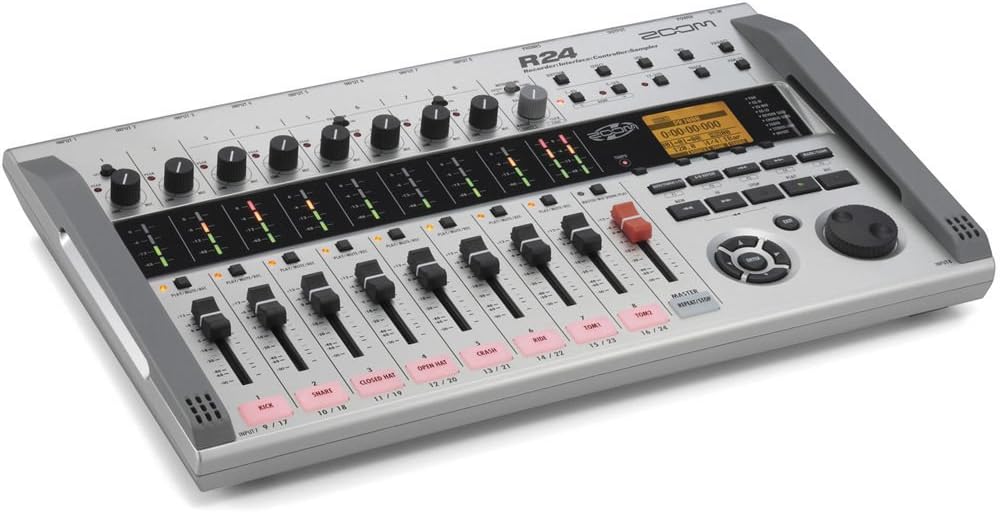
Figura 1: Aktarview of the Zoom R24 Digital Multitrack Recorder.
2. Setup
2.1 It-Tħaddim tal-Apparat
- The R24 can be powered by 6 AA batteries (included), providing up to 5 hours of operation.
- Alternatively, use an optional AD-17 AC adapter or a USB battery pack for continuous power.
2.2 Installazzjoni tal-Kard SD
The R24 records to SD and SDHC cards up to 32 GB. Ensure an SD card is properly inserted before recording.
2.3 Konnessjoni ta 'Inputs u Outputs
The R24 features 8 microphone inputs with combo XLR/TRS jacks. Inputs 1-8 are available. Phantom power is available on inputs 1-6. Input 1 also features a Hi-Z switch for direct guitar/bass connection.

Figure 2: Various connection options and battery compartment of the Zoom R24.
- Connect microphones, keyboards, or mixers to the XLR/TRS inputs.
- Use the Hi-Z switch on Input 1 for direct guitar or bass connection.
- Monitor audio via headphones or connect external monitors to the output jacks.
3. Istruzzjonijiet Operattivi
3.1 Ir-reġistrazzjoni
The R24 allows for 8 tracks of simultaneous recording per project. Use the intuitive interface to manage your tracks.

Figure 3: Close-up of the Zoom R24's control panel, showing faders, knobs, and screen interface.
- Input Routing: Select which tracks the inputs will record to via the touchscreen menu.
- Input Dynamics: Apply compression, limiting, or noise gating to each input as needed.
- Mikrofoni inkorporati: Utilize the high-sensitivity stereo condenser mics for capturing sound effects, speeches, or dialog.
3.2 Editing and Mixing
- Track Editing: Use the touchscreen to drag, drop, loop, and edit audio regions. Options include copy, delete, and split.
- Time Stretching: Adjust the timing of audio clips using the edit function.
- Mixing Tools: Access pan controls and a 3-band EQ for each track in the track settings menu.
- Ibgħat Effetti: Apply reverb, delay, or chorus effects to tracks.
- Patch Memory: Utilize Zoom's guitar effect collection with 40 preset patches or create custom effect chains of up to three effects.
3.3 Drum Machine and Synthesizer
- Rhythm Loops: The R24 includes 150 drum loops across 30 musical genres, each with five patterns for different song sections (intro, verse, chorus, bridge, outro).
- Synth Tracks: Connect a MIDI keyboard via USB-C or use the touchscreen to add synth parts with 18 available sounds.
3.4 Playback and Mastering
- Bouncing Tracks: Once recorded, edited, and mixed, tracks can be bounced down directly on the R24 to create a final song.
- Sequence Play: Create playlists of your projects for use as backing tracks during live performances or rehearsals.
3.5 USB Audio Interface and DAW Control
- The R24 can function as a 2-in/2-out or 2-in/4-out audio interface for direct recording to a computer (Mac, PC, iOS compatible).
- Utilize the R24's transport controls and faders to control your preferred Digital Audio Workstation (DAW).
Vidjo 1: Prodott Fuqview of the Zoom R24, demonstrating key features and functionalities.
4. Speċifikazzjonijiet
| Karatteristika | Dettall |
|---|---|
| Piż tal-oġġett | 2.87 liri |
| Dimensjonijiet tal-Prodott | 14.8 x 9.33 x 2.06 pulzieri |
| Numru tal-Mudell tal-Oġġett | R24 |
| Batteriji | 6 batteriji AA meħtieġa (inklużi) |
| Apparati Kompatibbli | Computers, mobile devices, and other audio equipment with USB 2.0 or USB 2.0 Hi-Speed, and devices that support SD and SDHC cards up to 32 GB. |
| Interface tal-Ħardwer | USB |
| Softwer Appoġġjat | Any DAW supporting Windows, macOS, and Linux |
| Format tal-Midja | WAV |
| Sistema Operattiva | Linux, Windows, macOS |
| Teknoloġija tal-Konnettività | USB |
| Numru ta 'Kanali | 10 |


