Introduzzjoni
This manual provides comprehensive instructions for the setup, operation, maintenance, and troubleshooting of your Logitech M510 Wireless Mouse. Designed for comfort and efficiency, the M510 offers precise control and convenient features for your computing needs.
The Logitech M510 is a comfortable wireless computer mouse featuring a USB Unifying Receiver, back/forward buttons, and side-to-side scrolling. It operates on 2 AA batteries and is compatible with Personal Computers and Macbooks running operating systems like Windows 10.
Kontenut tal-Pakkett
- Ġurdien mingħajr fili Logitech M510
- Riċevitur Unifikanti Logitech
- 2 Batteriji AA (installati minn qabel jew inklużi)
Setup
1. Installazzjoni tal-batterija
The Logitech M510 mouse requires two AA batteries for operation. These are typically included with your purchase. If not already installed, follow these steps:
- Sib l-għatu tal-kompartiment tal-batterija fuq in-naħa ta’ taħt tal-maws.
- Żerżaq jew erfa' l-għatu biex tiftaħ il-kompartiment.
- Daħħal żewġ batteriji AA, waqt li tiżgura li t-terminali pożittivi (+) u negattivi (-) ikunu allinjati sew mal-indikaturi ġewwa l-kompartiment.
- Agħlaq l-għatu tal-kompartiment tal-batterija sew.
2. Konnessjoni tar-Riċevitur Unifikanti
The Logitech M510 uses a Logitech Unifying Receiver for wireless connectivity. This small USB receiver allows you to connect multiple compatible Logitech devices to your computer using a single USB port.
- Locate the Logitech Unifying Receiver. It is often stored inside the battery compartment of the mouse for safekeeping during transport.
- Plug the Unifying Receiver into an available USB port on your computer (desktop, laptop, or Macbook).
- Your computer should automatically detect the receiver and install the necessary drivers. This may take a few moments.
- Once the drivers are installed, the mouse should be ready for use. If not, ensure the mouse's power switch (if present) is in the 'ON' position.

Immaġni: Minn fuq għal isfel view of the Logitech M510 Wireless Mouse alongside its compact USB Unifying Receiver.
Tħaddim tal-Maws
The Logitech M510 Wireless Mouse is designed for intuitive use with several programmable buttons and comfortable ergonomics.
Funzjonijiet Bażiċi
- Buttuna tal-Ikklikkjar fuq ix-Xellug: Buttuna primarja għall-għażla ta' oġġetti, ftuħ files, u l-interazzjoni mas-softwer.
- Buttuna tal-Ikklikkjar bil-Lemin: Buttuna sekondarja għall-aċċess tal-menus tal-kuntest u għażliet addizzjonali.
- Scroll Wheel: Skrollja 'l fuq jew 'l isfel fid-dokumenti u web paġni. Ir-rota tal-iscroll tiffunzjona wkoll bħala buttuna tan-nofs tal-ikklikkjar.
- Side-to-Side Scrolling: Tilt the scroll wheel left or right to scroll horizontally in applications that support this feature.
Advanced Features (Programmable Buttons)
The M510 features two thumb buttons (back/forward) on the left side, which can be customized using Logitech Options software (available for download from the Logitech website). By default, these buttons perform browser navigation functions.
- Buttuna Lura: Navigates back in web browsers jew file esploraturi.
- Buttuna 'l quddiem: Jinnaviga 'l quddiem ġewwa web browsers jew file esploraturi.
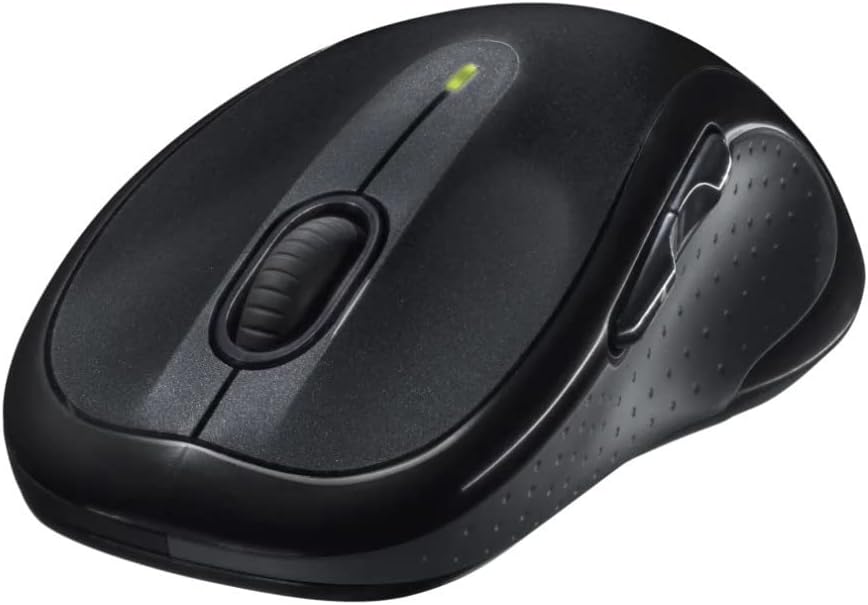
Immaġni: Angolata view of the Logitech M510 Wireless Mouse, highlighting its ergonomic shape and side buttons.
Manutenzjoni
Tindif il-Maws Tiegħek
To ensure optimal performance and hygiene, regularly clean your Logitech M510 mouse:
- Disconnect the mouse from your computer by removing the Unifying Receiver.
- Uża ċarruta ratba u mingħajr ħelu dampened with water or a mild cleaning solution (e.g., isopropyl alcohol) to wipe down the surface of the mouse.
- For crevices and around buttons, use a cotton swab or a soft brush.
- Avoid getting liquid into the internal components or the optical sensor.
- Allow the mouse to dry completely before re-connecting.
Sostituzzjoni tal-batterija
The Logitech M510 has an average battery life of 18 months. When the battery indicator light (if present) flashes or mouse performance degrades, it's time to replace the batteries.
- Itfi l-maws billi tuża s-swiċċ tal-enerġija fuq in-naħa ta' taħt.
- Iftaħ l-għatu tal-kompartiment tal-batterija.
- Neħħi l-batteriji AA qodma.
- Daħħal żewġ batteriji AA ġodda, waqt li tosserva l-polarità korretta (+/-).
- Agħlaq l-għatu tal-kompartiment tal-batterija.
- Erġa' ixgħel il-maws.
Issolvi l-problemi
| Problema | Kawża Possibbli | Soluzzjoni |
|---|---|---|
| Il-ġurdien ma jirrispondix | Low or dead batteries; Unifying Receiver not connected; Mouse power off; Driver issue. | Replace batteries; Ensure Unifying Receiver is securely plugged into a USB port; Turn mouse power switch to 'ON'; Reinstall Logitech Options software or check device manager for driver issues. |
| Moviment tal-kursur li jittardja jew li ma jkunx korrett | Interference; Dirty optical sensor; Mouse used on unsuitable surface; Low battery. | Move mouse closer to receiver; Clear obstructions; Clean optical sensor; Use a mouse pad or suitable surface; Replace batteries. |
| Il-buttuni tal-ġenb ma jaħdmux | Software not installed or configured; Application does not support custom buttons. | Download and install Logitech Options software from the official Logitech website to customize button functions. Ensure the application you are using supports these functions. |
| Unifying Receiver not recognized | Faulty USB port; Driver issue. | Try a different USB port; Restart your computer; Download and install the Logitech Unifying Software to re-pair the mouse with the receiver. |
Speċifikazzjonijiet
| Karatteristika | Dettall |
|---|---|
| Brand | Logitech |
| Numru tal-Mudell | 910-001822 |
| Serje | M510 |
| Teknoloġija tal-Konnettività | Radio Frequency, USB (via Unifying Receiver) |
| Teknoloġija ta 'Sejbien tal-Moviment | Laser |
| Kulur | Griż Skur |
| Piż tal-oġġett | 4.6 uqija (madwar 130 gramma) |
| Dimensjonijiet tal-Prodott (LxWxH) | 4.38 x 2.5 x 1.75 pulzieri (madwar 11.13 x 6.35 x 4.45 ċm) |
| Sors tal-Enerġija | Mħaddma bil-batterija |
| Batteriji Meħtieġa | 2 batteriji AA (inklużi) |
| Ħajja Medja tal-Batterija | 18 xhur |
| Pjattaforma tal-Ħardwer | Personal Computer, Macbook |
| Kompatibilità tas-Sistema Operattiva | Windows 10 (and likely earlier versions, macOS) |
| Karatteristiċi Speċjali | Battery Life Indicator, Power Saving Mode, Programmable Buttons, Wireless |
| Data L-Ewwel Disponibbli | 7 ta’ Ġunju 2010 |

Immaġni: Minn fuq għal isfel view of the Logitech M510 Wireless Mouse showing its approximate dimensions (4.4" length, 2.5" width).
Garanzija u Appoġġ
Informazzjoni dwar Garanzija
Logitech products typically come with a limited hardware warranty. For specific warranty terms and conditions applicable to your Logitech M510 Wireless Mouse, please refer to the warranty card included with your product or visit the official Logitech websit.
Appoġġ għall-Klijent
For further assistance, technical support, or to download the latest software (such as Logitech Options or Unifying Software), please visit the official Logitech support websit:
You may also find helpful resources, FAQs, and community forums on their websit.


