Introduzzjoni
The Brookstone Cool It Personal Fan is a portable, battery-powered device designed to provide personal cooling. Its compact size and flexible blades make it suitable for various environments, offering an adjustable airflow for comfort.
Il-karatteristiċi ewlenin jinkludu:
- Portable design for personal use anywhere.
- Adjustable fan speed for customized airflow.
- Flexible, finger-safe blades for enhanced safety.
- Includes a lanyard for hands-free carrying.
- Jaħdem bi 4 batteriji AA (mhux inklużi).
Setup
1. Installazzjoni tal-batterija
The Brookstone Cool It Personal Fan requires 4 AA batteries for operation. Batteries are not included with the product.
- Locate the battery compartment cover on the back of the fan handle.
- Żerżaq jew neħħi l-għatu bil-mod biex tiftaħ il-kompartiment.
- Daħħal 4 batteriji AA, waqt li tiżgura l-polarità korretta (+ u -) kif indikat ġewwa l-kompartiment.
- Erġa’ poġġi l-għatu tal-kompartiment tal-batterija, waqt li tiżgura li jkun magħluq sew.

Immaġni: Ġenb view of the fan, illustrating the general area for battery access.
2. Twaħħil tal-lanyard
A lanyard is included for convenient, hands-free carrying.
- Locate the small loop or attachment point at the top of the fan handle.
- Thread the lanyard through this loop and secure it according to the lanyard's design.
Istruzzjonijiet Operattivi
Aġġustament tal-Veloċità u Mixgħul/Mitfi
The fan features a variable speed control for customized airflow.
- To turn the fan on, rotate the control dial, typically located on the handle, clockwise.
- Continue rotating the dial clockwise to increase the fan speed.
- To decrease the fan speed, rotate the dial counter-clockwise.
- To turn the fan off, rotate the dial fully counter-clockwise until it clicks into the 'off' position.

Immaġni: Quddiem view of the fan, highlighting the fan blades and the control dial on the handle.
Using the Integrated Stand
The fan includes a small integrated stand for tabletop use.
- Locate the stand mechanism on the bottom or side of the fan handle.
- Extend or unfold the stand until it locks into position, allowing the fan to sit upright on a flat surface.
- Ensure the fan is stable before use.
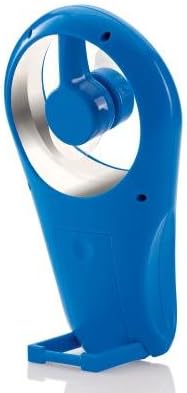
Immaġni: Ġenb view of the fan with its integrated stand extended for tabletop use.
Manutenzjoni
Tindif
To maintain optimal performance and appearance, clean the fan periodically.
- Ensure the fan is turned off and batteries are removed before cleaning.
- Imsaħ l-uċuħ ta 'barra b'artab, damp drapp. Tużax tindif jew solventi li joborxu.
- The flexible blades can be gently wiped if dust accumulates. Avoid bending them excessively.
- Tgħaddix il-fann fl-ilma jew f'xi likwidu ieħor.
Sostituzzjoni tal-batterija
Replace batteries when the fan's performance diminishes or it stops working.
- Segwi l-passi tal-installazzjoni tal-batterija deskritti fit-taqsima tas-Setup.
- Dejjem ibdel l-4 batteriji AA kollha fl-istess ħin b'oħrajn ġodda.
- Tħallatx batteriji qodma u ġodda, jew tipi differenti ta 'batteriji.
- Armi l-batteriji użati b'mod responsabbli skont ir-regolamenti lokali.
Issolvi l-problemi
| Problema | Kawża Possibbli | Soluzzjoni |
|---|---|---|
| Il-fann ma jixgħelx. | Il-batteriji huma eżawriti jew installati ħażin. | Iċċekkja l-polarità tal-batterija. Ibdel b'batteriji AA ġodda. |
| Low airflow or weak fan speed. | Batteries are low. Speed dial is set too low. | Replace batteries. Rotate the control dial clockwise to increase speed. |
| Il-fann jagħmel ħoss mhux tas-soltu. | Obstruction near blades. Loose battery cover. | Ensure no foreign objects are near the blades. Check if battery cover is secure. |
Speċifikazzjonijiet
- Ditta: Brookstone
- Isem tal-Mudell: Cool It
- Numru tal-Mudell tal-Oġġett: 883594041181
- Sors tal-Enerġija: Mħaddma bil-batterija
- Batteriji: 4 x AA (mhux inklużi)
- Metodu ta' Kontroll: Variable Dial Control
- Karatteristiċi Speċjali: Portable, Flexible Blades, Integrated Stand
- Komponenti Inklużi: Lanyard
- Dimensjonijiet tal-Prodott: 4 x 2 x 7 pulzieri (L x W x H)
- Piż tal-oġġett: 8 uqija (mingħajr batteriji)
- Użu fuq ġewwa/barra: Barra
Garanzija u Appoġġ
Warranty information for the Brookstone Cool It Personal Fan is not provided within this manual. For details regarding warranty coverage, product support, or service inquiries, please refer to the official Brookstone webis-sit jew ikkuntattja lis-servizz tal-klijenti tagħhom direttament.
You may find additional information and contact options on the Brookstone Store on Amazon.


