Introduzzjoni
Grazzi tax-xiriasing the Optimus F-1760 16-inch Wave Oscillating Stand Fan. This manual provides important information regarding the safe operation, assembly, maintenance, and troubleshooting of your fan. Please read these instructions thoroughly before use and retain them for future reference.

Image: The Optimus F-1760 stand fan positioned in a bedroom, showcasing its design and size relative to furniture.
Istruzzjonijiet Importanti dwar is-Sigurtà
Meta tuża apparat elettriku, għandhom dejjem jiġu segwiti prekawzjonijiet bażiċi biex jitnaqqas ir-riskju ta’ nar, xokk elettriku, u korriment lill-persuni, inkluż dan li ġej:
- Aqra l-istruzzjonijiet kollha qabel tuża dan il-fann.
- Uża dan il-fann biss kif deskritt f'dan il-manwal. Użi oħra mhux rakkomandati jistgħu jikkawżaw nar, xokk elettriku, jew korriment lil persuni.
- Biex tipproteġi kontra xokk elettriku, tpoġġix il-fann fit-tieqa, tgħaddasx l-unità, il-plagg jew il-korda fl-ilma u lanqas tisprejjax b'likwidi.
- Superviżjoni mill-qrib hija meħtieġa meta xi apparat jintuża minn jew ħdejn it-tfal.
- Aqla’ l-fann mis-sokit meta ma jkunx qed jintuża, meta ċċaqlaq il-fann minn post għall-ieħor, u qabel ma tnaddaf.
- Do not operate fan in the presence of explosive and/or flammable fumes.
- Tpoġġix il-fann jew xi partijiet ħdejn fjamma miftuħa, tisjir jew apparat ieħor li jsaħħan.
- Do not operate fan with a damaged cord or plug, or after the fan malfunctions or has been dropped or damaged in any manner.
- Evita kuntatt ma 'partijiet li jiċċaqilqu.
- Biex tiskonnettja, aqbad ipplaggja u iġbed mill-iżbokk tal-ħajt. Qatt taqbad fuq il-korda.
- Dejjem uża fuq wiċċ niexef u livell.
- M'għandekx twaħħal jew twaħħal il-fann fuq ħajt jew saqaf.
- Toperax mingħajr grills tal-fann f'posthom sewwa.
- This product employs overload protection (fuse). A blown fuse indicates an overload or short-circuit situation. If the fuse blows, unplug the product from the outlet. Replace the fuse as per the servicing instructions (follow product marking for proper fuse rating) and check the product. If the replacement fuse blows, a short-circuit may be present and the product should be discarded or returned to an authorized service facility for examination and/or repair.
Setup u Assemblea
The Optimus F-1760 fan requires minimal assembly. Ensure all components are present and undamaged before proceeding.
- Assemblaġġ tal-Bażi: Attach the weighted base legs to the main pole. Ensure they are securely fastened to provide stability. The base is designed to be sturdy, with weights at the ends of the feet.
- Aġġustament Għoli: The fan's height can be adjusted. Loosen the height adjustment knob on the pole, extend or retract the pole to the desired height, and then securely tighten the knob.
- It-twaħħil tar-ras tal-fann: Ensure the fan head is securely attached to the top of the pole. The motor housing and fan blade are plastic, while the grill is metal.
- Pjazzament: Place the fan on a dry, level surface. Ensure there is adequate space around the fan for proper air circulation and oscillation.
Istruzzjonijiet Operattivi
The Optimus F-1760 fan offers multiple control options and features for customized comfort.
Panel tal-Kontroll
The fan features a 4-position push-button switch on the pole for basic operation.
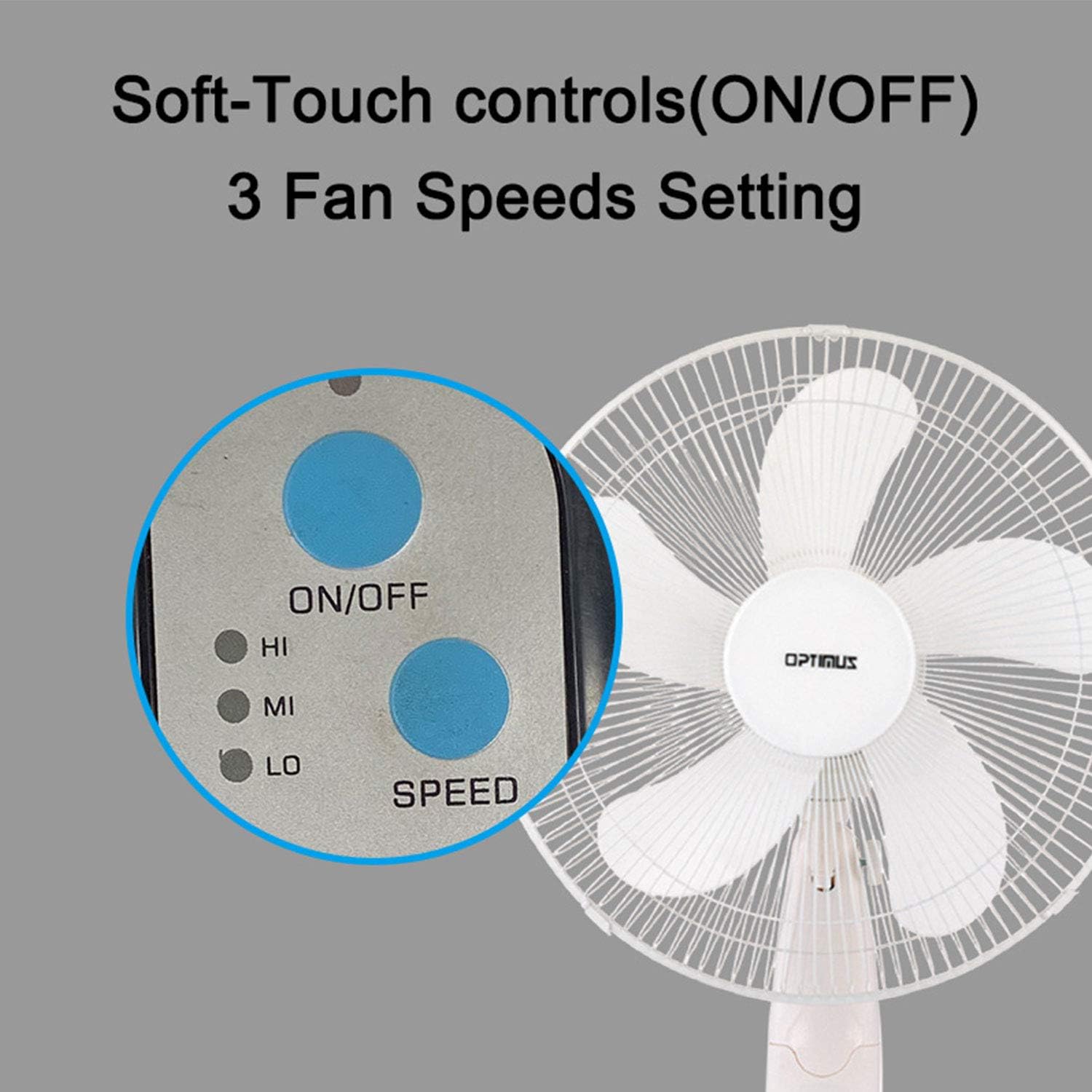
Image: The fan's soft-touch control panel, showing buttons for ON/OFF and SPEED, with indicators for High (HI), Medium (MI), and Low (LO) fan speeds.
- ON/OFF: Agħfas biex tixgħel jew titfi l-fann.
- Settings tal-veloċità: Select from Low, Medium, or High speeds. The 3-speed, energy-saving, whisper-quiet operation motor provides efficient airflow.
Kontroll mill-bogħod
The fan comes with a remote control for convenient operation from a distance. (Batteries not included).

Image: The remote control for the fan, featuring buttons for Mode, Time, Speed, and ON/OFF functions.
- ON/OFF: Ixgħel jew jitfi l-fann.
- VELOĊITÀ: Cycles through the three fan speeds (Low, Medium, High).
- MODALITÀ: Selects between different wind modes.
- ĦIN: Activates and sets the shut-off timer.
Modi tar-Riħ
The fan offers three distinct wind modes to suit your preference:

Image: The fan's control panel highlighting the MODE button and indicators for Normal, Natural, and Sleep wind modes.
- Modalità Normali: The fan blows at a constant speed based on your selected setting.
- Modalità Naturali: The fan speed fluctuates to mimic a natural breeze.
- Modalità Sleep: The fan operates at a lower, quieter speed, ideal for sleeping, with gentle speed variations.
Oscilazzjoni
The F-1760 features unique wave oscillation for comprehensive air distribution.

Image: A diagram illustrating the fan's capability for both vertical (up/down) and horizontal (left/right) wave oscillation, providing wider air coverage.
- Up/Down & Left/Right Wave Oscillating: Activates a unique oscillation pattern that moves the fan head both horizontally and vertically, distributing air throughout the room.
- To stop oscillation, press the oscillation button again.
Funzjoni Timer
Issettja l-fann biex jintefa awtomatikament wara perjodu speċifikat.

Image: The fan's control panel showing the TIME button and indicators for 1 hour (1H), 2 hours (2H), and 4 hours (4H) timer settings. The fan can be programmed for up to 7 hours.
- The timer can be set for 1, 2, 4, or up to 7 hours. Press the TIME button repeatedly to cycle through the desired duration.
Manutenzjoni u Tindif
Tindif regolari jgħin biex tinżamm il-prestazzjoni tal-fann u jtawwal il-ħajja tiegħu.
- Qabel it-Tindif: Dejjem aqla’ l-fann mill-plagg tal-elettriku qabel ma tnaddaf.
- Tindif ta' barra: Uża artab, damp drapp biex timsaħ l-uċuħ ta’ barra tal-fann. Tużax prodotti tat-tindif jew solventi li joborxu.
- Tindif tal-Grill: The metal grill can be cleaned with a soft brush or vacuum cleaner to remove dust. For thorough cleaning, the grill may need to be carefully removed.
- Tindif tax-xafra: If necessary, the fan blades can be cleaned. Ensure the fan is completely off and unplugged. The care instructions specify "Hand Wash" for components.
- Ħażna: Meta ma tkunx qed tużah għal perjodi twal, aħżen il-fann f'post frisk u niexef, preferibbilment fl-imballaġġ oriġinali tiegħu.
Issolvi l-problemi
| Problema | Kawża Possibbli | Soluzzjoni |
|---|---|---|
| Il-fann ma jixgħelx. | No power supply. Blown fuse. | Ensure the fan is plugged into a working outlet. Check the fuse in the plug and replace if necessary (refer to safety instructions for fuse replacement). |
| Fan operates but air movement is weak. | Low speed setting. Dust accumulation on blades/grill. | Increase the fan speed. Clean the fan blades and grills as per maintenance instructions. |
| Il-kontroll mill-bogħod mhux qed jaħdem. | Dead batteries. Obstruction between remote and fan. | Replace batteries in the remote control. Ensure a clear line of sight between the remote and the fan's receiver. |
| Fan changes speed automatically or unexpectedly. | Interferenza minn kontrolli remoti oħra (eż., remot tat-TV). | This fan may respond to frequencies from other remote controls. Try operating the fan manually or repositioning the fan/other devices to minimize interference. |
| Fan makes clicking noises during oscillation. | Normal operation of oscillation gears. | A slight clicking noise from the oscillation gears can occur during normal operation. If the noise is excessive or new, ensure the fan head is securely attached. |
| Fan feels unstable. | Base not properly assembled or tightened. Uneven surface. | Ensure all base components are securely fastened and the fan is placed on a firm, level surface. |
Speċifikazzjonijiet
- Isem tal-Mudell: F-1760
- Ditta: Optimus
- Dijametru tal-fann: 16 pulzieri
- Disinn tal-Fann Elettriku: Fann tal-Art
- Sors tal-Enerġija: Corded Elettriku
- Wattage: 60 watt
- Voltage: 6 Volts
- Numru ta 'xfafar: 3
- Settings tal-veloċità: 3 RPM (Low, Medium, High)
- Metodu ta' Kontroll: Remote, Imbotta Button
- Karatteristiċi Speċjali: Up/Down & Left/Right Wave Oscillating, Adjustable Height, Timer Function (up to 7 hours), Wind Modes (Normal, Natural, Sleep)
- Użu fuq ġewwa/barra: Ġewwa
- Piż tal-oġġett: 9.9 liri
- Komponenti Inklużi: Prodott, Manwal
Informazzjoni dwar Garanzija
This Optimus F-1760 fan comes with a Garanzija limitata ta 'sena from the date of purchase. This warranty covers defects in materials and workmanship under normal use. It does not cover damage resulting from misuse, accident, alteration, or unauthorized repair. Please retain your proof of purchase for warranty claims.
Appoġġ għall-Klijent
For technical assistance, warranty claims, or questions regarding your Optimus F-1760 fan, please contact Optimus customer service. Refer to the product packaging or the official Optimus webis-sit għall-aktar informazzjoni ta' kuntatt aġġornata.


