1. Introduzzjoni
The SANYO VPC-CG20 is a compact, high-definition camcorder and 10-megapixel digital camera designed for capturing both video and still images. This device features Full HD 1080i video recording at 60 frames per second, a 10-megapixel still image sensor, and a 5x optical zoom lens. It includes a 2.7-inch wide LCD monitor for easy framing and playback, along with optical image stabilization for clearer footage and photos. This manual provides essential information for setting up, operating, and maintaining your VPC-CG20 camcorder.
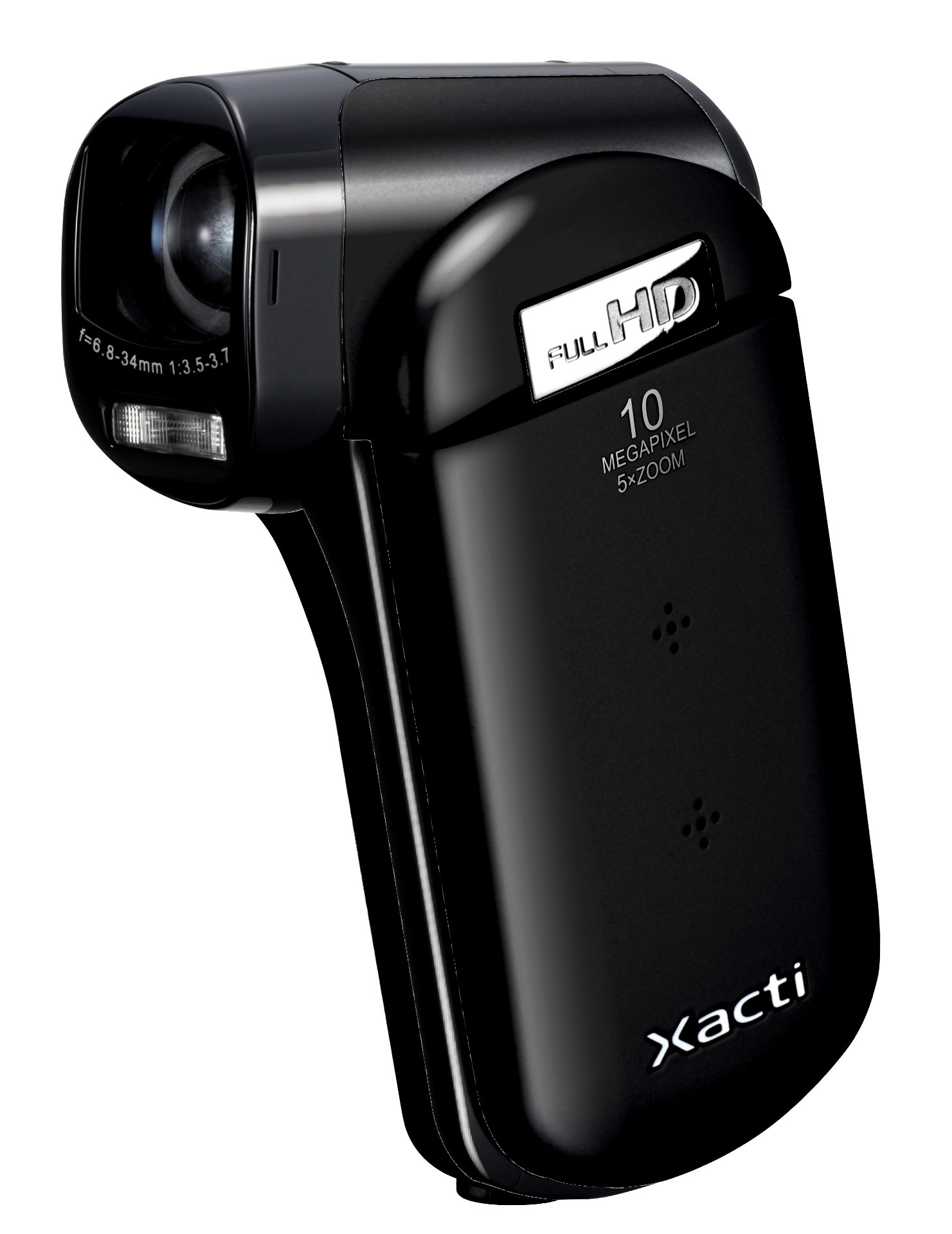
Stampa 1.1: Quddiem view of the SANYO VPC-CG20 High Definition Camcorder.
2. Kontenut tal-Pakkett
Please check that all the following items are included in your product package:
- SANYO VPC-CG20 Camcorder
- Batterija Rikarikabbli
- Adapter/Ċarġer tal-AC
- Cable USB
- AV Cable
- Ċinga tal-polz
- Manwal għall-Utent (dan id-dokument)
3. Partijiet u Kontrolli
Iffamiljarizza ruħek mad-diversi partijiet u kontrolli tal-camcorder tiegħek.
3.1. Quddiem View
The front of the camcorder features the lens, flash, and microphone.
3.2. Wara View
The rear panel typically includes the record button and power indicator.
3.3. Ġenb View (LCD Monitor Open)
When the 2.7-inch LCD monitor is open, you will find navigation buttons, menu access, and the zoom lever. The USB and AV ports are also located on the side, often beneath a protective cover.
3.4. Qiegħ View
The bottom of the camcorder houses the battery compartment and the SD card slot.
4. Setup
4.1. Iċċarġjar tal-batterija
- Insert the rechargeable battery into the camcorder's battery compartment, ensuring correct orientation.
- Connect the AC adapter to the camcorder's power input.
- Plug the AC adapter into a wall outlet. The charging indicator light will illuminate.
- Charge the battery until the indicator light changes or turns off, signaling a full charge.
4.2. Inserting an SD Memory Card
The VPC-CG20 uses SD memory cards for storage.
- Open the SD card slot cover, usually located on the bottom or side of the camcorder.
- Insert the SD card with the metal contacts facing the correct direction (refer to the diagram near the slot). Push until it clicks into place.
- Close the SD card slot cover securely.
Nota: Ensure the SD card is not locked (write-protected) before insertion.
5. Tħaddim tal-Vidjokamera
5.1. Tixgħil / Mitfi
- To power on, open the LCD monitor. The camcorder will typically power on automatically.
- To power off, close the LCD monitor.
5.2. Reġistrazzjoni tal-Vidjo
The VPC-CG20 records Full HD 1080i video (1920 x 1080) at 60 frames per second in H.264/MPEG-4 format.
- Ensure the camcorder is in video recording mode (check the mode switch or menu).
- Ikkwadra r-ritratt tiegħek billi tuża l-monitor LCD ta' 2.7 pulzieri.
- Agħfas il- Rekord button to start recording. The record indicator will light up.
- Agħfas il- Rekord buttuna għal darb'oħra biex tieqaf tirrekordja.
5.3. Teħid tar-Ritratti
The camcorder can capture 10-megapixel still images in JPEG format.
- Switch the camcorder to still image mode.
- Compose your shot on the LCD monitor.
- Agħfas il- Shutter button halfway to focus, then press fully to take the picture.
5.4. Using Zoom
Use the zoom lever to adjust the 5x optical zoom. Push the lever towards 'T' for telephoto (zoom in) and 'W' for wide-angle (zoom out).
5.5. Stabbilizzazzjoni tal-Immaġni
The VPC-CG20 features optical image stabilization to reduce blur from camera shake during both video recording and photo capture. This feature is typically active by default.
5.6. Daqq
- Switch the camcorder to playback mode.
- Uża l-buttuni tan-navigazzjoni biex tagħżel il-vidjow jew ir-ritratt mixtieq.
- Agħfas il- Play buttuna biex view videos or display photos.
5.7. Konnessjoni ma' Kompjuter
Biex tittrasferixxi files, connect the camcorder to your computer using the supplied USB cable. The camcorder will appear as a removable storage device, allowing you to copy files.
6. Manutenzjoni
6.1. Tindif tal-Kamera
- Uża drapp artab u niexef biex tnaddaf il-qafas tal-videocam.
- For the lens and LCD screen, use a specialized lens cleaning cloth and solution. Avoid abrasive materials.
- Do not use organic solvents such as alcohol or thinner.
6.2. Ħażna
Store the camcorder in a cool, dry place away from direct sunlight and extreme temperatures. Remove the battery if storing for extended periods.
7 Issolvi l-problemi
| Problema | Soluzzjoni |
|---|---|
| Il-kamkorder ma jixgħelx. | Ensure the battery is charged and correctly inserted. Try charging the battery. |
| Ma nistax nirrekordja vidjow/nieħu ritratti. | Check if an SD card is inserted and has sufficient free space. Ensure the SD card is not write-protected. |
| Kwalità fqira tal-immaġni/vidjow. | Clean the lens. Ensure adequate lighting. Check shooting mode settings. |
| Il-kompjuter ma jagħrafx il-camcorder. | Ensure the USB cable is securely connected. Try a different USB port or cable. Restart both camcorder and computer. |
8. Speċifikazzjonijiet
| Karatteristika | Dettall |
|---|---|
| Isem tal-Mudell | VPC-CG20 |
| Riżoluzzjoni tal-Qbid tal-Vidjo | 1080p (Full HD 1920 x 1080, 60i) |
| Riżoluzzjoni Għadha Effettiva | 10 MP |
| Zoom ottiku | 5x |
| Stabbilizzazzjoni tal-Immaġni | Ottiċi |
| Daqs tal-Iskrin | 2.7 Pulzier |
| Tip ta' Memorja Flash | SD (SDHC compatible) |
| Format tal-Qbid tal-Vidjo | H.264, MPEG-4 |
| Format tal-Immaġni Appoġġjat | JPEG |
| Teknoloġija tal-Konnettività | USB |
| Tip ta 'Focus | Auto Focus |
| Modi ta' Sparar | Sejbien tal-wiċċ |
| Piż tal-oġġett | 0.35 Libbra (madwar 159 gramma) |
9. Garanzija u Appoġġ
For information regarding the product warranty, please refer to the warranty card included in your original packaging or visit the official SANYO support website. For technical assistance, troubleshooting beyond this manual, or service inquiries, please contact SANYO customer support through their official channels.
Jekk jogħġbok żomm il-prova tax-xiri tiegħek għal pretensjonijiet ta' garanzija.


