1. Introduzzjoni
This manual provides essential information for the proper installation, operation, and maintenance of your BOSS Audio Systems BV2650UA DVD Player. Please read this manual thoroughly before using the product to ensure safe and optimal performance. Keep this manual for future reference.
Informazzjoni dwar is-Sigurtà
- Tħaddimx l-unità b'mod li jtelliflek mis-sewqan. Dejjem agħti prijorità lis-sigurtà fit-triq.
- Ensure all wiring is correctly connected to prevent damage to the unit or vehicle electrical system.
- Evita li tesponi l-unità għal temperaturi estremi, dawl tax-xemx dirett, jew umdità.
- Tippruvax tiżżarma jew timmodifika l-unità. Irreferi kull servizz lil persunal kwalifikat.
2. Kontenut tal-Pakkett
Ivverifika li l-oġġetti kollha huma preżenti fil-pakkett qabel l-installazzjoni:
- BOSS Audio Systems BV2650UA DVD Player Unit
- Kontroll mill-bogħod
- Qfil tal-Wajers
- Ħardwer tal-Immuntar
- Manwal għall-Utent (dan id-dokument)
3. Prodott Aktarview
The BV2650UA is a versatile DVD player designed for in-car entertainment, featuring multiple media playback options.
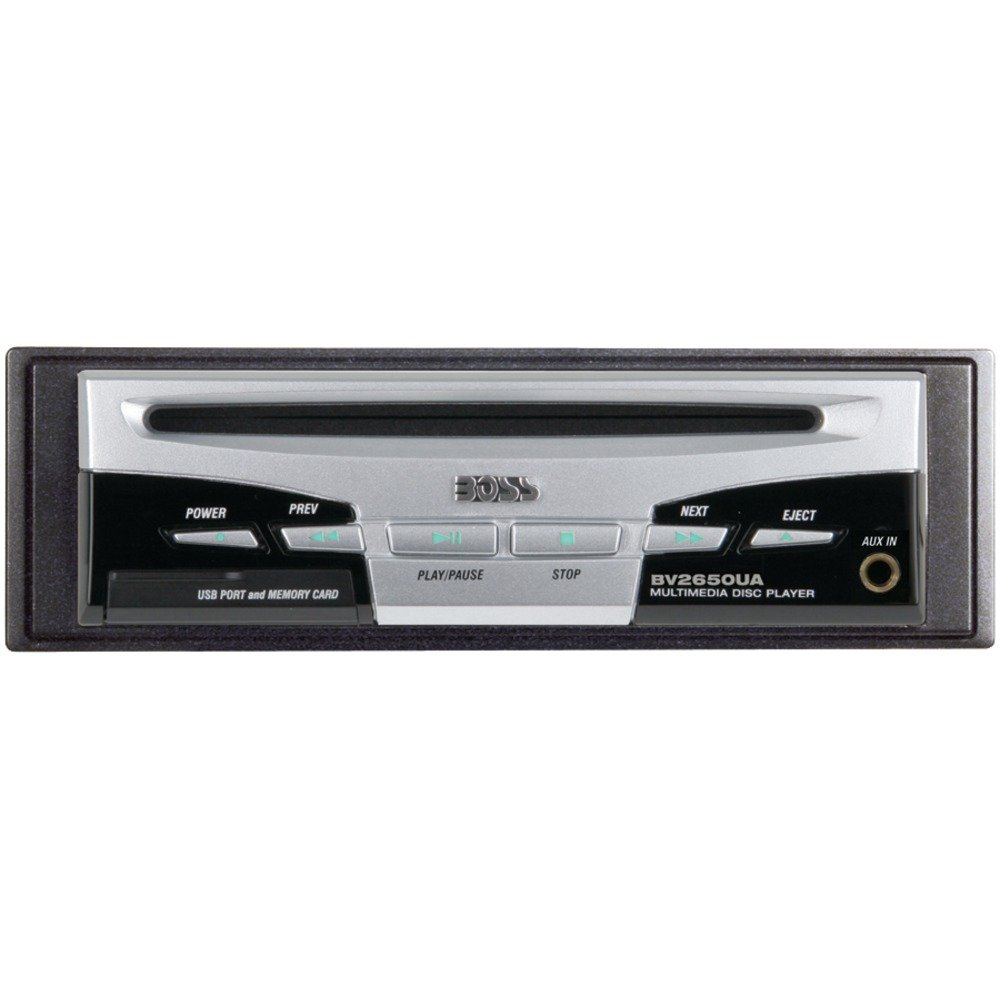
Immaġni: Quddiem view of the BOSS Audio Systems BV2650UA DVD Player, showing the disc slot, control buttons, USB port, and SD card slot.
Kontrolli u Portijiet tal-Panel ta' Quddiem
- Slott tad-Diska: Għall-inseriment ta' DVDs u CDs.
- Buttuna Eject: Releases the disc from the slot.
- Buttuna tal-Enerġija / Modalità: Turns the unit on/off and switches between input sources (DVD, USB, SD, AUX).
- Buttuna Play/Pause: Jikkontrolla l-plejbek tal-midja.
- Buttuni tal-Qbiż tat-Traċċa: Navigates between tracks or chapters.
- Kontroll tal-Volum: Jaġġusta l-livell tal-ħruġ tal-awdjo.
- Port USB: Connects USB storage devices for media playback.
- Slot tal-Kard SD: Inserts SD/MMC memory cards for media playback.
- Input AUX: Jack ta' 3.5mm għall-konnessjoni ta' apparati awdjo esterni.
Konnessjonijiet tal-Panew ta' wara
- Konnettur tal-Qawwa: Għall-konnessjoni tal-wajers ewlenin tal-enerġija.
- Ħruġ tal-Awdjo/Vidjo RCA: Connects to external monitors and audio ampliifikaturi.
- Remote Control Input: For wired remote control (if applicable).
4. Setup u Installazzjoni
Proper installation is crucial for the performance and longevity of your DVD player. If you are unsure about any steps, consult a professional installer.
Immuntar tal-Unità
- Choose a suitable location in your vehicle, typically in the dashboard or a console, ensuring adequate ventilation.
- Secure the mounting sleeve or bracket using the provided hardware.
- Slide the DVD player into the mounted sleeve until it locks into place.
Konnessjonijiet tal-Wiring
Irreferi għad-dijagramma tal-wajers ipprovduta mal-unità tiegħek għal konnessjonijiet speċifiċi. Il-konnessjonijiet ġenerali jinkludu:
- Yellow Wire (Constant Power): Qabbad ma' sors ta' enerġija kostanti ta' +12V.
- Red Wire (Accessory Power): Qabbad ma' sors ta' enerġija swiċċjat ta' +12V (tqabbid).
- Wajer Iswed (Art): Qabbad ma' punt ta' ert tax-chassis nadif.
- Blue Wire (Remote Turn-On): Connect to the remote turn-on input of an external amplifier or antenna.
- RCA Audio Outputs: Connect to the audio inputs of your car amplifier jew head unit.
- Ħruġ tal-Vidjo RCA: Connect to the video input of your car monitor.
Warning: Incorrect wiring can cause severe damage to the unit and vehicle. Always disconnect the vehicle's battery before making any electrical connections.
5. Istruzzjonijiet Operattivi
Operazzjoni Bażika
- Power On/Off: Press the Power/Mode button to turn the unit on. Press and hold to turn off.
- Għażla tas-Sors: Press the Power/Mode button repeatedly to cycle through available sources (DVD, USB, SD, AUX).
- Aġġustament tal-Volum: Use the volume control knob or buttons to adjust the audio level.
Daqq ta' DVD/CD
- Insert a DVD or CD into the disc slot with the label side facing up. The unit will automatically load the disc and begin playback.
- Use the Play/Pause button to pause or resume playback.
- Use the Track Skip buttons to navigate between tracks or chapters.
- Biex tneħħi diska, agħfas il-buttuna Eject.
Daqq tal-USB u tal-Karta SD
- Daħħal USB drive fil-port USB jew SD card fl-islott tal-SD card.
- Select the USB or SD source using the Mode button.
- The unit will automatically detect and display the media files. Use the navigation controls to browse and select files għall-plejbek.
- Supported formats include MP3, DVD, CD-R/RW, and SDVD.
Input AUX
- Connect an external audio device (e.g., smartphone, MP3 player) to the 3.5mm AUX input jack using an audio cable.
- Select the AUX source using the Mode button.
- Ikkontrolla l-plejbek mill-apparat estern konness.
Kontroll mill-bogħod
The included remote control provides convenient access to all functions. Point the remote control directly at the unit's IR sensor for optimal response.
6. Manutenzjoni
Tindif tal-Unità
- Wipe the unit's exterior with a soft, dry cloth. Do not use abrasive cleaners or solvents.
- Keep the disc slot and ports free from dust and debris.
Kura tad-Diska
- Immaniġġja d-diski mit-truf tagħhom biex tevita marki tas-swaba’ u grif.
- Aħżen id-diski fil-każijiet tagħhom meta ma tkunx qed tintuża.
- Naddaf id-diski maħmuġin b'ċarruta ratba u mingħajr suf, billi timsaħ miċ-ċentru 'l barra.
7 Issolvi l-problemi
If you encounter issues with your BV2650UA DVD Player, refer to the following common problems and solutions:
| Problema | Kawża Possibbli | Soluzzjoni |
|---|---|---|
| Ebda qawwa | Loose wiring; Blown fuse; Vehicle battery issue | Check power and ground connections; Inspect and replace fuse if necessary; Check vehicle battery. |
| L-ebda daqq ta' diska | Disc inserted incorrectly; Damaged disc; Unsupported disc format | Reinsert disc correctly; Try a different disc; Ensure disc is a supported format (DVD, CD, CD-R/RW, SDVD). |
| L-ebda daqq tal-USB / SD | Mhux appoġġjat file format; Corrupted media; Loose connection | Tiżgura files are MP3; Try a different USB/SD card; Reinsert media securely. |
| Ebda output tal-ħoss | Volume too low; Mute activated; Incorrect audio connections | Increase volume; Deactivate mute; Check RCA audio output connections to ampunità tal-lifer/ras. |
| Il-kontroll mill-bogħod ma jaħdimx | Dead batteries; Obstruction; Remote not pointed correctly | Replace remote batteries; Remove any obstructions; Point remote directly at the unit's IR sensor. |
If the problem persists after trying these solutions, contact BOSS Audio Systems customer support.
8. Speċifikazzjonijiet
Technical specifications for the BOSS Audio Systems BV2650UA DVD Player:
- Isem tal-Mudell: BV2650UA
- Dimensjonijiet tal-Prodott: 16.21 x 5.08 x 15.7 ċm
- Piż tal-oġġett: 907 g
- Teknoloġiji tal-Konnettività: AUX, USB
- Karatteristiċi Speċjali: Kontra l-Xokk
- Tip tal-Midja: SD Card Slot, DVD, CD, USB
- Format Awdjo Appoġġjat: MP3
- Modalità tal-Ħruġ tal-Awdjo: Stereo
- Apparati Kompatibbli: Television (for video output)
- Kulur: Iswed
9. Garanzija u Appoġġ
Il-prodotti tas-Sistemi awdjo BOSS huma ddisinjati għall-affidabbiltà u l-prestazzjoni. Għal informazzjoni speċifika dwar il-garanzija, jekk jogħġbok irreferi għall-karta tal-garanzija inkluża mal-prodott tiegħek jew żur is-sit uffiċjali tas-Sistemi awdjo BOSS. websit.
For technical support, troubleshooting assistance, or service inquiries, please contact BOSS Audio Systems customer service through their official channels. Have your model number (BV2650UA) and purchase information ready when contacting support.
Websit: www.bossaudio.com (Eżample link, please refer to actual manufacturer's websit)


