1. Introduzzjoni
Thank you for choosing the Domo DO9089W Digital Kitchen Scale. This manual provides essential information for the safe and efficient operation, maintenance, and troubleshooting of your new kitchen scale. Please read these instructions carefully before first use and keep them for future reference.
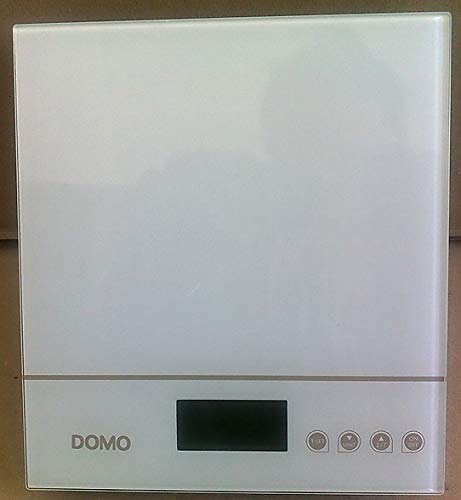
Figura 1: Domo DO9089W Digital Kitchen Scale. This image shows the compact design of the scale with its glass weighing platform and LCD display.
2. Istruzzjonijiet tas-Sigurtà
- Tgħaddix l-iskala fl-ilma jew likwidi oħra.
- Naddaf l-iskala bl adamp drapp biss. Tużax tindif li joborxu.
- Place the scale on a firm, flat, and stable surface for accurate measurements.
- Tgħabbix iżżejjed l-iskala lil hinn mill-kapaċità massima tagħha ta' 5 kg.
- Żomm l-iskala 'l bogħod minn temperaturi estremi, dawl tax-xemx dirett, u umdità għolja.
- Dan l-apparat huwa għall-użu fid-dar biss.
3. Kontenut tal-Pakkett
Ivverifika li l-oġġetti kollha huma preżenti fil-pakkett:
- 1 x Domo DO9089W Digital Kitchen Scale
- 1 x Manwal tal-Utent (dan id-dokument)
- Batteries (may or may not be included, check packaging)
4. Setup
4.1. Installazzjoni tal-batterija
- Sib il-kompartiment tal-batterija fuq in-naħa ta' taħt tal-iskala.
- Iftaħ l-għatu tal-kompartiment tal-batterija.
- Insert the required 3V batteries (typically 2x CR2032, check compartment for exact type and polarity). Ensure correct polarity (+/-).
- Agħlaq l-għatu tal-kompartiment tal-batterija sew.
4.2 Tqegħid
Place the scale on a hard, flat, and level surface. Uneven surfaces can affect weighing accuracy.
5. Istruzzjonijiet Operattivi
5.1. Power On/Off
- Biex tixgħel: Agħfas il-buttuna ON/OFF button. The LCD display will show '0g' or '0lb'.
- Biex titfi: Agħfas u żomm il-buttuna ON/OFF button for a few seconds, or the scale will automatically shut off after a period of inactivity.
5.2. Użin tal-Oġġetti
- Ensure the scale is on and displays '0g' or '0lb'.
- Place the item to be weighed directly onto the glass weighing platform.
- The weight will be displayed on the large LCD screen.
5.3. Funzjoni tat-Tara (Żero)
Il-funzjoni tat-tara tippermettilek tiżen diversi ingredjenti fl-istess kontenitur jew tnaqqas il-piż ta' kontenitur.
- Poġġi kontenitur vojt fuq il-pjattaforma tal-użin. Id-displej se juri l-piż tiegħu.
- Agħfas il- TARE button (often labeled 'T' or integrated with the ON/OFF button). The display will reset to '0g'.
- Add the ingredient to the container. The display will show only the weight of the ingredient.
- Repeat the tare process for additional ingredients.
5.4. Konverżjoni tal-Unità
To switch between weighing units (e.g., grams, pounds, ounces), press the UNITÀ or MODALITÀ button (if available). The current unit will be indicated on the LCD display.
5.5. Itfi Awtomatiku
The scale is equipped with an automatic shut-off feature to conserve battery life. It will turn off after a period of inactivity, typically around 60-120 seconds.
6. Manutenzjoni u Tindif
- Imsaħ l-iskala bi ftit damp drapp. Tużax aġenti tat-tindif kimiċi jew li joborxu.
- Do not allow water to enter the interior of the scale.
- Neħħi l-batteriji jekk l-iskala ma tkunx se tintuża għal perjodu estiż biex tevita t-tnixxija.
7 Issolvi l-problemi
| Problema | Kawża Possibbli | Soluzzjoni |
|---|---|---|
| L-iskala ma tixgħel | Batteriji mejta jew installati ħażin. | Ibdel il-batteriji b'oħrajn ġodda, filwaqt li tiżgura polarità korretta. |
| Inaccurate readings / Cannot zero | Scale on an uneven surface; Overloaded; Internal error. | Place scale on a flat, stable surface. Ensure weight is within 5 kg limit. Try removing batteries for 10 seconds and reinserting. |
| Id-displej juri 'Err' jew 'O-Ld' | L-iskala hija mgħobbija żżejjed. | Remove items from the scale immediately. Do not exceed 5 kg. |
| Buttons unresponsive or sensitive | Moisture or debris on buttons; Software glitch. | Ensure buttons are clean and dry. Remove batteries for a few seconds to reset the scale. |
8. Speċifikazzjonijiet
| Karatteristika | Speċifikazzjoni |
|---|---|
| Numru tal-Mudell | DO9089W |
| Brand | DOMO |
| Kapaċità Massima | 5 kg |
| Eżattezza | 1 g |
| Tip ta 'Wiri | LCD |
| Materjal | Pjattaforma tal-użin tal-ħġieġ |
| Dimensjonijiet (L x W x H) | 18 x 18 x 4 ċm |
| Piż | Madwar 762 g |
| Sors tal-Enerġija | 3V batteries (type may vary, check compartment) |
| Itfi Awtomatiku | Iva |
9. Garanzija u Appoġġ
Dan il-prodott jiġi ma 'a 24-il xahar garanzija for the appliance itself. For items equipped with batteries, the batteries are guaranteed for 6 months. This warranty covers manufacturing defects under normal use. It does not cover damage resulting from misuse, accidents, unauthorized modifications, or normal wear and tear.
For warranty claims or technical support, please contact your retailer or the DOMO customer service department. Please have your proof of purchase and model number (DO9089W) ready.


