1. Introduzzjoni
The Zircon StudSensor e50 Electronic Stud Finder is designed to quickly and easily locate the edges of wood and metal studs and joists behind walls, floors, and ceilings. It incorporates advanced technology to provide accurate detection and enhance safety during various home improvement and construction tasks.

Figure 1: Zircon StudSensor e50 Electronic Stud Finder
This manual provides detailed instructions for the proper setup, operation, and maintenance of your StudSensor e50. Please read it thoroughly before use to ensure safe and effective operation.
2. Setup
2.1 Installazzjoni tal-batterija
- Iftaħ l-għatu tal-kompartiment tal-batterija li jinsab fuq wara tal-unità.
- Insert a new 9V alkaline battery, ensuring correct polarity (+/-).
- Agħlaq l-għatu tal-kompartiment tal-batterija sew.
2.2 Kalibrazzjoni
The StudSensor e50 features patented TruCal technology, which automatically calibrates the tool. To ensure accurate scanning:
- Place the tool flat against the wall where you intend to scan.
- Press and hold the Power button. The tool will emit an audio tone and the LCD display will indicate when calibration is complete and the tool is ready to scan.
- Do not release the Power button during the entire scanning process.
3. Modi Operattivi
The StudSensor e50 offers two primary scanning modes for different applications:
3.1 STUD SCAN Mode
This mode locates the edges and center of wood or metal studs in normal walls up to 3/4 inch (19 mm) deep.

Figure 2: Using the StudSensor e50 for wall scanning
3.2 DEEPSCAN Mode
This mode doubles the scanning depth for walls up to 1-1/2 inches (38 mm) deep. It also enables scanning for joists in some ceilings and floors.
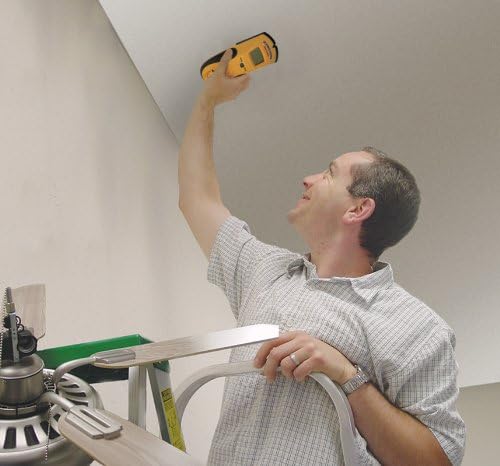
Figure 3: Using the StudSensor e50 for ceiling scanning
3.3 WireWarning Detection
The WireWarning detection feature indicates the presence of live, unshielded electrical wiring up to 2 inches (51 mm) deep in both Stud Scan and DeepScan modes. This is a crucial safety feature to prevent accidental contact with electrical hazards.
4. Karatteristiċi ewlenin
- Wiri LCD faċli biex jinqara: Clearly indicates stud edges and other detected objects.
- Updated SpotLite Pointer: Shines an arrow-shaped light on the wall to precisely mark the target location.
- Disinn Ergonomiku: The e50's new body design can be held comfortably in either hand at any angle, reducing common scanning errors. The rubber overmolded grip provides a secure hold.
- "Over-the-Stud" Indication: Zircon's patented technology alerts the user if scanning begins over a stud, prompting them to start the scan in a new location for accurate results.
- Patented TruCal Technology: Automatically calibrates the tool and indicates when it is ready to scan.

Figure 4: Ergonomic design of the StudSensor e50
5. Għajnuniet dwar l-Użu
- Ensure the tool is calibrated on a section of the wall that is free of studs or other objects.
- Move the tool slowly and steadily across the surface. Rapid movements can lead to inaccurate readings.
- Keep your free hand away from the scanning surface to avoid interference.
- For best results, scan the area multiple times from different directions to confirm findings.
6 Issolvi l-problemi
- Qari mhux eżatt: Ensure proper calibration. If the
Dokumenti Relatati - StudSensor e50

Zircon StudSensor Pro SL-AC Stud Finder Manwal għall-Utent
Gwida komprensiva għall-użu taż-Zircon StudSensor Pro SL-AC stud finder, li tiddettalja l-installazzjoni, il-kalibrazzjoni, il-modi ta' skennjar, il-volum tal-ACtagSejbien ta' e, u soluzzjoni ta' problemi għal lokalizzazzjoni preċiża ta' studs u wajers.
Zircon StudSensor L20 Stud Finder: User Manual and Operating Guide
Comprehensive guide for the Zircon StudSensor L20 stud finder, covering installation, operation, troubleshooting, and safety precautions for locating studs in walls. Includes product features, usage tips, and warranty information.
Zircon SuperScan® ID Skaner tal-Ħajt Avvanzat: Manwal tal-Utent u Istruzzjonijiet
Manwal dettaljat għall-utent għaż-Zircon SuperScan® ID Advanced Wall Scanner. Tgħallem kif tiskopri studs, oġġetti tal-metall, oġġetti ta' densità baxxa, u wajers tal-AC ħajjin. Jinkludi informazzjoni dwar is-setup, it-tħaddim, is-soluzzjoni tal-problemi, u l-garanzija.
Zircon Wood Stud SuperScan Advanced Stud Finder User Manual
Comprehensive user manual for the Zircon Wood Stud SuperScan Advanced Stud Finder, detailing features, operating modes (Auto, Edge, DeepScan), WireWarning detection, installation, scanning techniques, and troubleshooting.
Leak Alert™ Electronic Water Detector User Manual
User manual for the Zircon Leak Alert™ Electronic Water Detector. Provides instructions on installation, testing, placement, troubleshooting, and warranty information for this battery-powered water leak detection device.
Zircon StudSensor Pro SL: Sib Studs b'Skennjar Profond b'Sistema ta' Puntament SpotLite
Skopri ż-Zircon StudSensor Pro SL, apparat li jiskennja l-istuds b'mod profond li jinkludi s-Sistema SpotLite Pointing brevettata għal skoperta preċiża ta' studs tal-injam u tal-metall wara l-ħitan. Tgħallem dwar il-karatteristiċi, l-ispeċifikazzjonijiet, u t-teknoloġija TruCal tiegħu.