Creative Inspire S2 Bluetooth Wireless Multimedia Speaker System User Manual
Model: Inspire S2 (51MF0390AA003)
Prodott Overview
The Creative Inspire S2 Bluetooth Wireless Multimedia Speaker System provides high-quality audio through its two satellite speakers and a subwoofer, with the added convenience of Bluetooth wireless connectivity. This system is designed for use with computers and other Bluetooth-enabled devices, offering a versatile audio solution.
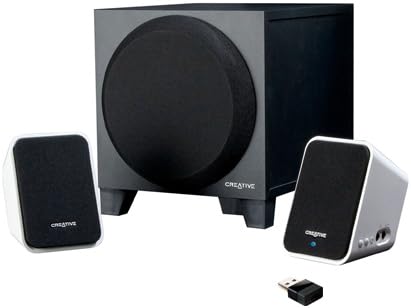
Image: The Creative Inspire S2 system, showing the central subwoofer unit, two compact satellite speakers, and a small USB Bluetooth transmitter. The satellite speakers are white with black grilles, and the subwoofer is black.
Kontenut tal-Kaxxa
Ivverifika li l-komponenti kollha huma preżenti fl-imballaġġ:
- Żewġ Kelliema tas-Satellita
- Subwoofer wieħed
- Trasmettitur Bluetooth USB
- Adapter tal-Enerġija Universali
- Gwida ta' Bidu Mgħaġġel (irreferi għal dan il-manwal għal struzzjonijiet dettaljati)
- Warranty/Technical Support Leaflet
Setup Istruzzjonijiet
1. Konnessjoni Fiżika
- Pożizzjonament: Place the subwoofer on the floor or a sturdy surface. Position the two satellite speakers on either side of your computer monitor or listening area for optimal stereo separation.
- Qabbad l-Ispeakers tas-Satellita: Qabbad il-kejbils mill-ispikers tas-satellita mal-portijiet korrispondenti fuq wara tas-subwoofer. Kun żgur li l-konnessjoni hija sigura.
- Qabbad l-Enerġija: Plug the universal power adapter into the subwoofer's power input, then connect the adapter to a wall outlet.
2. Bluetooth Connection (Wireless Audio)
For Computers (using included USB Bluetooth Transmitter):
- Insert Transmitter: Plug the included USB Bluetooth transmitter into an available USB port on your computer. Your computer may automatically install necessary drivers.
- Power On Speakers: Ensure the speaker system is powered on. The power button is typically located on one of the satellite speakers. A green light should indicate power.
- Tqabbil awtomatiku: The speaker system and USB transmitter should automatically pair. A blue light on the satellite speaker will indicate a successful Bluetooth connection.
- Agħżel l-Output tal-Awdjo: On your computer, navigate to your sound settings and select the "Creative Inspire S2" or similar Bluetooth audio device as your default playback device.
For Other Bluetooth Devices (e.g., Smartphones, Tablets, Laptops with built-in Bluetooth):
- Power Off Speakers: Ensure the speaker system is turned off.
- Daħħal il-Mod tat-Tqabbil: With the speakers off, press and hold the '+' (volume up) button on the satellite speaker. Continue holding until a blue light begins to flash rapidly. This indicates the speakers are in pairing mode.
- Ippermetti l-Bluetooth fuq l-Apparat: On your smartphone, tablet, or laptop, go to the Bluetooth settings and ensure Bluetooth is enabled.
- Select "Inspire S2": In the list of available devices, select "Inspire S2" (or similar). If prompted for a passcode, enter "0000" (four zeros).
- Ikkonferma l-Konnessjoni: Once paired, the blue light on the satellite speaker will become solid, indicating a successful connection.
3. Wired Connection (Auxiliary Input)
The Inspire S2 system also supports a wired connection for devices without Bluetooth or for a direct audio link.
- Qabbad il-Kejbil tal-Awdjo: Connect a 3.5mm audio cable (not included) from the audio output of your device (e.g., MP3 player, laptop headphone jack) to the "Audio In" port on the side of the satellite speaker.
- Power On Speakers: Ensure the speaker system is powered on.
- Daqq: Begin audio playback from your connected device. The system will automatically prioritize the wired input if a cable is connected.
Istruzzjonijiet Operattivi
Qawwa mixgħul/mitfi
- To power on the system, press the power button located on one of the satellite speakers. A green LED will illuminate.
- To power off, press the power button again. The LED will turn off.
Kontroll tal-Volum
- Use the '+' and '-' buttons on the satellite speaker to adjust the system's volume.
- You can also control the volume from your connected Bluetooth device or computer.
Daqq Awdjo
- Once connected via Bluetooth or auxiliary cable, simply start playing audio from your source device.
- Ensure the volume on both the speaker system and your source device is adjusted appropriately.
Manutenzjoni
- Tindif: Use a soft, dry cloth to clean the surfaces of the speakers and subwoofer. Avoid using liquid cleaners or abrasive materials.
- Pjazzament: Ensure the speakers are placed on stable surfaces to prevent accidental falls. Avoid placing them in direct sunlight, near heat sources, or in excessively humid environments.
- Ventilazzjoni: Do not block the ventilation openings on the subwoofer to ensure proper airflow and prevent overheating.
- Ġestjoni tal-Kejbil: Keep cables organized and untangled to prevent damage and tripping hazards.
Issolvi l-problemi
| Problema | Soluzzjoni Possibbli |
|---|---|
| L-ebda ħoss mill-kelliema. |
|
| Bluetooth device cannot pair or connect. |
|
| Il-ħoss huwa distort jew intermittenti. |
|
| Speakers turn off unexpectedly when using auxiliary input. |
|
Speċifikazzjonijiet
| Karatteristika | Dettall |
|---|---|
| Isem tal-Mudell | Inspire S2 |
| Numru tal-Mudell | 51MF0390AA003 |
| Tip ta' Kelliem | Desktop Multimedia Speaker System |
| Teknoloġija tal-Konnettività | Bluetooth Wireless, Wired (3.5mm Auxiliary) |
| Qawwa tal-Ħruġ Massimu tal-Ispeaker | 7 Watt (RMS) |
| Sinjal-mal-ħoss Ratio | 75 dB |
| Product Dimensions (Satellite) | 2.9 x 2.9 x 4.05 pulzieri (approssimattiv) |
| Piż tal-oġġett | 3 Pounds (total system) |
| Sors tal-Enerġija | Corded Elettriku |
| Karatteristiċi Speċjali | USB Bluetooth technology, Creative DIRECT-THROW subwoofer, easy-access controls, Energy Star qualified |
Garanzija u Appoġġ
For warranty information and technical support, please refer to the warranty/technical support leaflet included in your product packaging. You may also visit the official Creative websit għall-aħħar riżorsi ta' appoġġ, FAQs, u informazzjoni ta' kuntatt.
Appoġġ onlajn: www.creative.com/support


