Introduzzjoni
The HP Procurve 1810G-24 Switch (J9450A) is a managed Gigabit Ethernet switch designed for small and medium-sized businesses. It provides reliable network connectivity with advanced features for enhanced performance and security. This manual provides essential information for the setup, operation, maintenance, and troubleshooting of your switch.

Figure 1: HP Procurve 1810G-24 Switch (J9450A) - Front Angled View
This image shows the overall design of the HP Procurve 1810G-24 Switch, highlighting its compact form factor and the arrangement of its ports and indicators.
Kontenut tal-Pakkett
Ivverifika li l-oġġetti kollha huma preżenti fil-pakkett:
- HP Procurve 1810G-24 Switch (J9450A)
- Kejbil tal-enerġija
- Kit tal-immuntar fuq xtilliera
- Kejbil tal-konsola
Setup
1. Installazzjoni Fiżika
The HP Procurve 1810G-24 Switch can be placed on a desktop or mounted in a standard 19-inch equipment rack using the included rack-mount kit.
- Immuntar fuq l-ixtilliera: Attach the rack-mount brackets to the sides of the switch using the provided screws. Secure the switch into the rack.
- Poġġiment fuq id-Desktop: Ensure adequate ventilation around the switch. Do not block any ventilation openings.
2. Konnessjoni tal-Enerġija
Connect the provided power cable to the power inlet on the rear of the switch and then to a grounded AC power outlet. The switch will power on automatically.

Figure 2: Rear Panel of the Switch
This image displays the rear panel of the HP Procurve 1810G-24 Switch, showing the power input and product labels.
3. Konnessjonijiet tan-Netwerk
Connect your network devices (computers, servers, other switches) to the RJ45 ports on the front panel of the switch using standard Ethernet cables. The switch supports 10/100/1000 Mbps connections.

Figure 3: Front Panel of the Switch
Din l-immaġni tipprovdi ċara view of the front panel of the HP Procurve 1810G-24 Switch, detailing the 24 Gigabit Ethernet ports and indicator lights.
The switch also features dual-personality ports (ports 23 and 24) which can function as either 10/100/1000 RJ45 ports or mini-GBIC (SFP) slots for optional fiber connectivity (e.g., Gigabit-SX, -LX, -LH, or 100-FX).

Figure 4: Front Panel Indicators and Controls
This close-up image highlights the power indicator, fault locator, LED mode, and speed indicators on the front panel of the HP Procurve 1810G-24 Switch.
It-tħaddim tas-Swiċċ
Web Ġestjoni tal-Interface
The HP Procurve 1810G-24 Switch features an intuitive web-based management interface for configuration, monitoring, and administration. To access the web interface:
- Kun żgur li l-kompjuter tiegħek huwa konness mas-swiċċ.
- Iftaħ a web browser and enter the default IP address of the switch (refer to the product documentation or sticker for the default IP).
- Log in using the default credentials (if applicable).
- Mill- web interface, you can configure various settings, including:
- VLAN Support and Tagging: Configure up to 64 port-based VLANs and dynamic IEEE 802.1Q VLAN tagging for network segmentation and security.
- Konfigurazzjoni tal-Port: Adjust port speed, duplex settings, and enable/disable ports.
- Aggregazzjoni tal-Link: Għaqqad diversi portijiet għal aktar bandwidth u redundanza.
- Kwalità tas-Servizz (QoS): Agħti prijorità lit-traffiku tan-netwerk għal applikazzjonijiet kritiċi.
Indikaturi LED
The front panel LEDs provide visual status of the switch and its ports:
- LED tal-qawwa: Jindika l-istatus tal-enerġija.
- Fault Locator LED: Jindika ħsarat fis-sistema.
- LEDs tal-Link/Attività (għal kull port):
- Solid Green: Link established.
- Flashing Green: Activity on the port.
- LEDs tal-veloċità (għal kull port):
- Off: 10 Mbps
- Flash: 100 Mbps
- On: 1000 Mbps (Gigabit)
Manutenzjoni
The HP Procurve 1810G-24 Switch is designed for low maintenance. It operates without internal fans, contributing to a quiet environment and reduced dust accumulation.
- Aġġornamenti tal-Firmware: Periodically check the official HP website for firmware updates to ensure optimal performance and security. Follow the instructions provided with the firmware update package.
- Tindif: Uża drapp artab u niexef biex tnaddaf il-barra tas-swiċċ. Tużax prodotti tat-tindif likwidi jew aerosol.
- Ventilazzjoni: Kun żgur li l-fetħiet tal-ventilazzjoni ma jkunux imxekkla biex tevita li s-sħana tisħon iżżejjed.
Issolvi l-problemi
Ebda Qawwa
- Iċċekkja li l-kejbil tal-enerġija huwa konness sew kemm mas-swiċċ kif ukoll mas-sokit tal-enerġija.
- Kun żgur li l-iżbokk tad-dawl jiffunzjona billi ttestjah b'apparat ieħor.
No Link Light on Port
- Check the Ethernet cable connection at both ends (switch and connected device).
- Ipprova kejbil Ethernet differenti.
- Test the port with a known working device.
- Kun żgur li l-apparat imqabbad ikun mixgħul u qed jaħdem sew.
Connectivity Issues After Power Failure
In some rare instances, the switch may not fully restore network connectivity to all ports immediately after a power outage. If this occurs:
- Ċiklu tal-Enerġija: Disconnect the power cable from the switch, wait for approximately 30 seconds, and then reconnect it.
- Reseat Cables: Physically disconnect and reconnect the Ethernet cables for affected devices.
- Irrisettjar tal-Fabbrika: If issues persist, a factory reset may be necessary. This will revert all settings to their default values. Consult the detailed product manual for the specific procedure, which often involves using a small pointed object (like a paperclip) to press a reset button.
Web Interface Inaccessible
- Ivverifika li l-indirizz IP tal-kompjuter tiegħek jinsab fl-istess subnet bħall-indirizz IP awtomatiku tas-swiċċ.
- Neħħi l-cache u l-cookies tal-browser tiegħek.
- Ipprova differenti web browser.
- Perform a factory reset if you have forgotten the login credentials or if the interface remains unresponsive.
Speċifikazzjonijiet
| Karatteristika | Deskrizzjoni |
|---|---|
| Numru tal-Mudell | J9450A |
| Tip ta' Swiċċ | Ġestita Gigabit Ethernet Switch |
| Numru ta' Portijiet | 24 (22 x 10/100/1000BASE-T, 2 x Dual-Personality 10/100/1000BASE-T or SFP) |
| Rata ta' Trasferiment tad-Data | 1000 Megabit Kull Sekonda (Gigabit) |
| Tip ta' Interface | RJ45, SFP |
| Materjal tal-Każ | Metall |
| Dimensjonijiet (L x W x H) | 17 x 7 x 2 pulzieri (bejn wieħed u ieħor) |
| Piż tal-oġġett | 5 liri |
| Input tal-Enerġija | 100-127V ~ 0.75A (0.75A), 200-240V ~ 0.4A (0.4A) |
| Temperatura operattiva | 0°C sa 40°C (32°F sa 104°F) |
| Tkessiħ | Fanless |
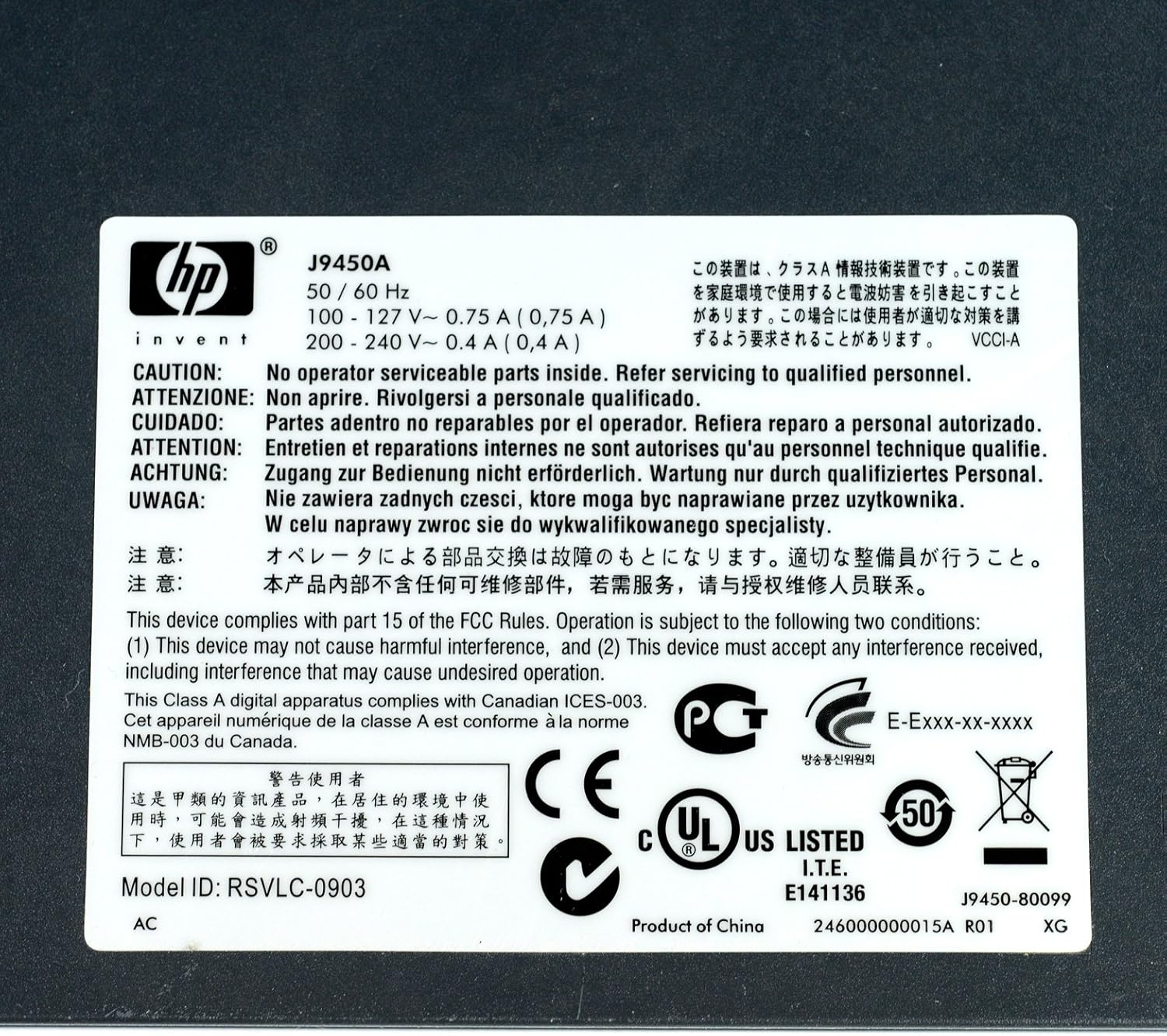
Figure 5: Product Label with Specifications
This image displays the product label, which includes the model number, electrical ratings, and various compliance marks.
Garanzija u Appoġġ
Informazzjoni dwar Garanzija
The HP Procurve 1810G-24 Switch typically comes with a Garanzija ta' Sostituzzjoni tul il-Ħajja for the original owner. Please refer to the official HP warranty documentation for complete terms and conditions, as warranty details may vary by region and purchase date.
Appoġġ Tekniku
For technical assistance, product registration, or to download the latest drivers and firmware, please visit the official HP support website. Have your product model number (J9450A) and serial number ready when contacting support.
Tipikament tista' ssib riżorsi ta' appoġġ fuq: www.hp.com/support


