1. Introduzzjoni u Fuqview
The Mitel 5312 IP Phone is a versatile and user-friendly communication device designed for modern office environments. It features a full-duplex handsfree speakerphone, a multi-line backlit display, and programmable feature keys, providing intuitive access to advanced call handling and converged applications supported by Mitel's IP communication platforms.
This manual provides comprehensive instructions for setting up, operating, maintaining, and troubleshooting your Mitel 5312 IP Phone, ensuring optimal performance and user experience.
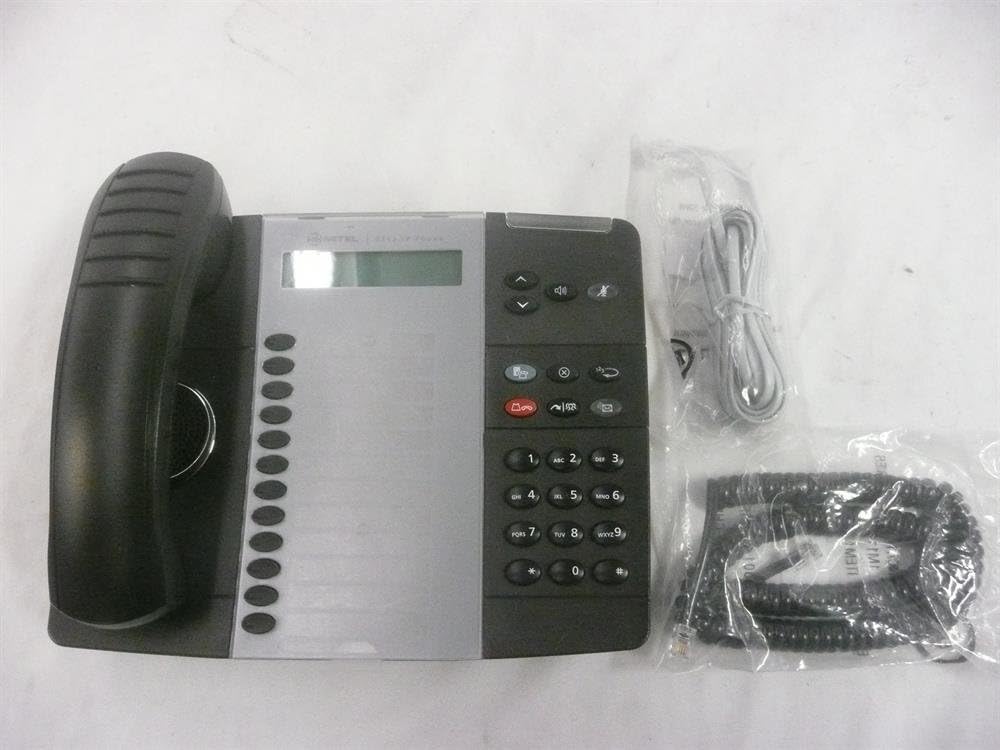
Figure 1: Mitel 5312 IP Phone with included accessories.
2. Karatteristiċi ewlenin
- Wiri: Two-line by 20-character white, backlit, graphics display with contrast control and auto-dimming.
- Ċwievet programmabbli: Twelve multi-function keys with dual-color LED indicators for speed dialing, line appearances, and feature access.
- Ċwievet tal-Funzjoni: Dedicated keys for Hold, Menu, Message, Speaker, Mute, Transfer/Conference, Redial, and Cancel.
- Speakerphone: Full duplex handsfree speakerphone operation.
- Personalizzazzjoni: Browser-based desktop user tool programming for easy access to telephone system features.
3. Gwida ta' Setup
3.1 Kontenut tal-Pakkett
Qabel ma tibda, kun żgur li l-komponenti kollha huma preżenti:
- Unità tat-telefon IP Mitel 5312
- Handset u korda mkebba
- Kejbil Ethernet
- Adapter tal-enerġija (jekk ma tużax Power over Ethernet - PoE)
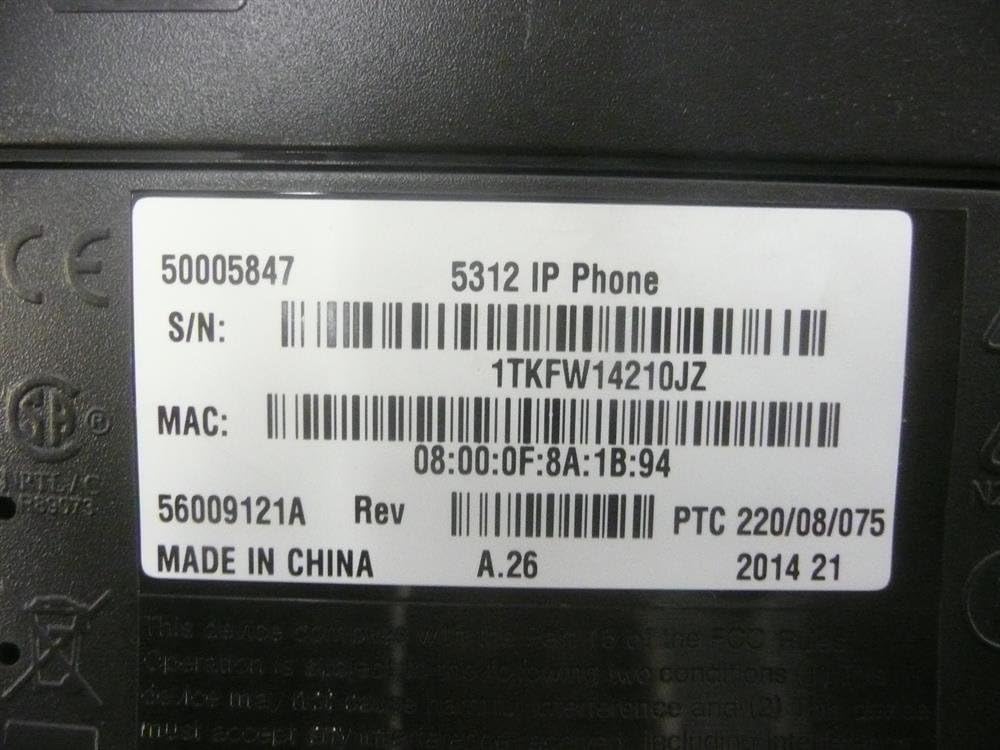
Figure 2: Mitel 5312 IP Phone and its primary accessories.
3.2 Konnessjoni tat-Telefon
- Qabbad il-Handset: Ipplaggja tarf wieħed tal-korda mkebba fil-handset u t-tarf l-ieħor fil-port tal-handset fuq il-bażi tat-telefon.
- Qabbad man-Netwerk:
- If using Power over Ethernet (PoE), connect one end of the Ethernet cable to the LAN port on the phone and the other end to a PoE-enabled network switch or router.
- If not using PoE, connect one end of the Ethernet cable to the LAN port on the phone and the other end to your network switch/router. Then, connect the power adapter to the phone's power port and plug it into a power outlet.
- Optional PC Connection: Jekk tixtieq tqabbad kompjuter permezz tat-telefon, daħħal kejbil Ethernet mill-kompjuter tiegħek fil-port tal-PC fuq it-telefon.
- L-Ewwel Bidu: The phone will power on and begin its boot-up sequence. This may take a few moments as it obtains network configuration and registers with your IP communications platform.
4. Istruzzjonijiet Operattivi
4.1 Funzjonijiet Bażiċi tas-Sejħiet
- Tagħmel Sejħa: Lift the handset, press a line key, or press the Speaker button. Dial the number.
- Tweġiba għal Sejħa: Lift the handset, press the flashing line key, or press the Speaker button.
- Tmiem Sejħa: Replace the handset, or press the Speaker button if using speakerphone.
- Żomm: Waqt sejħa, agħfas Żomm key. To retrieve, press the flashing line key.
- Siekta: Agħfas il- Mute key to mute your microphone during a call. Press again to unmute.
- Speakerphone: Agħfas il- Speaker key to activate or deactivate the speakerphone.
4.2 Karatteristiċi Avvanzati
- Trasferiment: Waqt sejħa, agħfas Transfer/Conference key. Dial the transfer destination, then press Transfer/Conference again to complete (blind transfer) or wait for an answer and announce the call (supervised transfer).
- Konferenza: Waqt sejħa, agħfas Transfer/Conference key. Dial the number of the third party. Once connected, press Transfer/Conference għal darb'oħra biex jingħaqad mal-partijiet kollha.
- Ċempil mill-ġdid: Agħfas il- Rifilja key to call the last dialed number.
- Message Access: Agħfas il- Messaġġ key to access your voicemail.
- Ċwievet programmabbli: The twelve programmable keys can be configured for speed dialing, line appearances, or quick access to system features. Consult your system administrator for specific programming details.
5. Manutenzjoni
Proper care and maintenance will extend the life of your Mitel 5312 IP Phone.
- Tindif: Uża artab, ftit damp cloth to clean the phone's surface. Avoid abrasive cleaners, solvents, or strong chemicals. Do not spray liquids directly onto the phone.
- Ambjent: Keep the phone in a dry environment, away from direct sunlight, excessive heat, or extreme cold. Ensure proper ventilation.
- Immaniġġjar: Handle the phone and its components with care. Avoid dropping the handset or pulling excessively on cords.
6 Issolvi l-problemi
This section addresses common issues you might encounter with your Mitel 5312 IP Phone.
| Problema | Kawża Possibbli | Soluzzjoni |
|---|---|---|
| No dial tone / Phone not registering | Network cable disconnected, no power (if not PoE), incorrect network configuration, server issue. | Check Ethernet cable connection. Ensure power adapter is plugged in (if applicable). Verify network settings with your IT administrator. Restart the phone by unplugging and replugging the power/Ethernet cable. |
| Id-displej huwa vojt jew ma jistax jinqara | No power, display settings, hardware fault. | Check power connection. Adjust display contrast (if available). If the issue persists, contact support. |
| Ma nistax nisma' lil min qed iċempel / Min qed iċempel ma jistax jismagħni | Volume too low, Mute activated, faulty handset/speakerphone, network quality. | Adjust volume. Check if Mute is active. Try speakerphone or handset to isolate the issue. Check network connection quality. |
If you continue to experience issues, please contact your IT support or Mitel customer service. Be prepared to provide the model number and serial number of your device.
7. Speċifikazzjonijiet
Detailed technical specifications for the Mitel 5312 IP Phone (Model: 50005847).
| Karatteristika | Dettall |
|---|---|
| Numru tal-Mudell | 50005847 |
| Brand | Mitel |
| Piż tal-oġġett | 3 liri |
| Kulur | Iswed, Fidda |
| Tip tat-Telefon | Corded |
| Materjal | Plastik |
| Sors tal-Enerġija | Corded Elettriku |
| Tip ta' Dialer | Tastiera Unika |
| Tip ta' Sistema ta' Tweġiba | Diġitali |
| Apparati Kompatibbli | Mitel's IP communications platforms, VoIP services, PSTN networks |
| Kapaċità ta' Sejħa ta' Konferenza | Bażiku |
| L-Ewwel Data Disponibbli | 4 ta’ Awwissu, 2009 |

Figure 3: Product label with identification details.
Extracted details from label:
Numru tas-serje: 1TKFW14210JZ, FSABV9236
Indirizz MAC: 08:00:0F:8A:1B:94, 08-00-0F-3B-E5-DA
Reviżjoni: A.26, A.2
8. Appoġġ u Garanzija
For technical assistance, troubleshooting beyond this manual, or warranty inquiries, please contact Mitel customer support or your authorized Mitel reseller.
When contacting support, please have your product model number (50005847) and serial number ready. The serial number can be found on the label at the bottom of your phone unit (refer to Figure 3).
Information regarding protection plans and return policies may be available from your point of purchase.