Hoover UH70120 T-Series WindTunnel Rewind Plus Upright Vacuum Cleaner Instruction Manual
Mudell: UH70120
Istruzzjonijiet Importanti dwar is-Sigurtà
Meta tuża apparat elettriku, għandhom dejjem jiġu segwiti prekawzjonijiet bażiċi, inklużi dawn li ġejjin:
- Aqra l-istruzzjonijiet kollha qabel tuża dan l-apparat.
- Dejjem aqla’ l-plagg mill-plakka meta ma tkunx qed tużaha u qabel ma tnaddaf jew tagħmel manutenzjoni.
- Tużax barra jew fuq uċuħ imxarrbin.
- Tħallix li tintuża bħala ġugarell. Attenzjoni mill-qrib hija meħtieġa meta jintuża minn jew ħdejn it-tfal.
- Uża biss kif deskritt f'dan il-manwal. Uża biss l-aċċessorji rakkomandati mill-manifattur.
- Tużax b'korda jew plagg bil-ħsara. Jekk l-apparat mhux qed jaħdem kif suppost, ikun waqa’, saritlu ħsara, jitħalla barra, jew waqa’ fl-ilma, erġa’ lura f’ċentru ta’ servizz.
- Tiġbedx jew iġorrux bil-korda, uża korda bħala manku, agħlaq bieb fuq korda, jew iġbed korda madwar truf jew kantunieri li jaqtgħu. Tmexxix l-apparat fuq il-korda. Żomm il-korda 'l bogħod minn uċuħ imsaħħna.
- Tneħħix il-plagg billi tiġbed il-korda. Biex tneħħi l-plagg, aqbad il-plagg, mhux il-korda.
- M'għandekx timmaniġġja l-plagg jew l-apparat b'idejhom imxarrbin.
- Tpoġġi l-ebda oġġett fil-fetħiet. Tużax b'xi ftuħ imblukkat; żomm ħieles minn trab, lint, xagħar, u kull ħaġa li tista 'tnaqqas il-fluss ta' l-arja.
- Żomm ix-xagħar, il-ħwejjeġ maħlula, is-swaba’, u l-partijiet kollha tal-ġisem 'il bogħod mill-fetħiet u l-partijiet li jiċċaqilqu.
- Itfi l-kontrolli kollha qabel ma splaggja.
- Uża attenzjoni żejda meta tnaddaf it-taraġ.
- Tużax biex tiġbor likwidi li jaqbdu jew kombustibbli, bħall-gażolina, jew tuża f'żoni fejn jistgħu jkunu preżenti.
- Tiġborx xi ħaġa li tkun qed taħraq jew tpejjep, bħal sigaretti, lofarini, jew irmied jaħraq.
- Tużax mingħajr tazza tat-trab u/jew filtri f'posthom.
Prodott Overview
The Hoover UH70120 T-Series WindTunnel Rewind Plus Upright Vacuum Cleaner is designed for effective cleaning across various floor types. It features WindTunnel technology for powerful suction and a HEPA media filter to capture fine particles. The retractable cord offers convenient storage.

Immaġni: Quddiem view of the Hoover UH70120 T-Series WindTunnel Rewind Plus Upright Vacuum Cleaner. The vacuum is green and gray, featuring a clear dirt cup and a retractable cord system.
Istruzzjonijiet ta' Armar
Your Hoover UH70120 vacuum cleaner comes partially assembled. Follow these steps to complete the assembly:
- Waħħal il-Manku: Insert the handle assembly into the top of the vacuum body until it clicks securely into place. Ensure it is firmly seated.
- Waħħal il-Manka: Connect the flexible hose to the hose inlet on the back of the vacuum. Twist to secure.
- Aċċessorji tal-Aħżen: Place the included cleaning tools (extension wand, crevice tool, upholstery/dusting brush, powered hand tool) onto their designated storage clips on the vacuum body.

Image: The Hoover UH70120 vacuum cleaner with its handle and various cleaning attachments stored on the unit.
It-tħaddim tal-Vacuum Cleaner
Tixgħel/Jitfi
To turn the vacuum cleaner on or off, locate the power switch on the main body of the unit. Press the switch to activate or deactivate the vacuum.
Aġġustament Għoli
The vacuum features 5 height adjustment settings to optimize cleaning for different floor types. Rotate the dial on the front of the cleaner head to select the appropriate setting:
- Baxx: Għal pavimenti vojta u twapet b'pil baxx.
- Medju: Għal twapet b'pil medju.
- Għoli: Għal twapet b'pil għoli u twapet shag.

Image: A hand adjusting the height adjustment dial on the cleaner head of the Hoover UH70120 vacuum. The dial shows settings for different carpet heights.

Image: The Hoover UH70120 vacuum cleaner operating on a carpeted surface, with a hardwood floor visible adjacent to it, demonstrating its versatility.
Korda li tinġibed lura
To extend the power cord, pull it out from the back of the vacuum until the desired length is reached. To retract the cord, gently pull the cord out a short distance, then release it. The cord will automatically rewind into the unit.

Image: The Hoover UH70120 vacuum cleaner with its power cord fully extended from the retractable cord mechanism.
Użu ta 'Annessi
The Hoover UH70120 comes with several on-board tools for specialized cleaning tasks:
- Bastun ta 'Estensjoni: Jipprovdi firxa estiża għal żoni għoljin jew taħt l-għamara.
- Għodda tal-qsim: Ideali għat-tindif ta' spazji dojoq, kantunieri, u tul it-truf.
- Upholstery/Dusting Brush: For cleaning delicate surfaces, upholstery, and removing dust.
- Powered Hand Tool: For deep cleaning stairs, upholstery, and pet hair.
To use an attachment, ensure the vacuum is in the upright position and turn it off. Detach the hose from the main unit and connect the desired tool to the end of the hose. Turn the vacuum on to begin cleaning.

Image: A woman carrying the Hoover UH70120 vacuum cleaner up a carpeted staircase, demonstrating its portability for stair cleaning.
Manutenzjoni
Tbattal it-Tazza tal-Ħmieġ
The UH70120 features a bagless design with an easy-to-empty dirt cup. For optimal performance, empty the dirt cup when debris reaches the MAX fill line.
- Kun żgur li l-vakwu huwa splaggjat.
- Press the dirt cup release button and lift the dirt cup away from the vacuum.
- Hold the dirt cup over a trash receptacle and press the bottom release latch to open the bottom flap and empty contents.
- Close the bottom flap securely and reattach the dirt cup to the vacuum.
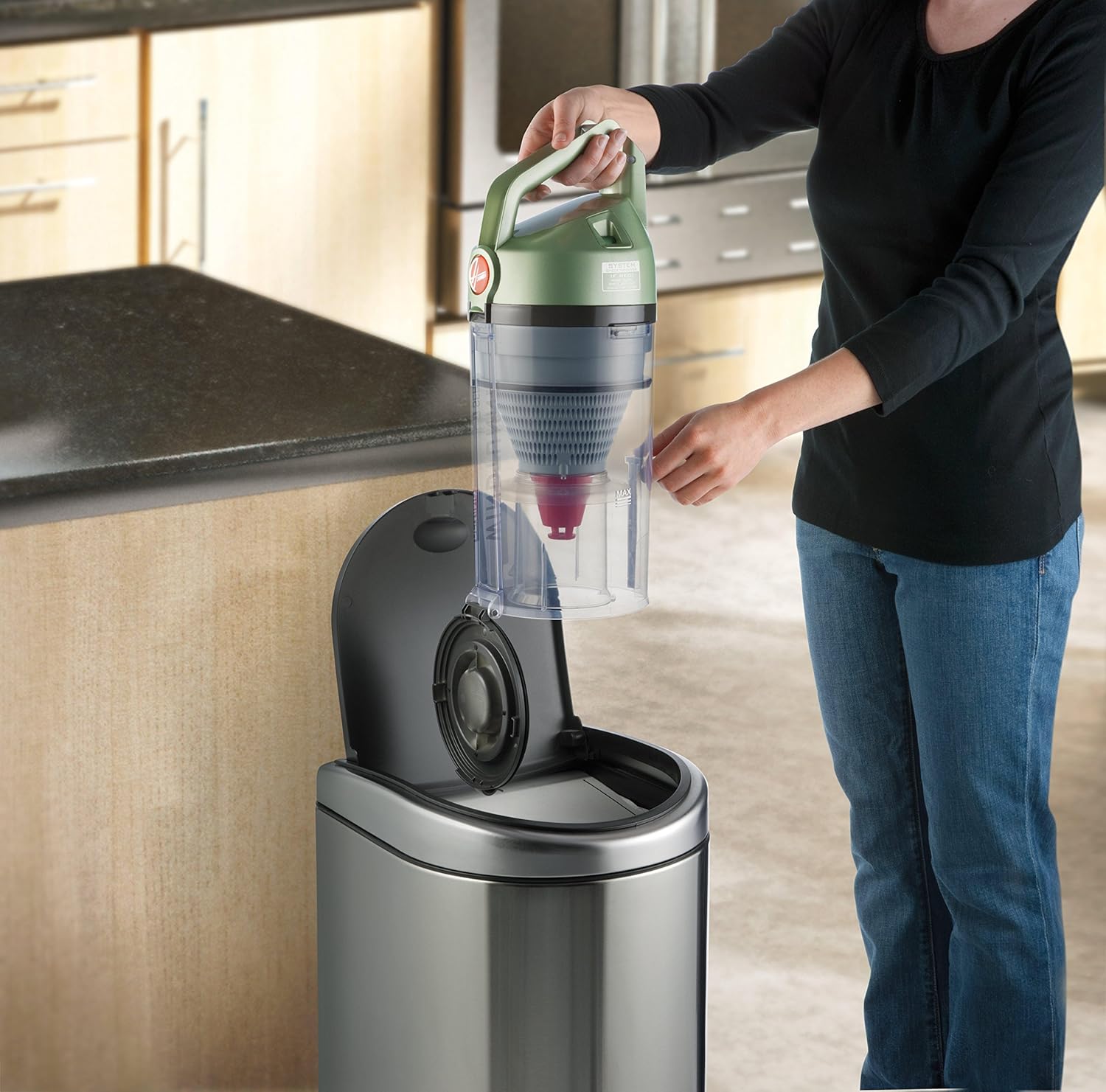
Image: A woman demonstrating how to empty the clear dirt cup of the Hoover UH70120 vacuum cleaner into a trash can.
Tindif Filtri
Regular filter cleaning is essential for maintaining suction power and air quality. The UH70120 includes a rinsable filter and a HEPA media filter.
- Rinsable Filter: This filter is located inside the dirt cup. Remove it and rinse under running water until clean. Allow it to air dry completely for at least 24 hours before reinserting. Do not use the vacuum without a dry filter.
- Filtru tal-Midja HEPA: This filter is located near the bottom of the dirt cup assembly. Tap it gently over a trash can to remove loose dirt. The HEPA filter is not rinsable and should be replaced periodically (refer to product packaging or Hoover website for replacement schedule).
Immaġni: Close-up view of the Hoover UH70120 vacuum cleaner showing the compartment for the HEPA filter, which is accessible for cleaning or replacement.
Manutenzjoni tar-Roll tal-Pinzell
Periodically check the brush roll for tangled hair, strings, or debris. Turn off and unplug the vacuum. Use scissors to carefully cut away any obstructions from the brush roll. This ensures effective cleaning and prevents damage to the motor.
Issolvi l-problemi
| Problema | Kawża Possibbli | Soluzzjoni |
|---|---|---|
| Il-vakwu mhux se jixgħel. | No power to outlet; Plug not firmly inserted. | Check fuse or breaker; Ensure plug is fully inserted into outlet. |
| Telf ta 'ġbid. | Dirt cup full; Filters clogged; Hose or nozzle clogged. | Empty dirt cup; Clean or replace filters; Clear any obstructions from hose or nozzle. |
| Ir-romblu tal-pinzell mhux qed idur. | Obstruction in brush roll; Belt broken or stretched. | Remove obstruction from brush roll; Inspect and replace belt if necessary. |
| Vacuum not picking up. | Height adjustment incorrect; Dirt cup not properly installed. | Adjust height setting for floor type; Reinstall dirt cup securely. |
Speċifikazzjonijiet
- Ditta: Hoover
- Isem tal-Mudell: T-Series Windtunnel Rewind Plus
- Numru tal-Mudell: UH70120
- Fattur tal-Formola: Wieqaf
- Karatteristika Speċjali: HEPA Media Filtration
- Komponenti Inklużi: Extension Wand, Crevice Tool, Upholstery/Dusting Brush, Powered Hand Tool
- Qawwa: Corded, 12 Amps / 1440 Watts
- Tul tal-manka: 8 Saqajn
- Piż tal-oġġett: 16.5 liri
- Dimensjonijiet tal-Prodott: 16 x 12 x 32.5 pulzieri
- Livell ta' Storbju: 79 Deċibel
- Użu: Indoor, for Carpet, Hardwood Floors, Pet hairs, Tile Floors
Informazzjoni dwar Garanzija
This Hoover UH70120 T-Series WindTunnel Rewind Plus Upright Vacuum Cleaner is covered by a Garanzija limitata ta 'sena. For detailed terms and conditions, please refer to the warranty card included with your product or visit the official Hoover websit.
Appoġġ għall-Klijent
For further assistance, replacement parts, or service inquiries, please contact Hoover Customer Service:
- Websit: www.hoover.com
- Telefon: Refer to your product documentation for the most current contact number.
Vidjows Uffiċjali tal-Prodott
No official seller-created product videos were found for this model that meet the embedding criteria.