Introduzzjoni
This manual provides essential instructions for the safe and efficient operation of your Optoma TX612 XGA DLP Multimedia Projector. Please read this manual thoroughly before using the projector and retain it for future reference. The Optoma TX612 is designed to deliver clear and vibrant images for various presentation environments.
Informazzjoni dwar is-Sigurtà
- Do not look directly into the projector lens meta l-lamp is on. The intense light can damage your eyes.
- Żgura ventilazzjoni xierqa madwar il-proġekter. Timblokkax il-fetħiet tal-ventilazzjoni as this can lead to overheating.
- Avoid placing the projector in direct sunlight, near heat sources, or in environments with high humidity or excessive dust.
- Use only the power cord supplied with the projector. Connect to a properly grounded outlet.
- Tippruvax isservi dan il-prodott int stess. Irreferi l-manutenzjoni kollha lil persunal tas-servizz kwalifikat.
- Skonnettja l-korda tad-dawl from the wall outlet before cleaning or if the projector will not be used for an extended period.
Karatteristiċi tal-Prodott
- Luminożità Għolja: 3500 ANSI lumens for clear, easy-to-read text and vibrant images.
- Proporzjon ta' Kuntrast Għoli: 3000:1 contrast ratio enhances image detail.
- Iffrankar tal-Enerġija: Standby VGA and audio pass-through features reduce power consumption.
- Konnettività Wireless: Supports optional wireless dongle for flexible setup.
- Karatteristiċi tas-Sigurtà: Control panel lock and password protection to customize security settings.
- Manutenzjoni Baxxa: Filter-free design contributes to a low cost of ownership.
Setup
1. Konnessjonijiet Fiżiċi
Connect your video sources and audio devices to the appropriate ports on the rear panel of the projector. Ensure all cables are securely connected.
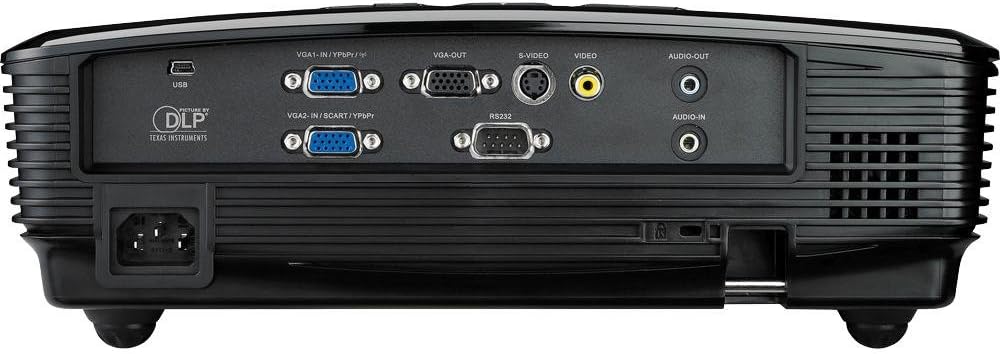
This image displays the rear panel of the Optoma TX612 projector, highlighting various connectivity options including VGA-IN (VGA1-IN/YPbPr, VGA2-IN/SCART/YPbPr), VGA-OUT, S-VIDEO, VIDEO, AUDIO-OUT, AUDIO-IN, RS232, and USB ports, along with the power input.
- VGA-IN (VGA1-IN/YPbPr, VGA2-IN/SCART/YPbPr): Connect to a computer or other VGA-compatible device.
- VIDEO: Connect to composite video sources.
- S-VIDEO: Connect to S-Video sources.
- AUDIO-IN: Connect audio cables from your source device.
- AUDIO-OUT: Connect to external speakers if desired.
- USB: For service or optional wireless dongle.
- RS232: Għall-kontroll tal-proġettazzjoni permezz ta' kompjuter jew sistema ta' kontroll.
- Input ta' Enerġija: Qabbad il-korda tal-enerġija fornuta hawn.
2. Power On/Off
- Biex Tixgħel: Qabbad il-korda tad-dawl u agħfas il- Qawwa button on the control panel or remote control. The power indicator light will turn on.
- Biex Tifi: Agħfas il- Qawwa button twice. The projector will enter a cooling down cycle before completely shutting off. Do not unplug the projector during the cooling cycle.
3. Aġġustament tal-Immaġni
Adjust the projected image using the lens rings and control panel buttons.

This image shows the top of the Optoma TX612 projector, featuring the control panel with buttons for power, source selection, re-sync, and navigation. Also visible are the focus and zoom rings for lens adjustment.
- Ċirku tal-Fokus: Dawwar il- FOCUS ring around the lens until the image is sharp and clear.
- Ċirku Zoom: Dawwar il- ZOOM ring to adjust the size of the projected image.
- Korrezzjoni Keystone: Use the menu options to correct trapezoidal distortion if the projector is not perfectly perpendicular to the screen.
It-tħaddim tal-Proġekter
1. Għażla tas-Sors tal-Input
Agħfas il- SORS button on the control panel or remote control to cycle through available input sources (VGA1, VGA2, Video, S-Video, etc.) until your desired source is displayed.
2. Navigazzjoni fil-menu
Agħfas il- MENU button to access the On-Screen Display (OSD) menu. Use the arrow buttons to navigate through options and the DĦUL buttuna biex tagħżel. Agħfas MENU għal darb'oħra biex toħroġ.
- Settings tal-Immaġni: Aġġusta l-luminożità, il-kuntrast, il-kulur, it-lewn, u n-nitidezza.
- Issettjar tal-wiri: Configure aspect ratio, keystone correction, and projection mode.
- Setup Settings: Manage language, auto power off, and security features.
Manutenzjoni
- Lamp Sostituzzjoni: Il-proġekter lamp għandu ħajja finita. Meta l-lamp indicator lights up or the image becomes dim, the lamp jista' jkun jeħtieġ sostituzzjoni. Irreferi għall-manwal sħiħ tas-servizz għal aktar dettaljiamp struzzjonijiet ta’ sostituzzjoni jew ikkuntattja persunal tas-servizz kwalifikat.
- Tindif tal-Lenti: Uża drapp artab u mingħajr suf iddisinjat speċifikament għal lentijiet ottiċi. Tużax prodotti tat-tindif jew solventi li joborxu.
- Cleaning the Projector Casing: Imsaħ iċ-ċasing b'artab, damp drapp. Evita li tuża kimiċi ħarxa.
- Disinn Mingħajr Filtru: The Optoma TX612 features a filter-free design, reducing the need for regular filter cleaning.
Issolvi l-problemi
| Problema | Soluzzjoni Possibbli |
|---|---|
| Ebda immaġini murija |
|
| L-immaġni hija mċajpra |
|
| L-immaġni hija distorta (forma ta' trapeżojde) |
|
| L-ebda awdjo |
|
Speċifikazzjonijiet
| Karatteristika | Dettall |
|---|---|
| Numru tal-Mudell | TX612 |
| Riżoluzzjoni tal-Wiri | 1024 x 768 (XGA) |
| Luminożità | 3500 lumens ANSI |
| Proporzjon ta' Kuntrast | 3000:1 |
| Teknoloġija tal-Konnettività | Wireless (with optional dongle) |
| Karatteristika Speċjali | Kelliema integrati |
| Dimensjonijiet tal-Prodott | 9.21 x 12.76 x 3.82 pulzieri |
| Piż tal-oġġett | 10 liri |
| Manifattur | Optoma |
| Lingwa | Ingliż |
Garanzija u Appoġġ
For detailed warranty information, technical support, or service inquiries, please refer to the warranty card included with your product or visit the official Optoma websit. Żomm l-irċevuta tax-xiri tiegħek bħala prova tax-xiri għal talbiet ta' garanzija.
Riżorsi onlajn: For the latest drivers, firmware updates, and additional support documentation, please visit www.optoma.com.


