1. Introduzzjoni
This manual provides comprehensive instructions for the installation, operation, and maintenance of your Chieftec BT-02B-U3 Mesh Mini-ITX PC Case. Please read this manual thoroughly before beginning any installation or operation to ensure proper usage and to prevent damage to the product or other components. Keep this manual for future reference.
2. Informazzjoni dwar is-Sigurtà
- Dejjem skonnettja l-provvista tal-enerġija mis-sokit tal-ħajt qabel ma tinstalla jew tneħħi xi komponenti.
- Handle all components with care to avoid electrostatic discharge (ESD) damage. Consider using an anti-static wrist strap.
- Kun żgur li jkun hemm ventilazzjoni xierqa madwar il-kaxxa tal-PC biex tevita li tissaħħan iżżejjed.
- Do not expose the product to moisture or extreme temperatures.
- Żomm il-partijiet żgħar u l-materjali tal-ippakkjar 'il bogħod mit-tfal.
3. Prodott Aktarview
The Chieftec BT-02B-U3 is a compact Mini-ITX PC case designed for standard, cost-effective components. It includes a powerful 250W SFX power supply, making it suitable for ITX motherboards with desktop CPUs. Its mesh design aids in ventilation.

Figura 3.1: Quddiem u ġenb view of the Chieftec BT-02B-U3 Mesh Mini-ITX PC Case. This image displays the compact form factor, the optical drive bay, and the front panel controls including power and USB ports.

Figura 3.2: Fuq quddiem view of the Chieftec BT-02B-U3 PC Case. This perspective highlights the horizontal orientation, the optical drive slot, and the front panel buttons and indicators.
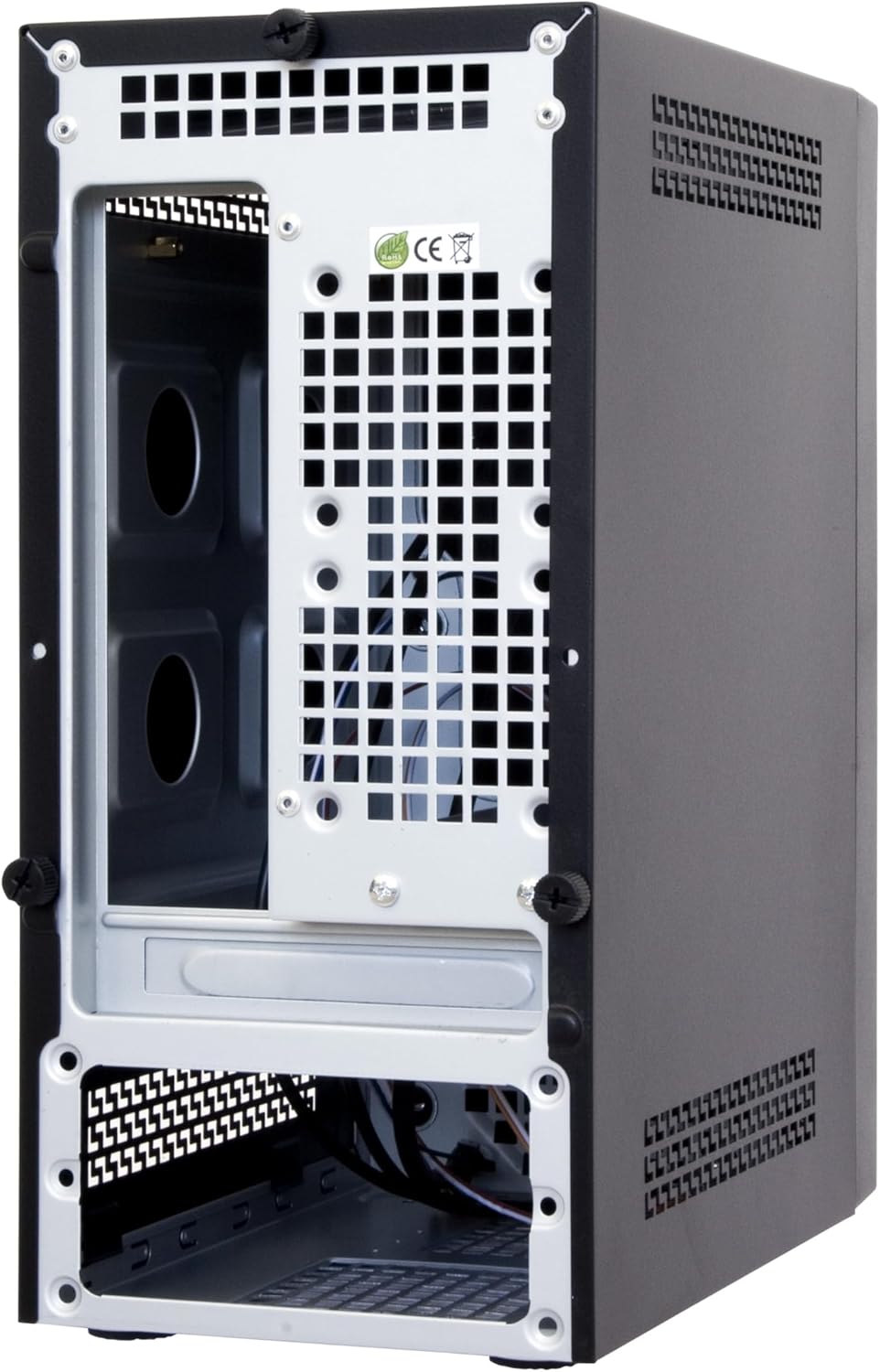
Figura 3.3: Rear and internal view of the Chieftec BT-02B-U3 PC Case. This image shows the internal structure, including the motherboard tray area, expansion slots, and the bottom-mounted power supply bay.
4. Setup u Installazzjoni
Follow these general steps for installing components into your Chieftec BT-02B-U3 PC case. Specific component installation instructions should be referenced from their respective manuals.
- Ipprepara l-Każ: Remove the side panel(s) by unscrewing the thumbscrews at the rear of the case.
- Installa Motherboard: Secure your Mini-ITX motherboard onto the standoffs provided in the case. Ensure the I/O shield is properly seated.
- Installa Drives tal-Ħażna: Mount your 2.5-inch or 3.5-inch storage drives into the designated bays.
- Install Optical Drive (Optional): If using, install a slim optical drive into the front bay.
- Qabbad il-Kejbils tal-Panel ta' Quddiem: Connect the power switch, reset switch, USB ports (2x USB 2.0, 2x USB 3.0), and audio jacks to the corresponding headers on your motherboard.
- Qabbad il-Provvista tal-Enerġija: Connect the 24-pin ATX power connector, 4/8-pin CPU power connector, and SATA power connectors to your components. The case includes a pre-installed 250W SFX power supply.
- Ġestjoni tal-Kejbil: Irrota l-kejbils b'mod pulit biex ittejjeb il-fluss tal-arja u l-estetika.
- Agħlaq il-Każ: Reattach the side panel(s) and secure them with the thumbscrews.
5. Istruzzjonijiet Operattivi
- Qawwa Mixgħul: Connect the power cable to the power supply and a wall outlet. Press the power button located on the front panel of the case.
- Itfi: Shut down your operating system normally. The system will power off automatically. Alternatively, press and hold the power button for 4 seconds to force a shutdown (not recommended for regular use).
- Konnessjoni Periferali: Use the available USB ports (2x USB 2.0, 2x USB 3.0) on the front panel and the rear I/O panel of your motherboard to connect keyboards, mice, and other devices.
6. Manutenzjoni
- Tindif: Regularly clean the exterior of the case with a soft, dry cloth. For dust accumulation inside, use compressed air to gently clear vents and components. Ensure the system is powered off and unplugged before cleaning.
- Ventilazzjoni: Ensure that the case's ventilation openings are not obstructed to maintain optimal airflow and cooling performance.
7 Issolvi l-problemi
Jekk tiltaqa' ma' problemi bil-bini tal-PC tiegħek, ikkunsidra l-passi ġenerali li ġejjin għas-soluzzjoni tal-problemi:
- Ebda Qawwa:
- Check if the power cable is securely connected to both the power supply and the wall outlet.
- Ensure the power supply switch (if present) is in the 'ON' position.
- Verify that the front panel power switch cable is correctly connected to the motherboard.
- Ebda Display:
- Ensure your monitor is connected to the correct video output port (either on the motherboard or a dedicated graphics card).
- Check that all internal power cables (24-pin ATX, CPU power) are firmly seated.
- Reseat RAM modules and any graphics cards.
- Storbju Eċċessiv:
- Identify the source of the noise (e.g., CPU fan, case fan, PSU fan).
- Ensure no cables are obstructing fan blades.
- Clean dust from fans and heatsinks.
8. Speċifikazzjonijiet
| Karatteristika | Dettall |
|---|---|
| Brand | Chieftec |
| Numru tal-Mudell | BT-02B-U3 |
| Tip ta' Każ | Mini-Torri (Mini-ITX) |
| Kompatibbiltà tal-motherboard | Mini ITX |
| Provvista tal-Enerġija | Integrated 250W SFX Power Supply |
| Materjal | Azzar Liga |
| Kulur | Iswed |
| Dimensjonijiet tal-Prodott (LxWxH) | 9.45 x 5.31 x 11.61 pulzieri (24 x 13.5 x 29.5 ċm) |
| Piż tal-oġġett | 7.22 liri (3.28 kg) |
| Portijiet USB 2.0 | 2 |
| Portijiet USB 3.0 | 2 |
| Metodu tat-tkessiħ | Arja |
| Tip ta' Immuntar tal-Provvista tal-Enerġija | Mount tal-qiegħ |
9. Garanzija u Appoġġ
For warranty information or technical support, please refer to the official Chieftec webis-sit jew ikkuntattja lill-bejjiegħ lokali tiegħek. Żomm il-prova tax-xiri tiegħek għal talbiet ta' garanzija.
For further assistance, you may visit the Chieftec official websit: www.chieftec.eu


