Prodott Overview
The DigiTech SC-2 HardWire Valve-Distortion pedal is engineered for superior performance, meticulous craftsmanship, and true innovation. It features True Bypass circuitry, ensuring your guitar tone remains pure when the effect is disengaged. Designed to operate at a higher, constant voltage, it preserves tonal quality and reduces noise, performing flawlessly even with hot guitar pickups and in amplifier effects loops. The SC-2 is built for touring musicians, incorporating unique Stomplock™ guards to prevent accidental control changes and includes custom-cut Velcro® pads for pedalboard mounting.
Key features include two modes of operation: Crunch and Saturated, offering a wide range of distortion tones from classic rock to more modern sounds.

Figura 1: Quddiem view of the DigiTech SC-2 HardWire Valve-Distortion Pedal, showing Level, Low, High, and Gain knobs, along with the Crunch/Saturated mode switch and footswitch.
Setup
- Konnessjoni tal-Enerġija: The SC-2 pedal can be powered by a 9V battery (included) or an optional external 9V DC power supply (not included). Ensure the power supply meets the pedal's specifications (9V DC, center negative, 100mA minimum).
- Konnessjoni tal-Input: Connect your guitar or the output of a preceding effect pedal to the Input jack on the right side of the SC-2 using a standard 1/4-inch instrument cable.
- Konnessjoni tal-Output: Qabbad il- Output jack on the left side of the SC-2 to your amplifier's input or the input of the next effect pedal in your signal chain using a standard 1/4-inch instrument cable.
- Installazzjoni tal-Batterija (jekk applikabbli): To install or replace the 9V battery, unscrew the four screws on the bottom plate of the pedal. Carefully remove the plate, connect the 9V battery to the battery clip, and place it inside the compartment. Replace the bottom plate and secure the screws.
- Stomplock™ Knob Guards: For live performance, consider using the included Stomplock™ knob guards to prevent accidental changes to your settings. Place the clear plastic guard over the control knobs.
- Pedalboard Mounting: Use the custom-cut Velcro® pads provided to securely attach the pedal to a pedalboard.
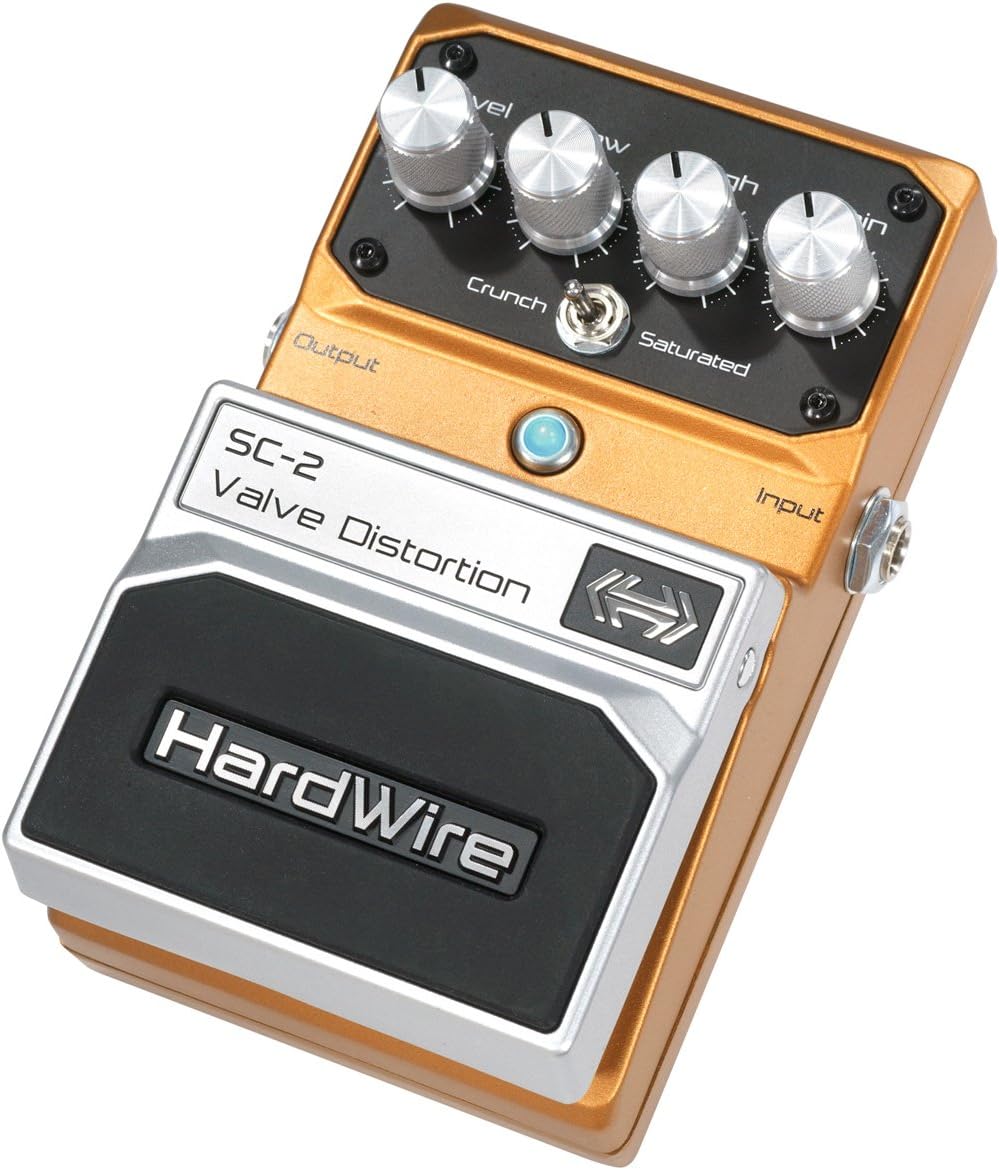
Figura 2: Angolat view of the DigiTech SC-2 HardWire Valve-Distortion Pedal, highlighting the input and output jacks on the sides.
Istruzzjonijiet Operattivi
The SC-2 features intuitive controls for shaping your distortion tone.
Kontrolli:
- Livell: Controls the overall output volume of the effect. Adjust this to balance the volume between the effect on and off states.
- Baxx: Adjusts the amount of low-frequency content in the distorted signal. Turn clockwise for more bass, counter-clockwise for less.
- Għoli: Adjusts the amount of high-frequency content in the distorted signal. Turn clockwise for more treble, counter-clockwise for less.
- Qligħ: Controls the amount of distortion. Turn clockwise for more saturation and sustain, counter-clockwise for less.
- Crunch/Saturated Switch: This toggle switch selects between two distinct distortion modes:
- Crunch Mode: Provides a classic, mid-rich distortion suitable for hard rock and blues tones. This mode offers excellent note clarity and dynamic response.
- Saturated Mode: Delivers a more aggressive, scooped-mid distortion with increased gain and sustain, ideal for modern rock and metal sounds.
- Swiċċ tas-saqajn: Engages or bypasses the effect. When the effect is engaged, the LED indicator will illuminate. The SC-2 features True Bypass, meaning your signal remains unaffected when the pedal is bypassed.
Operazzjoni Bażika:
- Ensure all connections (guitar, amplifier, power) are secure.
- Set the Level knob to a low position initially to avoid sudden loud sounds.
- Select your desired distortion mode using the Crunch/Saturated switch.
- Engage the effect by pressing the footswitch. The LED will light up.
- Adjust the Gain knob to achieve your desired level of distortion.
- Fine-tune your tone using the Low and High equalization knobs.
- Adjust the Level knob to match the volume of your bypassed signal.
Manutenzjoni
- Tindif: Use a soft, dry cloth to clean the pedal's exterior. Avoid abrasive cleaners or solvents, as they may damage the finish or controls.
- Ħażna: When not in use for extended periods, disconnect the power supply or remove the battery to prevent leakage. Store the pedal in a cool, dry place away from direct sunlight and extreme temperatures.
- Konnessjonijiet: Iċċekkja perjodikament il-konnessjonijiet tal-kejbil kollha għal xedd u kedd. Kun żgur li l-ġakkijiet huma ħielsa mit-trab u l-fdalijiet.
- Sostituzzjoni tal-batterija: If using battery power, replace the 9V battery when the LED indicator dims or the sound quality degrades, indicating low power.
Issolvi l-problemi
| Problema | Kawża Possibbli | Soluzzjoni |
|---|---|---|
| L-ebda ħoss meta l-pedala tkun attivata. |
|
|
| Ħoss dgħajjef jew distort. |
|
|
| Excessive noise or hum. |
|
|
Speċifikazzjonijiet
| Karatteristika | Dettall |
|---|---|
| Mudell | SC-2 |
| Brand | DigiTech |
| Format tas-Sinjal | Analogu |
| Sors tal-Enerġija | 9V Battery (included) or 9V DC Power Supply (optional) |
| Voltage | 9 Volts |
| Ampetà | 100 Milliamps |
| Piż tal-oġġett | 1.6 Libbra (madwar 0.73 kg) |
| Dimensjonijiet tal-Prodott | 7.13 x 2.5 x 4.25 pulzieri (madwar 18.1 x 6.35 x 10.8 ċm) |
| Kulur | Aħdar |
| Bypass Veru | Iva |
| Karatteristiċi Speċjali | Stomplock™ knob guards, Constant high-voltagoperazzjoni |
Garanzija u Appoġġ
For specific warranty information and technical support, please refer to the official DigiTech website or contact DigiTech customer service directly. Keep your proof of purchase for warranty claims.
DigiTech Official Websit: www.digitech.com
Nota: L-ispeċifikazzjonijiet u l-karatteristiċi tal-prodott jistgħu jinbidlu mingħajr avviż.


