Introduzzjoni
Grazzi tax-xiriasing the Technics SL-PD807 MASH 5 Disc CD Player. This manual provides detailed instructions for the proper setup, operation, and maintenance of your new audio component. Please read this manual thoroughly before using the unit to ensure optimal performance and longevity.
The SL-PD807 features a 5-disc carousel changer, allowing for extended playback without interruption, and incorporates MASH (Multi-stage Noise Shaping) D/A conversion for high-quality audio reproduction.
Informazzjoni Importanti dwar is-Sigurtà
- Sors tal-Enerġija: Ensure the unit is connected to an AC 120V, 60Hz power supply.
- Ventilazzjoni: Timblokkax il-fetħiet tal-ventilazzjoni. Ħalli biżżejjed spazju madwar l-unità għal fluss tal-arja xieraq biex tevita li jisħon iżżejjed.
- Umdità: Tesponix l-unità għax-xita jew għall-umdità. Tpoġġix oġġetti mimlija b'likwidi, bħal vażuni, fuq l-unità.
- Tindif: Skonnettja l-unità mill-plagg tal-ħajt qabel ma tnaddafha. Uża drapp niexef għat-tindif.
- Servizzi: Tippruvax tagħmel manutenzjoni fuq din l-unità int stess. Irreferi għal kull manutenzjoni għand persunal tas-servizz kwalifikat.
Kontenut tal-Pakkett
Jekk jogħġbok iċċekkja li l-oġġetti kollha huma preżenti fil-pakkett:
- Technics SL-PD807 MASH 5 Disc CD Player
- Korda tal-Enerġija
- Kejbils Awdjo RCA
Note: A remote control is not included with this unit.
Setup
1. Spakkjar
Carefully remove the CD player and all accessories from the packaging. Retain the packaging materials for future transport or storage.
2 Tqegħid
Place the CD player on a stable, level surface away from direct sunlight, heat sources, and excessive dust or vibrations. Ensure there is sufficient space around the unit for proper ventilation.

Figura 1: Quddiem view of the Technics SL-PD807 CD Player with included RCA cables.
3. Konnessjonijiet
Qabbad is-CD player mal- amplifier or receiver using the supplied RCA audio cables.
- Connect one end of the RCA audio cables (red and white plugs) to the 'LINE OUT' jacks on the rear of the SL-PD807.
- Connect the other end of the RCA audio cables to an available 'CD IN' or 'AUX IN' input on your amplifier/receiver. Match the red plug to the 'R' (right) input and the white plug to the 'L' (left) input.
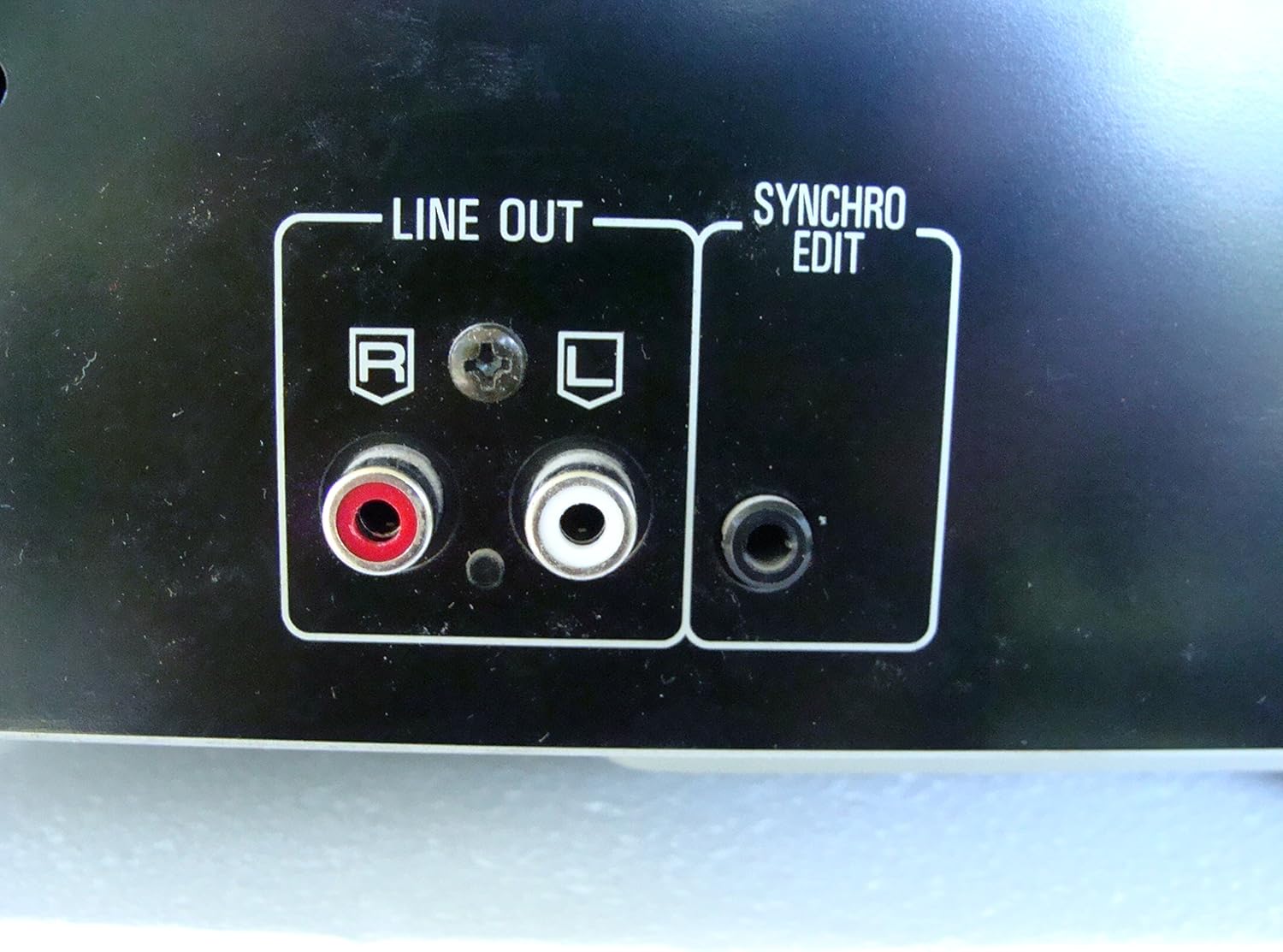
Figura 2: Rear panel connections, highlighting the 'LINE OUT' (RCA) and 'SYNCHRO EDIT' ports.
- Plug the power cord into the AC inlet on the rear of the CD player, then plug the other end into a standard AC wall outlet.
Istruzzjonijiet Operattivi
1. Power On/Off
Agħfas il- QAWWA button located on the front left of the unit to turn the CD player on or off.
2. It-Tagħbija tad-Diski
The SL-PD807 features a 5-disc carousel. Press the FTUĦ/MAGĦLUQ button to open the disc tray. Place up to five CDs onto the numbered disc slots with the label side facing up. Press FTUĦ/MAGĦLUQ mill-ġdid biex tagħlaq it-trej.

Figura 3: Front panel controls including disc tray, display, and playback buttons.
3. Daqq Bażiku
- Play: Agħfas il- PLAY Agħfas il-buttuna (►) biex tibda l-plejbek.
- Pawża: Agħfas il- PAWŻA button (⏸) to temporarily stop playback. Press again to resume.
- Waqqaf: Agħfas il- STOP button (■) to stop playback.
- Aqbeż il-binarji: Agħfas il- SKIP buttons (⏭︎ / ⏮︎) to skip to the next or previous track.
- Fittex: Żomm il- FITTEX buttons (⏪︎ / ⏩︎) to fast forward or rewind within a track.
4. Disc Exchange
You can exchange discs while another disc is playing. Press the DISK SKIP button to rotate the carousel to an empty slot or a disc you wish to remove/replace. The currently playing disc will continue to play until you select a new disc to play.
5. Modi ta' Daqq
- Play bl-addoċċ: Agħfas il- KAŻ button to play tracks on the current disc or all loaded discs in a random order.
- Logħob tal-Programm: Uża l- PROGRAMM button to create a custom playback sequence of tracks from the loaded discs. Refer to the on-screen display for programming steps.
- Irrepeti Play: Agħfas il- IRREpeti button to repeat the current track, current disc, or all discs.
Manutenzjoni
1. Tindif tal-Unità
Wipe the exterior of the unit with a soft, dry cloth. For stubborn stains, slightly dampen the cloth with water and a mild detergent, then wipe dry. Do not use abrasive cleaners, benzene, thinner, or alcohol, as these can damage the finish.

Figura 4: Top surface of the unit, illustrating areas that may require cleaning or show wear.
2. Kura tad-Diska
- Immaniġġja d-diski mit-truf tagħhom biex tevita marki tas-swaba’ fuq il-wiċċ tal-logħob.
- Keep discs clean. Wipe from the center outwards with a soft, lint-free cloth if necessary.
- Aħżen id-diski fil-kaxxi tagħhom biex tipproteġihom mit-trab u l-grif.
Issolvi l-problemi
If you experience problems with your CD player, please consult the following table before seeking service.
| Problema | Kawża Possibbli | Soluzzjoni |
|---|---|---|
| Ebda qawwa | Il-korda tal-enerġija mhux imqabbda sew. | Iċċekkja l-konnessjoni tal-korda tal-enerġija mal-unità u mas-sokit tal-ħajt. |
| L-ebda ħoss | RCA audio cables not connected correctly. AmpL-input tal-lifer/riċevitur mhux magħżul. | Ensure RCA cables are securely connected to both the CD player and amplifier. Agħżel l-input korrett fuq tiegħek amplifier/riċevitur. |
| Id-diska ma tilgħabx / Qed taqbeż | Id-diska hija maħmuġa jew imxarrba. Id-diska hija mdaħħla ħażin. | Clean the disc with a soft, lint-free cloth. Ensure the disc is placed label-side up in the tray. Try another disc. |
| Carousel does not rotate | Obstruction in the disc tray. | Ensure no foreign objects are obstructing the carousel mechanism. |
Speċifikazzjonijiet
The following are the technical specifications for the Technics SL-PD807 MASH 5 Disc CD Player:
| Karatteristika | Speċifikazzjoni |
|---|---|
| Isem tal-Mudell | SL-PD807 |
| Manifattur | Teknika |
| Kapaċità tad-Diska | 5 Diska |
| Rekwiżiti ta' Enerġija | AC 120V, 60Hz, 13W |
| Dimensjonijiet tal-Pakkett | 17 x 17 x 5 pulzieri |
| Piż tal-oġġett | 15.02 liri |
| Teknoloġija tal-Konnettività | Awżiljarju, Infra-aħmar |
| Karatteristika Speċjali | Protezzjoni kontra l-Skip |

Figura 5: Product label displaying model number and power specifications.
Garanzija u Appoġġ
For information regarding warranty coverage and customer support for your Technics SL-PD807 CD Player, please refer to the warranty card included with your purchase or visit the official Technics website. If you require further assistance, please contact Technics customer service.


