Introduzzjoni
Grazzi tax-xiriasing the KLH AUDIO KL-300i Nostalgia 5-n-1 System. This integrated audio system combines classic and modern audio playback capabilities, including a turntable, CD player, cassette player, AM/FM radio, and an iPod dock. This manual provides essential information for setting up, operating, and maintaining your system to ensure optimal performance and longevity.
Informazzjoni dwar is-Sigurtà
Please read all safety instructions carefully before operating this product. Keep this manual for future reference.
- Sors tal-Enerġija: Qabbad l-unità biss ma' sokit tal-enerġija AC tal-volum speċifikattage.
- Ventilazzjoni: Aċċerta ruħek li jkun hemm ventilazzjoni adegwata. Timblokkax il-fetħiet tal-ventilazzjoni.
- Ilma u Umdità: Tesponix l-unità għax-xita jew għall-umdità. Tpoġġix oġġetti mimlija b'likwidi, bħal vażuni, fuq l-unità.
- Sħana: Tpoġġix l-unità ħdejn sorsi tas-sħana bħal radjaturi, reġistri tas-sħana, stufi, jew apparat ieħor (inkluż amplifiers) li jipproduċu sħana.
- Tindif: Skonnettja l-unità mill-plagg tal-ħajt qabel ma tnaddafha. Uża biss drapp niexef.
- Servizzi: Tippruvax isservi dan il-prodott int stess. Irreferi l-manutenzjoni kollha lil persunal tas-servizz kwalifikat.
Kontenut tal-Pakkett
Iċċekkja li l-oġġetti kollha elenkati hawn taħt huma inklużi fil-pakkett:
- KLH AUDIO KL-300i Main Unit
- Kontroll mill-bogħod
- Kejbil tal-Input Awżiljarju
- AM/FM Antenna Wire
- Manwal ta 'Istruzzjoni (dan id-dokument)
Prodott Overview
Familiarize yourself with the various components and controls of your KLH AUDIO KL-300i system.
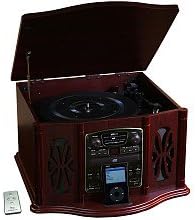
This image displays the KLH AUDIO KL-300i Nostalgia 5-n-1 System. The unit features a dark wood finish. The top lid is open, revealing a turntable. Below the turntable, the front panel includes controls for the CD player, AM/FM radio tuner, and an iPod dock. A small remote control is visible to the left of the main unit.
Kontrolli tal-Panew ta' Quddiem:
- Buttuna tal-Qawwa: Ixgħel jew jitfi l-unità.
- Selettur tal-Funzjoni: Switches between Phono, CD, Radio, iPod, and Aux modes.
- Buttuna tal-Volum: Jaġġusta l-livell tal-volum ewlieni.
- CD Player Controls: Daqq/Pawża, Waqqaf, Aqbeż 'il Quddiem/Lura.
- Tuner tar-Radju: AM/FM band selector, Tuning knob.
- iPod Dock: Connector for iPod devices.
- Aux-In Jack: Input ta' 3.5mm għal apparati awdjo esterni.
- Jack tal-headphone: Ħruġ ta' 3.5mm għal smigħ privat.
Panel ta 'Fuq:
- Turntable: For playing vinyl records.
- Għatu: Protects the turntable when not in use.
Panel tal-ġenb:
- Gverta tal-Cassettes: For playing audio cassette tapes.
Setup
Follow these steps for initial setup of your audio system.
- Pjazzament: Place the unit on a stable, flat surface away from direct sunlight, heat sources, and excessive dust or moisture. Ensure there is adequate space around the unit for ventilation.
- Qabbad l-Antenna: For optimal AM/FM radio reception, connect the supplied antenna wire to the antenna terminal on the rear of the unit. Extend the wire fully for better reception.
- Konnessjoni tal-Enerġija: Ipplaggja l-korda tal-enerġija AC f'bokk standard tal-ħajt.
- Qawwa Inizjali Mixgħula: Press the Power button on the front panel to turn on the unit.
Istruzzjonijiet Operattivi
Operazzjoni Ġenerali:
- Power On/Off: Agħfas il-buttuna Power biex tixgħel jew titfi l-unità.
- Għażla tal-Funzjoni: Use the Function Selector knob or buttons to choose your desired audio source (Phono, CD, Radio, iPod, Aux).
- Aġġustament tal-Volum: Rotate the Volume knob to increase or decrease the sound level.
Operazzjoni turntable:
- Lift the lid of the unit.
- Poġġi rekord tal-vinil fuq il-platter tat-turntable.
- Select the appropriate speed (33 1/3, 45, or 78 RPM) using the speed selector switch. For 45 RPM records, place the included adapter on the spindle if needed.
- Gently lift the tonearm and position the stylus over the desired starting groove of the record.
- Lower the tonearm slowly onto the record. Playback will begin automatically.
- To stop playback, gently lift the tonearm and return it to its rest.
Tħaddim tas-CD Player:
- Press the Function Selector to CD mode.
- Press the Eject button to open the CD tray.
- Poġġi CD fit-trej bin-naħa tat-tikketta tħares 'il fuq.
- Press the Eject button again to close the tray. The CD will begin playing automatically or display the track count.
- Uża l-buttuni Play/Pause, Stop, u Skip biex tikkontrolla l-plejbek.
Cassette Player Operation:
- Daħħal tejp tal-cassette fl-islott tal-cassette fuq il-ġenb tal-unità.
- Agħfas il-buttuna Play biex tibda daqq.
- Use the Fast Forward (FF) button to advance the tape quickly.
- To stop playback, press the Stop/Eject button. Pressing it halfway will eject the tape.
Tħaddim tar-Radju AM/FM:
- Press the Function Selector to Radio mode.
- Select either AM or FM band using the band selector switch.
- Rotate the Tuning knob to search for radio stations.
- Adjust the antenna wire for best reception.
iPod Dock Operation:
- Press the Function Selector to iPod mode.
- Carefully place your compatible iPod device onto the iPod dock connector.
- Use your iPod's controls to select and play music. Audio will be routed through the KLH AUDIO system's speakers.
Aux-In Operation:
- Press the Function Selector to Aux mode.
- Connect an external audio device (e.g., MP3 player, smartphone) to the Aux-In jack on the front panel using the supplied 3.5mm auxiliary cable.
- Play audio from your external device. The sound will be played through the KLH AUDIO system's speakers.
Użu tal-Kontroll mill-bogħod:
The remote control primarily operates the CD player functions (Play, Pause, Stop, Skip). Note that the remote cannot turn the unit on or off.
Manutenzjoni
Proper care will ensure the longevity of your system.
- Tindif tal-Unità: Imsaħ il-barra tal-unità b'ċarruta ratba u niexfa. Tużax prodotti tat-tindif, xama' jew solventi li joborxu.
- Kura tal-istilus: Handle the turntable stylus with extreme care. Clean the stylus periodically with a soft brush, brushing from back to front.
- Kura tas-CD/Kassett: Keep CDs and cassette tapes clean and free of dust. Store them in their cases when not in use.
Issolvi l-problemi
Jekk tesperjenza problemi bis-sistema tiegħek, irreferi għall-problemi u s-soluzzjonijiet komuni li ġejjin.
| Problema | Kawża Possibbli | Soluzzjoni |
|---|---|---|
| Ebda Qawwa | Il-korda tal-enerġija mhux imdaħħla sew. | Iċċekkja l-konnessjoni tal-korda tal-enerġija mal-unità u mas-sokit tal-ħajt. |
| Ebda Ħoss | Volum baxx wisq; Funzjoni żbaljata magħżula; Headphones imqabbda. | Increase volume; Select correct function; Disconnect headphones. |
| Turntable mhux għażil | Unit not powered on; Belt dislodged. | Ensure unit is on; Contact service if belt issue suspected. |
| Riċeviment Radju Fqir | L-antenna mhux estiża jew pożizzjonata b'mod korrett. | Extend and adjust the antenna wire for better signal. |
| Is-CD mhux qed idoqq | CD inserted incorrectly; CD is scratched or dirty. | Ensure CD is label-side up; Clean or replace CD. |
Speċifikazzjonijiet
| Karatteristika | Speċifikazzjoni |
|---|---|
| Sors tal-Enerġija | AC 120V ~ 60Hz |
| Dimensjonijiet (W x D x H) | Approx. 17" x 17" x 10.5" (43.2 cm x 43.2 cm x 26.7 cm) |
| Veloċitajiet tat-turntable | 33 1/3, 45, 78 RPM |
| Medda ta 'Frekwenza tar-Radju | AM: 530-1710 kHz, FM: 88-108 MHz |
| Kompatibilità CD | CD, CD-R / RW |
| iPod Dock | Compatible with older generation iPods (30-pin connector) |
Garanzija u Appoġġ
This product is covered by a limited manufacturer's warranty. For specific warranty terms and conditions, please refer to the warranty card included with your purchase or contact KLH customer support. If you require technical assistance or have questions not covered in this manual, please contact KLH customer service through their official webis-sit jew l-informazzjoni ta' kuntatt ipprovduta mal-prodott tiegħek.


