1. Introduzzjoni
This manual provides essential information for the safe and efficient use of your Hama USB 7.1 Surround Sound Card, Model 00051620. Please read these instructions carefully before using the device and keep them for future reference. This external sound card allows you to connect headphones, microphones, or speakers with a 3.5mm jack to your computer or tablet via a USB-A port, enhancing your audio experience with simulated 7.1 surround sound.
2. Istruzzjonijiet tas-Sigurtà
- Do not open the device. Opening the device voids the warranty and may lead to electric shock.
- Ipproteġi l-prodott mill-ħmieġ, l-umdità u s-sħana żejda.
- Uża l-prodott biss għall-iskop maħsub tiegħu.
- Twaqqax il-prodott jew tesponih għal xokkijiet qawwija.
- Żomm dan il-prodott, bħall-prodotti kollha elettriċi, fejn ma jintlaħaqx mit-tfal.
- Armi l-materjal tal-ippakkjar immedjatament skont ir-regolamenti applikabbli lokalment.
3. Kontenut tal-Pakkett
Ivverifika li l-pakkett tiegħek fih l-oġġetti li ġejjin:
- 1x Hama USB 7.1 Surround Sound Card (Model 00051620)
- 1x Manwal ta 'Istruzzjoni
4. Prodott Aktarview
The Hama USB 7.1 Surround Sound Card is a compact audio adapter designed to provide enhanced sound capabilities for your computer or tablet. It features a USB-A connector for easy plug-and-play functionality and includes dedicated ports for audio input and output.
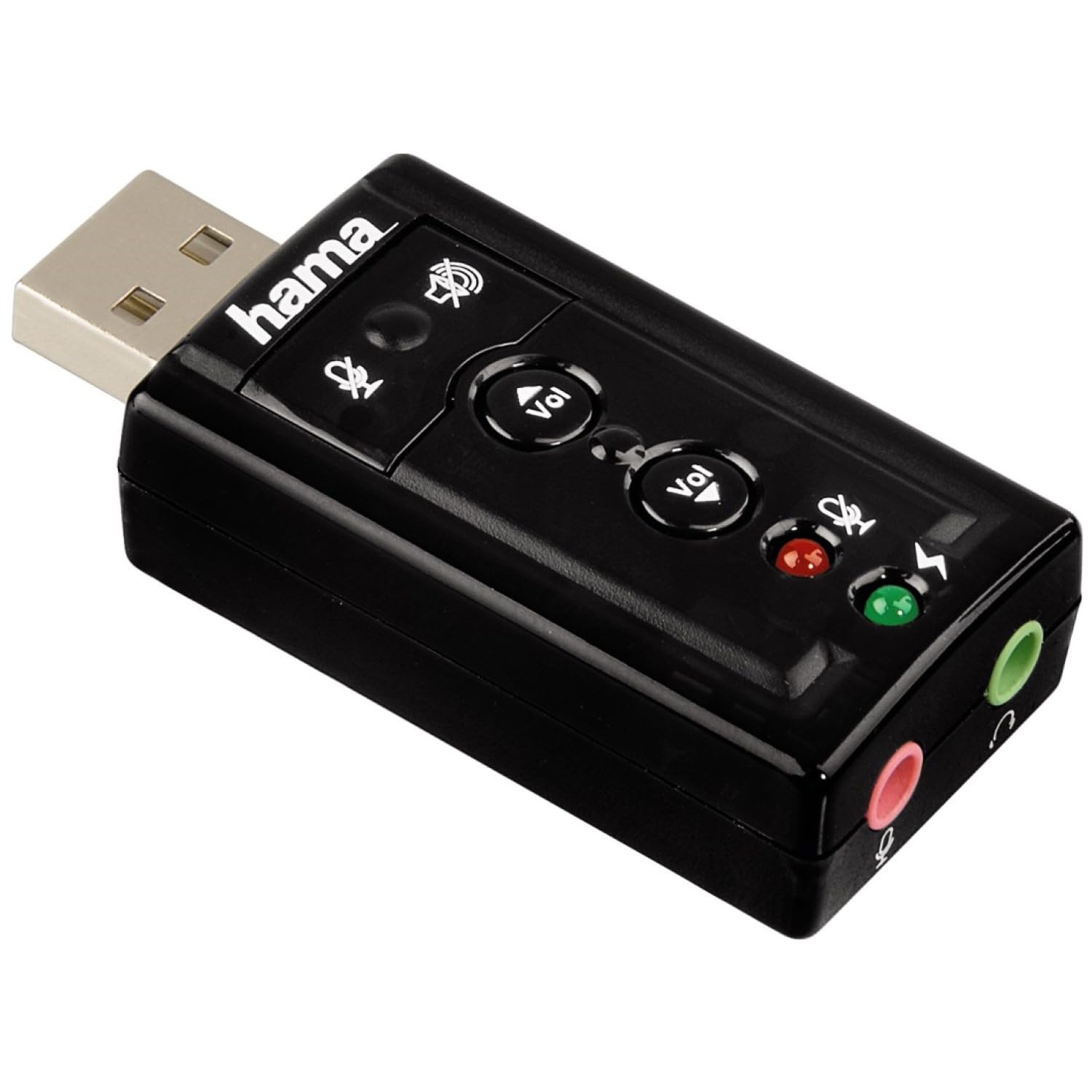
Immaġni 1: Fuq view of the Hama USB 7.1 Surround Sound Card, showing the USB-A connector, volume control buttons, and mute indicators.
Kontrolli u Portijiet:
- Konnettur USB-A: For connecting to your computer or tablet.
- Buttuni Volum 'il fuq /' l isfel: Jaġġusta l-volum tal-ħruġ tal-awdjo.
- Buttuna Mute tal-Mikrofonu: Mutes or unmutes the connected microphone.
- Buttuna tal-Mute tal-Ispeaker: Mutes or unmutes the audio output to headphones/speakers.
- 3.5mm Microphone Jack (Red): Għall-konnessjoni ta 'mikrofonu estern.
- 3.5mm Headphone/Speaker Jack (Green): Għall-konnessjoni ta' headphones jew speakers.

Image 2: End view of the Hama USB 7.1 Surround Sound Card, highlighting the red microphone input jack and the green headphone/speaker output jack.
5. Rekwiżiti tas-Sistema
- Operating System: Windows, macOS, or compatible tablet OS.
- Available USB-A port.
- Headphones, microphone, or speakers with a 3.5mm jack connector.
6. Installazzjoni u Setup
- Connect the Sound Card: Plug the USB-A connector of the Hama USB 7.1 Surround Sound Card into an available USB-A port on your computer or tablet.
- Installazzjoni tas-sewwieq: The device is typically plug-and-play, and your operating system should automatically detect and install the necessary drivers. If prompted, follow the on-screen instructions.
- Qabbad Apparat Awdjo:
- For headphones or speakers, connect the 3.5mm jack into the aħdar port on the sound card.
- For a microphone, connect the 3.5mm jack into the aħmar port on the sound card.
- Ikkonfigura s-Settings tal-Awdjo: Access your operating system's sound settings to ensure the Hama USB 7.1 Surround Sound Card is selected as the default playback and recording device.
- Installazzjoni tas-Softwer (Mhux obbligatorja): For advanced features like XeaR-Sound 7.1 surround simulation, 10-band equalizer, and karaoke functions, install the dedicated software. Refer to the manufacturer's website for software downloads and installation instructions.
7. Operazzjoni
Basic Audio Control:
- Aġġustament tal-Volum: Use the 'Vol +' and 'Vol -' buttons on the sound card to increase or decrease the output volume.
- Mute Audio Output: Press the speaker mute button to temporarily silence the audio output. Press again to unmute.
- Mute Microphone Input: Press the microphone mute button to temporarily disable microphone input. Press again to enable.
Karatteristiċi Avvanzati tas-Softwer:
If you have installed the optional software, you can access the following features:
- XeaR-Sound Technology: Enables simulated 7.1 crystal-clear surround sound for stereo speakers or headsets.
- Ekwalizzatur 10-Band: Customize your audio experience with various presets (e.g., Jazz, Rock, Classic) or create your own.
- Additional Sound Effects: Apply various sound effects to your audio.
- Adjustable Room Acoustics: Modify the perceived acoustic environment.
- Karaoke Recording: Record karaoke performances with original voice suppression and tone adjustment capabilities.
8. Manutenzjoni
The Hama USB 7.1 Surround Sound Card requires minimal maintenance.
- Naddaf l-apparat biss bi ftit damp, drapp mingħajr ħelu. Tużax aġenti tat-tindif aggressivi.
- Ensure the USB port and audio jacks are free from dust and debris.
9 Issolvi l-problemi
Ebda Ħsejjes tal-Ħsejjes:
- Ensure the sound card is securely plugged into a USB port.
- Check if your headphones/speakers are correctly connected to the green jack.
- Verify that the speaker mute button on the sound card is not active.
- Confirm that the Hama USB 7.1 Surround Sound Card is selected as the default playback device in your operating system's sound settings.
- Adjust the volume using the sound card's buttons and your computer's volume controls.
Mikrofonu Mhux Jaħdem:
- Ensure your microphone is correctly connected to the red jack.
- Verify that the microphone mute button on the sound card is not active.
- Confirm that the Hama USB 7.1 Surround Sound Card is selected as the default recording device in your operating system's sound settings.
- Iċċekkja s-settings tal-privatezza tal-mikrofonu fis-sistema operattiva tiegħek.
Kwistjonijiet ta' Kwalità tal-Ħoss:
- Kun żgur li l-konnessjonijiet kollha huma siguri.
- Try connecting the sound card to a different USB port.
- If using the optional software, check equalizer settings and disable any sound effects that might be causing distortion.
10. Speċifikazzjonijiet
| Karatteristika | Dettall |
|---|---|
| Brand | Hama |
| Numru tal-Mudell | 00051620 (magħruf ukoll bħala 51620) |
| Kulur | Iswed |
| Konnettur | USB A male |
| USBStandard | USB 2.0 |
| Konnessjoni tal-Ispeaker | 3.5mm female jack |
| Konnessjoni tal-headphone | 3.5mm female jack |
| Kontroll tal-Volum | Yes, with mute function |
| Modalità tal-Ħruġ tal-Awdjo | Jdawru |
| Surround Sound Channel Konfigurazzjoni | 7.1 (simulated with software) |
| Massimu SampRata tal-linarda | 48 kHz |
| Apparati Kompatibbli | USB (PC, Laptop, Tablets) |
| Manifattur | Hama EURL |
11. Informazzjoni dwar ir-Rimi
Observe the applicable local regulations for the disposal of electronic devices. The product must not be disposed of with normal household waste. Dispose of the product according to the European Directive 2012/19/EU on waste electrical and electronic equipment (WEEE) at a designated collection point for electrical and electronic equipment.
12. Garanzija
Hama GmbH & Co KG provides a limited warranty for this product. For detailed warranty terms and conditions, please refer to the official Hama webis-sit jew ikkuntattja lill-bejjiegħ lokali tiegħek. Żomm il-prova tax-xiri tiegħek għal talbiet ta' garanzija.
13. Appoġġ għall-Klijent
If you have any questions about this product or require technical assistance, please contact Hama customer support. You can find contact information on the official Hama websit (www.hama.com) or through your local retailer.


