1. Introduzzjoni
The Iwata-Medea Studio Series Smart Jet Pro is a single-piston, oil-less air compressor designed for airbrush applications. This unit features an auto shut-off function, an adjustable air-pressure gauge, and a moisture filter. It is engineered for quiet operation and reliability, making it suitable for both occasional and professional artists.
This manual provides essential information for the safe and efficient operation, setup, and maintenance of your Smart Jet Pro compressor.
2. Informazzjoni dwar is-Sigurtà
Please read and understand all safety instructions before operating the compressor. Failure to follow these instructions may result in electric shock, fire, or serious injury.
- Dejjem ħaddem il-kompressur f'żona b'ventilazzjoni tajba.
- Tużax ħdejn likwidi jew gassijiet li jaqbdu.
- Ensure the power cord is undamaged and properly grounded.
- Skonnettja l-enerġija qabel ma tagħmel xi manutenzjoni jew tindif.
- Żomm it-tfal u l-annimali domestiċi 'l bogħod mill-kompressur waqt it-tħaddim.
- Dan il-prodott fih kimiċi magħrufa mill-Istat ta’ Kalifornja li jikkawżaw kanċer u difetti fit-twelid jew ħsara riproduttiva oħra.
3. Kontenut tal-Pakkett
Ivverifika li l-oġġetti kollha huma preżenti fil-pakkett:
- Iwata-Medea Studio Series Smart Jet Pro Air Compressor (Model IS 875)
- High-strength polyurethane air hose
- Moisture filter (pre-installed)
- Manwal ta 'Istruzzjoni (dan id-dokument)
4. Prodott Aktarview
The Smart Jet Pro compressor features a compact design with an all-metal protective case and a convenient carrying handle. Key components include the air pressure gauge, pressure regulator knob, and moisture filter.

Figura 1: Quddiem view of the Iwata-Medea Smart Jet Pro Air Compressor, showing the pressure gauge, regulator, and included air hose.
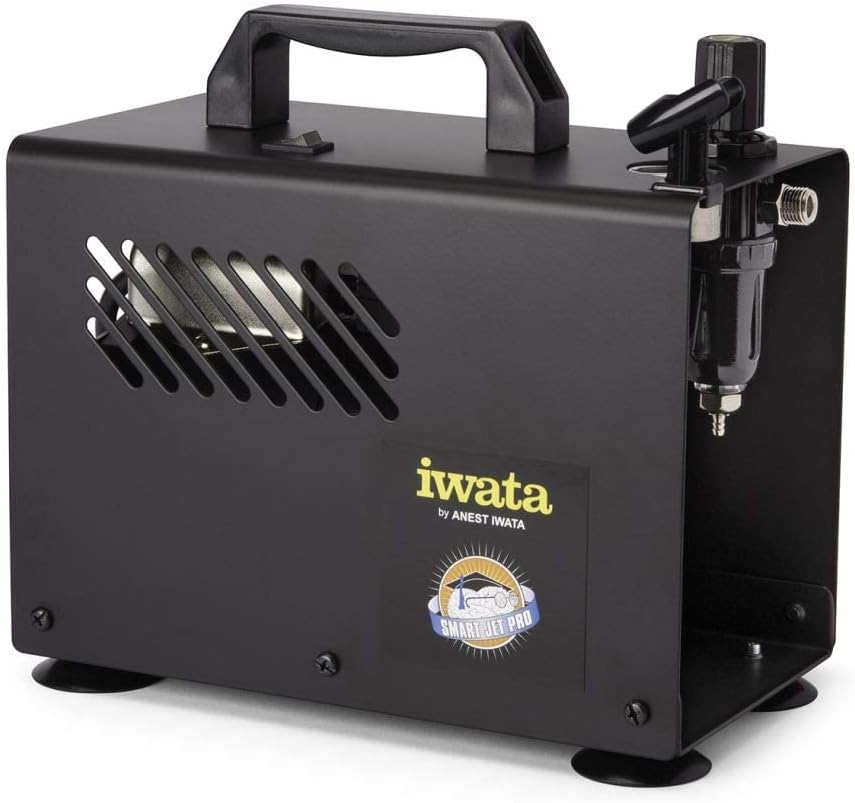
Figura 2: Ġenb view of the compressor, highlighting the integrated moisture filter and pressure adjustment knob.
5. Setup
- Pjazzament: Place the compressor on a stable, level surface in a clean, well-ventilated area. Ensure adequate space around the unit for air circulation.
- Qabbad il-Pajp tal-Arja: Connect one end of the provided air hose to the air outlet on the compressor. Connect the other end to your airbrush. Ensure connections are secure to prevent air leaks.
- Konnessjoni tal-Enerġija: Plug the compressor's power cord into a standard 120V AC electrical outlet.
6. Istruzzjonijiet Operattivi
- Qawwa Mixgħul: Flip the power switch located on the top of the compressor to the "ON" position. The compressor will start running.
- Aġġusta l-Pressjoni tal-Arja: Use the pressure regulator knob (typically located near the air outlet and gauge) to adjust the desired air pressure. Turn clockwise to increase pressure and counter-clockwise to decrease. Monitor the air pressure gauge for accurate readings. The maximum operating pressure is 35 PSI.
- Karatteristika tat-Tfiq Awtomatiku: The Smart Jet Pro features an automatic shut-off function. When the airbrush trigger is released and air flow stops, the compressor will automatically turn off to conserve energy and reduce wear. It will restart automatically when the airbrush trigger is pressed again.
- Ibda l-Airbrushing: Once the desired pressure is set, you can begin your airbrushing work.
- Itfi: After use, flip the power switch to the "OFF" position and unplug the compressor from the power outlet.
7. Manutenzjoni
Regular maintenance ensures optimal performance and longevity of your compressor.
- Moisture Filter Drainage: The integrated moisture filter collects condensation. Periodically check the filter bowl for accumulated water. To drain, ensure the compressor is off and depress the small valve at the bottom of the filter bowl to release the water.
- Tindif: Wipe the exterior of the compressor with a clean, damp cloth. Do not use harsh chemicals or abrasive cleaners. Ensure no liquids enter the internal components.
- Filtru tal-Arja: The compressor is designed with an internal air filter. No user-serviceable air filter replacement is typically required for this model.
8 Issolvi l-problemi
Irreferi għal din it-taqsima għal kwistjonijiet komuni u s-soluzzjonijiet tagħhom.
| Problema | Kawża Possibbli | Soluzzjoni |
|---|---|---|
| Il-kompressur ma jixgħelx. | No power, loose connection, power switch off. | Check power cord connection, ensure outlet is functional, verify power switch is ON. |
| Pressjoni tal-arja baxxa jew xejn. | Regulator set too low, air leaks, clogged airbrush. | Adjust pressure regulator, check hose connections for leaks, clean airbrush. |
| Il-kompressur jaħdem kontinwament. | Air leak in system, airbrush trigger stuck open. | Check all connections for leaks, ensure airbrush trigger is fully released. |
| Excessive moisture in air line. | Moisture filter needs draining. | Drain the moisture filter as described in the Maintenance section. |
9. Speċifikazzjonijiet
Technical specifications for the Iwata-Medea Studio Series Smart Jet Pro Air Compressor (Model IS 875).

Figure 3: Product dimensions of the Iwata-Medea Smart Jet Pro Air Compressor.
| Karatteristika | Speċifikazzjoni |
|---|---|
| Isem tal-Mudell | IS 875 |
| Brand | Iwata |
| Voltage | 120 Volts |
| Sors tal-Enerġija | Corded Elettriku |
| Livell ta' Storbju | 50 Deċibel |
| Pressjoni Operattiva Massima | 35 PSI (lira għal kull pulzier kwadru) |
| Qawwa tal-Mutur | 0.13 HP (1/8 hp) |
| Piż tal-oġġett | 12.67 libbra (5.76 Kilogrammi) |
| Dimensjonijiet tal-Prodott (L x W x H) | 6.18" x 8.65" x 2.25" |
| Karatteristika Speċjali | Moisture Filter, Auto Shut-Off |
| Komponenti Inklużi | Filter, Air Hose |
10. Garanzija u Appoġġ
For warranty information or technical support, please refer to the documentation included with your purchase or contact Iwata customer service. Keep your purchase receipt as proof of purchase for warranty claims.
For further assistance, visit the official Iwata webis-sit jew ikkuntattja ċ-ċentri ta’ servizz awtorizzati tagħhom.


