1. Introduzzjoni
Welcome to the user manual for your new Singing Machine SMVG-620 CD+G Karaoke System. This system is designed to provide hours of entertainment with its CD+G playback capabilities, built-in camera, 5.5-inch monitor, and AM/FM radio. Please read this manual thoroughly before operating your unit to ensure proper use and to maximize your enjoyment.
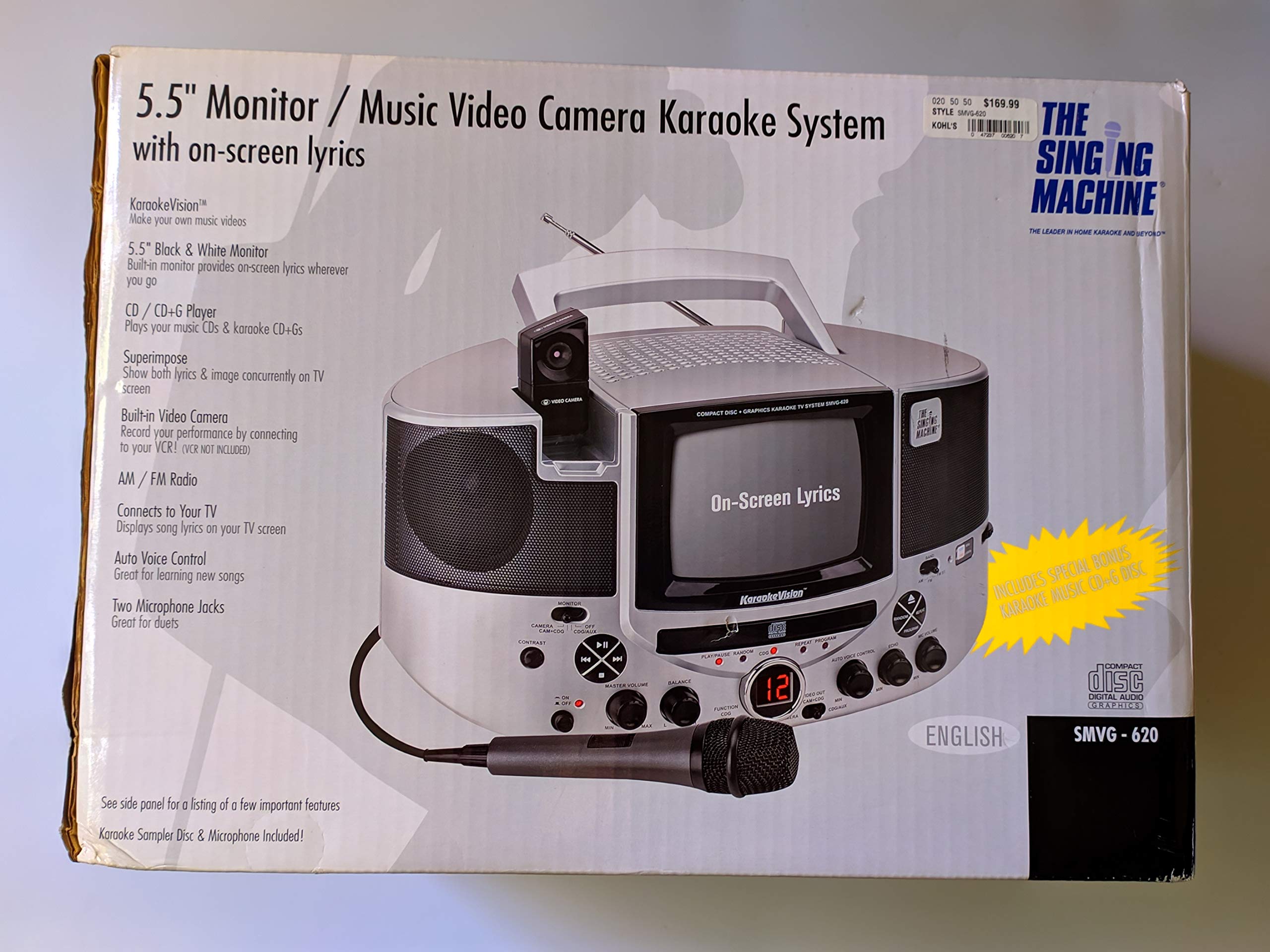
Figura 1.1: The Singing Machine SMVG-620 CD+G Karaoke System.
For optimal performance and safety, always follow the instructions and warnings provided.
2. Informazzjoni Importanti dwar is-Sigurtà
- Aqra l-Istruzzjonijiet: L-istruzzjonijiet kollha tas-sigurtà u tat-tħaddim għandhom jinqraw qabel ma jitħaddem l-apparat.
- Żomm Istruzzjonijiet: L-istruzzjonijiet tas-sigurtà u tat-tħaddim għandhom jinżammu għal referenza futura.
- Oqgħod attent it-Twissijiet: It-twissijiet kollha fuq l-apparat u fl-istruzzjonijiet tat-tħaddim għandhom jiġu osservati.
- Segwi l-Istruzzjonijiet: L-istruzzjonijiet kollha tat-tħaddim u l-użu għandhom jiġu segwiti.
- Ilma u Umdità: Tużax dan l-apparat ħdejn l-ilma.
- Tindif: Naddaf biss b'ċarruta niexfa.
- Ventilazzjoni: Timblokkax il-fetħiet tal-ventilazzjoni. Installa skont l-istruzzjonijiet tal-manifattur.
- Sħana: Tinstallax ħdejn xi sorsi tas-sħana bħal radjaturi, reġistri tas-sħana, stufi, jew apparat ieħor (inkluż amplifiers) li jipproduċu sħana.
- Protezzjoni tal-Korda tal-Enerġija: Ipproteġi l-korda tad-dawl milli timxi fuqha jew maqrusa, partikolarment fil-plakek, ir-reċipjenti tal-konvenjenza, u l-punt fejn joħorġu mill-apparat.
- Attachments/Aċċessorji: Uża biss aċċessorji/aċċessorji speċifikati mill-manifattur.
- Sajjetti: Aqla’ dan l-apparat waqt maltempati tas-sajjetti jew meta ma jintużax għal perjodi twal ta’ żmien.
- Servizzi: Irreferi l-manutenzjoni kollha lil persunal tas-servizz kwalifikat. Il-manutenzjoni hija meħtieġa meta l-apparat ikun sar xi ħsara.
3. Kontenut tal-Pakkett
Carefully unpack your Singing Machine SMVG-620 system and ensure all items listed below are present and in good condition.
- SMVG-620 CD+G Karaoke System
- One (1) Microphone
- Sampler CD+G Disc
- Audio/Video RCA Cables
- Adapter tal-Qawwa AC
- Manwal ta' Istruzzjoni

Figura 3.1: Contents of the box, including the microphone, RCA cables, and the instruction manual.
4. Prodott Aktarview
Familiarize yourself with the various parts and controls of your SMVG-620 Karaoke System.

Figura 4.1: Wara view of the product packaging highlighting key features and components of the SMVG-620 system.
Karatteristiċi ewlenin:
- 5.5" Black & White Monitor: For on-screen lyrics from CD+G discs.
- Built-in Color Camera: Allows you to see yourself on the monitor or connected TV.
- Dual Microphone Jacks: Connect two microphones for duets (one microphone included).
- Radju AM/FM: Isma' l-istazzjonijiet tar-radju favoriti tiegħek.
- CD+G Player: Plays standard audio CDs and CD+Graphics discs.
- Kontroll tal-Vuċi Awtomatiku (AVC): Helps maintain vocal balance by automatically reducing the main vocal track when you sing.
- Kontroll tal-Eku: Adds depth and resonance to your voice.
- Professional Style Microphone: For clear vocal pickup.
- Output Awdjo/Vidjo: Connects to your TV for larger screen display and enhanced audio.
5. Setup
5.1 Konnessjoni tal-Enerġija
- Kun żgur li l-unità titqiegħed fuq wiċċ stabbli u ċatt.
- Connect the AC power adapter to the DC IN jack on the back of the SMVG-620 unit.
- Plug the other end of the AC power adapter into a standard wall outlet (AC 120V ~ 60Hz).
5.2 Konnessjoni ma' Televiżjoni
Biex view lyrics on a larger screen and enhance audio, connect the SMVG-620 to your television using the supplied Audio/Video RCA cables.
- Locate the AUDIO OUT (white and red) and VIDEO OUT (yellow) jacks on the back of the SMVG-620.
- Connect the white plug of the RCA cable to the white AUDIO OUT jack on the karaoke system and to the white AUDIO IN jack on your TV.
- Connect the red plug of the RCA cable to the red AUDIO OUT jack on the karaoke system and to the red AUDIO IN jack on your TV.
- Connect the yellow plug of the RCA cable to the yellow VIDEO OUT jack on the karaoke system and to the yellow VIDEO IN jack on your TV.
- Turn on your TV and select the correct A/V input source (e.g., AV1, Video 1) that corresponds to the jacks you used.
5.3 Konnessjoni tal-Mikrofonu
Plug the microphone into either the MIC 1 or MIC 2 jack on the front of the SMVG-620 unit.
6. Operazzjoni
6.1 Tixgħel/Jitfi
Agħfas il- QAWWA button located on the front panel to turn the unit ON or OFF.
6.2 Daqq tas-CD+G
- Open the CD compartment door and carefully place a CD+G disc (or standard audio CD) onto the spindle with the label side facing up. Close the door.
- Agħżel CD+G mode using the FUNCTION selector.
- Agħfas il- DĦABBA/PAWŻA buttuna biex tibda d-daqq.
- Aġġusta l- VOLUM MASTER il-pum sal-livell tas-smigħ mixtieq tiegħek.
- Uża l- SKIP buttuni (<< or >>) biex tinnaviga bejn it-traċċi.
- Biex tieqaf, agħfas DĦABBA/PAWŻA again. Press again to resume.
- Biex twaqqaf il-plejbek, agħfas il-buttuna STOP buttuna.
6.3 Użu tal-Mikrofonu
- Ensure the microphone is connected to a MIC jack.
- Aġġusta l- VOLUM MIK pum biex tikkontrolla l-livell tal-ħruġ tal-mikrofonu.
- Dawwar il- ECHO knob to add an echo effect to your voice.
- Il- AUTO VOICE CONTROL (AVC) switch can be toggled ON/OFF. When ON, the original vocal track on a CD+G disc will be reduced when you sing into the microphone.
Radju 6.4 AM/FM
- Agħżel AM or FM mode using the FUNCTION selector.
- Extend the FM antenna for better reception.
- Dawwar il- IRTUNING il-pum biex tagħżel l-istazzjon tar-radju mixtieq.
- Aġġusta l- VOLUM MASTER pum.
6.5 Funzjoni tal-Kamera
The built-in camera allows you to display your image on the 5.5-inch monitor or a connected TV.
- Ensure the unit is powered on and connected to a TV if you wish to use an external display.
- The camera feed will automatically display when the unit is in CD+G or Video mode, or when no other video source is active.
7. Manutenzjoni
7.1 Tindif tal-Unità
- Dejjem aqla 'l-unità mill-iżbokk tad-dawl qabel it-tindif.
- Uża drapp artab u niexef biex tnaddaf l-uċuħ ta’ barra.
- Tużax prodotti tat-tindif, xama', jew solventi li joborxu għax jistgħu jagħmlu ħsara lill-finitura.
- Għal-lenti tas-CD, uża diska speċjalizzata għat-tindif tal-lentijiet tas-CD.
7.2 Kura tas-CD
- Immaniġġja s-CDs mit-truf tagħhom biex tevita marki tas-swaba’ fuq il-wiċċ li qed iddoqqhom.
- Keep discs in their cases when not in use to prevent scratches.
- Naddaf id-diski b'ċarruta ratba u mingħajr suf, billi timsaħ miċ-ċentru 'l barra.
8 Issolvi l-problemi
If you encounter any issues with your SMVG-620, please refer to the following common problems and solutions.
| Problema | Kawża Possibbli | Soluzzjoni |
|---|---|---|
| Ebda qawwa | Il-korda tal-enerġija mhux konnessa sew. | Kun żgur li l-adapter tal-AC huwa pplaggjat sew fl-unità u f'sokit tal-ħajt li jaħdem. |
| L-ebda ħoss mill-kelliema | Master Volume is too low. Magħżula l-modalità ta' funzjoni żbaljata. | Increase the MASTER VOLUME. Select the correct FUNCTION (CD+G, AM, FM). |
| L-ebda ħoss mill-mikrofonu | Mikrofonu mhux imqabbad. MIC VOLUME is too low. Is-swiċċ tal-mikrofonu huwa MITFI. | Plug microphone into MIC 1 or MIC 2 jack. Increase the MIC VOLUME. Ensure microphone switch is ON. |
| No video on TV / No lyrics | RCA cables not connected correctly. Input tat-TV mhux korrett magħżul. Not a CD+G disc. | Check all RCA cable connections (yellow for video). Select the correct A/V input on your TV. Ensure you are playing a CD+G disc for lyrics. |
| CD skipping | Id-diska hija maħmuġa jew mibruxa. L-unità tinsab fuq wiċċ instabbli. | Clean the disc or try another disc. Place the unit on a stable, vibration-free surface. |
9. Speċifikazzjonijiet
| Numru tal-Mudell | SMVG-620 (SIN SMVG620) |
| Sors tal-Enerġija | AC 120V ~ 60Hz (via AC Adapter) |
| Monitor | 5.5-inch Black & White |
| Għadd tal-Kelliem | 2 |
| Apparati Kompatibbli | Televiżjoni |
| Tip tal-Midja | CD, CD+G |
| Dimensjonijiet tal-Prodott (LxWxH) | 35.8 x 20.8 x 19.3 ċm (14.1 x 8.2 x 7.6 pulzieri) |
| Piż tal-oġġett | 3.9 kg (8.6 lbs) |
10. Garanzija u Appoġġ
For warranty information and customer support, please refer to the warranty card included with your product or contact The Singing Machine directly. You may also consult your retailer for details regarding their return and warranty policies.
Manifattur: IL-MAGNA TAL-KANT


