1. Introduzzjoni
Thank you for choosing the Escali Primo Digital Food Scale. This manual provides essential information for the proper setup, operation, and maintenance of your new scale. Designed for accuracy and ease of use, the Escali Primo is ideal for various kitchen tasks, including food preparation, baking, and portion control.
The Escali Primo Digital Food Scale features a simple two-button operation, a sealed control panel for easy cleaning, and an automatic shut-off function to conserve battery life. It measures weights up to 11 lb (5,000 g) with precision.

Image: Escali Primo Digital Food Scale, Metallic.
2. Komponenti tal-Prodott
The Escali Primo Digital Food Scale consists of the following main components:
- Pjattaforma tal-użin: The surface where items are placed for measurement.
- Wirja Diġitali: Shows weight readings and unit indicators.
- On/Tare/Off Button: Used to power the scale on/off and activate the tare function.
- Unit (g/oz) Button: Used to switch between measurement units (grams, ounces, pounds:ounces).
- Kompartiment tal-batterija: Located on the underside, holds two AA batteries.
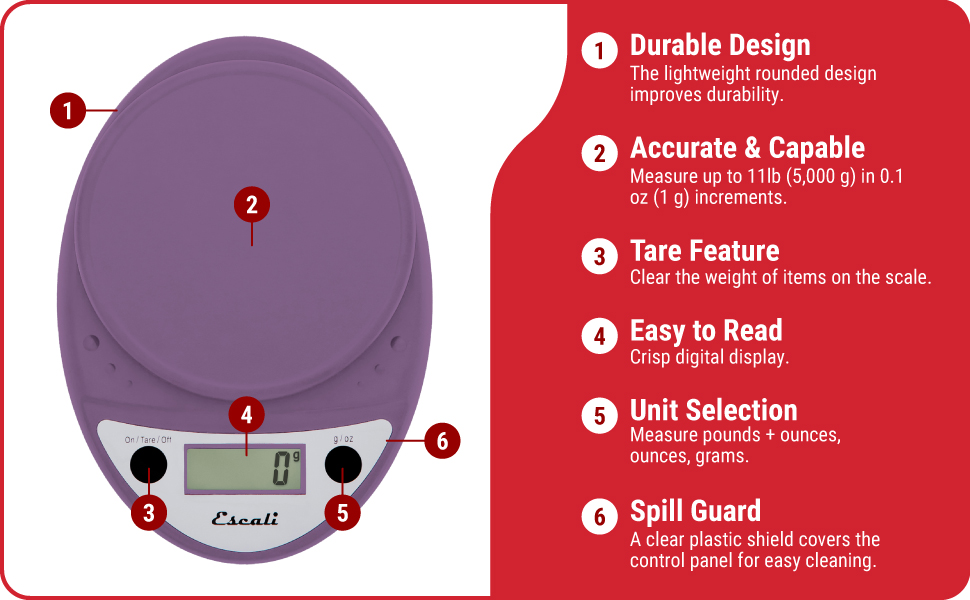
Image: Key features of the Escali Primo Digital Food Scale.
3. Setup
3.1 Installazzjoni tal-batterija
- Sib il-kompartiment tal-batterija fuq in-naħa ta' taħt tal-iskala.
- Iftaħ l-għatu tal-kompartiment tal-batterija.
- Daħħal żewġ batteriji AA, waqt li tiżgura l-polarità korretta (+/-) kif indikat ġewwa l-kompartiment.
- Agħlaq l-għatu tal-kompartiment tal-batterija sew.
3.2 Tqegħid Inizjali
Place the scale on a flat, stable, and level surface. Avoid placing it on soft or uneven surfaces, which can affect accuracy.
4. Istruzzjonijiet Operattivi
4.1 Power On/Off
- Biex Tixgħel: Agħfas il- On/Tare/Off buttuna. Id-displej se juri "0" meta jkun lest.
- Biex Tifi: Agħfas u żomm il- On/Tare/Off button for approximately 3 seconds. The scale will also automatically shut off after four minutes of inactivity to conserve battery life.
4.2 Għażla ta' Unità
To change the unit of measurement (grams, ounces, pounds:ounces), press the g/oz button while the scale is on. The display will cycle through the available units.

Image: Display and unit selection button.
4.3 Funzjoni tat-tara
The tare function allows you to subtract the weight of a container or to measure multiple ingredients consecutively.
- Poġġi kontenitur vojt fuq il-pjattaforma tal-użin. Id-displej se juri l-piż tiegħu.
- Agħfas il- On/Tare/Off buttuna. Id-displej jerġa' lura għal "0".
- Żid l-ingredjent tiegħek fil-kontenitur. Il-wiri se juri biss il-piż tal-ingredjent.
- Repeat the tare process for additional ingredients if needed.

Image: Using the scale for portion control with meal prep.
4.4 Oġġetti tal-Użin
Once the scale is on and set to your desired unit, simply place the item(s) to be weighed directly onto the weighing platform or into a tared container. The weight will be displayed instantly.

Image: Weighing ingredients for baking.
5. Manutenzjoni
5.1 Tindif
The sealed control panel and rounded design make the Escali Primo scale easy to clean. Wipe the scale with a damp drapp. Tgħaddix l-iskala fl-ilma jew tuża tindif li joborxu.
5.2 Ħażna
Store the scale in a dry place at room temperature. Avoid placing heavy objects on the scale when not in use, as this may affect its calibration over time.
6 Issolvi l-problemi
| Problema | Kawża Possibbli | Soluzzjoni |
|---|---|---|
| L-iskala ma tixgħel | Batteriji mejta jew installati ħażin. | Ibdel il-batteriji b'batteriji AA ġodda, filwaqt li tiżgura l-polarità korretta. |
| Qari mhux eżatt | Scale not on a flat, stable surface; scale overloaded; debris under platform. | Place scale on a firm, level surface. Ensure weight does not exceed 11 lb (5000 g). Clean any debris from under the platform. |
| Id-displej juri "Err" | L-iskala hija mgħobbija żżejjed. | Remove items from the scale. Ensure total weight is within the 11 lb (5000 g) capacity. |
| Automatic shut-off too soon | Normal operation (4 minutes of inactivity). | This is a battery-saving feature. Press the On/Tare/Off button to restart. |
7. Speċifikazzjonijiet
- Mudell: P115
- Kapaċità: 11 lb (5,000 g)
- Żidiet: 0.05 oz (1 g)
- Unitajiet ta' Kejl: oz, lb:oz, g
- Qawwa: 2 batteriji AA (inklużi)
- Dimensjonijiet tal-Prodott: 8.5 x 6 x 1.5 pulzieri (approssimattiv)
- Tip ta' wiri: LED diġitali
- Karatteristiċi Speċjali: Auto Shut Off, Tare Function, Sealed Control Panel
8. Informazzjoni dwar Garanzija
The Escali Primo Digital Food Scale comes with a Garanzija tul il-ħajja. For detailed warranty terms and conditions, please refer to the official Escali websit jew ikkuntattja l-appoġġ tal-klijent.
9. Appoġġ għall-Klijent
For further assistance, product information, or support, please visit the official Escali webis-sit jew ikkuntattja lid-dipartiment tas-servizz tal-konsumatur tagħhom. Id-dettalji ta' kuntatt tipikament jistgħu jinstabu fuq l-imballaġġ tal-prodott jew fuq il-manuskritt tal-manifattur. websit.
Tista' ssib aktar informazzjoni u appoġġ fuq Escali Store on Amazon.


