Introduzzjoni
The ButtKicker Gamer2 is an immersive haptic transducer system designed to provide powerful and accurate tactile feedback, enhancing your gaming, simulation, and entertainment experiences. Unlike traditional subwoofers that move air, the ButtKicker Gamer2 directly transfers low-frequency sound into physical vibrations, allowing you to feel the action without excessive noise. This manual provides comprehensive instructions for the proper installation, operation, and maintenance of your ButtKicker Gamer2 system.
The system includes a ButtKicker Gamer transducer unit and a 90-watt power amplifier, along with all necessary cables and mounting hardware for easy attachment to most chairs or sim rigs.
X'hemm fil-Kaxxa
Ivverifika li l-komponenti kollha huma preżenti fil-pakkett tiegħek:
- ButtKicker Gamer transducer with Easy Clamp™ mekkaniżmu ta 'twaħħil
- ButtKicker Power Amplifier BKA-130-C (120V Only)
- 13.5' cable with quick release, connecting ButtKicker Gamer to the Ampaktar ħaj
- RCA and mini "Y" adapters
- 5' RCA to RCA cable
- 5' RCA to mini cable
- Two Velcro® cable holders

Figure 1: Included components of the ButtKicker Gamer2 system.
Setup Istruzzjonijiet
Follow these steps to properly set up your ButtKicker Gamer2 system:
1. Attaching the ButtKicker Gamer Transducer
The ButtKicker Gamer unit features an Easy-Clamp™ mounting arm designed for quick and secure attachment. It can be clamped to any center post up to 1.4 inches (3.5 cm) in diameter, commonly found on office chairs or sim racing cockpits.
- Identify a sturdy, central post on your chair or sim rig.
- Loosen the adjustment knob on the Easy-Clamp™ mechanism.
- Poġġi l-clamp around the post and tighten the adjustment knob until the ButtKicker Gamer is securely fastened and does not wobble. Ensure the unit is positioned to allow for free movement and does not interfere with chair mechanisms.

Figure 2: Detail of the Easy-Clamp™ mounting arm.

Figure 3: ButtKicker Gamer2 mounted on an office chair.

Figure 4: ButtKicker Gamer2 mounted on a sim racing rig.
2. Konnessjoni tal-Enerġija Ampaktar ħaj
Place the ButtKicker Power Amplifier BKA-130-C in a convenient location, ensuring adequate ventilation. The amplifier is fanless for quiet operation.
- Connect the 13.5' cable from the ButtKicker Gamer transducer to the speaker output terminals on the amplifier. Ensure correct polarity if applicable (though typically not critical for transducers).
- Qabbad il- amplifier's power cable to a standard 120V AC outlet.

Figura 5: Amplifier placement in a typical setup.
3. Konnessjonijiet tal-Awdjo
The ButtKicker Gamer2 operates by converting low-frequency audio signals into vibrations. Connect the amplifier to your audio source (PC, gaming console, home theater receiver) using the provided cables.
- Konnessjoni tal-PC: Use the 5' RCA to mini cable and the mini "Y" adapter to split the audio output from your PC's sound card. One branch goes to your speakers/headphones, and the other to the ampl-input tal-lifer.
- Konnessjoni tal-Console: Use the RCA "Y" adapters with the 5' RCA to RCA cable to connect to your console's audio output (if available) or an audio extractor.
- Dedicated Subwoofer Output: For optimal performance, if your audio source has a dedicated subwoofer (LFE) output, connect the amplifier directly to this output using the appropriate RCA cable. This provides a cleaner low-frequency signal.
Nota Importanti: Some users report static when using the 3.5mm Y-splitter directly from a PC's main audio output. If you experience this, consider using a separate audio output for the ButtKicker (e.g., a secondary sound card, a monitor's 3.5mm output, or an Xbox controller's 3.5mm input if applicable for console setups) to provide a dedicated signal to the ampaktar ħaj.
4. Kontroll mill-Bogħod bil-Fili
Connect the wired remote control to the "Remote" port on the amplifier. This allows for convenient volume adjustment and power control from your seating position.
Istruzzjonijiet Operattivi
Once the system is set up, follow these steps to operate your ButtKicker Gamer2:
1. Tixgħel
Press the "Power" button on the amplifier or the wired remote control. The power indicator light will illuminate.
2. AmpKontrolli lifier

Figure 6: ButtKicker Power Amplifier BKA-130-C front panel.
- Low Filter Cutoff: Adjusts the lowest frequency the ButtKicker will respond to. Typically set between 50-70 Hz for general use.
- High Cutoff Frequency: Adjusts the highest frequency the ButtKicker will respond to. Setting this lower (e.g., 70-110 Hz) can provide a more focused "kick" sensation, while higher settings (up to 160 Hz) can offer a broader range of tactile feedback.
- Volum: Controls the intensity of the vibrations. Start with a low setting and gradually increase to your preferred level. Avoid setting it too high, which can lead to clipping.
- Clip/Signal Indicators: The "Signal" light indicates that an audio signal is being received. The "Clip" light indicates that the amplifier is being overdriven. If the "Clip" light flashes frequently, reduce the volume to prevent damage to the amplifier and transducer.
3. Adjusting for Optimal Experience
Experiment with the Low and High Cutoff Frequency settings to find the ideal tactile response for different games or media. For racing simulations, you might prefer a tighter, more impactful feel for engine RPMs and road textures. For explosions in action games, a broader frequency range might be desired.
Dimostrazzjoni bil-Vidjo: For a visual guide on the ButtKicker Gamer2's capabilities and setup, please refer to the official product video below.
Video 1: Official ButtKicker video demonstrating the Gamer2's immersive haptic feedback in various gaming scenarios. This video showcases the product's ability to translate in-game audio into physical sensations, enhancing realism.
Manutenzjoni
The ButtKicker Gamer2 system is designed for durability and requires minimal maintenance.
- Tindif: Use a soft, dry cloth to wipe down the transducer and ampEvita li tuża prodotti tat-tindif likwidi jew materjali li joborxu.
- Ventilazzjoni: Tiżgura l- amplifier has adequate airflow around it to prevent overheating, especially since it is convection-cooled (fanless).
- Ġestjoni tal-Kejbil: Use the provided Velcro cable ties to keep cables organized and prevent them from being snagged or damaged.
- Ħażna: If storing the unit for an extended period, disconnect it from power and store it in a dry, cool place.
Issolvi l-problemi
If you encounter issues with your ButtKicker Gamer2, refer to the following common problems and solutions:
| Problema | Kawża Possibbli | Soluzzjoni |
|---|---|---|
| Ebda setgħa li ampaktar ħaj | Power cable disconnected; outlet not active; ampisbaħ. | Check power cable connection; test outlet with another device; ensure amplifier power button is pressed. |
| No haptic feedback | Audio input not connected; volume too low; transducer cable disconnected; amplifier not receiving signal. | Verify all audio connections; increase amplifier volume; check transducer cable connection; ensure audio source is playing low-frequency content. Check "Signal" light on ampaktar ħaj. |
| Weak or inconsistent feedback | Volume too low; filter settings incorrect; transducer not securely mounted; audio source lacking strong bass. | Increase volume; adjust Low/High Cutoff Frequency; tighten transducer clamp; ensure audio content has sufficient bass. |
| "Clip" light flashing frequently | AmpIl-lifer huwa misjuq iżżejjed. | Naqqas il- amplifier's volume. Persistent clipping can damage the unit. |
| Static or unwanted noise in audio | Ground loop; audio Y-splitter interference. | Ipprova qabbad il- amplifier to a different audio output (e.g., a dedicated sound card output, or a monitor's audio out). Consider a ground loop isolator if the issue persists. |
Speċifikazzjonijiet
ButtKicker Gamer Transducer
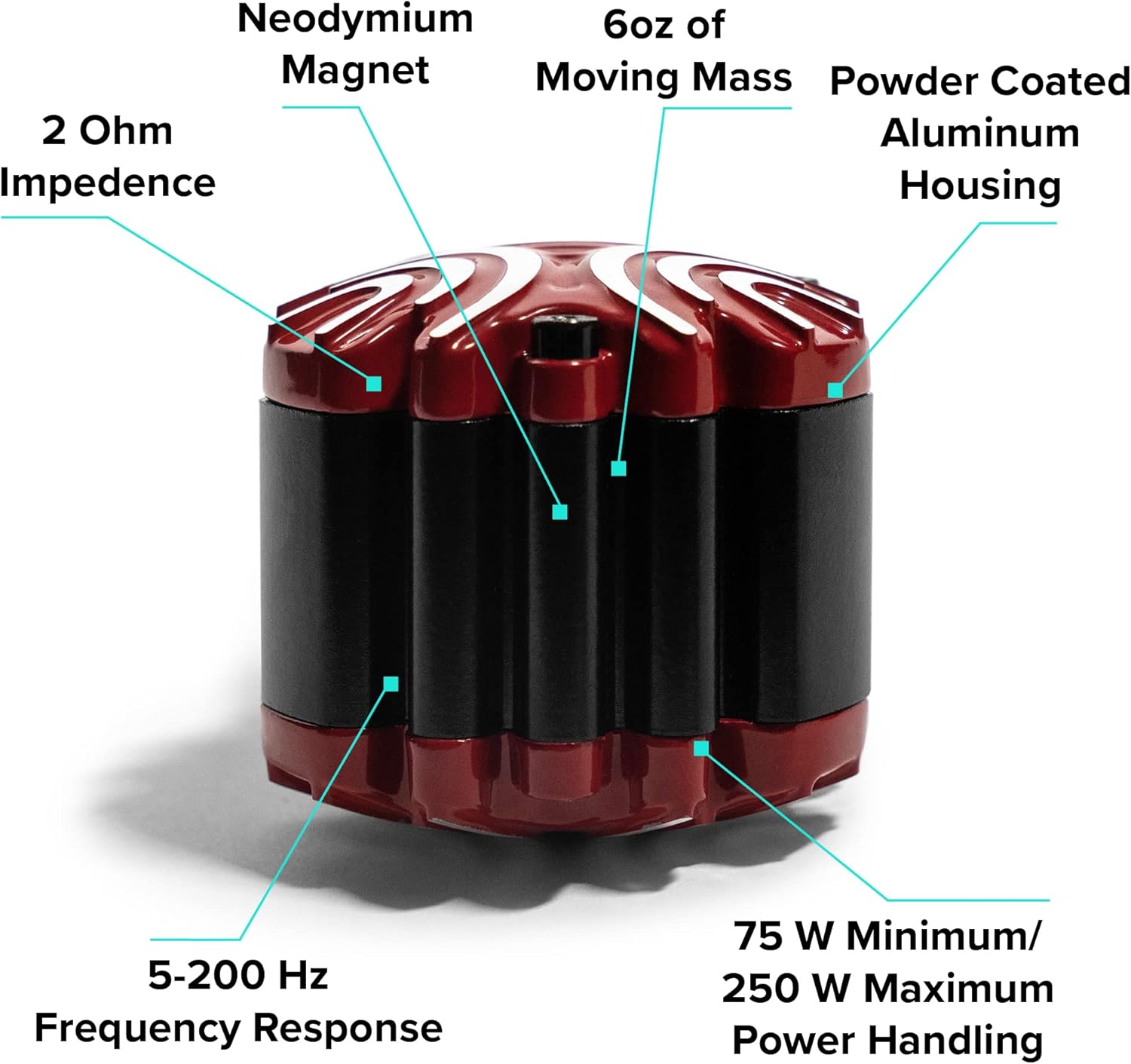
Figure 7: ButtKicker Gamer transducer key features.
- Impedenza: 2 Ohms
- Rispons tal-Frekwenza: 5-200 Hz
- Immaniġġjar tal-Enerġija: 75 W Minimum / 250 W Maximum
- Quddiesa Ċaqliq: 6 oz
- Kostruzzjoni: Powder Coated Aluminum Housing, Neodymium Magnet
- Immuntar: Easy-Clamp™ mechanism for posts up to 1.4" diameter
ButtKicker Power Amplifier BKA-130-C
- Output tal-Enerġija: 90 watts fi 2 ohms
- Tkessiħ: Fanless (convection-cooled)
- Input Voltage: 120V AC BISS
- Rispons tal-Frekwenza: 10-300 Hz
- Kontrolli: Low Filter Cutoff, High Cutoff Frequency, Volume
- Karatteristiċi: Wired remote control port, Pass-through outlet for daisy-chaining multiple units
- Kostruzzjoni: Djar tal-metall
Informazzjoni Ġenerali tal-Prodott
- Dimensjonijiet tal-Prodott: 12.2 x 10.83 x 16.14 pulzieri (ippakkjat)
- Piż tal-oġġett: 10.56 pounds (packaged)
- Numru tal-Mudell: BK-GR2
- ASIN: B000AOTLP6
Informazzjoni dwar Garanzija
ButtKicker products are manufactured to high standards. For specific warranty details, including coverage period and terms, please refer to the warranty card included with your product or visit the official ButtKicker websit. Żomm il-prova tax-xiri tiegħek għal talbiet ta' garanzija.
Appoġġ
For technical assistance, troubleshooting beyond this manual, or customer service inquiries, please contact ButtKicker customer support. The manufacturer, Guitammer Company, is known for its responsive customer support.
Please visit the official ButtKicker webis-sit għall-aktar informazzjoni ta' kuntatt u riżorsi ta' appoġġ aġġornati.


