Introduzzjoni
This manual provides essential information for the safe and efficient operation of your NEC VT37 1500-Lumen Portable Projector. Please read these instructions thoroughly before using the projector and retain them for future reference.
Kontenut tal-Pakkett
Iċċekkja li l-oġġetti kollha elenkati hawn taħt huma inklużi fil-pakkett tiegħek:
- NEC VT37 Projector
- Kap tal-Lenti
- Każ tal-Ġarr Artab
- Kejbil tal-Enerġija
- RGB Cable (VGA)
- Kontroll mill-bogħod
- Batteriji AAA (x2)
- Gwida ta 'Twaqqif Quick
- CD-ROM (User Manual)
- Karta ta' Garanzija
Informazzjoni dwar is-Sigurtà
WARNING: To prevent electric shock, do not open the top cover. No user-serviceable parts are inside. Refer all servicing to qualified service personnel.
TWISSIJA: Biex tnaqqas ir-riskju ta' nar jew xokk elettriku, tesponix dan l-apparat għax-xita jew l-umdità.
CAUTION HOT: The lamp and surrounding areas become extremely hot during operation. Allow the projector to cool down for at least 60 minutes after turning off before attempting any maintenance, especially lamp sostituzzjoni.
CAUTION: Replace with same type number lamp (LAMP TYPE: VT70LP).
Always ensure proper ventilation around the projector. Do not block ventilation openings.

Setup
1 Tqegħid
Place the projector on a stable, level surface. Ensure there is adequate space around the projector for ventilation. The versatile projection distance ranges from approximately 2 feet to 24 feet.
2. Qawwa tal-Konnessjoni
- Connect the power cable to the 'AC IN' port on the rear of the projector.
- Ipplaggja t-tarf l-ieħor tal-kejbil tal-enerġija f'sokit elettriku ertjat.
3. Konnessjoni tas-Sorsi tal-Input
The NEC VT37 offers multiple input options. Connect your source device (computer, DVD player, etc.) to the appropriate port on the projector's rear panel.

- COMPUTER IN (VGA): Connect a computer using the supplied RGB (VGA) cable.
- S-VIDEO IN: Connect devices with S-Video output.
- VIDEO FI: Connect devices with composite video output.
- AWDJO IN: Connect audio cables from your source device to the corresponding audio input jacks.
It-tħaddim tal-Proġekter
1. Tixgħil / Mitfi
- Agħfas il- QAWWA button on the projector's control panel or remote control to turn on the projector. The power indicator will illuminate.
- Biex itfi, agħfas QAWWA button again. The projector will enter a cool-down cycle before fully shutting down.
2. Kontrolli Bażiċi
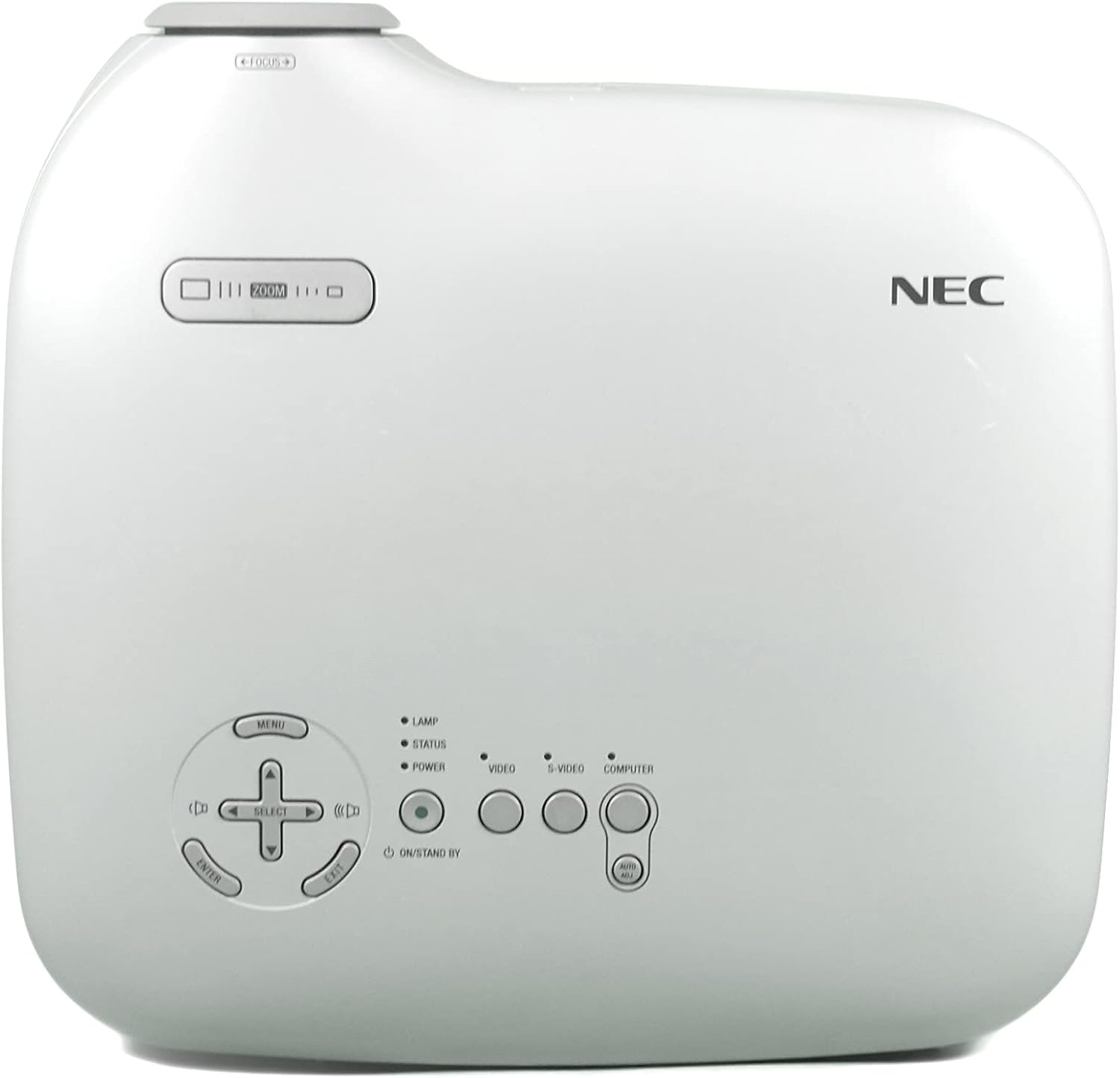
- MENU: Jaċċessa l-menù tal-wiri fuq l-iskrin (OSD).
- SELECT / Arrow Buttons: Innaviga permezz tal-għażliet tal-menu.
- Daħħal: Jikkonferma l-għażla.
- ZOOM: Jaġġusta d-daqs tal-immaġini.
- FOCUS: Jippromwovi l-immaġni.
- VIDEO / S-VIDEO / COMPUTER: Jagħżel is-sors tad-dħul.
3. Aġġustament tal-Immaġni
- Fokus: Dawwar iċ-ċirku tal-fokus fuq il-lenti sakemm l-immaġni tkun ċara.
- Zoom: Use the zoom lever near the lens to adjust the image size.
- Korrezzjoni Keystone: The projector features Square Shot Keystone Correction to instantly project a square image, even when the projector is set up at a steep offset angle to the screen. Access this function via the OSD menu.

Manutenzjoni
1. Lamp Sostituzzjoni
Il-lamp has an estimated life of 4,000 hours in eco-mode or 3,000 hours in normal mode. When the lamp life is nearing its end, a warning message may appear, or the lamp indicator may illuminate.
- Turn off the projector and unplug the power cable.
- Ħalli l-proġettur jiksaħ għal mill-inqas 60 minuta.amp compartment becomes extremely hot.
- Refer to the detailed instructions in the full user manual (on CD-ROM) for specific steps on how to open the lamp cover and replace the lamp.
- Always use a genuine NEC replacement lamp (Type: VT70LP).
2. Tindif tal-Filtru tal-Arja
Regular cleaning of the air filter is crucial for maintaining optimal performance and preventing overheating. The bottom label provides a reminder to clean the air filter.
- Turn off the projector and unplug the power cable.
- Locate the air filter cover, typically on the side or bottom of the projector.
- Remove the filter and gently clean it with a vacuum cleaner or soft brush. Do not wash the filter with water or any liquid.
- Reinsert the clean filter and close the cover securely.
3. Tindif tal-Lenti
Uża drapp artab u mingħajr suf iddisinjat speċifikament għal lentijiet ottiċi. Tużax prodotti tat-tindif jew solventi li joborxu.
Issolvi l-problemi
Jekk tiltaqa' ma' problemi bil-proġettur tiegħek, irreferi għas-soluzzjonijiet komuni li ġejjin:
- Ebda Qawwa: Ensure the power cable is securely connected to both the projector and a working electrical outlet. Check the power indicator light.
- Ebda Immaġni:
- Verify the input source is correctly selected (e.g., COMPUTER, VIDEO).
- Iċċekkja l-kejbil tal-konnessjoni bejn l-apparat tas-sors u l-proġettazzjoni.
- Kun żgur li l-apparat tas-sors ikun mixgħul u qed joħroġ sinjal.
- L-immaġni hija mċajpra: Aġġusta ċ-ċirku tal-fokus fuq il-lenti.
- Image is Distorted (not square): Use the keystone correction feature in the OSD menu.
- Twissija ta' tisħin żejjed: Ensure the air filter is clean and ventilation openings are not blocked. Allow the projector to cool down.
For more detailed troubleshooting, consult the full user manual provided on the CD-ROM.
Speċifikazzjonijiet
| Karatteristika | Speċifikazzjoni |
|---|---|
| Numru tal-Mudell | VT37 |
| Luminożità | 1500 lumens ANSI |
| Proporzjon ta' Kuntrast | 400:1 |
| Riżoluzzjoni tal-Wiri | 1920 x 1080 (Native, likely supports lower resolutions like SVGA) |
| Lamp Ħajja | 3,000 hours (Normal Mode), 4,000 hours (Eco-Mode) |
| Distanza ta' Projezzjoni | Approx. 2 to 24 feet |
| Projection Angles | 14-14.6 grad |
| Riproduzzjoni tal-Kulur | 16.7 million simultaneous colors |
| Awdjo | Built-in Monaural Speaker |
| Livell ta' Storbju | Sa 28 dB |
| Teknoloġija tal-Konnettività | HDMI, VGA (Note: HDMI is listed in specifications, but not explicitly on the rear panel image. Please verify actual unit.) |
| Piż tal-oġġett | 11 pounds (Package Weight) |
| Dimensjonijiet tal-Pakkett | 15 x 14.6 x 11.3 pulzieri |
Garanzija u Appoġġ
Informazzjoni dwar Garanzija
The manufacturer provides a two-year warranty covering parts and labor for the projector. A separate three-month warranty is provided for the lamp.
Appoġġ għall-Klijent
For technical assistance, warranty claims, or inquiries about accessories, please refer to the contact information provided on your warranty card or the official NEC websit.