1. Introduzzjoni
Grazzi tax-xiriasing the GPX BCD2004 Boombox. This portable audio system features a top-loading CD player and an AM/FM tuner, designed for versatile audio playback. This manual provides essential information for setting up, operating, and maintaining your device to ensure optimal performance and longevity.
2. Informazzjoni dwar is-Sigurtà
- Aqra l-Istruzzjonijiet: Carefully read all operating instructions before using the unit.
- Żomm Istruzzjonijiet: Żomm dan il-manwal għal referenza futura.
- Ilma u Umdità: Tesponix dan l-apparat għal taqtir jew titjir ta' ilma. Tpoġġix oġġetti mimlija b'likwidi, bħal vażuni, fuq l-apparat.
- Ventilazzjoni: Aċċerta ruħek li jkun hemm ventilazzjoni xierqa. Timblokkax xi fetħiet tal-ventilazzjoni.
- Sħana: Tpoġġix ħdejn sorsi ta' sħana bħal radjaturi, reġistri tas-sħana, stufi, jew apparat ieħor (inkluż amplifiers) li jipproduċu sħana.
- Sorsi ta' enerġija: Use only the power source indicated on the appliance.
- Batteriji: Follow battery safety guidelines. Do not mix old and new batteries, or different types of batteries. Remove batteries if the unit is not used for extended periods.
- Servizzi: Irreferi l-manutenzjoni kollha lil persunal tas-servizz kwalifikat.
3. Kontenut tal-Pakkett
Jekk jogħġbok iċċekkja li l-oġġetti li ġejjin huma inklużi fil-pakkett tiegħek:
- GPX BCD2004 Boombox Unit
- Kurdun tal-Enerġija AC
- Manwal għall-Utent
4. Kontrolli u Karatteristiċi Aktar minnview
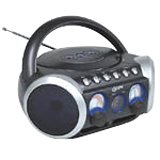
Figura 1: Quddiem view of the GPX BCD2004 Boombox. This image shows the overall design of the boombox, including the speaker grilles and the general layout of the front panel.
Familiarize yourself with the main controls and features of your boombox:
- Kompartiment tas-CD: Top-loading bay for inserting CDs.
- Swiċċ tal-Funzjoni: Selects between CD, AM, FM, and OFF modes.
- Kontroll tal-Volum: Rotary dial to adjust the audio output level.
- Iddajlja l-Irfinar: Rotary dial for selecting AM or FM radio frequencies.
- Buttuna Play/Pause: Starts or temporarily stops CD playback.
- Buttuna Waqqaf: Twaqqaf il-qari tas-CD.
- Buttuni Aqbeż/Tiftix (◀◀ / ▶▶): Skips to the previous/next track or searches within a track.
- Buttuna tal-Programm: Użat biex jipprogramma sekwenza ta' traċċi għad-daqq ta' CD.
- Irrepeti l-buttuna: Repeats the current track or the entire CD.
- Antenna AM/FM: Telescopic antenna for FM reception, internal antenna for AM.
- Input tal-Enerġija AC: Jack for connecting the AC power cord.
- Kompartiment tal-batterija: Located on the bottom or rear for 'C' batteries.
- Fold-down Carrying Handle: Għal portabbiltà faċli.
5. Setup
5.1 L-Ixgħel tal-Unità
Your GPX BCD2004 Boombox can be powered by either AC power or batteries.
Operazzjoni tal-Enerġija AC
- Ensure the Function Switch is in the OFF position.
- Insert the small end of the AC power cord into the AC power input jack on the back of the unit.
- Ipplaggja t-tarf l-ieħor tal-korda tal-enerġija AC f'sokit standard tal-ħajt AC (120V ~ 60Hz).
Operazzjoni tal-Enerġija tal-Batterija
For portable use, the boombox requires 8 'C' size batteries (not included).
- Ensure the Function Switch is in the OFF position.
- Iftaħ l-għatu tal-kompartiment tal-batterija li jinsab fil-qiegħ jew wara tal-unità.
- Insert 8 'C' size batteries, observing the correct polarity (+ and -) as indicated inside the compartment.
- Agħlaq l-għatu tal-kompartiment tal-batterija sew.
- Nota: When operating on battery power, disconnect the AC power cord from the unit.
6. It-Tħaddim tas-CD Player
The GPX BCD2004 is compatible with standard audio CDs, CD-R, and CD-RW discs.
6.1 It-tagħbija ta' CD
- Lift the CD compartment door located on the top of the unit.
- Place a CD onto the center spindle with the label side facing up.
- Gently close the CD compartment door until it clicks shut.
6.2 Daqq Bażiku tas-CD
- Issettja l-Iswiċċ tal-Funzjoni fil-pożizzjoni tas-CD.
- The CD player will begin to read the disc. The track number will typically display.
- Press the PLAY/PAUSE (▶/██) button to start playback.
- Aġġusta l-Kontroll tal-Volum għal-livell ta' smigħ mixtieq.
- To pause playback, press the PLAY/PAUSE (▶/██) button. Press it again to resume.
- To stop playback, press the STOP (■) button.
6.3 Skipping and Searching Tracks
- Aqbeż Track: During playback, press the SKIP/SEARCH FORWARD (▶▶) button to go to the next track. Press the SKIP/SEARCH BACKWARD (◀◀) button to go to the beginning of the current track, or press it twice to go to the previous track.
- Search Within Track: During playback, press and hold the SKIP/SEARCH FORWARD (▶▶) or SKIP/SEARCH BACKWARD (◀◀) button to fast forward or rewind through the current track. Release the button to resume normal playback.
6.4 Program Play
Tista' tipprogramma sa 16 trakka biex idoqqu f'ordni speċifika.
- In STOP mode, press the PROGRAM button. The program indicator will flash.
- Use the SKIP/SEARCH buttons (◀◀ / ▶▶) to select your desired first track.
- Press the PROGRAM button again to confirm the selection.
- Irrepeti l-passi 2 u 3 biex iżżid sa 16 trakka mal-lista tal-programmi tiegħek.
- After programming all desired tracks, press the PLAY/PAUSE (▶/██) button to start programmed playback.
- To clear the program, press the STOP (■) button twice.
6.5 Repeat Play
During CD playback, press the REPEAT button:
- Agħfas darba għal Irrepeti 1 (repeats the current track).
- Agħfas darbtejn għal Irrepeti Kollha (repeats the entire CD or programmed tracks).
- Press a third time to cancel repeat function.
7. Operating the AM/FM Radio
7.1 Tuning to Radio Stations
- Set the Function Switch to either the AM or FM position.
- Adjust the Tuning Dial to select your desired radio station.
- Aġġusta l-Kontroll tal-Volum għal-livell ta' smigħ mixtieq.
7.2 Improving Radio Reception
- Riċeviment tal-FM: Extend the telescopic antenna fully and adjust its position for the best reception.
- Riċeviment ta' filgħodu: The unit has a built-in AM antenna. Rotate the entire boombox for optimal AM reception.
8. Manutenzjoni
8.1 Tindif tal-Unità
- Imsaħ il-barra tal-unità b'artab, damp drapp. Tużax tindif jew solventi li joborxu.
- For the CD lens, use a specialized CD lens cleaner disc or a soft, lint-free cloth specifically designed for optical lenses.
8.2 Kura tal-Batterija
- Neħħi l-batteriji jekk l-unità ma tkunx se tintuża għal perjodu estiż biex tevita t-tnixxija.
- Armi l-batteriji użati b'mod responsabbli skont ir-regolamenti lokali.
9 Issolvi l-problemi
If you experience issues with your boombox, please refer to the following common problems and solutions:
| Problema | Kawża Possibbli | Soluzzjoni |
|---|---|---|
| Ebda qawwa | AC cord not connected; Batteries dead or incorrectly inserted; Function switch OFF. | Check AC cord connection; Replace batteries or check polarity; Set Function switch to CD, AM, or FM. |
| Is-CD mhux qed idoqq | CD inserted incorrectly; CD dirty or scratched; CD compartment door open; Function switch not on CD. | Insert CD with label side up; Clean or replace CD; Close CD door securely; Set Function switch to CD. |
| Riċeviment ħażin tar-radju | Antenna mhux estiża/aġġustata; Sinjal dgħajjef. | Extend and adjust FM antenna; Rotate unit for AM reception; Try a different location. |
| L-ebda ħoss jew volum baxx | Volume too low; Unit in pause mode. | Increase volume; Press Play/Pause button to resume playback. |
10. Speċifikazzjonijiet
- Mudell: BCD2004
- Ditta: GPX
- Kompatibbiltà CD: CD, CD-R, CD-RW
- Tuner tar-Radju: AM/FM
- Sors tal-Enerġija: AC 120V ~ 60Hz or 8 x 'C' Batteries (not included)
- Kelliema: 2 Full-range speakers
- Dimensjonijiet (madwar): 33.02 x 27.94 x 17.02 ċm (L x W x H)
- Piż (madwar): 2.18 kg
- Karatteristiċi: 16-track programming, Repeat play, Song skip/search, Fold-down carrying handle
11. Garanzija u Appoġġ
This GPX BCD2004 Boombox comes with a Garanzija ta '90 jum mid-data tax-xiri oriġinali. Din il-garanzija tkopri difetti fil-materjali u l-abbilità taħt użu normali.
For warranty service or technical support, please refer to the contact information provided with your purchase documentation or visit the official GPX website. Please have your model number (BCD2004) and proof of purchase ready when contacting support.


