1. Introduzzjoni
Il-Baħarview SEM-600-SYS Color & B&W Offshore System is an advanced underwater camera designed for marine observation. This system offers automatic changeover between color and black & white signals, adapting to varying light conditions underwater. Its robust and trollable design makes it ideal for continuous monitoring in diverse aquatic environments.
2. Kontenut tal-Pakkett
Jekk jogħġbok kun żgur li l-komponenti kollha huma preżenti qabel ma tipproċedi bl-installazzjoni:
- SEM-600-SYS Camera Unit
- Integrated Power and Video Cable
- Immuntar Clamps (2 unitajiet)
- 12V DC Power Adapter (e.g., cigarette lighter plug)
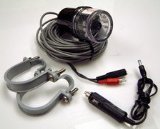
Image: The Seaview SEM-600-SYS Offshore System showing the camera unit, coiled cable, two mounting clamps, and a 12V DC power adapter.
3. Setup u Installazzjoni
Follow these steps for proper installation of your Seaview Offshore System:
- Immuntar tal-Kamera: Securely attach the camera unit to a suitable location on your vessel using the provided mounting clamps. Ensure the camera is positioned to provide an unobstructed view underwater. The mounting location should be stable and minimize vibration.
- Konnessjoni tal-Enerġija: Connect the 12V DC power adapter to a compatible power source on your boat (e.g., a 12V accessory outlet). Ensure the connection is secure.
- Konnessjoni tal-vidjo: Connect the video output cable from the camera unit to your display device (e.g., marine monitor, chartplotter, or TV with video input). Ensure the video input on your display is selected correctly.
- Ġestjoni tal-Kejbil: Route all cables safely, away from moving parts or areas where they could be pinched or damaged. Use cable ties or clips to secure them.
4. Istruzzjonijiet Operattivi
The SEM-600-SYS is designed for straightforward operation:
- Qawwa Mixgħul: Once all connections are made, apply power to the system. The camera will automatically activate and begin transmitting video.
- Modalità Awtomatika: The system automatically switches between color and black & white modes. In well-lit underwater conditions, the camera will operate in color mode. As light diminishes or in murky water, it will automatically switch to black & white mode to provide clearer images.
- Trolling Use: The system is designed to be trollable, allowing for continuous underwater viewing while your vessel is in motion. Ensure the camera is securely mounted and cables are properly managed to prevent entanglement.
5. Manutenzjoni
Regular maintenance will ensure the longevity and optimal performance of your system:
- Tindif: After each use, especially in saltwater, rinse the camera unit thoroughly with fresh water to prevent salt buildup and corrosion. Gently wipe the lens with a soft, clean cloth. Avoid using abrasive cleaners or solvents.
- Spezzjoni tal-Cable: Periodically inspect all cables and connections for signs of wear, cuts, or corrosion. Replace any damaged cables immediately.
- Ħardwer tal-Immuntar: Regularly check that all mounting clamps and screws are tight and secure.
- Ħażna: When not in use for extended periods, store the system in a dry, cool place, away from direct sunlight and extreme temperatures.
6 Issolvi l-problemi
Jekk tiltaqa' ma' problemi, irreferi għall-problemi u s-soluzzjonijiet komuni li ġejjin:
- L-ebda Immaġni fuq il-Wiri:
- Ensure the camera unit is receiving power. Check power connections and the 12V DC source.
- Verify that the video cable is securely connected to both the camera and the display unit.
- Confirm your display unit is set to the correct video input source.
- Kwalità Fqira tal-Immaġni:
- Clean the camera lens. Marine growth, dirt, or debris can obscure the view.
- Consider water clarity. Extremely murky water will naturally reduce image quality.
- Ensure adequate ambient light for optimal color mode performance. The system will switch to B&W in low light.
- Qawwa/Sinjal Intermittenti:
- Inspect the power and video cables for any damage, kinks, or loose connections.
- Check the integrity of the power source and its connection points.
7. Speċifikazzjonijiet
| Karatteristika | Dettall |
|---|---|
| Numru tal-Mudell | 260 SEM-600-SYS |
| Dimensjonijiet tal-Prodott (LxWxH) | 66.04 x 30.48 x 30.48 ċm |
| Piż tal-oġġett | 8.62 kg |
| Tip ta' Sinjal | Color & Black/White (Automatic Changeover) |
| Karatteristika tad-Disinn | Trollable |
8. Garanzija u Appoġġ
Informazzjoni dwar il-garanzija: For detailed warranty terms and conditions, please refer to the official documentation provided with your purchase or visit the SEAVIEW uffiċjali websit. Il-kopertura tal-garanzija tipikament tinkludi difetti fil-materjali u x-xogħol għal perjodu speċifikat mid-data tax-xiri.
Appoġġ għall-Klijent: If you require technical assistance, have questions about installation, or need to report a defect, please contact SEAVIEW customer support through their official channels. Have your model number (260 SEM-600-SYS) and purchase information ready when contacting support.


