Introduzzjoni
This manual provides comprehensive instructions for the installation, operation, and maintenance of the HP DL489A Nvidia Quadro FX 1100 128MB DDR II SDRAM AGP 8x Graphics Card. Please read this manual thoroughly before installation and use to ensure proper functionality and to prevent damage.
Informazzjoni dwar is-Sigurtà
Dejjem osserva l-prekawzjonijiet tas-sigurtà li ġejjin:
- Ensure your computer is powered off and unplugged from the wall outlet before installing or removing the graphics card.
- Neħħi kwalunkwe elettriku statiku minn ġismek billi tmiss oġġett tal-metall ertjat qabel ma timmaniġġja l-kard.
- Immaniġġja l-karta grafika mit-truf tagħha biex tevita li tmiss komponenti sensittivi.
- Tesponix il-kard għall-umdità jew temperaturi estremi.
Setup u Installazzjoni
Follow these steps to install the HP DL489A Nvidia Quadro FX 1100 graphics card into your computer system.
1. Ipprepara s-Sistema Tiegħek
- Power off your computer and disconnect all cables, including the power cord.
- Open the computer case. Refer to your computer's manual for specific instructions on how to open the case.
- Locate an available AGP 8x slot on your motherboard.
2. Install the Graphics Card
- Carefully align the graphics card with the AGP slot.
- Press down firmly and evenly on both ends of the card until it is securely seated in the slot. You may hear a click if your slot has a locking mechanism.
- Secure the card with a screw to the computer chassis, if applicable.
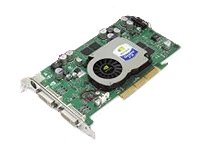
Image: The HP DL489A Nvidia Quadro FX 1100 Graphics Card. This image shows the physical card, highlighting its AGP connector and cooling solution, ready for installation into a compatible motherboard slot.
3. Close and Connect
- Agħlaq il-kaxxa tal-kompjuter.
- Reconnect all cables, including the power cord, monitor cables (DVI), and any peripherals.
- Ixgħel il-kompjuter tiegħek.
4. Installazzjoni tas-sewwieq
After the operating system loads, it may automatically detect the new hardware. If not, you will need to install the appropriate drivers. Drivers for the Nvidia Quadro FX 1100 can typically be found on the official Nvidia website or HP support websit. Segwi l-istruzzjonijiet fuq l-iskrin ipprovduti mill-installatur tas-sewwieq.
Tħaddim tal-Karta tal-Grafika
Once installed and drivers are configured, the HP DL489A graphics card will manage your system's display output. It supports dual DVI-D monitors.
Konfigurazzjoni tal-Wiri
To configure your display settings, including resolution, refresh rate, and multiple monitor setups:
- Windows: Right-click on the desktop and select "Display settings" or "NVIDIA Control Panel."
- Linux: Use your desktop environment's display settings utility or the NVIDIA X Server Settings application.
The card supports resolutions up to 1920x1200 per DVI output.
Manutenzjoni
Manutenzjoni xierqa tiżgura l-lonġevità u l-prestazzjoni ottimali tal-karta grafika tiegħek.
- Tneħħija tat-Trab: Periodically open your computer case and gently clean dust from the graphics card's heatsink and fan using compressed air. Ensure the fan does not spin rapidly during cleaning.
- Aġġornamenti tas-sewwieq: Keep your graphics drivers updated. Check the official Nvidia or HP websites for the latest compatible drivers.
- Monitoraġġ tat-temperatura: Monitor the card's temperature, especially during heavy use, using system monitoring software. Ensure adequate airflow within your computer case.
Issolvi l-problemi
Din it-taqsima tindirizza kwistjonijiet komuni li tista’ tiltaqa’ magħhom.
L-ebda Output tal-Wiri
- Ensure the monitor cables are securely connected to both the graphics card and the monitor.
- Ivverifika li l-monitor ikun mixgħul u ssettjat għas-sors tad-dħul korrett.
- Check if the graphics card is fully seated in the AGP slot.
- Try connecting the monitor to the motherboard's integrated graphics (if available) to rule out other system issues.
Driver Installation Issues
- Download drivers only from official Nvidia or HP support websiti.
- Ensure you are downloading the correct drivers for your operating system and the Quadro FX 1100.
- Uninstall any previous graphics drivers before attempting a new installation.
Instabbiltà jew Ħabtiet tas-Sistema
- Ensure your power supply unit (PSU) meets the minimum requirements for your system, including the graphics card.
- Check for overheating. Clean dust from the card's fan and heatsink.
- Verify that the graphics drivers are up to date and correctly installed.
Speċifikazzjonijiet
Key technical specifications for the HP DL489A Nvidia Quadro FX 1100 Graphics Card:
| Karatteristika | Dettall |
|---|---|
| Numru tal-Mudell | DL489A |
| Proċessur tal-Grafika | Nvidia Quadro FX 1100 |
| Daqs tal-Memorja | 128 MB |
| Tip ta' Memorja | DDR II SDRAM |
| Interface | AGP 8x |
| Portijiet tal-ħruġ | Dual DVI-D |
| Dimensjonijiet tal-Prodott | 12 x 9 x 3 pulzieri |
| Piż tal-oġġett | 2 liri |
Garanzija u Appoġġ
For warranty information and technical support, please refer to the documentation provided with your original computer system or contact Hewlett Packard customer support directly. Specific warranty terms may vary based on region and purchase date.
Appoġġ HP Websit: https://www.hp.com/support


