Introduzzjoni
This manual provides essential instructions for the safe and efficient operation of your Aiwa CSD-TD69 CD/Cassette Boombox. Please read this manual thoroughly before using the unit and retain it for future reference. This device combines a CD player, cassette player/recorder, and an AM/FM radio tuner into a portable unit.
Prodott Overview
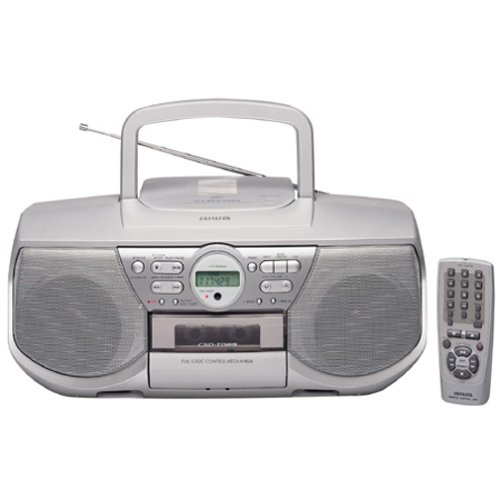
Immaġni: Quddiem view of the Aiwa CSD-TD69 CD/Cassette Boombox. This image displays the main unit with its CD compartment, cassette deck, radio tuner display, and control buttons. The speakers are visible on either side.
The Aiwa CSD-TD69 is a portable audio system designed for versatile media playback. It features a top-loading CD player, a front-loading cassette deck, and a digital-synthesized AM/FM radio tuner. The unit is equipped with stereo speakers and can be powered by AC current or batteries for portability. A remote control is included for convenient operation.
Setup
1. Konnessjoni tal-Enerġija
- Qawwa AC: Qabbad il-korda tal-enerġija AC fornuta mal-jack AC IN fuq l-unità u mbagħad ma' sokit standard tal-ħajt.
- Qawwa tal-batterija: For portable use, open the battery compartment on the bottom of the unit. Insert 8 x "D" size batteries (not included), ensuring correct polarity (+/-). Close the compartment securely.
2. Setup ta 'l-antenna
- Antenna FM: Extend the telescopic FM antenna fully and adjust its position for optimal FM reception.
- Antenna AM: The unit has a built-in AM antenna. Rotate the unit itself for best AM reception.
Istruzzjonijiet Operattivi
Kontrolli Ġenerali
- Power On/Off: Agħfas il- QAWWA buttuna biex tixgħel jew titfi l-unità.
- Selettur tal-Funzjoni: Uża l- FUNZJONI switch (CD/RADIO/TAPE) to select the desired mode of operation.
- Kontroll tal-Volum: Dawwar il- VOLUM knob to adjust the sound level.
Operazzjoni ta' CD Player
- Agħżel CD mode using the Function Selector.
- Open the CD compartment lid by pressing the FTUĦ/MAGĦLUQ buttuna.
- Poġġi CD bin-naħa tat-tikketta tħares 'il fuq fuq il-magħżel.
- Close the CD compartment lid. The display will show the total number of tracks.
- Agħfas il- DAQQ/PAWŻA (►/−) buttuna biex tibda d-daqq.
- Agħfas WAQQAF (■) biex twaqqaf daqq.
- Użu AQBEŻ (►►| / |◄◄) buttuni biex taqbeż il-binarji.
- Agħfas IRREpeti to repeat the current track or all tracks.
Tħaddim tal-Plejer/Reġistratur tal-Cassette
- Agħżel TEJP mode using the Function Selector.
- Agħfas il- Waqqaf/EJETTA buttuna biex tiftaħ il-kompartiment tal-cassette.
- Daħħal tejp tal-cassette bit-tarf miftuħ iħares 'il fuq.
- Agħlaq il-kompartiment tal-cassette.
- Agħfas ILGĦAB (►) biex tibda daqq.
- Agħfas REKORD (●) to begin recording (ensure a recordable tape is inserted).
- Użu AVVANZAT MALAJR (►►) u REWIND (◄◄) for tape navigation.
- Agħfas Waqqaf/EJETTA to stop playback/recording and eject the tape.
Operazzjoni tat-Tuner tar-Radju
- Agħżel RADJU mode using the Function Selector.
- Agħfas il- BANDA button to select AM or FM.
- Uża l- IRTUNING buttons (►►| / |◄◄) to manually tune to a station. Press and hold for auto-scan.
- Issettjar Presets:
- Intuna l-istazzjon mixtieq.
- Agħfas il- MEMORJA buttuna.
- Uża l- PRESET (+/-) buttuni biex tagħżel numru preset.
- Agħfas MEMORJA mill-ġdid biex tikkonferma.
- Filwaqt li jfakkru l-Presets: Uża l- PRESET (+/-) buttons to cycle through stored stations.
Kontroll mill-bogħod
The included remote control allows for convenient operation of most functions from a distance. Ensure the remote's battery is inserted correctly and that there are no obstructions between the remote and the unit's sensor.
Manutenzjoni
- Tindif tal-Unità: Imsaħ il-barra b'ċarruta ratba u niexfa. Għal tbajja' iebsa, uża ċarruta mnixxfa ħafif.ampened with mild detergent, then wipe dry. Do not use abrasive cleaners or solvents.
- Tindif tal-Lenti tas-CD: Use a commercially available CD lens cleaner disc periodically to maintain optimal CD playback quality.
- Tindif tar-Ras tal-Kassetta: After every 10-20 hours of use, clean the tape heads, pinch rollers, and capstan with a cotton swab lightly moistened with isopropyl alcohol.
- Sostituzzjoni tal-batterija: When the unit's performance degrades during battery operation, replace all batteries with new ones of the same type. Do not mix old and new batteries.
Issolvi l-problemi
| Problema | Kawża Possibbli | Soluzzjoni |
|---|---|---|
| Ebda qawwa | Il-korda tal-AC mhux imqabbda; Il-batteriji m'għadhomx jintużaw jew imdaħħla sew. | Ensure AC cord is firmly connected. Replace batteries, checking polarity. |
| L-ebda ħoss | Volume too low; Function mode incorrect. | Increase volume. Select the correct function (CD/RADIO/TAPE). |
| Is-CD jaqbeż jew ma jdoqqx | CD dirty or scratched; CD inserted incorrectly; Lens dirty. | Clean CD with a soft cloth. Reinsert CD correctly. Use a CD lens cleaner. |
| It-tejp tal-cassette mhux qed idoqq/jirrekordja | Tape incorrectly inserted; Tape heads dirty; Tape jammed. | Reinsert tape correctly. Clean tape heads. Do not force jammed tapes. |
| Riċeviment ħażin tar-radju | Antenna mhux estiża/pożizzjonata b'mod korrett; Interferenza. | Extend and adjust FM antenna. Rotate unit for AM. Move away from other electronic devices. |
Speċifikazzjonijiet
- Mudell: Aiwa CSD-TD69
- Output tal-Enerġija: 2.5 watt għal kull kanal
- Tip ta' Kelliem: Stereo
- Tuner: Digital-synthesized AM/FM tuner with 30 station presets
- CD Player: Top-loading, compatible with audio CDs
- Gverta tal-Cassettes: Full-logic mechanism, play and record functions
- Konnettività: Input awżiljarju
- Sors tal-Enerġija: AC 230V, 50Hz or 8 x "D" size batteries (DC 12V)
- Dimensjonijiet tal-Pakkett (madwar): 57.66 x 50.8 x 46.48 ċm
- Piż tal-Oġġett (madwar): 17.92 kg
- Aċċessorji inklużi: Kontroll mill-bogħod


