Introduzzjoni
This manual provides essential instructions for the safe and efficient operation of your Sharper Image SO226 Compact CD Stereo with AM/FM Digital Tuner. Please read this manual thoroughly before using the unit and retain it for future reference.
Istruzzjonijiet Importanti dwar is-Sigurtà
- Aqra l-istruzzjonijiet kollha qabel ma tħaddem l-apparat.
- Żomm dan il-manwal għal referenza futura.
- Tużax dan l-apparat ħdejn l-ilma.
- Naddaf biss b'ċarruta niexfa.
- Timblokkax il-fetħiet tal-ventilazzjoni. Installa skont l-istruzzjonijiet tal-manifattur.
- Tinstallax ħdejn xi sorsi tas-sħana bħal radjaturi, reġistri tas-sħana, stufi, jew apparat ieħor (inkluż amplifiers) li jipproduċu sħana.
- Ipproteġi l-korda tad-dawl milli timxi fuqha jew maqrusa, partikolarment fil-plakek, ir-reċipjenti tal-konvenjenza, u l-punt fejn joħorġu mill-apparat.
- Uża biss aċċessorji/aċċessorji speċifikati mill-manifattur.
- Irreferi l-manutenzjoni kollha lil persunal tas-servizz kwalifikat. Il-manutenzjoni hija meħtieġa meta l-apparat ikun sar xi ħsara.
Kontenut tal-Pakkett
Iċċekkja li l-oġġetti kollha huma preżenti meta tiftaħ il-pakkett:
- Sharper Image SO226 Compact CD Stereo Unit
- AC Power Adapter (if applicable, check packaging)
- Manwal għall-Utent (dan id-dokument)
Prodott Overview
Familiarize yourself with the components and controls of your SO226 unit.
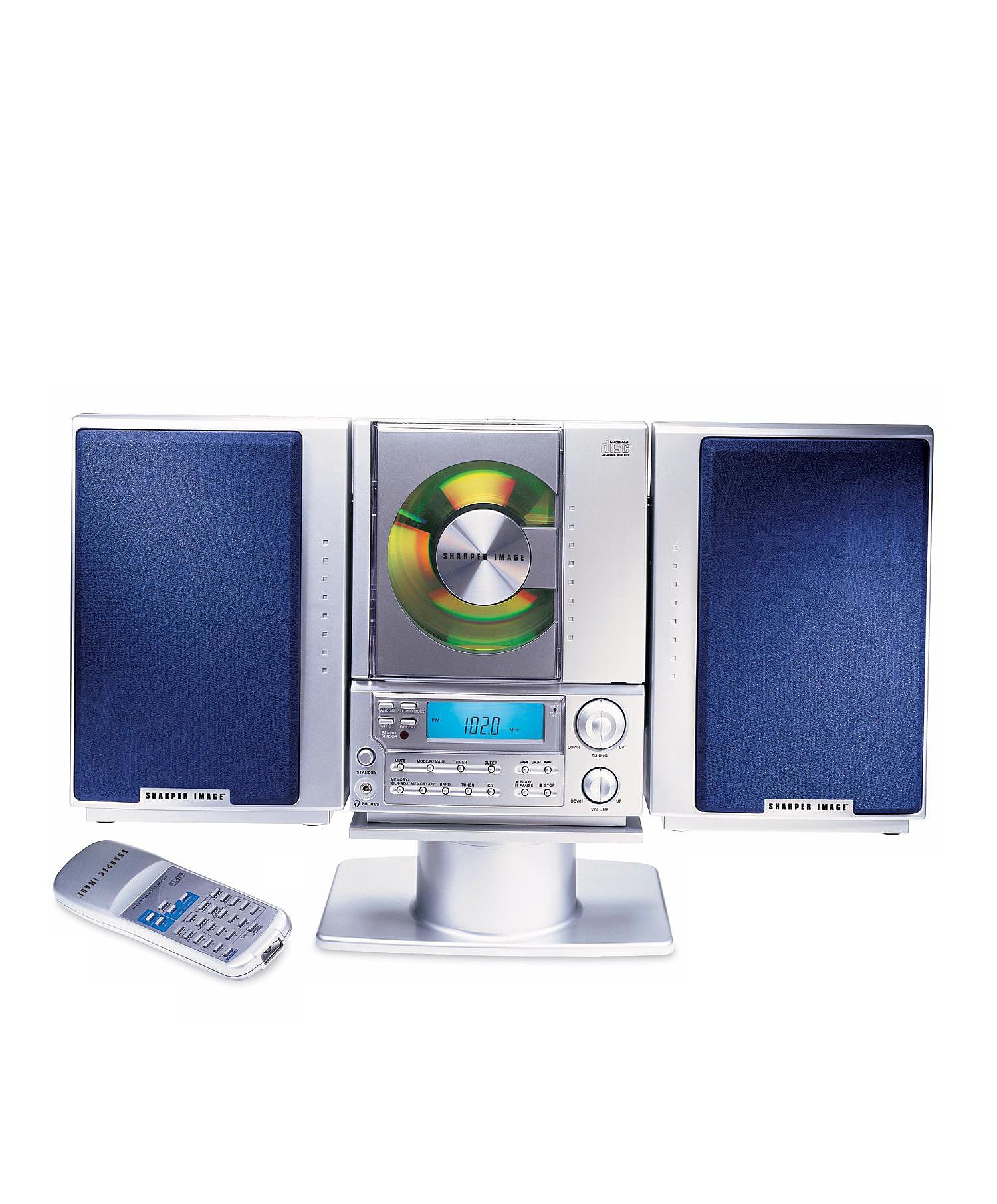
This image displays the front panel of the Sharper Image SO226 Compact CD Stereo. Visible features include the top-loading CD compartment, the digital display for radio frequencies and CD track information, and various control buttons for power, volume, CD playback, and radio tuning.
Pannell tal-Kontroll (Dispożizzjoni Tipika)
- Buttuna POWER: Ixgħel jew jitfi l-unità.
- FUNCTION/MODE Button: Switches between CD, AM, and FM modes.
- Buttuni tal-VOLUM +/-: Jaġġusta l-livell tal-ħruġ tal-awdjo.
- Buttuna PLAY/PAUSE: Jibda jew iwaqqaf id-daqq tas-CD.
- Buttuna STOP: Twaqqaf il-qari tas-CD.
- Buttuni SKIP/FITTEX (◀◀ / ▶▶): Skips tracks on CD or tunes radio frequencies.
- Buttuna PROGRAMM: Użat għall-ipprogrammar ta' traċċi tas-CDs.
- Buttuna SLEEP: Jattiva l-funzjoni tat-tajmer tal-irqad.
- Buttuni TUNING +/-: Fine-tunes radio frequencies.
- PRESET Buttons: Jaħżen u jsejjaħ lura l-istazzjonijiet tar-radju favoriti.
- Display LCD: Juri l-modalità attwali, in-numru tat-trakka, il-frekwenza, u l-ħin.
Setup
Konnessjoni tal-Enerġija
- Kun żgur li l-unità titqiegħed fuq wiċċ stabbli u ċatt.
- If using batteries (not included), open the battery compartment on the bottom or back of the unit and insert the required batteries, observing correct polarity.
- Alternatively, connect the AC power adapter (if supplied) to the DC IN jack on the unit and then plug the adapter into a standard wall outlet.
Setup tal-Antenna
- For FM reception, extend the telescopic antenna fully. Adjust its position for optimal reception.
- For AM reception, the unit has a built-in ferrite bar antenna. Rotate the entire unit for best AM reception.
Istruzzjonijiet Operattivi
Operazzjoni ta' CD Player
- Agħfas il- QAWWA buttuna biex tixgħel l-unità.
- Agħfas il- FUNZJONI/MOD button repeatedly until 'CD' appears on the display.
- Iftaħ l-għatu tal-kompartiment tas-CD.
- Place a CD with the label side facing up into the compartment.
- Close the CD compartment cover. The unit will read the CD, and the total number of tracks will be displayed.
- Agħfas il- DĦABBA/PAWŻA buttuna biex tibda d-daqq.
- Biex tieqaf, agħfas DĦABBA/PAWŻA għal darb'oħra. Agħfasha darba oħra biex tkompli.
- Biex twaqqaf il-plejbek, agħfas il-buttuna STOP buttuna.
- Biex taqbeż għall-binarju li jmiss, agħfas il- SKIP/SEARCH ▶▶ buttuna.
- Biex tmur lura għall-bidu tat-trakka kurrenti jew għat-trakka ta' qabel, agħfas il-buttuna SKIP/SEARCH ◀◀ buttuna.
- To fast forward or rewind within a track, press and hold the SKIP/SEARCH ▶▶ or ◀◀ buttuna waqt daqq.
Operazzjoni tar-Radju AM/FM
- Agħfas il- QAWWA buttuna biex tixgħel l-unità.
- Agħfas il- FUNZJONI/MOD button repeatedly until 'AM' or 'FM' appears on the display.
- Irfinar Manwali: Agħfas il- TUNING +/- buttuni biex taġġusta l-frekwenza pass pass.
- Skennjar Awtomatiku: Agħfas u żomm il- TUNING +/- buttons for a few seconds. The tuner will scan and stop at the next strong station.
- Ħażna ta 'Presets: Issettja l-istazzjon mixtieq tiegħek. Agħfas il-buttuna PROGRAMM buttuna. In-numru tal-preset se jteptep. Uża l- SKIP / FITTEX buttuni biex tagħżel numru preset, imbagħad agħfas PROGRAMM mill-ġdid biex tikkonferma.
- Filwaqt li jfakkru l-Presets: Fil-modalità tar-radju, agħfas il-buttuna Issettjat minn qabel buttons to cycle through your stored stations.
Sleep Timer Funzjoni
The unit features a convenient sleep timer that automatically turns off the sound after a set period.
- While the unit is playing (CD or Radio), press the L-IRQAD buttuna.
- Kull pressa tal- L-IRQAD button will cycle through available sleep times (e.g., 10, 20, 30, 60, 90 minutes, or OFF).
- Select your desired sleep duration. The unit will automatically power off after the selected time has elapsed.
Manutenzjoni
- Tindif tal-Unità: Imsaħ il-barra tal-unità b'ċarruta ratba u niexfa. Tużax prodotti tat-tindif jew solventi li joborxu.
- CD Care: Handle CDs by their edges. Keep them clean and free of scratches. If a CD is dirty, wipe it gently with a soft, lint-free cloth from the center outwards.
- Ħażna: When not in use for extended periods, disconnect the power adapter and remove batteries. Store the unit in a cool, dry place.
Issolvi l-problemi
Jekk tiltaqa' ma' problemi, irreferi għall-problemi u s-soluzzjonijiet komuni li ġejjin:
- Ebda Qawwa:
- Ensure the AC power adapter is securely plugged into both the unit and a working wall outlet.
- If using batteries, check if they are inserted correctly and are not depleted. - Ebda Ħsejjes:
- Check the volume level and increase it if necessary.
- Ensure the correct function mode (CD/AM/FM) is selected. - CD Not Playing / Skipping:
- Ensure the CD is inserted correctly with the label side up.
- Clean the CD for any dirt or scratches.
- Try a different CD to rule out a faulty disc.
- Ensure the CD compartment cover is fully closed. - Riċeviment tar-Radju Fqir:
- For FM, fully extend and adjust the telescopic antenna.
- For AM, rotate the entire unit for better signal.
- Move the unit away from other electronic devices that may cause interference. - Buttuni li ma jirrispondux:
- Try turning the unit off and on again.
- Disconnect power for a few minutes, then reconnect.
Speċifikazzjonijiet
| Numru tal-Mudell | SO226 |
| Dimensjonijiet tal-Prodott (L x W x H) | 1.3 x 19 x 5.5 pulzieri (3.3 x 48.3 x 14 ċm) |
| Piż tal-oġġett | 5 liri (2.27 kg) |
| Tip ta' Kelliem | Stereo |
| Sors tal-Enerġija | Battery Powered (AC adapter typically included or sold separately) |
| Color (as per specific variant) | Blu |
Garanzija u Appoġġ
Għal informazzjoni dwar il-garanzija u appoġġ għall-klijenti, jekk jogħġbok irreferi għad-dokumentazzjoni inkluża max-xiri tiegħek jew żur is-sit uffiċjali ta' Sharper Image. websit. Żomm il-prova tax-xiri tiegħek għal talbiet ta' garanzija.


