Introduzzjoni
Grazzi tax-xiriasing the GPX C3960 Personal CD/MP3 Player. This manual provides detailed instructions for the proper setup, operation, and maintenance of your device. Please read this manual thoroughly before use and retain it for future reference.
Kontenut tal-Pakkett
Kun żgur li l-oġġetti kollha huma preżenti fil-pakkett:
- GPX C3960 Personal CD/MP3 Player
- Earbuds Stereo
- Manwal għall-Utent (dan id-dokument)
Prodott Overview
Familiarize yourself with the components and features of your GPX C3960 player.
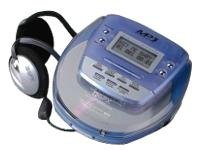
Image: The GPX C3960 Personal CD/MP3 Player, shown in a translucent blue casing, with a pair of silver over-ear headphones connected. The player features a small LCD screen and control buttons on its top surface.
Karatteristiċi ewlenin:
- CD-R/RW and MP3 disc playback compatibility
- Anti-skip protection: 45 seconds for audio CDs, 120 seconds for MP3 CDs
- Dynamic Bass Boost (DBB) for enhanced audio output
- 24-track programmable memory
- Low battery alert indicator
- Jopera fuq 2 batteriji AA
Setup
1. Installazzjoni tal-batterija
- Locate the battery compartment on the bottom of the player.
- Żerżaq l-għatu tal-kompartiment tal-batterija miftuħ.
- Daħħal żewġ (2) batteriji AA, waqt li tiżgura l-polarità korretta (+ u -) kif indikat ġewwa l-kompartiment.
- Agħlaq l-għatu tal-kompartiment tal-batterija sew.
- Nota: Replace batteries when the low battery indicator appears on the display or when playback performance degrades.
2. Konnessjoni tal-headphones
- Plug the stereo earbuds or your preferred headphones into the TELEFONiċi jack located on the side of the player.
Istruzzjonijiet Operattivi
1. Tixgħil / Mitfi
- Biex tixgħel, agħfas il- PLAY/PAUSE (►/‖‖) buttuna.
- Biex titfi, agħfas il- WAQQAF (■) button twice, or wait for the auto-power off feature to activate after a period of inactivity.
2. Loading a CD/MP3 Disc
- Agħfas il- Miftuħa button to open the disc compartment lid.
- Carefully place a CD or MP3 disc onto the center spindle with the label side facing up.
- Agħfas id-diska bil-mod 'l isfel sakemm tikklikkja f'postha.
- Close the disc compartment lid firmly until it latches.
3. Daqq Bażiku
- Play/Pawsa: Agħfas PLAY/PAUSE (►/‖‖) biex tibda jew twaqqaf il-plejbek.
- Waqqaf: Agħfas WAQQAF (■) biex twaqqaf daqq.
- Aqbeż il-binarji: Agħfas AQBEŻ 'IL QUDDIEM (►►) or AQBEŻ LURA (◄◄) to move to the next or previous track.
- Fittex: Agħfas u żomm AQBEŻ 'IL QUDDIEM (►►) or AQBEŻ LURA (◄◄) during playback to fast-forward or rewind within a track.
4. Kontroll tal-Volum
- Aġġusta l- VOLUM dial located on the side of the player to increase or decrease the audio output level.
5. Dynamic Bass Boost (DBB)
- Agħfas il- DBB button to activate or deactivate the dynamic bass boost feature, which enhances low-frequency sounds.
6. Anti-Skip Protection
The GPX C3960 features electronic anti-skip protection to prevent audio interruptions during movement. This provides approximately 45 seconds of protection for standard audio CDs and 120 seconds for MP3 CDs.
7. Binarji tal-Ipprogrammar
- With the player stopped, press the PROGRAMM button. The program indicator will flash.
- Uża l- AQBEŻ 'IL QUDDIEM (►►) or AQBEŻ LURA (◄◄) buttuni biex tagħżel il-binarju mixtieq.
- Agħfas PROGRAMM għal darb'oħra biex iżżid it-trakka magħżula mal-memorja tal-programm.
- Repeat steps 2 and 3 for up to 24 tracks.
- Agħfas PLAY/PAUSE (►/‖‖) to start playback of the programmed sequence.
- To clear the program, open the disc compartment or press WAQQAF (■) darbtejn.
Manutenzjoni
Tindif tal-Unità
- Wipe the exterior of the player with a soft, slightly damp drapp. Tużax tindif jew solventi li joborxu.
- Never open the disc compartment while the player is operating.
- Keep the lens clean. If the lens becomes dirty, use a soft camera lens brush to gently remove dust.
Kura tal-batterija
- Neħħi l-batteriji jekk l-unità ma tkunx se tintuża għal perjodu estiż biex tevita t-tnixxija.
- Tħallatx batteriji qodma u ġodda, jew tipi differenti ta 'batteriji.
Immaniġġjar tad-Diska
- Immaniġġja d-diski mit-truf tagħhom biex tevita marki tas-swaba’ u grif.
- Aħżen id-diski fil-każijiet tagħhom meta ma tkunx qed tintuża.
- Naddaf id-diski b'ċarruta ratba u mingħajr suf, billi timsaħ miċ-ċentru 'l barra.
Issolvi l-problemi
| Problema | Kawża Possibbli | Soluzzjoni |
|---|---|---|
| Ebda qawwa | Il-batteriji huma mejta jew imdaħħla ħażin. | Ibdel il-batteriji b'oħrajn ġodda, filwaqt li tiżgura polarità korretta. |
| Disc not playing / "NO DISC" error | Id-diska hija maħmuġa, mibruxa, jew imdaħħla ħażin. | Clean the disc. Reinsert the disc with the label side up. Try a different disc. |
| Ħoss jaqbeż jew distort | Disc is dirty, scratched, or player is subjected to excessive vibration. | Clean the disc. Ensure the player is on a stable surface or reduce movement. |
| L-ebda ħoss mill-headphones | Headphones not properly connected or volume too low. | Kun żgur li l-headphones huma mdaħħla sew. Żid il-volum. Ittestja b'headphones differenti. |
Speċifikazzjonijiet
- Ditta: GPX
- Mudell: C3960
- Midja Appoġġjata: CD, CD-R, CD-RW, MP3-CD
- Protezzjoni kontra l-Skip: 45 seconds (CD), 120 seconds (MP3-CD)
- Sors tal-Enerġija: 2 x batteriji AA
- Karatteristika Speċjali: Portabbli
- Piż tal-oġġett: Madwar 726 g
- Dimensjonijiet: Madwar 40.64 x 38.1 x 30.48 ċm (Dimensjonijiet tal-Pakkett)
Garanzija u Appoġġ
For warranty information or technical support, please refer to the documentation included with your purchase or visit the official GPX websit. Żomm il-prova tax-xiri tiegħek għal talbiet ta' garanzija.


