1. Introduzzjoni
This manual provides essential information for the proper setup, operation, and maintenance of your GPX C3302RS Sports Cassette Player. Please read these instructions thoroughly before using the device to ensure optimal performance and longevity.
2. Setup
2.1 Disimballaġġ
Carefully remove the cassette player from its packaging. Ensure all components are present. Retain the packaging for future transport or storage.
2.2 Power Source: Battery Installation
The GPX C3302RS requires two (2) AA batteries for operation. Follow these steps to install the batteries:
- Locate the battery compartment cover, typically on the back or side of the unit.
- Żerżaq jew erfa' l-għatu biex tiftaħ il-kompartiment.
- Insert two fresh AA batteries, ensuring the positive (+) and negative (-) terminals align with the markings inside the compartment.
- Agħlaq l-għatu tal-kompartiment tal-batterija sew.
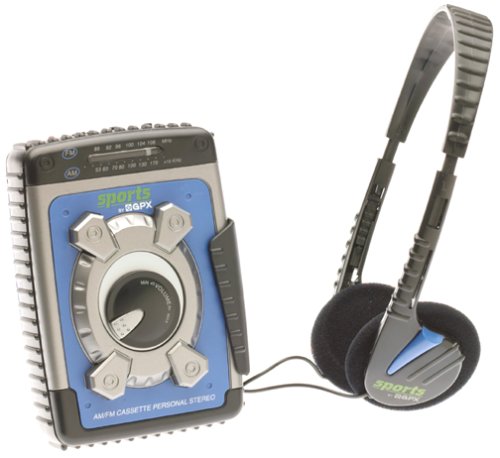
Image: The GPX C3302RS Sports Cassette Player with its cassette compartment open, revealing the internal mechanism. This view also indicates the general location for battery access, often adjacent to or within the main body of the player.
2.3 Konnessjoni tal-headphones
Locate the headphone jack, usually marked with a headphone symbol. Insert your 3.5mm stereo headphones firmly into this jack. Ensure the connection is secure for optimal audio output.
3. Istruzzjonijiet Operattivi
3.1 Loading a Cassette Tape
- Agħfas il- Waqqaf/EJETTA buttuna biex tiftaħ il-bieba tal-kompartiment tal-cassette.
- Insert a cassette tape with the exposed tape side facing upwards and the desired side (A or B) facing the playback head.
- Gently close the cassette compartment door until it clicks shut. Do not force the door.
3.2 Cassette Playback Controls
- ILGĦAB (►): Press this button to start playing the cassette tape.
- STOP/EJECT (■/▲): Press once to stop playback. Press again to open the cassette compartment.
- FAST FORWARD (FFWD ►►): Press and hold to rapidly advance the tape. Release to stop.
- REWIND (REW ◄◄): Press and hold to rapidly rewind the tape. Release to stop.
- PAUSE (▐▐): Press to temporarily stop playback without disengaging the tape. Press again to resume.
3.3 Kontroll tal-Volum
Dawwar il- VOLUM dial, typically located on the side or front of the unit, to adjust the audio output level through your headphones.
3.4 Tħaddim tar-Radju AM/FM
Your GPX C3302RS includes an integrated AM/FM radio tuner.
- Żerżaq il- FUNZJONI aqleb għal waħda minnhom AM or FM.
- Dawwar il- IRTUNING dial to scan for radio stations.
- Aġġusta l- VOLUM dial to your desired listening level.
- For optimal FM reception, extend the telescopic antenna. For AM reception, rotate the unit for best signal.
3.5 Funzjoni ta' Spinta tal-Bass
Involvi l- BASS BOOST switch (if present) to enhance low-frequency audio output for a richer sound experience.
4. Manutenzjoni
4.1 Tindif tal-Unità
- Barra: Wipe the exterior of the player with a soft, slightly damp drapp. Tużax tindif jew solventi li joborxu.
- Rasijiet tat-Tejp: Periodically clean the tape heads, pinch roller, and capstan using a cotton swab lightly moistened with isopropyl alcohol. This helps maintain sound quality and prevents tape damage.
4.2 Kura u Sostituzzjoni tal-Batterija
- Replace batteries when the sound becomes distorted or the unit stops functioning.
- Always replace both batteries at the same time with new ones.
- Neħħi l-batteriji jekk l-unità ma tkunx se tintuża għal perjodu estiż biex tevita tnixxija u ħsara.
- Armi l-batteriji użati b'mod responsabbli skont ir-regolamenti lokali.
4.3 Ħażna
When not in use, store the cassette player in a cool, dry place away from direct sunlight, extreme temperatures, and excessive dust.
5 Issolvi l-problemi
| Problema | Kawża Possibbli | Soluzzjoni |
|---|---|---|
| Ebda qawwa | Batteriji mejta jew installati ħażin. | Ibdel il-batteriji b'oħrajn ġodda, waqt li tiżgura l-polarità korretta. |
| L-ebda ħoss | Headphones not connected properly; Volume too low; Dirty tape heads. | Ensure headphones are fully plugged in. Increase volume. Clean tape heads. |
| Tape not playing/moving | Tape jammed; PLAY button not fully engaged; Batteries low. | Check tape for damage. Press PLAY firmly. Replace batteries. |
| Riċeviment ħażin tar-radju | Antenna not extended (FM); Unit orientation (AM); Weak signal area. | Extend FM antenna. Rotate unit for AM. Try moving to a different location. |
6. Speċifikazzjonijiet
- Numru tal-Mudell: C3302RS
- Sors tal-Enerġija: 2 x 'AA' size batteries (not included)
- Dimensjonijiet tal-Prodott: 4.2 x 2 x 5.1 pulzieri (approssimattiv)
- Piż tal-oġġett: 1.6 uqija (mingħajr batteriji)
- Manifattur: GPX
7. Garanzija u Appoġġ
For warranty information or technical support regarding your GPX C3302RS Sports Cassette Player, please refer to the warranty card included with your purchase or visit the official GPX websit. Żomm l-irċevuta tax-xiri tiegħek bħala prova tax-xiri.


