
Introduzzjoni
The Moondrop x Wuthering Waves U.C.T.S. is an Ultra HiFi Sound Open Wireless System (OWS) headset designed for gaming and high-fidelity audio. It features hybrid dual drivers, AI noise cancelling, LHDC-V transmission, and LE Audio support. This manual provides essential information for the proper use and care of your U.C.T.S. headset.
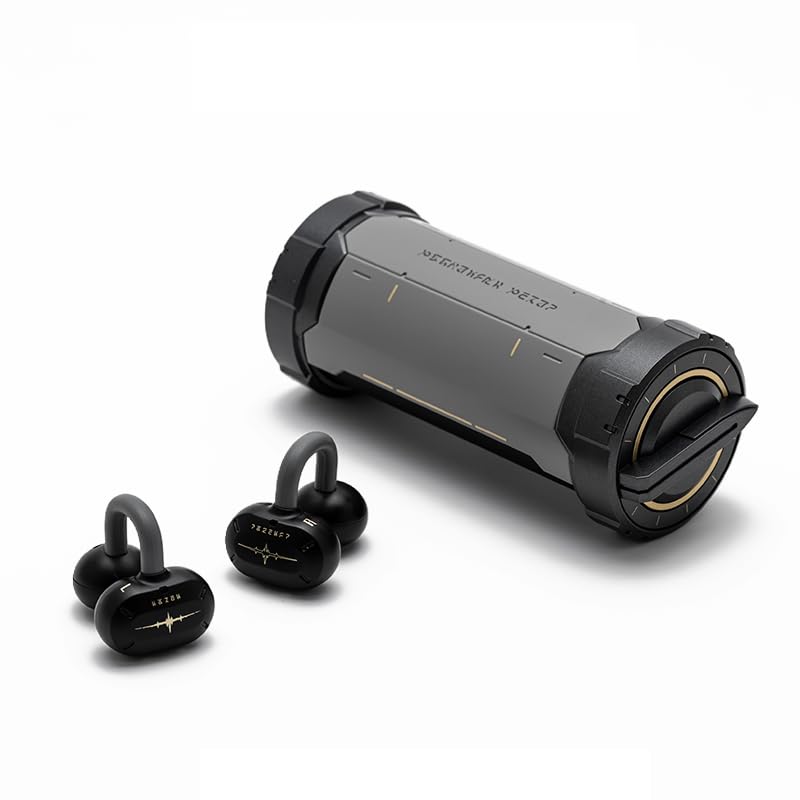
Image: The Moondrop x Wuthering Waves U.C.T.S. gaming headset with its cylindrical charging case.
X'hemm fil-Kaxxa
Ivverifika li l-oġġetti kollha huma preżenti fil-pakkett:
- Earbuds (Xellug u Lemin)
- Kawża tal-Iċċarġjar
- Kejbil tal-Iċċarġjar USB-C (mhux elenkat espliċitament iżda standard)
- Manwal
- Istruzzjoni għall-ilbies
- Guidance Card
- Karta tas-Servizz
- Collaboration Badge x2
- Laser Ticket x2
- Lanyard x1

Image: The complete package contents, including the headset, charging case, and various collaboration merchandise.
Setup
1. Iċċarġjar Inizjali
Before first use, fully charge the earbuds and charging case. Connect the USB-C cable to the charging port on the case and to a power source. The earbuds will charge automatically when placed inside the case.
- Earbud Charging Time: Approximately 1.7 Hours
- Charging Case Charging Time: Approximately 2 Hours

Image: The charging case opened, revealing the earbuds securely placed inside for charging.
2. Tqabbil tal-Bluetooth
- Kun żgur li l-earbuds huma ċċarġjati u mqiegħda fil-kaxxa tal-iċċarġjar.
- Iftaħ il-kaxxa tal-iċċarġjar. Il-earbuds jidħlu fil-modalità ta' tqabbil awtomatikament.
- Fuq l-apparat tiegħek (smartphone, tablet, kompjuter), attiva l-Bluetooth u fittex apparati disponibbli.
- Select "Moondrop U.C.T.S." from the list of found devices to connect.
- For LC3 codec, connect to "Moondrop U.C.T.S.-LEA" after activating it in the app.
3. Moondrop App Installation
For full customization and advanced features, download the Moondrop App. The app allows you to adjust sound settings, customize touch controls, and manage dual-device connectivity.
- Android users: Download from moondroplab.com or Google Play Store.
- iOS users: Download from the App Store.

Image: A smartphone displaying the Moondrop U.C.T.S. application interface, showing earbud status and settings.
Istruzzjonijiet Operattivi
Liebes il-Earbuds
The U.C.T.S. earbuds feature a C-shaped bridge design for comfortable and secure open-ear placement. Ensure the earbuds are positioned correctly over your ears for optimal sound and stability.

Image: A user wearing the Moondrop U.C.T.S. earbuds, demonstrating their open-ear fit.
Touch Kontrolli
The earbuds feature touch-sensitive areas for control. Default controls include:
- Tektek doppju: Daqq/Pawża l-awdjo.
- Triple Tap (Left): Kanzunetta preċedenti.
- Triple Tap (Right): Kanzunetta li jmiss.
- Erba' Viti: Switch between Low Latency Game Mode and High-Fidelity Music Mode.
Customization of touch controls is available through the Moondrop App.
Modi tal-Ħsejjes
- Modalità tal-Logħob b'Latenza Baxxa: Provides a 55ms low-latency experience, suitable for gaming. Activate by four taps on the earbud.
- High-Fidelity Music Mode: Standard audio mode for music playback.
Konnettività b'Apparat Doppju
The U.C.T.S. supports simultaneous connection to two devices. Switch between connected devices using the Moondrop App for a seamless experience.
AI Noise Cancelling (ENC)
Equipped with a built-in NPU core and an AI ENC algorithm, the headset effectively reduces environmental noise during calls, enhancing vocal clarity.
Dipole Directional Sound Transmission
This technology minimizes sound leakage by directing sound towards the ear canal, reducing up to 97% of sound leakage at 15cm from the ear.
Manutenzjoni
Iċċarġjar
Recharge the earbuds by placing them in the charging case. Recharge the case using a USB-C cable. Regular charging ensures optimal battery performance.
- Earbud Battery Life: Approximately 9 hours (AAC)
- Charging Case Battery Life: Approximately 21.5 Hours (AAC)
- Total Playback Time: 9 + 21.5 hours
- Standby Time: 50 + 120 hours
Tindif
Gently wipe the earbuds and charging case with a soft, dry, lint-free cloth. Avoid using abrasive materials, alcohol, or chemical cleaners. Do not immerse the device in water.
Issolvi l-problemi
Kwistjonijiet ta' Konnettività
- Il-earbuds mhux qed jitqabbdu: Ensure earbuds are charged. Place them in the case, close, then open to re-enter pairing mode. Check your device's Bluetooth settings.
- L-app mhux qed tikkonnettja: If the Moondrop App struggles to connect, try restarting the app or your device. Ensure Bluetooth is active and the earbuds are connected to your phone.
- Konnessjoni instabbli: Ensure you are within the 10-meter working distance (or up to 40 meters in open environments). Avoid physical obstructions between the earbuds and your device.
Kwistjonijiet ta' Ħsejjes
- Ebda ħoss: Check device volume and earbud battery level. Ensure earbuds are properly connected via Bluetooth.
- Volum baxx: Adjust volume on both your device and through the app.
- Tnixxija tal-ħoss: Ensure earbuds are correctly positioned on your ears.
Speċifikazzjonijiet
- Tip ta' Prodott:
- Ultra HiFi Sound OWS
- Mudell:
- MD-OWS-014 (WUTHERING WAVES xMOONDROP U.C.T.S.)
- Verżjoni Bluetooth:
- Bluetooth 6.0
- Bluetooth Profiles:
- A2DP/AVRCP/HFP/HSP
- Codec awdjo:
- SBC/AAC/LC3/LHDC-V
- Port tal-Iċċarġjar:
- USB-C
- Distanza tax-Xogħol:
- 10 Meters (Barrier-free Environment)
- Kapaċità tal-Earbud:
- 3.7V/40mAh
- Kapaċità tal-Batterija tal-Każ tal-Iċċarġjar:
- 3.7V/300mAh
- Tqegħid tal-widnejn:
- Widna Miftuħa
- Fattur tal-Formola:
- Veru Wireless
- Teknoloġija tal-Konnettività:
- Wireless
Garanzija
Dan il-prodott jiġi ma 'a 1 Snin Garanzija mid-data tax-xiri. Jekk jogħġbok żomm il-prova tax-xiri tiegħek għal talbiet ta' garanzija. Il-garanzija tkopri difetti fil-manifattura iżda ma tkoprix ħsara kkawżata minn użu ħażin, inċidenti, jew modifiki mhux awtorizzati.
Appoġġ
For further assistance, technical support, or warranty inquiries, please refer to the service card included in your package or visit the official Moondrop store:


