
1. Introduzzjoni
Thank you for choosing the MZEIBO 50W Sound Bar. This sound bar is designed to enhance your audio experience for Smart TVs, offering powerful sound and versatile connectivity options. This manual provides essential information for safe and effective use, including setup, operation, maintenance, and troubleshooting.
Jekk jogħġbok aqra dan il-manwal bir-reqqa qabel ma tuża l-prodott u żommu għal referenza futura.
2. Informazzjoni dwar is-Sigurtà
- Tesponix dan l-apparat għal taqtir jew titjir ta' ilma.
- Tpoġġix oġġetti mimlija b'likwidi, bħal vażuni, fuq l-apparat.
- Aċċerta ruħek li jkun hemm ventilazzjoni xierqa. Timblokkax xi fetħiet tal-ventilazzjoni.
- Place the sound bar on a stable, flat surface.
- Uża biss l-adapter tal-enerġija fornut mal-unità.
- Skonnettja l-apparat waqt maltempati bis-sajjetti jew meta ma jintużax għal perjodi twal.
- Tippruvax issewwi l-unità int stess. Irreferi għal kull manutenzjoni f'idejn persunal kwalifikat.
3. Kontenut tal-Pakkett
Iċċekkja li l-oġġetti kollha elenkati hawn taħt huma inklużi fil-pakkett tiegħek:
- MZEIBO Sound Bar (Model: tv soundbar)
- Kejbil tal-Enerġija
- Gwida Quick Start
- Kontroll mill-bogħod
- Cable ARC
- Kejbil ottiku
- Audio Line (AUX Cable)
- Viti tal-Immuntar mal-Ħajt

Image: Contents of the MZEIBO Sound Bar package, showing the sound bar, power cable, ARC cable, optical cable, AUX cable, remote control, user manual, and wall mount screws.
4. Prodott Aktarview
Karatteristiċi ewlenin:
- Powerful 50W Audio Output: Delivers rich, immersive sound with deep bass and crisp highs.
- Għażliet ta' Konnessjoni Multipli: Bluetooth 5.3, HDMI ARC, Optical, and AUX for versatile connectivity.
- Compact 17-Inch Design: Sleek design fits neatly on desks or shelves.
- Enhanced Sound Technology: Three equalizer modes (Music, Movie, News) to optimize audio.
- 360° Surround & Deep Bass: Four speakers combined with a built-in bass system create dynamic audio.
Komponenti:

Immaġni: Interna view of the sound bar highlighting its high-powered rectangular speakers with dual full-range drivers and sound ports for clear audio.

Image: The rear panel of the MZEIBO Sound Bar, illustrating the Bluetooth, Optical, ARC, AUX, and DC IN connection ports.
5. Setup
Pjazzament:
Place the sound bar on a flat, stable surface in front of your TV or mount it on the wall below your TV. Ensure there are no obstructions in front of the sound bar for optimal sound projection.

Image: The MZEIBO Sound Bar positioned neatly on a media console directly below a television, demonstrating typical placement.
Konnessjoni mal-Enerġija:
- Connect the power cable to the DC IN port on the back of the sound bar.
- Ipplaggja t-tarf l-ieħor tal-kejbil tal-enerġija f'sokit tal-ħajt.
Konnessjonijiet Awdjo:
Choose one of the following methods to connect the sound bar to your audio source (e.g., TV, projector, computer).
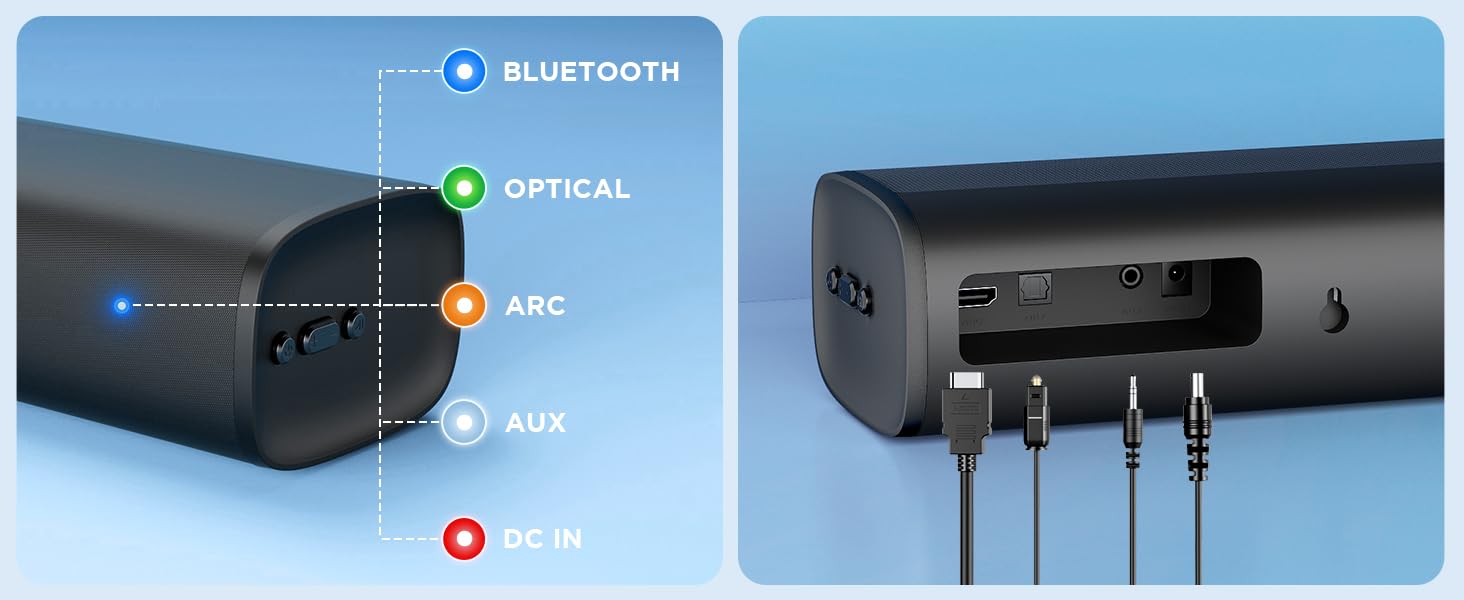
Image: A diagram illustrating the multiple connection options (Bluetooth, HDMI ARC, Optical, 3.5mm Aux) and compatible devices such as televisions, projectors, desktops, laptops, tablet PCs, and mobile phones.
Konnessjoni HDMI ARC:
- Connect one end of the HDMI ARC cable to the HDMI ARC port on the sound bar.
- Qabbad it-tarf l-ieħor mal-port HDMI ARC fuq it-TV tiegħek.
- Select the HDMI ARC input on your TV.
Konnessjoni ottika:
- Connect one end of the Optical cable to the OPTICAL port on the sound bar.
- Connect the other end to the Optical output port on your TV.
- Select the Optical input on your TV.
Konnessjoni AUX:
- Connect one end of the 3.5mm AUX cable to the AUX port on the sound bar.
- Connect the other end to the 3.5mm audio output port on your device (e.g., TV, phone).
- Agħżel l-input AUX fuq is-sound bar.
Konnessjoni Bluetooth:
- Qawwa fuq il-bar tal-ħoss.
- Press the 'Mode' button on the remote or sound bar until 'BT' (Bluetooth) mode is selected. The indicator light will flash.
- On your device (e.g., smartphone, tablet), enable Bluetooth and search for 'MZEIBO Sound Bar'.
- Select the sound bar from the list of available devices to pair. Once connected, the indicator light will stop flashing.
6. Istruzzjonijiet Operattivi
Funzjonijiet Bażiċi:
- Power On/Off: Press the power button on the remote or sound bar.
- Kontroll tal-Volum: Use the Volume Up (+) and Volume Down (-) buttons on the remote or sound bar.
- Għażla tal-Modalità tad-Dħul: Press the 'Mode' button on the remote or sound bar to cycle through Bluetooth, HDMI ARC, Optical, and AUX inputs.
Modi tal-Ħsejjes:
The MZEIBO Sound Bar features three optimized sound modes for different content types:
- Modalità tal-Film: Ittejjeb iċ-ċarezza tad-djalogu u tipprovdi ħsejjes usa'tage għall-films.
- Modalità Mużika: Optimizes audio for a balanced and rich musical experience with noticeable bass response.
- Modalità Aħbarijiet: Jiffoka fuq iċ-ċarezza vokali, u b'hekk il-kontenut mitkellem ikun aktar faċli biex jinftiehem.
To switch between modes, press the corresponding button (Movie, Music, News) on the remote control.

Image: A remote control pointing towards the sound bar, with icons representing Movie Mode, Music Mode, and News Mode displayed on a screen, indicating the sound bar's equalizer settings.
Video: A demonstration of the MZEIBO Sound Bar's features and sound quality, showcasing its use with a Smart TV.
7. Manutenzjoni
- Tindif: Uża drapp artab u niexef biex tnaddaf il-wiċċ tas-sound bar. Tużax prodotti tat-tindif likwidi jew materjali li joborxu.
- Ħażna: Jekk taħżen is-sound bar għal perjodu estiż, aqlagħha mill-plagg tal-elettriku u aħżenha f'post frisk u niexef.
- Evita l-Ostruzzjonijiet: Ensure the speaker grilles are free from dust and debris to maintain optimal sound quality.
8 Issolvi l-problemi
| Problema | Kawża Possibbli | Soluzzjoni |
|---|---|---|
| Ebda qawwa | Il-kejbil tal-enerġija mhux imqabbad jew is-sokit mhux qed jaħdem. | Iċċekkja l-konnessjoni tal-kejbil tal-enerġija. Ipprova sokit tal-enerġija differenti. |
| L-ebda ħoss | Incorrect input mode selected. Volume too low. Cable not connected properly. | Select the correct input mode. Increase volume. Reconnect audio cables securely. Check TV audio output settings. |
| Tqabbil Bluetooth falla | Sound bar not in pairing mode. Device too far. Interference. | Ensure sound bar is in BT pairing mode (flashing light). Move device closer. Avoid other wireless devices. |
| Il-kontroll mill-bogħod ma jaħdimx | Batteries are dead or incorrectly inserted. Obstruction between remote and sound bar. | Replace batteries. Ensure correct polarity. Remove any obstructions. Point remote directly at the sound bar. |
9. Speċifikazzjonijiet
| Karatteristika | Speċifikazzjoni |
|---|---|
| Brand | MZEIBO |
| Numru tal-Mudell | tv soundbar |
| Qawwa tal-Ħruġ Massimu tal-Ispeaker | 50 Watts |
| Rispons ta' Frekwenza | 20 KHz |
| Teknoloġija tal-Konnettività | Bluetooth, HDMI (ARC), Optical, AUX (3.5mm) |
| Verżjoni Bluetooth | 5.3 |
| Modalità tal-Ħruġ tal-Awdjo | Jdawru |
| Tip ta 'Immuntar | Immonta fuq il-mejda |
| Tip ta' Kelliem | Soundbar |
| Metodu ta' Kontroll | Remote |
| Daqs tal-Kelliem | 17 Pulzier |
| Dimensjonijiet tal-oġġett (D x W x H) | 16.54"D x 3.94"W x 2.72"H |
| Sors tal-Enerġija | Corded Elettriku |
10. Garanzija
The MZEIBO Sound Bar (Model: tv soundbar) comes with a 36-il xahar garanzija from the date of purchase. This warranty covers manufacturing defects and workmanship under normal use. It does not cover damage caused by misuse, accidents, unauthorized modifications, or improper installation.
Jekk jogħġbok żomm il-prova tax-xiri tiegħek għal pretensjonijiet ta' garanzija.
11. Appoġġ
For technical support, warranty claims, or any questions regarding your MZEIBO Sound Bar, please contact our customer service team through the retailer where you purchased the product or visit the official MZEIBO brand store online.
Aħna impenjati li nipprovdu servizz u appoġġ eċċellenti lill-klijenti.