
1. Prodott Aktarview
The Edifier CC300 is a professional Bluetooth 6.0 communicator headset designed for reliable and high-quality audio communication in various professional environments. It features AI-enhanced dual-microphone noise filtering, a 30mm dynamic driver for clear sound, and multiple connectivity options for versatile use.
2. Kontenut tal-Pakkett
- Edifier CC300 Headset
- Dongle USB-C
- Kejbil għall-Iċċarġjar USB-A għal USB-C
- Manwal għall-Utent
3. Karatteristiċi tal-prodott
The Edifier CC300 headset is engineered for comfort and performance, featuring a lightweight design and a flexible microphone arm.

Figura 3.1: Edifier CC300 Headset with included USB-C dongle and charging cable.

Figura 3.2: Ġenb view of the Edifier CC300 Headset with the microphone arm extended.

Figura 3.3: The microphone arm can rotate 240 degrees for flexible positioning on either the left or right side.
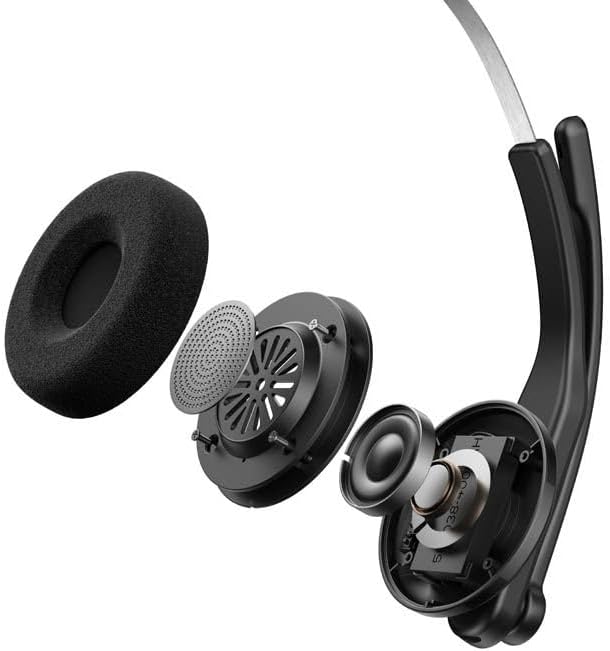
Figura 3.4: Sploda view showing the internal components of the earcup, including the 30mm dynamic driver.
4. Setup
4.1 Iċċarġjar inizjali
Before first use, fully charge the headset using the provided USB-A to USB-C cable. Connect the USB-C end to the headset and the USB-A end to a power source (e.g., computer USB port or wall adapter). The charging indicator light will show the charging status.
4.2 Tixgħel/Jitfi
- Biex Tixgħel: Agħfas u żomm il-buttuna tal-Qawwa sakemm id-dawl indikatur jixgħel.
- Biex Tifi: Agħfas u żomm il-buttuna tal-Qawwa sakemm id-dawl indikatur jintefa.
4.3 L-Ilbies tal-Headset
Adjust the headband for a comfortable fit. The microphone arm can be rotated 240 degrees to be positioned on either the left or right side of your face. Position the microphone approximately 2-3 cm from your mouth for optimal voice pickup.
5. Istruzzjonijiet Operattivi
The Edifier CC300 features intuitive controls for managing calls and audio playback.

Figura 5.1: Diagram illustrating the control buttons and their functions on the Edifier CC300 Headset.
5.1 Funzjonijiet tal-buttuni
| Azzjoni | Funzjoni |
|---|---|
| Press and hold (Power Button) | Qawwa mixgħul/mitfi |
| Press 1x (Mute Button) | Activate/Deactivate Mute (during calls) |
| Press 1x (Volume Up) | Żid il-Volum |
| Press and hold (Volume Up) | Track li jmiss |
| Press and hold (Volume Down) | Naqqas il-Volum |
| Press 1x (Volume Down) | Track Preċedenti |
| Press 1x (Call Button) | Play/Pause Audio; Answer/End Call |
| Press and hold (Call Button) | Irrifjuta Sejħa |
| Press 2x (Call Button) | Isemmi mill-ġdid l-Aħħar Numru |
6. Għażliet ta' Konnettività
The Edifier CC300 offers three versatile connection methods:
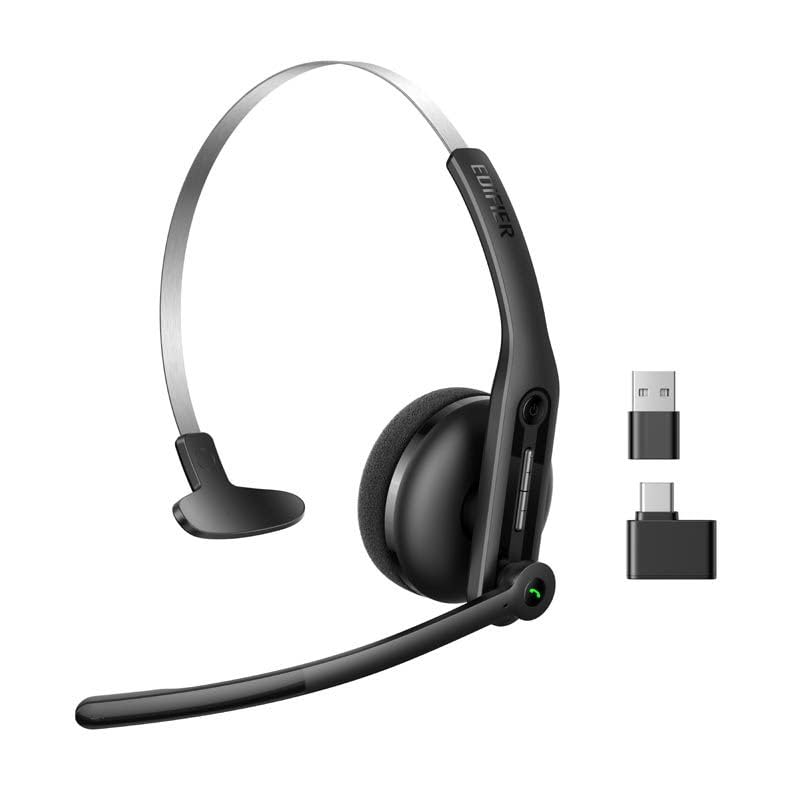
Figura 6.1: Visual representation of the three connectivity options: Bluetooth, USB-C dongle, and wired USB-A.
6.1 Konnessjoni Bluetooth
- Ensure the headset is powered on and in pairing mode (indicator light flashing).
- On your device (smartphone, laptop), enable Bluetooth and search for "EDIFIER CC300".
- Select the headset to pair. Once connected, the indicator light will turn solid blue.
6.2 USB-C Dongle Connection
- Plug the provided USB-C dongle into an available USB-C port on your computer.
- Power on the headset. It will automatically connect to the dongle for a stable, low-latency connection.
6.3 Wired USB-A Connection
- Connect the headset to your computer using the provided USB-A to USB-C cable.
- The headset will function as a wired audio device, providing zero interference.
7. Batterija u Iċċarġjar
The CC300 headset is designed for extended use with a long-lasting battery.
- Ħajja tal-batterija: Up to 72 hours for audio playback, or 36 hours for talk time.
- Ħin tal-Iċċarġjar: Madwar sagħtejn għal ħlas sħiħ.
- Indikatur tal-Iċċarġjar: Refer to the LED indicator on the headset for charging status.
To charge, connect the headset to a power source using the USB-A to USB-C cable.
8. Manutenzjoni
- Tindif: Uża drapp artab u niexef biex tnaddaf il-headset. Tużax prodotti tat-tindif likwidi jew aerosols.
- Ħażna: Aħżen il-headset f'post frisk u niexef 'il bogħod mix-xemx diretta u minn temperaturi estremi.
- Evita l-umdità: Keep the headset away from water and high humidity to prevent damage.
- Immaniġġja b'Kura: Evita li twaqqa’ l-headset jew li tissottomettih għal impatti qawwija.
9 Issolvi l-problemi
9.1 Ebda Ħoss jew Kwalità Awdjo Fqira
- Ensure the headset is powered on and properly connected (Bluetooth, dongle, or wired).
- Iċċekkja l-livelli tal-volum kemm fuq il-headset kif ukoll fuq l-apparat konness tiegħek.
- If using Bluetooth, ensure the headset is within range of your device.
- Try restarting both the headset and your connected device.
9.2 Il-Mikrofonu Mhux Jaħdem
- Kun żgur li l-mikrofonu mhux siekta (iċċekkja l-buttuna tal-mute).
- Verify that the headset is selected as the input device in your computer's or device's sound settings.
- Ensure the microphone arm is positioned correctly near your mouth.
9.3 Headset Not Pairing via Bluetooth
- Ensure the headset is in pairing mode (indicator light flashing).
- Turn off Bluetooth on other nearby devices to avoid interference.
- Insieh l-apparat mil-lista tal-Bluetooth tal-apparat tiegħek u erġa' pprova qabbad.
10. Speċifikazzjonijiet
| Karatteristika | Dettall |
|---|---|
| Brand | Edifikatur |
| Isem tal-Mudell | CC300 |
| Kulur | Iswed |
| Teknoloġija tal-Konnettività | Wireless (Bluetooth), Wired (USB-A), USB-C Dongle |
| Verżjoni Bluetooth | 6.0 |
| Protokolli Bluetooth | A2DP, AVRCP, HFP |
| Codec Awdjo | SBC |
| Tip ta' Sewwieq | Sewwieq dinamiku ta' 30mm |
| Rispons ta' Frekwenza | 20Hz - 20KHz |
| Livell tal-Pressjoni tal-Ħoss | 94 ± 3dB(A) |
| Kapaċità tal-batterija | 400mAh |
| Ħin ta 'Daqq tal-Mużika | Appross. 72 sigħat |
| Ħin tat-Tkellem | Appross. 36 sigħat |
| Ħin tal-Iċċarġjar | Appross. 1.5 sigħat |
| Input tal-Enerġija | 5V/500mAh |
| Piż | 70 Gramm |
| Karatteristiċi Speċjali | AI-enhanced Dual-Mic Noise Cancellation |
| Apparati Kompatibbli | Mobile Phones, Desktops, Laptops |
11. Garanzija u Appoġġ
11.1 Informazzjoni dwar Garanzija
The Edifier CC300 Headset comes with a garanzija ta 'sena from the date of purchase, covering manufacturing defects. Please retain your proof of purchase for warranty claims. The warranty does not cover damage caused by misuse, accidents, unauthorized modifications, or normal wear and tear.
11.2 Appoġġ għall-Klijent
For technical assistance, troubleshooting, or warranty inquiries, please contact Edifier customer support through their official website or the contact information provided with your product packaging. You may also visit the Ħanut Edifier fuq Amazon għal aktar informazzjoni.