
1. Introduzzjoni
Thank you for choosing the Audizio Arco Active Tower Speaker. This manual provides essential information for the safe and correct operation of your new audio system. Please read it thoroughly before use and retain it for future reference.
2. Istruzzjonijiet tas-Sigurtà
- Provvista tal-Enerġija: Tiżgura l-provvista tal-enerġija voltage matches the requirements specified on the speaker.
- Ventilazzjoni: Timblokkax il-fetħiet tal-ventilazzjoni. Installa skont l-istruzzjonijiet tal-manifattur.
- Ilma u Umdità: Tesponix dan l-apparat għax-xita jew għall-umdità. Tpoġġix oġġetti mimlija b'likwidi, bħal vażuni, fuq l-apparat.
- Sorsi tas-Sħana: Tinstallax ħdejn xi sorsi tas-sħana bħal radjaturi, reġistri tas-sħana, stufi, jew apparat ieħor (inkluż amplifiers) li jipproduċu sħana.
- Tindif: Naddaf biss b'ċarruta niexfa.
- Servizzi: Irreferi l-manutenzjoni kollha lil persunal tas-servizz kwalifikat. Il-manutenzjoni hija meħtieġa meta l-apparat ikun sar xi ħsara.
3. Kontenut tal-Pakkett
Carefully unpack the box and ensure all items are present and in good condition. If any item is missing or damaged, contact your retailer immediately.
- Audizio Arco Active Speaker
- Front Panel (Speaker Grille)
- Stand tal-Kelliem
- Kontroll mill-bogħod
- Kejbil tal-Enerġija
- Manwal ta 'Istruzzjoni (dan id-dokument)
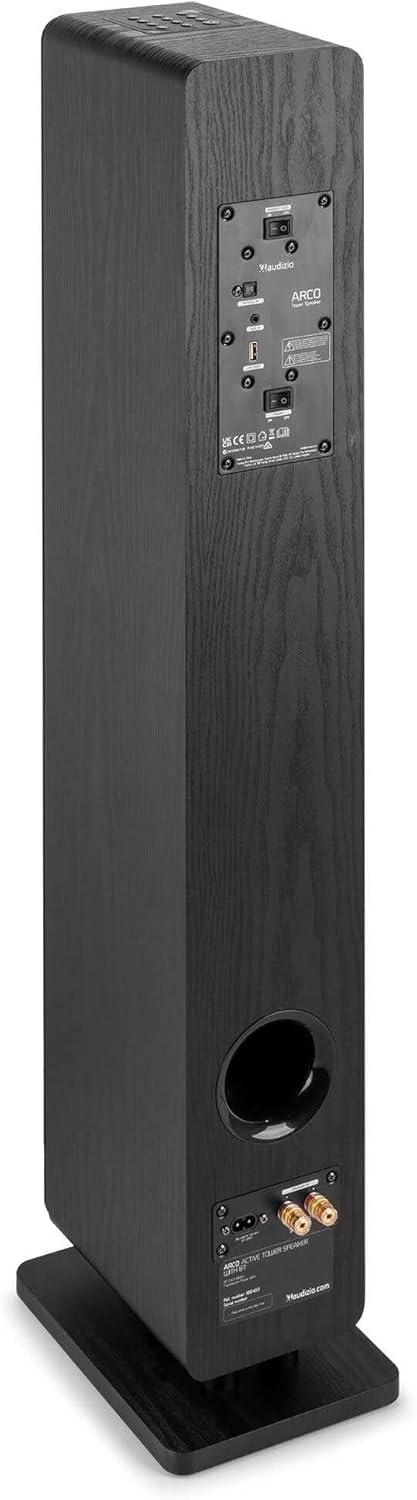
Image: All components included in the Audizio Arco package, including the speaker, remote control, and various connection cables.
4. Prodott Aktarview
Quddiem View (with Grille)

Image: The Audizio Arco speaker from the front, with the black fabric grille covering the drivers. The top panel shows control buttons, and the base features subtle LED lighting.
Quddiem View (without Grille)

Image: The Audizio Arco speaker with the front grille removed, showcasing the tweeter and three 4-inch woofer/subwoofer drivers. The top panel controls and LED-lit base are also visible.
Wara View (Connections and Controls)

Image: The back panel of the Audizio Arco speaker, featuring the power input, optical input, AUX input, USB port, and speaker output terminals for passive speakers. Control switches are also visible.
Kontroll mill-bogħod

Immaġni: Dettaljata view of the Audizio Arco remote control, showing buttons for power, mute, Bluetooth, link (TWS), input selection, playback controls, volume adjustment, and bass/treble settings.
Base LED Lighting

Image: A close-up of the speaker's base, illustrating the integrated ambient LED lighting feature that illuminates the area beneath the speaker.
5. Setup
5.1 Assembling the Speaker
- Carefully remove the speaker and its stand from the packaging.
- Attach the speaker stand to the base of the speaker using the provided screws. Ensure it is securely fastened.
- If desired, attach the front panel (grille) to the front of the speaker. It is held in place magnetically.
5.2 Konnessjoni tal-Enerġija
- Connect the power cable to the AC IN port on the rear of the speaker.
- Ipplaggja t-tarf l-ieħor tal-kejbil tal-enerġija f'sokit tal-ħajt adattat.
5.3 Tqegħid Inizjali
Place the speaker on a stable, flat surface. For optimal sound, position it in a location where sound can propagate freely without obstruction. Avoid placing it directly against a wall if possible, to allow for better bass response.
6. Istruzzjonijiet Operattivi
6.1 Power On/Off
Agħfas il- Qawwa button on the top panel of the speaker or on the remote control to turn the speaker on or off.
6.2 Għażla tal-Input
Agħfas il- Input button on the top panel or the remote control to cycle through available input sources: Bluetooth, USB, AUX, Optical.
6.3 Konnessjoni Bluetooth
- Agħżel Bluetooth as the input source. The speaker will enter pairing mode, indicated by a flashing LED.
- Fuq l-apparat mobbli tiegħek (smartphone, tablet, eċċ.), attiva l-Bluetooth u fittex apparati disponibbli.
- Select "Audizio ARCO" from the list of devices.
- Once paired, the LED indicator will stop flashing and remain solid. You can now stream audio from your device.
6.4 Daqq tal-USB
- Daħħal USB flash drive li jkun fih l-awdjo files fil- USB port fuq wara tal-ispiker.
- Agħżel USB bħala s-sors tal-input.
- L-ispiker jibda jdoqq l-awdjo awtomatikament files from the USB drive. Use the remote control for playback functions (play/pause, skip track).
6.5 Input AUX
- Qabbad apparat awdjo estern (eż., MP3 player, CD player) mal- KAJN IN (3.5mm) port on the rear of the speaker using an appropriate audio cable.
- Agħżel AUX bħala s-sors tal-input.
- Audio from your connected device will now play through the speaker.
6.6 Input ottiku
- Connect your TV or other audio source with an optical output to the OTTIKU FI (Toslink) port on the rear of the speaker using an optical cable.
- Agħżel Ottiċi bħala s-sors tal-input.
- Ensure your TV's audio output settings are configured for PCM stereo output if you experience no sound.
6.7 Tqabbil ta' Stereo Veru Wireless (TWS)
The Audizio Arco speaker supports TWS functionality, allowing you to pair two Arco speakers wirelessly for a stereo sound experience.
- Ensure both Audizio Arco speakers are powered on and not connected to any Bluetooth device.
- Fuq kelliem wieħed (dan se jkun il-kelliem primarju), agħfas u żomm il-buttuna LINK button on the remote control or the TWS button on the top panel until you hear a pairing tone.
- The primary speaker will search for the secondary speaker. Once connected, you will hear a confirmation tone, and the LED indicators on both speakers will synchronize.
- Issa, qabbad l-apparat Bluetooth tiegħek mal-ispiker primarju kif deskritt fit-taqsima 6.3. L-awdjo se jindaqq stereo permezz taż-żewġ kelliema.
6.8 Kontroll tad-Dawl LED
The ambient LED light at the base of the speaker can be controlled via the remote control. Refer to the remote control diagram for the specific button.
6.9 Tone Control (Remote Control)
Uża l- BASS+ / BASS- u TBL+ / TBL- buttons on the remote control to adjust the bass and treble levels to your preference. The ĊATT button resets the tone settings to default.
7. Manutenzjoni
7.1 Tindif
- Dejjem aqla’ l-ispiker mill-plagg tal-elettriku qabel ma tnaddaf.
- Uża drapp artab u niexef biex timsaħ l-uċuħ ta’ barra tal-ispiker.
- Tużax prodotti tat-tindif likwidi, aerosols, jew kimiċi li joborxu, għax dawn jistgħu jagħmlu ħsara lill-finitura.
- For the speaker grille, use a soft brush or vacuum cleaner with a brush attachment to gently remove dust.
7.2 Ħażna
If storing the speaker for an extended period, unplug it from the power source and store it in a cool, dry place, away from direct sunlight and extreme temperatures.
8 Issolvi l-problemi
| Problema | Kawża Possibbli | Soluzzjoni |
|---|---|---|
| Ebda qawwa | Kejbil tal-enerġija mhux imqabbad; Sokit tal-enerġija mhux attiv. | Ensure power cable is securely connected to speaker and outlet. Test outlet with another device. |
| L-ebda ħoss | Incorrect input selected; Volume too low; Mute activated; Source device issue. | Select correct input. Increase volume. Deactivate mute. Check audio output of source device. |
| Tqabbil Bluetooth ifalli | Speaker not in pairing mode; Device too far; Already paired to another device. | Ensure speaker is in Bluetooth pairing mode. Move device closer. Disconnect from other devices. |
| No sound from Optical input | TV audio output settings incorrect; Optical cable damaged. | Set TV audio output to PCM stereo. Check optical cable for damage and ensure secure connection. |
| TWS pairing ifalli | Speakers not in TWS pairing mode; Too far apart. | Ensure both speakers are in TWS pairing mode (not connected to Bluetooth). Move speakers closer. |
9. Speċifikazzjonijiet
| Karatteristika | Speċifikazzjoni |
|---|---|
| Brand | Audizio |
| Isem tal-Mudell | ARCO Active Tower |
| Tip ta' Kelliem | Active Hi-Fi Speaker (Floor-standing) |
| Max Output Power | 160 Watt |
| Teknoloġija tal-Konnettività | Bluetooth 5.4, Optical (Toslink), USB, AUX (3.5mm) |
| Modalità tal-Ħruġ tal-Awdjo | Stereo |
| Rispons ta' Frekwenza | 20000 Hz (Upper limit, typical for full-range speakers) |
| Woofer Driver Size | 3 x 4 pulzier |
| Input Voltage | 230 Volt |
| Metodu ta' Kontroll | Remote Control, On-device buttons |
| Karatteristiċi Speċjali | Ambient LED light, TWS (True Wireless Stereo) function |
| Dimensjonijiet (D x W x H) | 24 ċm x 17 ċm x 95.5 ċm |
| Piż tal-oġġett | 9.85 Kilogrammi |
| Apparati Kompatibbli | Smartphones, Televisions, Tablets |
10. Garanzija u Appoġġ
10.1 Informazzjoni dwar Garanzija
Audizio products are manufactured to high quality standards. This product is covered by a manufacturer's warranty, the terms of which may vary by region. Please refer to your purchase documentation or contact your local retailer for specific warranty details.
10.2 Appoġġ għall-Klijent
Should you require technical assistance or have questions regarding your Audizio Arco speaker, please contact your retailer or visit the official Audizio websit għal riżorsi ta' appoġġ u informazzjoni ta' kuntatt.