
1. Introduzzjoni
This manual provides detailed instructions for the assembly, operation, and maintenance of your SEDETA 47x24 Inch Electric Standing Desk. Please read all instructions carefully before use to ensure proper function and safety. This desk is designed for versatile use in various environments, including home offices, studios, and gaming setups.
Informazzjoni dwar is-Sigurtà
- Kun żgur li l-komponenti kollha huma mwaħħla sew qabel l-użu.
- Żomm it-tfal u l-annimali domestiċi 'l bogħod mill-iskrivanija waqt l-aġġustament tal-għoli.
- Do not overload the desk; refer to the specifications for maximum weight capacity.
- Evita li tpoġġi likwidi direttament fuq il-pannell tal-kontroll jew fuq is-sokits tal-elettriku.
- Unplug the desk from the power source before cleaning or maintenance.
2. Kontenut tal-Pakkett
Verify that all parts are present before beginning assembly. If any parts are missing or damaged, please contact customer service.
- Desktop (1)
- Qafas tas-Saqajn (2)
- Crossbar/Support Bar (1)
- Panel tal-Kontroll (1)
- Power Adapter and Cable (1)
- Casters (4, 2 with locks)
- Adjustable Feet (4, optional alternative to casters)
- Built-in Power Strip (1)
- Assembly Hardware (screws, washers, Allen wrench, screwdriver)
- Manwal ta' Istruzzjoni (1)
3. Setup u Assemblea
Assembly typically requires two people for ease, but can be completed by one. Tools are included.
- Ħoll il-Komponenti: Neħħi l-partijiet kollha mill-imballaġġ bir-reqqa u poġġihom fuq wiċċ nadif u artab biex tevita l-grif.
- Attach Leg Frames: Secure the leg frames to the desktop using the provided screws. Ensure they are aligned correctly.
- Installa l-Crossbar: Attach the crossbar between the leg frames. Ensure the lifting axle is fully inserted into both slots for proper lifting mechanism function.
- Choose Mobility Option: Decide between casters for mobility or adjustable feet for stationary use. Attach your chosen option to the bottom of the leg frames. If using casters, ensure the two lockable casters are placed on the same side for easier locking.
- Panel tal-Kontroll tal-Immuntar: Secure the control panel to the underside of the desktop in the designated area.
- Qabbad il-Wiring: Connect the motor cables from the leg frames to the control box, and then connect the control panel cable to the control box. Plug the power adapter into the control box.
- Install Power Strip: If not pre-installed, secure the built-in power strip into its designated slot on the desktop.
- Qawwa Inizjali: Plug the desk into a wall outlet. The LED display on the control panel should light up.

4. Istruzzjonijiet Operattivi
Aġġustament Għoli
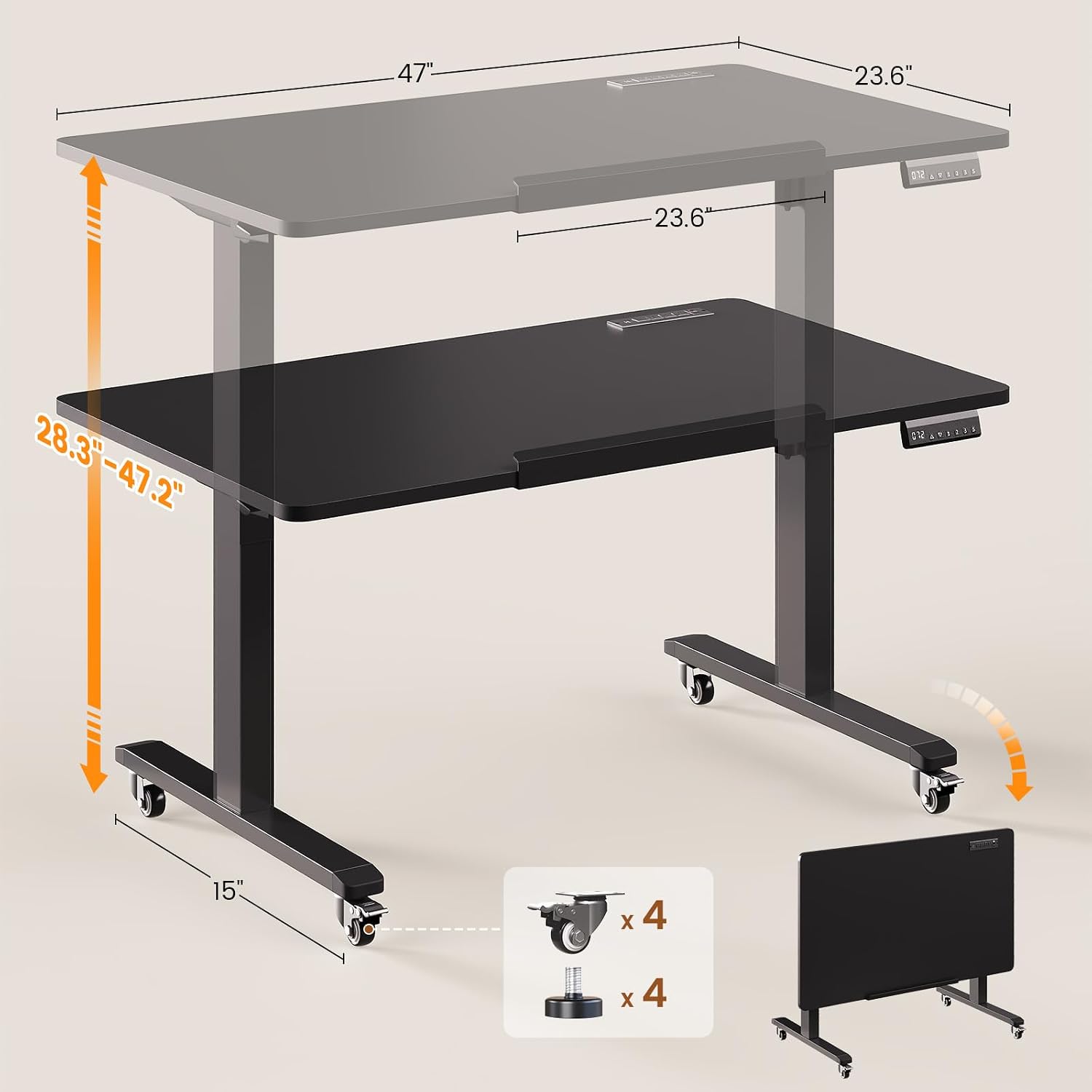
The desk features an electric lift system for smooth height adjustments between 28.3 inches and 47.2 inches.

- Aġġustament tal-Għoli: Uża l- Up u Down arrow buttons on the control panel to raise or lower the desk to your desired height. The current height will be displayed on the LED screen.
- Presets tal-memorja: The control panel has three memory preset buttons (1, 2, 3). To save a height, adjust the desk to the desired position, then press the S button followed by the desired preset number (1, 2, or 3). To recall a saved height, simply press the corresponding preset number button.
- Funzjoni ta' Irrisettjar (RST): If the desk encounters an error or does not respond, press and hold the RST button until the desk moves to its lowest position and resets.
Desktop Tilt Function
The desktop can be tilted from 0° to 180° for various activities like drawing or using it as a writing board.

- To tilt the desktop, locate the tilt mechanism on the side of the desk.
- Release the locking mechanism (usually a lever or knob) and adjust the desktop to your desired angle.
- Securely lock the mechanism once the desired tilt is achieved.
Mobility and Folding
The desk is equipped with casters for easy movement and can be folded for compact storage.
- Nimxu l-Iskrivanija: Unlock the two lockable casters. Gently push the desk to its new location. Once in position, lock the casters to prevent unintended movement.
- Tiwi għall-Ħażna: Adjust the desk to its lowest height. Tilt the desktop to the 180° vertical position. This allows the desk to be stored flat against a wall or in a closet.
5. Karatteristiċi
- Aġġustament Elettriku tal-Għoli: Smooth and quiet motor (<40dB) allows for height changes from 28.3" to 47.2".
- 180° Tiltable Desktop: Converts from a flat desk to a drafting table or vertical writing board.
- Multifunctional Control Panel: Features an LED display, up/down buttons, and 3 memory presets for quick height recall.
- Strixxa tal-Enerġija Inkorporata: Includes 4 AC outlets (120V/12A), 2 USB ports (5V/2A), and 1 Type-C port (5V/2A) with a 6.6 ft power cord for convenient device charging.
- Disinn Mobbli: Equipped with four smooth-rolling casters (two lockable) for easy relocation. Adjustable feet are also included as an alternative.
- Foldable for Storage: The desk can be folded flat for space-saving storage when not in use.
- Desktop Spazjuż: Measures 47"L x 23.6"W, providing ample space for work or creative projects.
- Kostruzzjoni b'saħħitha: Features a robust alloy steel frame with a 200-lb capacity.


6. Manutenzjoni
- Tindif: Imsaħ id-desktop u l-qafas b'ċarruta ratba u damp drapp. Evita prodotti tat-tindif li joborxu jew kimiċi ħarxa li jistgħu jagħmlu ħsara lill-finitura.
- Ġestjoni tal-Kejbil: Iċċekkja u organizza l-kejbils regolarment biex tevita t-tħabbil u l-ħsara.
- Lubrikazzjoni: The electric lift mechanism is generally maintenance-free. Do not attempt to lubricate internal components unless specifically instructed by customer support.
- Iċċekkja tal-Qafliet: Iċċekkja l-viti u l-qafliet kollha perjodikament biex tiżgura li huma ssikkati. Erġa' ssikkahom jekk meħtieġ.
7 Issolvi l-problemi
| Problema | Kawża Possibbli | Soluzzjoni |
|---|---|---|
| Desk does not move or respond to control panel. | Power cable disconnected; motor cable loose; control panel error. | Check power connections. Ensure all motor and control panel cables are securely plugged in. Press and hold the RST Agħfas il-buttuna għal 5 sekondi biex tirrisettja s-sistema. |
| L-iskrivanija tiċċaqlaq b'mod irregolari. | Lifting axle not fully inserted; uneven weight distribution. | Ensure the crossbar's lifting axle is fully inserted into both leg frame slots. Redistribute items on the desktop evenly. Perform a system reset. |
| Storbju waqt it-tħaddim. | Normal motor sound; loose fasteners. | A quiet motor sound is normal (<40dB). Check and tighten all assembly screws if excessive noise occurs. |
| Desktop tilt mechanism is stiff or loose. | Locking mechanism needs adjustment. | Ensure the tilt locking mechanism is fully engaged or disengaged. Do not force the tilt. |
| Is-sokits tal-elettriku mhux qed jaħdmu. | Power strip switch off; desk not powered. | Check the power switch on the built-in power strip. Ensure the desk is plugged into a live wall outlet. |
8. Speċifikazzjonijiet
- Ditta: SEDETA
- Mudell: B0GHQ32MJ2
- Dimensjonijiet tal-Prodott: 47.2"D x 23.6"W x 28.3"H (minimum height)
- Medda ta' Aġġustament Għoli: 28.3" sa 47.2"
- Desktop Tilt Range: 0° sa 180°
- Kulur: Iswed
- Materjal: Engineered Wood (Desktop), Alloy Steel (Frame)
- Mekkaniżmu ta' rfigħ: Elettriku
- Livell ta' Storbju: <40dB
- Kapaċità tal-piż: 200 lbs (approximate, for flat desktop)
- Strixxa tal-Enerġija: 4 AC Outlets (120V/12A), 2 USB Ports (5V/2A), 1 Type-C Port (5V/2A)
- Tul tal-Kable tal-Enerġija: 6.6 pied
- Karatteristiċi Speċjali: Foldable, 180° Tiltable desktop, Mobile (with casters), Built-in Power Outlet, Memory Presets
9. Garanzija u Appoġġ
SEDETA provides a 3-year service warranty for this product. For any issues during purchase, assembly, or use, please contact SEDETA customer service. We are committed to providing satisfactory solutions.
Informazzjoni ta' Kuntatt: Please refer to the contact details provided with your purchase or visit the official SEDETA websit għall-appoġġ.