
1. Introduzzjoni
This manual provides essential information for setting up, operating, maintaining, and troubleshooting your Xiaomi Redmi Note 15 Pro 5G smartphone. Please read this manual carefully before using your device to ensure optimal performance and longevity.
The Xiaomi Redmi Note 15 Pro 5G features a 200MP main camera with optical stabilization, a 6580mAh battery, a 1.5K CrystalRes AMOLED display with 120Hz refresh rate, and is powered by the Mediatek Dimensity 7400-Ultra processor. It also boasts advanced water and dust resistance (IP66, IP68, IP69, and IP69K ratings).
2. Device Overview
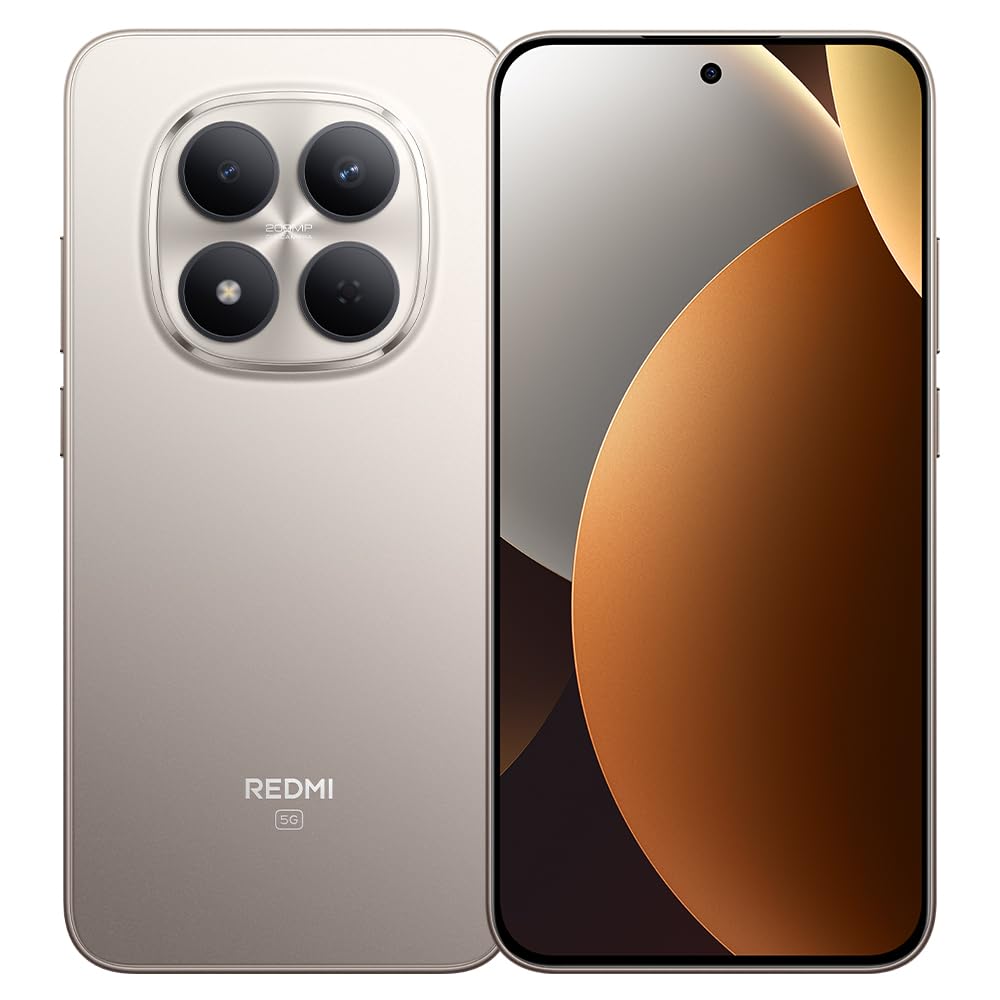
Figura 1: Xiaomi Redmi Note 15 Pro 5G Smartphone. This image displays the front and back of the device, highlighting its sleek design and camera module.
Kontenut tal-Pakkett
- Xiaomi Redmi Note 15 Pro 5G Smartphone
- Adapter tal-Enerġija
- Kejbil USB Type-C
- Għodda tal-Ejector tas-SIM (tista' tvarja skont ir-reġjun)
- Gwida Quick Start (dan il-manwal)
3. Setup
3.1. Daħħal is-SIM Card
- Sib it-trej tal-kard SIM fuq il-ġenb tat-tagħmir tiegħek.
- Daħħal l-għodda tal-ejecter tas-SIM fit-toqba ż-żgħira ħdejn it-trej u agħfas sew sakemm it-trej joħroġ 'il barra.
- Place your Nano-SIM card(s) into the tray with the gold contacts facing down. Ensure proper orientation. This device supports Dual SIM functionality.
- Erġa' daħħal it-trej fit-telefon bir-reqqa.
3.2. L-Ewwel Tixgħel u l-Konfigurazzjoni
- Agħfas u żomm il-buttuna tal-Qawwa sakemm jidher il-logo ta' Xiaomi.
- Segwi l-istruzzjonijiet fuq l-iskrin biex tagħżel il-lingwa u r-reġjun tiegħek, tikkonnettja mal-Wi-Fi, u tissettja l-kont Google tiegħek.
- Configure biometric security features such as facial recognition for enhanced security.
3.3. Iċċarġjar tal-Apparat
Connect the USB Type-C cable to the phone's charging port and the other end to the provided power adapter. Plug the adapter into a power outlet. The device supports fast charging. Ensure the power adapter is suitable for your region.
4. Istruzzjonijiet Operattivi
4.1. Wiri u Navigazzjoni
- The device features a 6.83-inch CrystalRes AMOLED display with a 120Hz refresh rate for smooth visuals.
- Navigate using gestures or on-screen navigation buttons (configurable in settings).
- Adjust display brightness and color settings in the 'Display' section of the Settings app.
4.2. Użu tal-kamera
Your Redmi Note 15 Pro 5G is equipped with a 200MP main rear camera with optical stabilization and a 20MP front camera.
- Iftaħ l-app Camera.
- Agħżel il-modalità mixtieqa tiegħek (Ritratt, Ritratt, Vidjo, Professjonali, eċċ.).
- Tektek il-buttuna tax-shutter biex tieħu ritratti jew tibda/twaqqaf ir-reġistrazzjoni tal-vidjow.
- Utilize the 200MP mode for high-resolution images and 4K video recording for detailed videos.
4.3. Prestazzjoni u Konnettività
- The Mediatek Dimensity 7400-Ultra processor and 8GB RAM ensure smooth multitasking and gaming.
- Connect to 5G networks for high-speed internet access.
- Manage Wi-Fi, Bluetooth, and mobile data connections through the Quick Settings panel or the 'Network & Internet' section in Settings.
5. Manutenzjoni
5.1. Kura tal-batterija
- The 6580mAh battery provides extended usage. For optimal battery life, avoid extreme temperatures.
- Use the provided charger for efficient and safe charging.
- Regularly check battery usage in Settings to identify and manage power-consuming apps.
5.2. Reżistenza għall-Ilma u t-Trab
Your device is rated IP66, IP68, IP69, and IP69K for water and dust resistance. This means it is protected against strong jets of water, immersion up to certain depths, and high-pressure/high-temperature water jets. However, resistance is not permanent and may decrease over time with normal wear. Avoid exposing the device to seawater, chlorinated water, or liquids other than fresh water. If the device gets wet, dry it thoroughly before charging or using the USB port.
5.3. Aġġornamenti tas-Software
Regularly check for and install software updates to ensure your device has the latest features, security patches, and performance improvements. Go to 'Settings' > 'About phone' > 'MIUI version' to check for updates.
6 Issolvi l-problemi
6.1. Kwistjonijiet Komuni u Soluzzjonijiet
- Apparat mhux qed jixgħel: Kun żgur li l-batterija hija ċċarġjata. Qabbad mal-ċarġer għal mill-inqas 15 minuti, imbagħad ipprova ixgħelha.
- Ħajja fqira tal-batterija: Reduce screen brightness, disable unnecessary background apps, turn off GPS/Bluetooth when not in use. Check 'Battery' settings for detailed usage.
- Problemi ta' konnettività (Wi-Fi/5G): Restart your device. Toggle Wi-Fi/Mobile Data off and on. Reset network settings if the issue persists.
- L-apps jiġġarraf: Clear the cache of the problematic app (Settings > Apps > [App Name] > Storage > Clear cache). If the issue continues, reinstall the app.
- L-apparat ma jirrispondix: Agħfas u żomm il-buttuna tal-Qawwa għal madwar 10-15-il sekonda biex terġa' tibda.
7. Speċifikazzjonijiet
| Karatteristika | Speċifikazzjoni |
|---|---|
| Brand | XIAOMI |
| Mudell | Redmi Note 15 Pro 5G |
| Sistema Operattiva | Android |
| Mudell tas-CPU | Mediatek Dimensity 7400-Ultra |
| Kapaċità tal-Ħżin | 256 GB |
| RAM | 8 GB |
| Daqs tal-Iskrin | 6.83 Pulzier |
| Tip ta 'Wiri | AMOLED |
| Riżoluzzjoni Massima tal-Iskrin | 2772 x 1280 pixel |
| Riffriskar Rata | 120 Hz |
| Riżoluzzjoni tal-Kamera ta 'wara | 200 MP |
| Riżoluzzjoni tal-Kamera ta 'quddiem | 20 MP |
| Riżoluzzjoni tal-Qbid tal-Vidjo | 4K (4096 Pixel) |
| Kapaċità tal-batterija | 6580 mAh |
| Tul tal-Batterija | 24-il Siegħa (użu tipiku) |
| Teknoloġija tal-Konnettività | 5G, 2G |
| Teknoloġija tan-Netwerk Wireless | GSM |
| Tip ta' Konnettur | USB Tip-Ċ |
| Tip ta' SIM Card | Nano-SIM (Dual SIM) |
| Sigurtà Biometrika | Rikonoxximent tal-wiċċ |
| Livell ta 'Reżistenza għall-Ilma | IP66, IP68, IP69, IP69K |
| Jack tal-headphone | Xejn |
| Komponenti Inklużi | Adapter tal-Enerġija |
| Ċertifikazzjoni tat-Test Estern | Anatel: 062732509185 / Model: 25080RABDG |
8. Garanzija u Appoġġ
8.1. Informazzjoni dwar Garanzija
Dan il-prodott jiġi ma 'a Garanzija ta '90 jum against manufacturing defects. Please retain your proof of purchase for warranty claims. The warranty does not cover damage caused by misuse, accidents, unauthorized repairs, or normal wear and tear.
8.2. Appoġġ għall-Klijent
For further assistance, technical support, or warranty inquiries, please refer to the official Xiaomi support website or contact their customer service. You can find contact details on the official Xiaomi webis-sit jew fid-dokumentazzjoni pprovduta mat-tagħmir tiegħek.
For product homologation details, please visit: sistemas.anatel.gov.br/sch