
1. Introduzzjoni
This manual provides detailed instructions for the installation, operation, and maintenance of your Junsun 8 Core Car Radio. Please read this manual thoroughly before installation and use to ensure proper functionality and safety. This unit is designed for Subaru Forester models from 2015 to 2018.
2. Informazzjoni dwar is-Sigurtà
- Always ensure the vehicle is parked and the engine is off before performing any installation or wiring.
- Skonnettja l-batterija tal-vettura qabel tibda l-installazzjoni biex tevita xorts elettriċi.
- Ikkonsulta professjonist jekk m'intix ċert dwar xi passi tal-installazzjoni.
- Tħaddimx l-apparat b'mod li jtellifk l-attenzjoni mis-sewqan.
- Ensure all connections are secure to prevent malfunctions.
3. Kontenut tal-Pakkett
Ivverifika li l-komponenti kollha huma preżenti fil-pakkett:
- Head Unit (Junsun 8 Core Car Radio)
- Wire Cables (Vehicle-specific harness)
- Crowbar (for trim removal)
- Qafas (għall-installazzjoni)
- Backup Camera (HS19 model)
4. Setup u Installazzjoni
The Junsun Car Radio is designed for genuine plug-and-play installation, retaining factory features like steering wheel controls and data displays. No cutting or splicing of factory wiring is typically required.
4.1. Kontroll ta' Qabel l-Installazzjoni
- Ensure your vehicle is a Subaru Forester model year 2015-2018.
- Gather necessary tools, including the provided crowbar and a screwdriver set.
4.2. Removing the Factory Radio
- Carefully use the crowbar to pry off the trim panels surrounding the factory radio.
- Unscrew the mounting bolts holding the factory radio in place.
- Gently pull out the factory radio and disconnect all wiring harnesses.
 Image: Comparison of the car dashboard before and after installing the Junsun Car Radio, showing the integrated appearance.
4.3. Konnessjonijiet tal-Wiring
Connect the provided vehicle-specific harness to the Junsun head unit and the vehicle's factory wiring. Most connectors are unique and will only fit in one direction.
 Image: Detailed diagram illustrating the wiring connections for high-end car systems, supporting original rear camera and steering wheel controls.
 Image: Detailed diagram illustrating the wiring connections for low-end car systems. Note that aftermarket camera is provided and SWC function may require manual programming.
4.3.1. Harman Kardon Sound System Compatibility
If your vehicle has a Harman Kardon sound system, connect the AMP wire in the power cable to the AMP wire in the RCA harness. This wire is typically pink or blue.
 Image: Diagram showing the specific wiring connection for integrating with the Harman Kardon sound system, highlighting the AMP konnessjoni tal-wajer.
4.4. Installazzjoni ta' Kamera ta' Backup
The included HS19 1080P AHD backup camera provides clear visuals for safer reversing. Connect the camera to the designated input on the head unit's wiring harness. Route the camera cable carefully to the rear of the vehicle.
 Image: Illustration of a car reversing with the backup camera view displayed on the head unit, showing parking assistance lines.
 Image: A visual representation of the rearview camera in action, providing parking assistance with dynamic guidelines as a car backs into a parking spot.
4.5. Installazzjoni Finali
- Mount the Junsun head unit into the dashboard opening, securing it with the factory bolts.
- Reattach the trim panels, ensuring they snap securely into place.
- Erġa' qabbad il-batterija tal-vettura.
5. Istruzzjonijiet Operattivi
The Junsun Car Radio features a 9-inch IPS HD touchscreen (1280x720 resolution) and an 8-core CPU with 4GB RAM and 64GB ROM for smooth operation.
 Image: Diagram illustrating the internal components of the Junsun Car Radio, highlighting the 8-Core CPU, 4GB RAM, and 64GB ROM for enhanced performance.
5.1. Funzjonijiet Bażiċi
- Power On/Off: Agħfas u żomm il-buttuna tal-qawwa fuq l-unità jew uża l-ignition tal-vettura.
- Kontroll tal-Volum: Aġġusta l-volum billi tuża l-buttuni fiżiċi fuq l-unità jew il-kontrolli tal-istering.
- Skrin tad-dar: Tap the Home icon to return to the main interface.
5.2. CarPlay mingħajr fili u Android Auto
The unit supports both wireless and wired connections for Apple CarPlay and Android Auto. This allows seamless integration of your smartphone for navigation, music, messages, and calls.
- Konnessjoni bla fili: Enable Bluetooth on your iPhone or Android device and pair it with the car radio. Follow the on-screen prompts to activate CarPlay or Android Auto.
- Konnessjoni bil-fili: Connect your smartphone to the unit via a USB cable.
 Image: Screenshots demonstrating the user interface for CarPlay and Android Auto on the Junsun Car Radio, showing various app icons for navigation, music, and communication.
5.3. Bluetooth 5.0
The upgraded Bluetooth 5.0 system enables hands-free calls, contact syncing, and music playback. An external microphone is included for clear audio during calls.
- Tqabbil: Go to the Bluetooth settings on the head unit, enable Bluetooth on your phone, and select the head unit from the list of available devices.
- Sejħat mingħajr idejn: Once paired, you can make and receive calls directly from the head unit.
- Streaming tal-Mużika: Daqq l-awdjo mit-telefon tiegħek permezz tal-ispikers tal-karozza.
 Image: A visual representation of the Bluetooth 5.0 interface on the car radio, showing options for phone calls, music playback, and accessing the phonebook.
5.4. Navigazzjoni tal-GPS
The built-in navigation software provides real-time traffic updates when connected to the internet. The HD screen ensures clear visibility of all navigation details. Offline maps are also supported.
 Image: The car radio display showing a GPS navigation map with route information, alongside icons representing various travel modes.
5.5. Radju FM/AM
Enjoy high-quality FM/AM radio for news and updates. The unit supports RDS (Radio Data System) for enhanced information display.
 Image: The car radio screen displaying the FM radio interface, showing current frequency and preset options, with a classic radio icon in the background.
5.6. Steering Wheel Controls (SWC)
The system supports original steering wheel controls, allowing you to adjust volume, switch songs, and answer calls without taking your hands off the wheel.
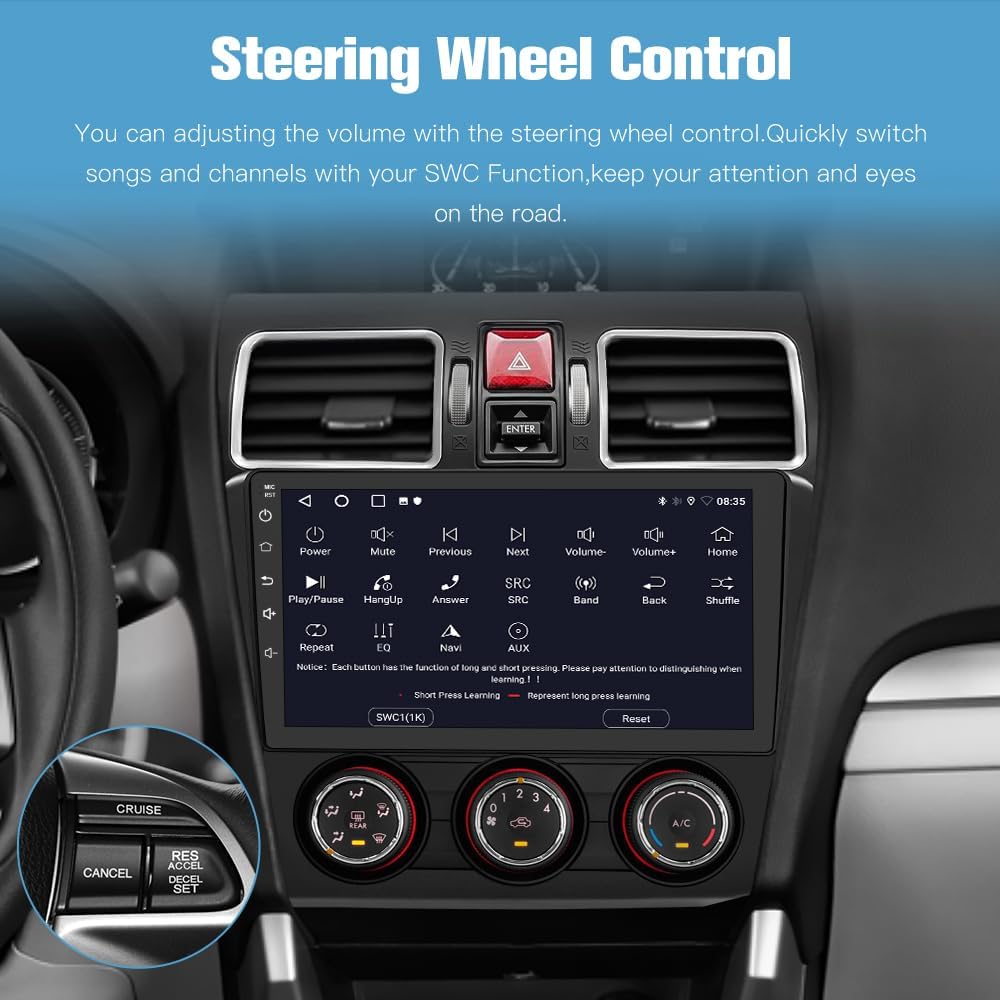 Image: The car radio display showing the steering wheel control settings, with an inset image of a steering wheel highlighting the control buttons.
5.7. Split Screen Funzjoni
Utilize the split-screen feature to run two applications simultaneously, such as navigation and music, or a video and maps.
 Image: The car radio screen demonstrating the split-screen feature, showing maps on one side and music playback or video on the other.
5.8. DSP (Proċessur tal-Ħoss Diġitali) integrat
The integrated DSP allows for advanced audio tuning, providing a customized sound experience within your vehicle.
 Image: The car radio display showing the DSP interface with an equalizer and sound field adjustments, alongside a diagram illustrating sound delay compensation within a car cabin.
5.9. 5GHz WiFi Connectivity
Connect to available Wi-Fi networks for internet access, enabling online navigation, app downloads, and streaming services.
 Image: The car radio display showing various online applications and web browsing, indicating 5GHz WiFi connectivity.
6. Manutenzjoni
6.1. Aġġornamenti tas-Software
Keep your Android 13 head unit current with wireless updates. These updates enhance software usability, address bugs, and boost security. Access the update feature through the system settings menu.
6.2. Tindif
Use a soft, dry cloth to clean the touchscreen and unit exterior. Avoid abrasive cleaners or solvents that could damage the display or finish.
7 Issolvi l-problemi
Jekk tiltaqa' ma' problemi, irreferi għas-soluzzjonijiet komuni li ġejjin:
| Problema | Kawża Possibbli | Soluzzjoni |
|---|---|---|
| L-unità ma tixgħelx | Konnessjoni tal-enerġija maħlula, fjus maħruq, batterija tal-vettura skonnettjata. | Iċċekkja l-konnessjonijiet kollha tal-enerġija, spezzjona l-fjusis tal-vettura, u kun żgur li l-batterija hija konnessa. |
| L-ebda ħoss | Volume too low, mute activated, incorrect wiring to speakers/ampaktar ħaj. | Increase volume, check mute status, verify speaker/amplifier wiring. For Harman Kardon systems, ensure AMP wire is connected. |
| CarPlay/Android Auto mhux qed jikkonnettja | Bluetooth/USB connection issue, phone settings. | Ensure Bluetooth is on and paired, try a different USB cable, check phone's CarPlay/Android Auto settings. |
| Lagging performance | Too many apps open, system overload. | Close unnecessary applications. Perform a system restart if needed. |
| Kamera ta' wara ma turiex | Camera wiring issue, incorrect gear selection. | Check camera connections, ensure vehicle is in reverse gear. |
If problems persist, contact Junsun technical support.
8. Speċifikazzjonijiet
| Karatteristika | Dettall |
|---|---|
| Brand | Junsun |
| Daqs tal-Iskrin | 9 Pulzier |
| Tip ta 'Wiri | IPS touch screen |
| Kapaċità tal-Ħżin tal-Memorja | 64 GB ROM |
| RAM | 4 GB |
| Teknoloġija tal-Konnettività | Bluetooth 5.0, Ethernet, USB, Wi-Fi (5GHz) |
| Karatteristiċi Speċjali | Wireless CarPlay, Android Auto, Built-in DSP, GPS Navigation, Steering Wheel Control Support, Backup Camera Input |
| Sistema ta' Navigazzjoni bis-Satellita Appoġġjata | GPS (North America Map Type) |
| Input tal-Interface tal-Bniedem | Buttuni, Mikrofonu, Skrin tattili |
| Komponenti Inklużi | Head unit, Wire cables, Crowbar, Frame, Backup camera |
9. Garanzija
This Junsun Car Radio comes with a 1-year manufacturer's warranty. Please retain your proof of purchase for warranty claims.
10. Appoġġ
For technical assistance or inquiries, please contact Junsun Car Electronics customer support. Our dedicated team is available to assist you.
 Image: Illustration indicating 24-hour technical support availability, with steps on how to contact the seller for assistance.