
Introduzzjoni
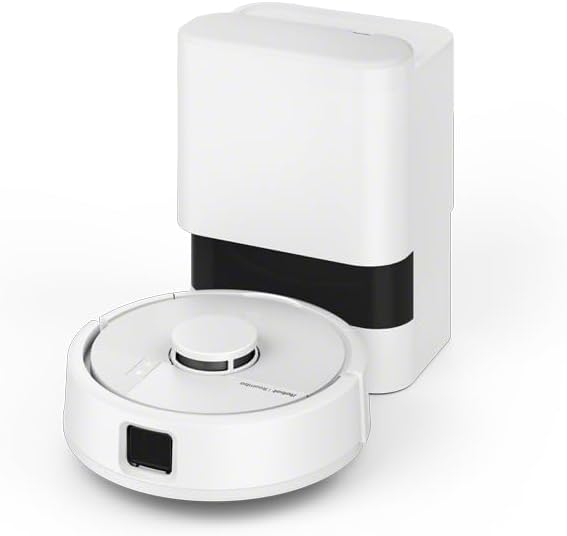
This instruction manual provides essential information for the safe and efficient use of your iRobot Roomba Mini Robot Vacuum and Mop with AutoEmpty Dock. Please read this manual thoroughly before operating the device and retain it for future reference. The Roomba Mini is designed to provide comprehensive floor cleaning, combining powerful vacuuming with practical mopping capabilities, all within a compact design.
Il-karatteristiċi ewlenin jinkludu:
- Modi ta' Tindif Doppju: Easily switch between vacuuming and mopping for versatile floor care.
- Navigazzjoni LiDAR: ĊaraView LiDAR technology ensures precise 360° mapping and efficient navigation, even in confined spaces.
- Baċir Awtomatiku Vojt: Automatically empties the robot's dustbin into a sealed bag, providing up to three months of maintenance-free cleaning.
- Disinn kompatt: Its mini size allows it to reach difficult areas such as under furniture, sofas, and chairs.
- Kontroll intelliġenti: Manage and schedule cleaning tasks intuitively via the Roomba Home app.
Setup
1. Żpakkjar u Kontenut tal-Pakkett
Neħħi bir-reqqa l-komponenti kollha mill-imballaġġ. Ivverifika li l-oġġetti kollha elenkati hawn taħt huma preżenti.

Deskrizzjoni tal-Immaġni: This image displays the complete contents of the iRobot Roomba Mini package. It includes the main Roomba Mini robot, the AutoEmpty Dock, an AllergenLock dust bag, a pack of 30 disposable cleaning pads, a mop plate attachment, a side brush for edge cleaning, and a tool for cutting tangled hair from the brushes.
Il-pakkett għandu jkun fih:
- Roomba Mini Robot Vacuum and Mop
- Baċir AutoEmpty
- AllergenLock Dust Bag (pre-installed in dock)
- Disposable Cleaning Pads (30 count)
- Mop Plate Attachment
- Pinzell tal-Ġenb
- Hair Cutting Tool
- Adapter tal-Enerġija
2. Tqegħid tal-Baċir
Place the AutoEmpty Dock on a hard, level surface against a wall. Ensure there is at least 0.5 meters (1.5 feet) of clear space on either side of the dock and 1.2 meters (4 feet) in front of it. Plug the power cord into a wall outlet. The dock should be placed in an area with good Wi-Fi coverage.
3. Iċċarġjar Inizjali
Place the Roomba Mini onto the AutoEmpty Dock. Ensure the charging contacts on the robot align with those on the dock. The robot will begin charging automatically. For optimal battery life, fully charge the robot before its first use. A full charge typically takes several hours.
4. Installazzjoni u Konnessjoni tal-App
Niżżel il- Roomba Home app from your device's app store. Follow the in-app instructions to connect your Roomba Mini to your home Wi-Fi network and complete the setup process. The app will guide you through creating a map of your home.
Operating the Roomba Mini
1. Tibda Ċiklu ta' Tindif
Tista' tibda ċiklu ta' tindif b'diversi modi:
- Via the App: Open the Roomba Home app and select 'Clean' to start a new cleaning job. You can also schedule cleanings or select specific rooms.
- Buttuna Manwali: Press the 'Clean' button on top of the robot once to start a cleaning cycle. Press it again to pause, and a third time to send the robot back to its dock.
- Kontroll tal-Vuċi: If connected to a compatible smart home assistant (e.g., Amazon Echo, Google Home), you can use voice commands to start or stop cleaning.
2. Vacuuming and Mopping Modes
The Roomba Mini can both vacuum and mop. To switch to mopping mode, attach the mop plate with a disposable cleaning pad to the underside of the robot. The robot will automatically detect the mop plate and adjust its cleaning behavior, including avoiding carpets.

Deskrizzjoni tal-Immaġni: This image shows the iRobot Roomba Mini robot in mopping mode on a hard floor. A red virtual boundary line is visible, indicating the robot's ability to detect and avoid carpets while mopping, ensuring only hard surfaces are cleaned.
3. LiDAR Navigation
The integrated LiDAR system allows the Roomba Mini to create a precise map of your home, enabling systematic and efficient cleaning paths. This technology helps the robot navigate around obstacles and clean thoroughly.

Deskrizzjoni tal-Immaġni: The image illustrates the Roomba Mini robot vacuum actively using its ClearView LiDAR navigation system. Green laser lines emanate from the robot, mapping the surrounding environment and allowing it to efficiently maneuver around furniture and other household obstacles.
4. AutoEmpty Function
After each cleaning cycle, the Roomba Mini will return to its AutoEmpty Dock. The dock will automatically suction the collected dirt and debris from the robot's internal bin into a larger AllergenLock bag within the dock. This feature minimizes manual emptying for up to three months.
Manutenzjoni
Regular maintenance ensures optimal performance and extends the lifespan of your Roomba Mini.
1. Cleaning the Brushes
Periodically check and clean the main brush and side brush. Hair and debris can get tangled, affecting cleaning efficiency.
- Pinzell Prinċipali: Remove the main brush module from the underside of the robot. Use the provided hair cutting tool to remove any tangled hair or fibers.
- Pinzell tal-Ġenb: Unscrew the side brush and remove any accumulated debris.
Deskrizzjoni tal-Immaġni: Din l-immaġni tipprovdi ċara view of the underside of the iRobot Roomba Mini robot vacuum. It highlights the central main brush roller, responsible for agitating and collecting debris, and the green three-armed side brush, designed to sweep dirt from edges and corners into the robot's path.
2. Replacing Disposable Mop Pads
After mopping, detach the used disposable pad from the mop plate and discard it. Attach a new pad for the next mopping session. Various scented pads are available for purchase.

Deskrizzjoni tal-Immaġni: The image displays the underside of the iRobot Roomba Mini robot vacuum, with a white disposable mop pad securely attached to the mop plate. This configuration is used for the robot's mopping function.
3. Manutenzjoni tal-Filtru
The robot's internal filter should be cleaned regularly and replaced every few months, depending on usage. Refer to the Roomba Home app for specific instructions on filter cleaning and replacement.
4. Tindif tas-Sensuri u l-Kuntatti tal-Iċċarġjar
Wipe the robot's sensors and charging contacts with a clean, dry cloth to ensure proper navigation and charging.
Issolvi l-problemi
If your Roomba Mini encounters an issue, the Roomba Home app will often provide specific error messages and solutions. Here are some common issues and general troubleshooting steps:
- Robot Mhux Qed Jiċċarġja: Ensure the AutoEmpty Dock is plugged in and the robot is properly aligned with the charging contacts. Clean the charging contacts on both the robot and the dock.
- Robot li Qed Jeħel: Clear any loose cables, small objects, or thick rugs that might obstruct the robot's path. Use the app to set 'Keep Out Zones' if there are persistent problem areas.
- Prestazzjoni Fqira tat-Tindif: Check and clean the main brush, side brush, and filter. Ensure the dustbin is not full (though the AutoEmpty dock should manage this). Replace worn-out brushes or filters.
- Ir-Robot Mhux Qed Jikkonnettja mal-Wi-Fi: Ensure your Wi-Fi network is active and the robot is within range. Follow the in-app instructions for Wi-Fi setup or re-connection.
- AutoEmpty Dock Not Emptying: Check if the AllergenLock bag in the dock is full and needs replacement. Ensure there are no obstructions in the dock's suction path.
For more detailed troubleshooting, consult the Roomba Home app or the iRobot support websit.
Speċifikazzjonijiet
| Karatteristika | Dettall |
|---|---|
| Brand | iRobot |
| Isem tal-Mudell | F155240 |
| Uċuħ Rakkomandati | Multi-wiċċ |
| Karatteristiċi Speċjali | Zone exclusion, Multi-floor mapping, Precision laser mapping and navigation, LiDAR navigation, Edge cleaning |
| Kulur | Abjad |
| Tip ta' Kontroll | Button, App, Voice |
| Tip ta 'filtru | Fabric or Cartridge |
| Kompożizzjoni tal-batterija | Lithium-ion |
| Voltage | 12.8 Volts |
| Sors tal-Enerġija | Corded Electric (for dock) |
| Batteriji Inklużi | Iva |
| Apparati Kompatibbli | Amazon Echo, Google Home, Smartphone, Tablet |
| Fattur tal-Formola | Robot |
| Dimensjonijiet (L x W x H) | 24.5L x 24.5W x 28.5H ċm |
| Użu Rakkomandat | Cleaning small apartments, secondary rooms, or high-traffic areas |
Informazzjoni dwar Garanzija
iRobot products are covered by a limited warranty. The specific terms and duration of your warranty may vary based on your region and point of purchase. Please refer to the warranty card included with your product or visit the official iRobot websit għal informazzjoni dettaljata dwar il-garanzija u r-reġistrazzjoni.
Żomm il-prova tax-xiri tiegħek għal pretensjonijiet ta' garanzija.
Appoġġ għall-Klijent
For further assistance, technical support, or to purchase replacement parts and accessories, please contact iRobot Customer Care.
- Appoġġ onlajn: Visit the official iRobot websit għal FAQs, gwidi għas-soluzzjoni tal-problemi, u għażliet ta’ kuntatt.
- Roomba Home App: The app often provides direct access to support resources and diagnostic tools.
When contacting support, please have your product model number (F155240) and serial number ready.